
F&D A140F
F&D A140F 2.1 Speaker System
Руководство пользователя
1. Введение
This manual provides essential information for the proper setup, operation, and maintenance of your F&D A140F 2.1 Speaker System. Please read these instructions carefully before using the product to ensure optimal performance and safety. Keep this manual for future reference.
2. Продукт закончилсяview
The F&D A140F is a 2.1 channel multimedia speaker system designed to deliver enhanced audio. It features a powerful subwoofer and two satellite speakers, offering a balanced sound experience for various media. The system includes multiple connectivity options and user-friendly controls.

Image 1: The F&D A140F 2.1 Speaker System, showing the central subwoofer unit and two compact satellite speakers.
Основные характеристики:
- 3-inch full-range drivers for satellite speakers.
- 4-inch heavy-duty subwoofer speaker for deep bass.
- Heavy-duty metal grill for satellite speakers.
- Innovative automatic multi-color LED lighting.
- Plug and play USB / CARD (SD / MMC/MS) reader.
- USB reader supporting MP3 / WMA dual formats decoding.
- Advanced PLL Technology for uninterrupted digital FM experience.
- Dedicated buttons for USB reader control (Source, Play/Pause, Next, Previous).
- High-efficient energy-saving design for low power consumption.
- Side panel controls for volume and bass adjustment.
Видео 1: Чиновник наверхуview of the F&D 2.1 Speaker System, highlighting its audio performance, specifications, connectivity features, and smart controls.
3. Что в коробке
Upon unpacking your F&D A140F 2.1 Speaker System, please ensure all the following items are present:
- 1 x Сабвуфер
- 2 сателлитных динамика
- 1 х пульт дистанционного управления
- 1 x 3.5mm to RCA Stereo Audio Cable
- 1 x RCA to RCA Stereo Audio Cable (optional, may vary by region)
- 1 гарантийный талон
- 1 x Battery (for remote control)
- 1 x Operational Manual (this document)
4. Инструкции по настройке
Выполните следующие действия, чтобы настроить акустическую систему:
- Размещение: Place the subwoofer on a stable surface, preferably on the floor for optimal bass. Position the satellite speakers on either side of your listening area, ensuring they are at an equal distance from you for balanced stereo sound.
- Подключите сателлитные колонки: Connect the cables from the satellite speakers to the corresponding output ports on the rear panel of the subwoofer. Ensure a secure connection.
- Подключите источник звука:
- For devices with a 3.5mm audio output (e.g., smartphones, laptops): Use the provided 3.5mm to RCA stereo audio cable. Connect the 3.5mm end to your device and the RCA ends to the 'AUDIO IN' ports on the subwoofer.
- For devices with RCA audio output (e.g., TVs, DVD players): Use an RCA to RCA stereo audio cable (one may be included). Connect one end to your device's audio output and the other to the 'AUDIO IN' ports on the subwoofer.
- Подключение питания: Connect the power cable from the subwoofer to a standard AC 220V-240V ~50/60Hz power outlet.
- Включение питания: Turn on the main power switch located on the subwoofer. The LED display should light up.
5. Инструкция по эксплуатации
Основная операция:
- Включение/выключение питания: Use the main power switch on the subwoofer or the power button on the remote control to turn the system on or off.
- Выбор источника: Press the 'SOURCE' button on the subwoofer or remote control to cycle through input modes: AUX, USB, SD/MMC/MS Card, FM Radio.
- Регулятор громкости: Adjust the master volume using the 'Volume+/-' buttons on the side panel of the subwoofer or the remote control.
- Управление басами: Adjust the bass level using the dedicated bass control knob on the side panel of the subwoofer.
USB / Card Reader Operation:
Insert a USB drive or SD/MMC/MS card into the respective slot on the subwoofer. The system will automatically switch to USB/Card mode and begin playing compatible audio fileс (MP3/WMA).
- Воспроизведение/Пауза: Нажмите кнопку «Воспроизведение/Пауза», чтобы приостановить или возобновить воспроизведение.
- Следующий/Предыдущий: Press the 'Next/CH+' or 'Previous/CH-' buttons to skip to the next or previous track.
Работа FM-радио:
Switch to FM mode using the 'SOURCE' button.
- Автоматическое сканирование: Нажмите кнопку «СКАНИРОВАТЬ», чтобы автоматически отсканировать и сохранить доступные FM-радиостанции.
- Изменить канал: Use the 'CH+' or 'CH-' buttons to navigate through saved stations.
- Ручная настройка: Use the 'TUNE+' or 'TUNE-' buttons for fine-tuning radio frequencies.
6. Элементы управления
The F&D A140F speaker system features both on-unit controls and a remote control for convenient operation.
Subwoofer Side Panel Controls:
- Ручка регулировки громкости: Регулирует общий уровень громкости.
- Ручка баса: Регулирует интенсивность басов.
- USB-порт: Для подключения USB-флешек.
- Слот для карты: For inserting SD/MMC/MS memory cards.
- Кнопка источника: Переключает режимы ввода.
- Кнопка воспроизведения/паузы: Управляет воспроизведением мультимедиа.
- Кнопка «Предыдущий/CH»: Skips to previous track/FM channel.
- Кнопка Next/CH+: Skips to next track/FM channel.
Дистанционное управление:
The included remote control provides full functionality from a distance.
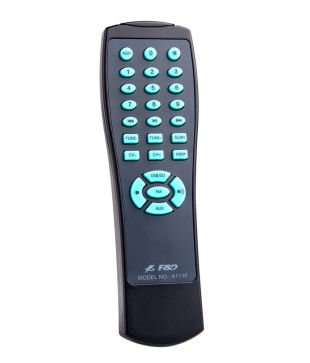
Image 2: The remote control for the F&D A140F speaker system, featuring numerical buttons, source selection, playback controls, and volume adjustment.
The remote control includes buttons for:
- Включение/выключение питания
- Source Selection (USB/SD, FM, AUX)
- Увеличение/уменьшение громкости
- Воспроизведение/Пауза
- Next/Previous Track/Channel
- Numerical Keypad for direct track/channel selection
- FM Scan, Tune+/-
7. Связь
The F&D A140F offers versatile connectivity options to link with various audio devices:
- USB-порт: Supports USB flash drives for direct playback of MP3 and WMA audio files.
- Устройство считывания карт: Compatible with SD, MMC, and MS memory cards for audio playback.
- AUX Input (3.5mm to RCA): Connects to devices like smartphones, tablets, laptops, and MP3 players using the provided 3.5mm to RCA cable.
- RCA Input (RCA to RCA): Connects to devices such as televisions, DVD players, and other audio sources with RCA output.
- FM-радио: Built-in FM tuner for listening to radio broadcasts.
8. Технические характеристики
| Особенность | Спецификация |
|---|---|
| Бренд | F&D |
| Номер модели | A140F |
| Режим аудиовыхода | Stereo (2.1 Channels) |
| Выходная мощность (RMS) | 37W (Satellites: 12Wx2 + Subwoofer: 13W) |
| Частотная характеристика (спутники) | 160Hz ~ 20KHz |
| Частотная характеристика (сабвуфер) | 45Hz ~ 105Hz |
| Отношение сигнал/шум (S/N) | ≥65дБ |
| Разделение | ≥35дБ |
| Satellite Speaker Driver | 3-inch full range |
| Драйвер динамика сабвуфера | 4-inch heavy duty |
| Технология связи | USB, Card Reader (SD/MMC/MS), 3.5mm AUX, RCA |
| Входная мощность | AC 220V-240V ~50/60Hz 0.5A |
| Метод контроля | Buttons (on-unit and remote) |
| Материал | Metal (grill) |
| Размеры сабвуфера (ШxВxГ) | 210 х 240 х 245 мм |
| Габариты спутника (ШхВхГ) | 153 х 96 х 112 мм |
| Вес товара | 3.42 кг (брутто) |
| Совместимые устройства | Настольный компьютер, ноутбук, MP3-плеер, смартфон, планшет, телевизор |
| Тип беспроводной технологии | Bluetooth (as per specifications, primary connectivity is wired/USB/Card) |
9. Поиск Неисправностей
If you encounter any issues with your F&D A140F speaker system, please refer to the following common problems and solutions:
- Нет питания:
- Ensure the power cable is securely plugged into both the subwoofer and a working AC outlet.
- Check if the main power switch on the subwoofer is in the 'ON' position.
- Проверьте работоспособность розетки, подключив к ней другое устройство.
- Нет звука:
- Confirm that the correct audio source is selected (AUX, USB, FM). Press the 'SOURCE' button to cycle through inputs.
- Increase the master volume on the subwoofer or remote control.
- Check all audio cables for secure connections between the source device and the subwoofer.
- Ensure the audio output on your source device is not muted or set to a very low volume.
- Verify satellite speakers are correctly connected to the subwoofer.
- Искаженный звук:
- Reduce the volume level on both the speaker system and the source device.
- Check audio cable connections for any loose or damaged cables.
- Убедитесь, что источник звука имеет хорошее качество.
- USB/Card Reader Not Working:
- Ensure the USB drive or memory card is inserted correctly and fully.
- Убедитесь, что звук files are in a supported format (MP3, WMA).
- Try a different USB drive or memory card to rule out media issues.
- Ensure the system is in USB/Card mode.
- Плохой прием FM-радио:
- Adjust the position of the FM antenna (if external) or the speaker system itself to improve signal reception.
- Выполните автоматическое сканирование, чтобы найти станции с более сильным сигналом.
- Avoid placing the system near other electronic devices that may cause interference.
- Пульт дистанционного управления не работает:
- Убедитесь, что батарея правильно вставлена с соблюдением полярности.
- Замените аккумулятор на новый.
- Point the remote control directly at the infrared receiver on the subwoofer.
- Remove any obstacles between the remote and the subwoofer.
10. Гарантия и поддержка
The F&D A140F 2.1 Speaker System comes with a Гарантия 1 год с даты покупки. Пожалуйста, сохраните чек и гарантийный талон для предъявления гарантийных претензий.
For technical support, service, or further inquiries, please refer to the contact information provided on your warranty card or visit the official F&D webсайт.
Ask a question about this manual
Ask about setup, troubleshooting, compatibility, parts, safety, or missing instructions. Manuals+ will review the question and use this page’s manual context to help answer it.