
Zalman ZM-VE350 (SILVER)
Zalman ZM-VE350 USB 3.0 External 2.5" Hard Drive Enclosure User Manual
Model: ZM-VE350 (SILVER)
1. Продукт закончилсяview
The Zalman ZM-VE350 is a versatile external enclosure designed for 2.5-inch SATA I/II/III HDDs and SSDs. It features a USB 3.0 interface for high-speed data transfer and includes a built-in virtual CD emulator, allowing it to function as a virtual optical drive for convenient booting from ISO files. Its aluminum body provides durability and efficient heat dissipation, while the intuitive menu system ensures ease of use for all users. The device also incorporates a one-touch backup function and a safe removal feature to protect your data.

Figure 1.1: The Zalman ZM-VE350 external hard drive enclosure.
2. Настройка и установка
2.1 Содержимое упаковки
Перед началом установки убедитесь, что в упаковке присутствуют все компоненты:
- Zalman ZM-VE350 Enclosure
- Защитный чехол
- Screws (2 pcs) & Screwdriver
- Кабель USB 3.0
- Краткое пособие

Figure 2.1: Included components of the ZM-VE350 package.
2.2 Hardware Installation (HDD/SSD)
- Carefully open the ZM-VE350 enclosure.
- Connect your 2.5-inch SATA I/II/III HDD or SSD to the internal SATA connector within the enclosure. Ensure a firm connection.
- Secure the drive inside the enclosure using the provided screws and screwdriver.
- Надежно закройте корпус.
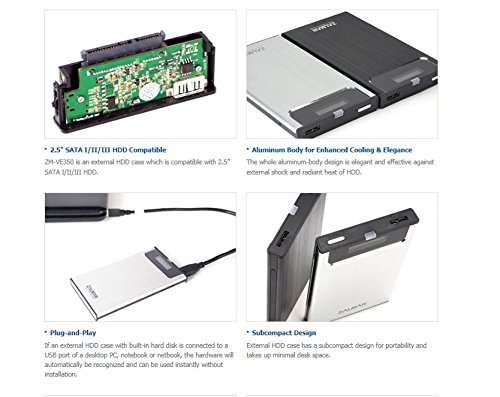
Figure 2.2: Illustration of 2.5" SATA HDD compatibility and internal connection.
2.3 Подключение к компьютеру
The ZM-VE350 is designed for plug-and-play operation. Once a hard drive is installed:
- Connect the ZM-VE350 to your computer using the supplied USB 3.0 cable.
- The hardware will be automatically recognized by your operating system (Windows 2000, XP, Vista, 7, 8, 8.1 / Mac OS / Linux) without requiring additional driver installation.
3. Инструкция по эксплуатации
3.1 Передача данных
The ZM-VE350 utilizes a USB 3.0 interface, providing high-speed data transfer rates up to 5Gbps. For optimal performance, connect the enclosure to a USB 3.0 port on your computer. It is also backward compatible with USB 2.0 and USB 1.1 ports, though at reduced speeds.
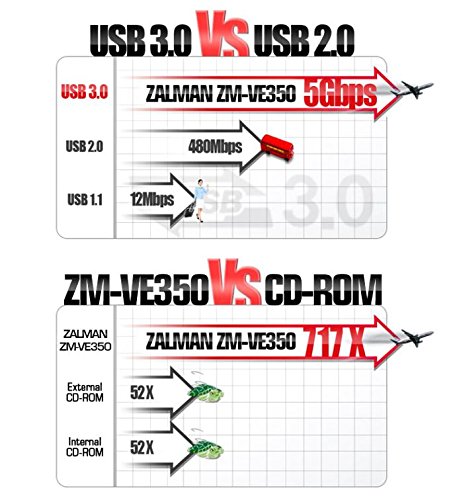
Figure 3.1: USB 3.0 vs. USB 2.0 speed comparison.
3.2 Virtual ODD Function
The ZM-VE350 can emulate an optical disc drive (CD-ROM, DVD, Blu-ray) using ISO image files. This feature is particularly useful for convenient system booting or software installation without a physical disc drive.
- Store your ISO files in a designated folder on the installed hard drive.
- Navigate through the enclosure's intuitive menu system (displayed on the built-in screen) to select the desired ISO file.
- Once selected, the enclosure will present itself to the computer as a virtual optical drive containing the chosen ISO.
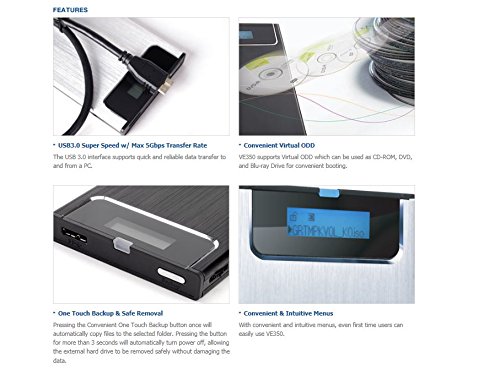
Figure 3.2: Virtual ODD display and menu navigation.
3.3 One-Touch Backup and Safe Removal
The ZM-VE350 features a convenient button for both one-touch backup and safe power off:
- One-Touch Backup: Pressing the button once will automatically copy files to a pre-selected folder on the internal drive. Refer to the quick guide for initial setup of the backup folder.
- Безопасное удаление: Pressing and holding the button for more than 3 seconds will automatically power off the enclosure. This allows for safe removal of the external hard drive without risking data corruption.
4. Техническое обслуживание
4.1 Уход и обращение
To ensure the longevity and optimal performance of your ZM-VE350 enclosure:
- Поддерживайте чистоту устройства, протирая его мягкой сухой тканью. Избегайте использования жидких чистящих средств.
- The aluminum alloy body is designed to be robust and dissipate heat, but avoid exposing it to extreme temperatures or direct sunlight.
- Utilize the provided leather pouch for additional protection during travel or storage to prevent scratches and minor impacts.
- Avoid dropping the device or subjecting it to strong vibrations, as this can damage the internal hard drive.
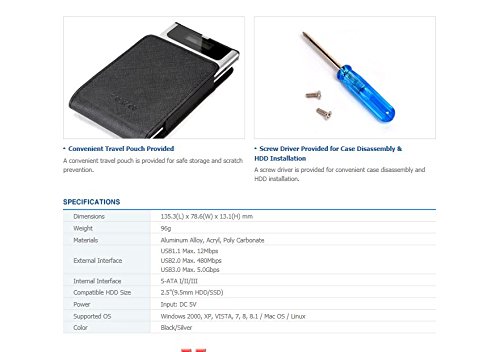
Figure 4.1: Convenient travel pouch for protection.
5. Поиск Неисправностей
5.1 Общие проблемы и решения
- Устройство не распознается компьютером:
- Ensure the USB cable is securely connected to both the enclosure and the computer's USB port.
- Попробуйте подключиться к другому USB-порту на вашем компьютере.
- Verify that the internal 2.5" HDD/SSD is properly seated and connected within the enclosure.
- Test the enclosure with a different USB cable if available.
- Низкая скорость передачи данных:
- Ensure you are connected to a USB 3.0 port on your computer for maximum speed. USB 2.0 or 1.1 ports will result in slower transfers.
- Check if the USB 3.0 cable is functioning correctly.
- Verify the health and speed of the internal HDD/SSD.
- Virtual ODD function not working:
- Ensure the ISO file is not corrupted and is stored in the correct directory on the internal drive as per the quick guide instructions.
- Confirm that the correct ISO file is selected via the enclosure's menu.
- Restart the enclosure and reconnect it to the computer.
- Enclosure does not power off with safe removal button:
- Ensure no active data transfers or file operations are occurring.
- Hold the button for the specified duration (more than 3 seconds).
6. Технические характеристики
| Размеры | 135.3(Д) x 78.6(Ш) x 13.1(В) мм |
| Масса | 96 г |
| Материалы | Алюминиевый сплав, акрил, поликарбонат |
| Внешний интерфейс | USB 3.0, USB 2.0, USB 1.1 |
| Внутренний интерфейс | S-ATA I/II/III |
| Compatible HDD Size | 2.5" HDD/SSD |
| Входная мощность | 5 В постоянного тока |
| Поддерживаемые ОС | Windows 2000, XP, Vista, 7, 8, 8.1 / Mac OS / Linux |
| Цвет | Черный/Серебристый |
7. Гарантия и поддержка
7.1 Информация о гарантии
This product comes with a 0-year warranty. Please retain your proof of purchase for any warranty claims.
7.2 Поддержка клиентов
For further assistance, technical support, or inquiries not covered in this manual, please refer to the official Zalman webили обратитесь в службу поддержки клиентов. Контактная информация обычно указана на сайте производителя. webсайте или упаковке продукта.