
Введение
This manual provides essential information for the safe and efficient operation of your Tripp Lite SMX1500LCDT SmartPro Line-Interactive Uninterruptible Power Supply (UPS). Please read all instructions carefully before installation and use. This UPS is designed to provide reliable battery backup and surge protection for connected electronic equipment.
Важные инструкции по технике безопасности
Failure to follow these instructions may result in fire, electric shock, or serious injury.
- This UPS contains hazardous voltages. Do not attempt to open the UPS enclosure. Servicing should only be performed by qualified service personnel.
- Connect the UPS to a properly grounded AC power outlet. Do not use extension cords or adapters.
- Не подключайте к ИБП предметы, не связанные с компьютером, такие как медицинское оборудование, оборудование жизнеобеспечения, микроволновые печи или пылесосы.
- Position the UPS in a well-ventilated area, away from direct sunlight, heat sources, and excessive moisture.
- Ensure the total current draw of connected equipment does not exceed the UPS's rated capacity.
- The battery inside the UPS is not user-replaceable. Refer to qualified service personnel for battery replacement.
Содержимое упаковки
Убедитесь, что все перечисленные ниже предметы включены в ваш пакет:
- Tripp Lite SMX1500LCDT UPS Unit
- USB-кабель
- Шнур питания
- Руководство по эксплуатации

Image: The Tripp Lite SMX1500LCDT UPS unit shown with its accompanying USB cable, power cord, and the instruction manual, illustrating the complete package contents.
Настраивать
1. Размещение
Place the UPS on a flat, stable surface. Ensure adequate airflow around the unit. The UPS can be positioned as a tower or mounted in a rack (rackmount hardware sold separately).
2. Подключение к источнику питания
- Connect the provided power cord to the UPS input receptacle.
- Plug the other end of the power cord into a grounded AC wall outlet.
- Allow the UPS to charge for 24 hours before initial use to ensure full battery capacity.
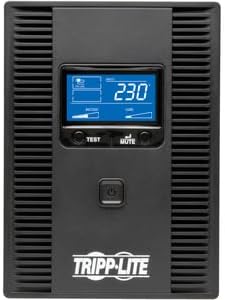
Изображение: Спереди view of the Tripp Lite SMX1500LCDT UPS, highlighting the LCD display and the main power button for user interaction.

Изображение: сзади view of the Tripp Lite SMX1500LCDT UPS, displaying the AC input, various output outlets (battery backup and surge-only), and communication ports for connectivity.
3. Подключение оборудования
Connect your electronic devices to the appropriate outlets on the rear of the UPS:
- Розетки с резервным питанием от батареи и защитой от скачков напряжения: These outlets provide both battery backup power during outages and surge protection. Connect critical equipment such as computers, monitors, and network devices here.
- Розетки только с защитой от перенапряжения: These outlets provide surge protection only and do not offer battery backup. Connect non-critical peripherals like printers or scanners here.
4. USB Communication Port
Connect the provided USB cable from the UPS's USB port to a USB port on your computer. This allows your computer to communicate with the UPS for automatic shutdown, monitoring, and power management features using Tripp Lite's PowerAlert software (available for download from the Tripp Lite webсайт).
Эксплуатация ИБП
1. Включение/выключение питания
- Для включения: Press and hold the power button on the front panel for approximately two seconds until you hear a beep. The LCD display will illuminate.
- Чтобы выключить: Press and hold the power button for approximately two seconds until the UPS powers down.
2. ЖК-дисплей
The front panel LCD provides real-time operational status and diagnostic information. Use the 'TEST' and 'MUTE' buttons to navigate through display screens and perform functions.

Изображение: под углом view of the Tripp Lite SMX1500LCDT UPS, prominently featuring its illuminated LCD display which shows operational data such as voltagе и загрузить.
3. Функция самотестирования
To perform a self-test, press and hold the 'TEST' button for a few seconds. The UPS will switch to battery power for a short period to test the battery and internal circuitry. The LCD will indicate the test status.
4. Mute Alarm
Во время отключения электроэнергииtage or other alarm condition, the UPS will emit an audible alarm. Press the 'MUTE' button to silence the alarm temporarily. The alarm will reactivate if the condition persists or changes.
Обслуживание
1. Замена батареи
The internal battery is not user-serviceable. If the UPS indicates a battery fault or the battery runtime significantly decreases, contact Tripp Lite customer support or a qualified service technician for battery replacement. Using incorrect batteries can pose a safety risk.
2. Уборка
Periodically clean the exterior of the UPS with a soft, dry cloth. Do not use liquid or aerosol cleaners. Ensure ventilation openings are free from dust and debris to maintain proper airflow.
Поиск неисправностей
Распространенные проблемы и способы их решения смотрите в таблице ниже.
| Проблема | Возможная причина | Решение |
|---|---|---|
| ИБП не включается. | Отсутствует входное питание переменного тока; аккумулятор разряжен. | Ensure UPS is plugged into a live AC outlet. Allow 24 hours for initial battery charge. |
| В нормальном режиме ИБП непрерывно подает звуковой сигнал. | Состояние перегрузки. | Reduce the load by unplugging non-essential equipment from battery backup outlets. |
| ИБП часто переключается в режим работы от батареи. | Unstable AC input power; Sensitivity setting too high. | Check AC power quality. Adjust UPS sensitivity setting via PowerAlert software if applicable. |
| Время работы от батареи меньше ожидаемого. | Аккумулятор старый или не полностью заряжен; перегрузка. | Allow 24 hours for battery to fully charge. Reduce connected load. Contact service for battery replacement if necessary. |
| ЖК-дисплей не отображается. | Источник бесперебойного питания выключен; на дисплее отображается спящий режим. | Press the power button to turn on. Press any button to wake the display. |
Технические характеристики
- Модель: SMX1500LCDT
- Емкость: 1500 ВА / 900 Вт
- Vol входtage: 230В
- Выход Voltage: 230В
- Тип батареи: Герметичный свинцово-кислотный
- Размеры (В x Ш x Г): 19.3 x 9.1 x 11.3 дюйма (приблизительно)
- Масса: 0.16 ounces (This weight seems incorrect based on typical UPS units. Please refer to product packaging or official specifications for accurate weight.)
- Рабочая температура: от 0°C до 40°C (от 32°F до 104°F)
Гарантия и поддержка
Tripp Lite products are backed by a limited warranty. For specific warranty terms and conditions, please refer to the warranty card included with your product or visit the official Tripp Lite website. For technical support, product registration, or service inquiries, please contact Tripp Lite customer service through their official webсайт или контактную информацию, указанную в документации к вашему продукту.