1. Введение
This manual provides comprehensive instructions for the setup, installation, operation, maintenance, and troubleshooting of your Antec VSK2000-U3 Micro-ATX Desktop Case. Please read this manual thoroughly before beginning installation to ensure proper assembly and optimal performance.
Video 1: Computer Case Display. This video provides a visual overview of a computer case, demonstrating its external features and design.
2.Основные характеристики
The Antec VSK2000-U3 Micro-ATX Desktop Case is designed for efficient and compact PC builds. Key features include:
- Motherboard Support: Up to Micro-ATX
- Cooling: 1 x 92 mm temperature-controlled fan included
- Power Supply Unit (PSU) Support: TFX form factor
- Drive Bays: Supports up to 1 x 5.25” ODD, 1 x 3.5" HDD & 1 x 2.5" SSD
- Слоты расширения: 4

Рисунок 1: Передняя часть view of the Antec VSK2000-U3 case, highlighting the front panel I/O and optical drive bay.
3. Настройка и установка
Follow these steps to install your components into the Antec VSK2000-U3 case. Ensure all power is disconnected before handling internal components.
3.1. Подготовка дела
- Снимите боковые панели: Carefully remove the side panels of the case to access the interior.
- Установка I/O Shield: Установите заглушку для разъемов ввода/вывода, входящую в комплект материнской платы, в заднее отверстие корпуса.

Рисунок 2: Сторона view of the Antec VSK2000-U3 case with the side panel removed, showing the internal layout.
3.2. Установка материнской платы
- Align Motherboard: Carefully align your Micro-ATX motherboard with the standoffs inside the case.
- Защитная материнская плата: Use the provided screws to secure the motherboard to the standoffs.
3.3. Установка источника питания
- Расположение блока питания: Install your TFX form factor power supply into its designated bay.
- Надежный блок питания: Закрепите блок питания винтами с задней стороны корпуса.
- Подключите кабели питания: Route and connect the necessary power cables to your motherboard and other components.

Рисунок 3: Сзади view of the Antec VSK2000-U3 case, showing the I/O shield area, expansion slots, and PSU mounting.
3.4. Drive Installation (ODD, HDD, SSD)
- Optical Drive (ODD): Install your 5.25" optical drive into the front bay. The case features a tool-less ODD housing system.
- Hard Disk Drive (HDD): Install your 3.5" HDD into the designated bay. The case features a tool-less HDD housing system.
- Solid State Drive (SSD): Install your 2.5" SSD into the designated bay.
- Подключение накопителей: Подключите кабели передачи данных и питания SATA ко всем установленным накопителям.
3.5. Установка платы расширения
- Снимите крышки слотов: Снимите заглушки с необходимых слотов расширения с задней панели корпуса.
- Установить карту: Insert your expansion card (e.g., graphics card) into the appropriate PCI-E slot on the motherboard.
- Безопасная карта: Закрепите плату расширения винтом.
3.6. Подключения на передней панели
Connect the front panel cables (USB 3.0, audio, power switch, reset switch, LED indicators) to the corresponding headers on your motherboard. Refer to your motherboard manual for specific header locations.
3.7. Организация кабелей.
Route cables neatly to improve airflow and aesthetics. Use cable ties or the case's cable management features to secure cables away from moving parts and airflow paths.
3.8. Video Tutorials for Installation
Video 2: Detailed Installation Tutorial. This video demonstrates the step-by-step process of installing components into a computer case, including the motherboard, power supply, and drives.
Video 3: Micro ATX PC Case Installation. This video illustrates the assembly process for a Micro ATX PC case, covering component placement and cable routing.
4. Инструкция по эксплуатации
Once all components are securely installed and connected, replace the side panels. Connect your monitor, keyboard, mouse, and other peripherals to the appropriate ports on the rear I/O panel and front panel. Connect the power cable to the power supply and a wall outlet, then press the power button on the front of the case to start your system.
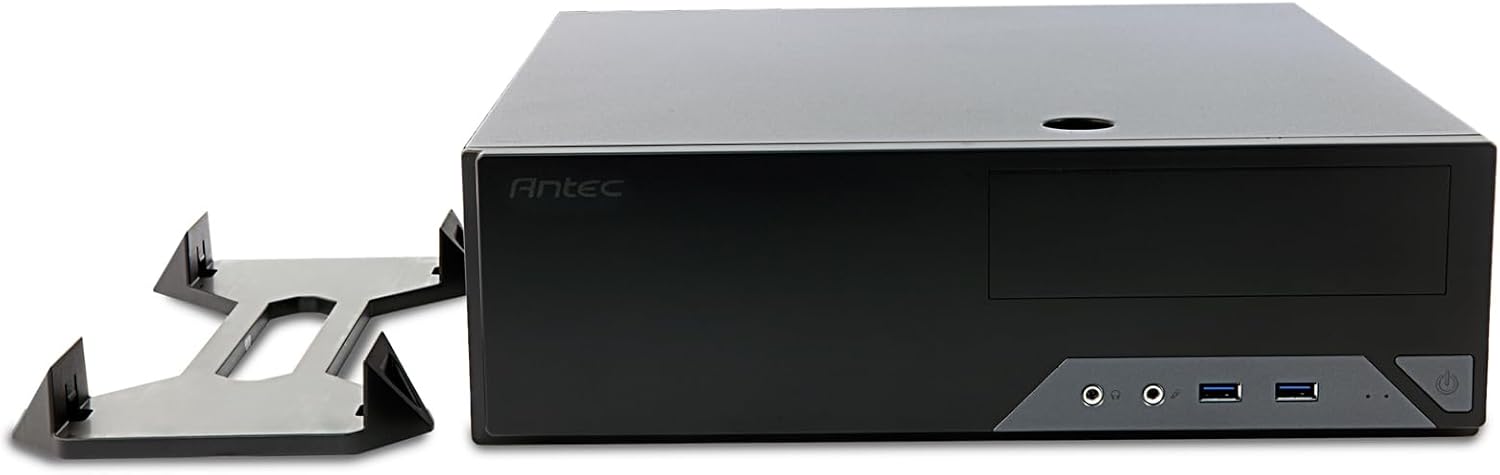
Figure 4: The Antec VSK2000-U3 case shown in a horizontal orientation with its included stand, demonstrating versatile placement options.
5. Техническое обслуживание
Регулярное техническое обслуживание помогает обеспечить долговечность и оптимальную производительность вашего ПК.
- Очистка от пыли: Periodically clean dust from the case interior, fans, and air vents using compressed air or a soft brush. Ensure the system is powered off and unplugged before cleaning.
- Управление кабелями: Check cable routing periodically to ensure no cables are obstructing airflow or fan operation.
- Проверка вентилятора: Ensure the included 92mm temperature-controlled fan and any other installed fans are operating correctly and free from obstructions.
6. Поиск Неисправностей
Если у вас возникли проблемы со сборкой вашего ПК, рассмотрите следующие распространенные шаги по устранению неполадок:
- Нет питания:
- Verify the power cable is securely connected to the PSU and wall outlet.
- Убедитесь, что переключатель блока питания находится в положении «ВКЛ».
- Check all internal power connections (24-pin ATX, 8-pin CPU, GPU power, drive power).
- Confirm front panel power switch cable is correctly connected to the motherboard.
- Нет дисплея:
- Ensure the monitor is connected to the correct graphics output (dedicated GPU or motherboard integrated graphics).
- Переустановите графическую карту и модули оперативной памяти.
- Чрезмерный шум:
- Identify the source of the noise (fan, HDD).
- Clean dust from fans.
- Ensure no cables are touching fan blades.
7. Технические характеристики
| Особенность | Деталь |
|---|---|
| Бренд | Антек |
| Ряд | VSK2000-U3 |
| Название модели | VSK2000-U3 |
| Совместимость с материнской платой | Микро ATX |
| Тип корпуса | Mid Tower (Slim Desktop) |
| Размеры (ДxШxВ) | 18.6 x 15.9 x 7 дюйма |
| Вес товара | 5.28 фунта |
| Цвет | Черный |
| Материал | Painted/Coated Metal (Likely Steel Or Aluminum With Plastic Components) |
| Тип крепления блока питания | Rear Mount (TFX form factor) |
| Метод охлаждения | Air (1 x 92 mm temperature-controlled fan included) |
| Размер вентилятора | 92 миллиметра |
| Отсеки для дисков | 1 x 5.25” ODD, 1 x 3.5" HDD, 1 x 2.5" SSD |
| Слоты расширения | 4 |
8. Гарантия и поддержка
The Antec VSK2000-U3 Micro-ATX Desktop Case comes with a Гарантия 2 год. For technical support, warranty claims, or additional product information, please visit the official Antec webили обратитесь в службу поддержки клиентов. Сохраните чек о покупке для подтверждения гарантии.
Для получения дополнительной помощи, пожалуйста, обратитесь к Магазин Antec.