
Mad Catz MCB312630A13/04/1
Инструкция по эксплуатации мобильного геймпада Mad Catz CTRLi
Model: MCB312630A13/04/1 | Brand: Mad Catz
Введение
The Mad Catz C.T.R.L.i Mobile Gamepad is an Apple Certified controller designed to provide console-grade gaming controls for devices running iOS 7 or later, including iPhone, iPad, and Apple TV. This manual provides essential information for setting up, operating, maintaining, and troubleshooting your C.T.R.L.i gamepad.
Что в коробке?
- Mad Catz C.T.R.L.i Mobile Gamepad
- 2 батареек типа ААА
- Adjustable Smartphone Clip
Настраивать
1. Установка аккумулятора
The C.T.R.L.i gamepad requires two AAA batteries for operation.
- Найдите батарейный отсек на задней панели геймпада.
- Откройте крышку батарейного отсека.
- Вставьте две батарейки типа ААА, соблюдая правильную полярность (+/-).
- Плотно закройте крышку батарейного отсека.
Примечание: For optimal performance and battery life, use high-quality alkaline or rechargeable AAA batteries.
2. Bluetooth Pairing with iOS Devices
The C.T.R.L.i connects to your iOS device via Bluetooth.
- Ensure your C.T.R.L.i gamepad has fresh batteries and is powered on.
- On your iOS device (iPhone, iPad, Apple TV), go to Настройки > Bluetooth.
- Убедитесь, что Bluetooth включен.
- The C.T.R.L.i should appear in the "Other Devices" list. Tap on it to pair.
- После сопряжения индикаторные лампочки геймпада подтвердят подключение.
Кончик: If you experience pairing issues, ensure no other Bluetooth devices are interfering and try restarting both the gamepad and your iOS device.
3. Крепление зажима для смартфона
The included smartphone clip allows you to attach your iPhone directly to the gamepad for portable gaming.
- Locate the mounting slot on the top of the C.T.R.L.i gamepad.
- Slide the smartphone clip into the slot until it clicks securely into place.
- Adjust the clip to securely hold your smartphone. Ensure your device is centered and stable.

Image: Mad Catz C.T.R.L.i Gamepad with the adjustable smartphone clip attached, ready to hold a device.
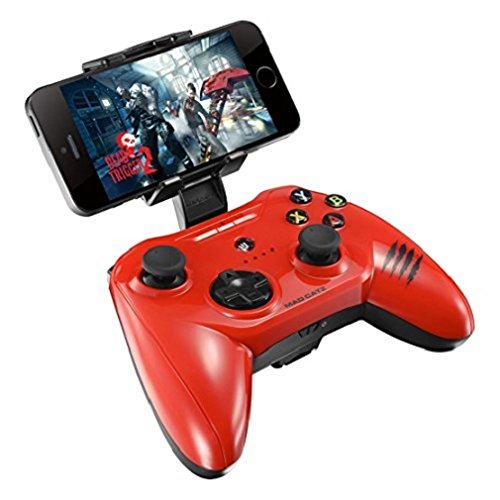
Image: Mad Catz C.T.R.L.i Gamepad with a smartphone securely mounted in the clip, demonstrating its use for mobile gaming.
Управление геймпадом
1. Основные элементы управления
The C.T.R.L.i features a standard console-style layout, including:
- Двойные аналоговые джойстики: Для точного перемещения и управления камерой.
- Крестовина: For directional input, often used in menu navigation or specific game actions.
- Кнопки действий (A, B, X, Y): Для внутриигровых действий.
- Кнопки на плечах (L1, R1) и триггеры (L2, R2): For additional in-game actions, often firing or aiming.
- Pause/Menu Button: Обычно используется для приостановки игр или доступа к внутриигровым меню.

Изображение: Спереди view of the Mad Catz C.T.R.L.i Mobile Gamepad, showcasing its buttons and analog sticks.

Изображение: сверху view of the Mad Catz C.T.R.L.i Mobile Gamepad, highlighting the L1, R1, L2, and R2 buttons.
2. Игровой опыт
Once paired, the C.T.R.L.i will function as the primary input for compatible iOS games. Many games automatically detect and configure for MFi controllers. For a list of compatible games, refer to the Mad Catz C.T.R.L.i app (available on the App Store).
Up to four C.T.R.L.i controllers can be paired with the same iOS device for multiplayer gaming, depending on the game's support.
3. Connecting to a TV (Big-Screen Gaming)
For a console-like experience, you can connect your iOS device to an HDTV and use the C.T.R.L.i as your controller.
- Connect your iOS device to your HDTV using an Apple Lightning Digital AV Adapter and an HDMI cable (both sold separately).
- Ensure your C.T.R.L.i is paired with your iOS device.
- Your game's display will mirror or extend to the TV, allowing you to play on a larger screen.
Обслуживание
Уборка
To clean your C.T.R.L.i gamepad, use a soft, dry, lint-free cloth. For stubborn smudges, slightly dampen the cloth with water. Avoid using harsh chemicals, abrasive cleaners, or excessive moisture, as these can damage the controller's finish and internal components.
Уход за аккумулятором
If the gamepad will not be used for an extended period, remove the AAA batteries to prevent leakage and potential damage. Dispose of used batteries responsibly according to local regulations.
Поиск неисправностей
Gamepad Not Connecting/Pairing
- Ensure the gamepad has fresh batteries and is powered on.
- Убедитесь, что Bluetooth включен на вашем устройстве iOS.
- Try turning the gamepad off and on again.
- On your iOS device, forget the device in Bluetooth settings and attempt to re-pair.
- Перезагрузите ваше устройство iOS.
- Убедитесь, что на вашем устройстве iOS установлена версия iOS 7 или более поздняя.
Buttons/Sticks Not Responding Correctly
- Check the Mad Catz C.T.R.L.i app for diagnostic tools or firmware updates. Firmware updates can resolve performance issues.
- Ensure the game you are playing fully supports MFi controllers. Some games may have limited or no controller support.
- Clean around the buttons and sticks to ensure no debris is causing interference.
Короткий срок службы батареи
- Ensure you are using new, high-quality AAA batteries.
- The gamepad will enter a sleep mode after 30 minutes of inactivity to conserve power.
- Consider using rechargeable AAA batteries for long-term cost efficiency.
Технические характеристики
| Номер модели | MCB312630A13/04/1 |
| Связность | Bluetooth |
| Совместимость | iOS 7 or later (iPhone 5/5c/5s/6/6 Plus, iPad Air, iPad mini, iPad 4th Gen, Apple TV) |
| Аккумуляторы | 2 x AAA батареи (в комплекте) |
| Размеры (Д x Ш x В) | 5.7 x 1.57 x 4.33 дюйма (14.5 x 4 x 11 см) |
| Масса | 1.76 унции (50 грамма) |
| Производитель | Безумный Кэтц |
| Первый доступный | 19 ноября 2014 г. |
Гарантия и поддержка
For warranty information and technical support, please refer to the official Mad Catz webили обратитесь в службу поддержки клиентов. Сохраните чек на случай предъявления гарантийных претензий.