
Введение
The Sennheiser RS 110 II is an open, supra-aural, wireless RF headphone system designed for detailed, warm sound reproduction with strong bass. It offers wireless freedom with reception through walls and ceilings, providing a range of up to 100 meters. This system is suitable for various audio applications, including modern music and television viewing. The headphones feature convenient volume and tuning controls directly on the earcup, ensuring a comfortable and lightweight listening experience.

Image: User enjoying the Sennheiser RS 110 II headphones.
Содержимое упаковки
Пожалуйста, проверьте содержимое упаковки, чтобы убедиться в наличии всех компонентов:
- Sennheiser RS 110 II On-Ear Headphones (HDR 110 II)
- TR 110 II Transmitter with charging cradle
- Power supply unit for transmitter
- Audio connection cable (3.5 mm jack to 2x RCA)
- Two AAA batteries (rechargeable recommended)
- Руководство по эксплуатации (данный документ)

Image: The Sennheiser RS 110 II headphone and transmitter unit.

Image: The retail packaging for the Sennheiser RS 110 II system, showing included components.
Настраивать
1. Connecting the Transmitter (TR 110 II)
- Подключение питания: Connect the power supply unit to the transmitter's power input and then plug it into a wall outlet.
- Подключение источника звука: Connect the audio connection cable from the transmitter's audio input to the audio output of your desired source (e.g., TV, stereo system, computer). Use the appropriate adapter if your source requires RCA inputs.

Image: The Sennheiser TR 110 II transmitter unit with its audio cable.
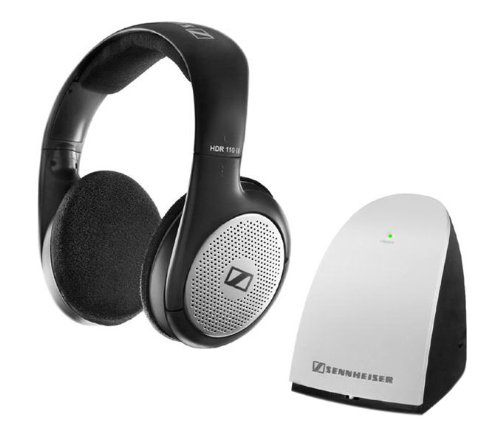
Image: The power supply unit for the Sennheiser TR 110 II transmitter.
2. Inserting Batteries into Headphones (HDR 110 II)
Open the battery compartment on the headphones and insert the two AAA batteries, observing the correct polarity (+/-). Close the compartment securely.
3. Первоначальное сопряжение и настройка
For optimal performance and to establish a clear audio connection, follow these steps carefully:
- Ensure your audio source (e.g., TV) is turned on and playing audio.
- Set the volume of your audio source to its maximum level. This is crucial for the transmitter to detect a strong signal.
- Включите наушники с помощью кнопки питания.
- Observe the transmitter. The green "ON/OFF" light will illuminate only when it receives a proper audio signal from your source. If it does not light up, recheck your audio connections and source volume.
- On the headphones, use the "Tune" button or the tuning control on the transmitter to find a clear signal. Adjust until you hear crystal-clear audio without static or interference.
- Once a clear signal is established and the green light on the transmitter is solid, you can adjust the volume on your audio source and headphones to your preferred listening level.
Примечание: The transmitter's green light indicates a strong audio signal is being received and transmitted. Without a sufficient input signal, the light may not activate, and the headphones will not receive audio.
Инструкция по эксплуатации
Включение/выключение питания
- To turn on the headphones, press and hold the power button located on the earcup until the indicator light illuminates.
- To turn off the headphones, press and hold the power button again until the indicator light turns off.
- The transmitter will automatically turn off after a few minutes if no audio signal is detected from the source.
Регулятор громкости
Adjust the listening volume using the rotary control located on the right earcup of the headphones. For best sound quality, ensure the audio source volume is set to a moderate to high level before adjusting the headphone volume.
Tuning for Optimal Reception
If you experience static or interference, use the "Tune" button on the headphones or the channel selector on the transmitter to find a clearer frequency. The system operates on multiple RF channels to minimize interference.
Дальность беспроводной связи
The RS 110 II system offers a wireless range of up to 100 meters (approximately 328 feet) in open spaces. Performance may vary depending on environmental factors such as walls, ceilings, and other electronic devices.
Обслуживание
Уборка
- Протрите наушники и передатчик мягкой сухой тканью.
- Do not use liquid cleaners or solvents, as they may damage the surface.
Уход за аккумулятором
- The headphones use AAA batteries. For continuous use, rechargeable AAA batteries are highly recommended.
- To charge rechargeable batteries, place the headphones on the transmitter's charging cradle. Ensure the charging contacts align correctly.
- If using non-rechargeable batteries, remove them when not in use for extended periods to prevent leakage.
Замена амбушюр
Ear cushions are subject to wear and tear over time. Replacement ear cushions can be purchased from authorized Sennheiser retailers or service centers to maintain comfort and hygiene.
Поиск неисправностей
| Проблема | Возможная причина | Решение |
|---|---|---|
| Нет звука или очень тихий звук |
|
|
| Static, buzzing, or interference |
|
|
| Poor sound quality (e.g., weak bass) |
|
|
| Наушники не заряжаются |
|
|
Технические характеристики
| Особенность | Деталь |
|---|---|
| Название модели | РС 110 II |
| Технология связи | РЧ (радиочастота) |
| Технология беспроводной связи | RF |
| Тип наушников | Open, Supra-aural (On-Ear) |
| Тип аудиодрайвера | Динамический драйвер |
| Тип управления | Volume Control, Tuning Control |
| Дальность беспроводной связи | До 100 метров |
| Вес товара | 230 грамм |
| Размеры продукта | 11 х 8.5 х 13.3 см |
| Аккумуляторы | 2 x AAA (rechargeable recommended) |
| Отношение сигнал/шум (дБ) | 65 дБ |
| Материал | Пластик |
| Цвет | Черный |
Гарантия и поддержка
The Sennheiser RS 110 II On-Ear Headphone system comes with a Гарантия 2 год Гарантия действует с даты покупки. Гарантия распространяется на производственные дефекты и обеспечивает надежную работу при нормальной эксплуатации.
For warranty claims, technical support, or service inquiries, please contact your local authorized Sennheiser service center or visit the official Sennheiser webсайт для получения дальнейшей помощи.
Сохраните чек о покупке для подтверждения гарантии.