
KODAK Z990
Инструкция по эксплуатации цифровой фотокамеры Kodak EasyShare Z990
Model: Z990 | Brand: KODAK
1. Введение
The KODAK EASYSHARE MAX Camera, model Z990, is a high-performance digital camera designed to capture crisp, beautiful pictures and HD videos. Featuring a 12 MP BSI CMOS sensor and a powerful 30x optical zoom lens, it offers advanced capabilities for both novice and experienced photographers. This manual provides detailed instructions on setting up, operating, and maintaining your camera to ensure optimal performance.

Figure 1.1: Kodak EasyShare Z990 Digital Camera
This camera is equipped with Kodak's Smart Capture feature, which automatically identifies the scene and adjusts camera settings for optimal results. It also includes a dedicated Share button for easy uploading of photos and videos to social networks and email.
2. Что в коробке
Before you begin, please ensure all the following items are included in your KODAK EASYSHARE MAX Camera package:
- KODAK EASYSHARE MAX Camera (Z990)
- KODAK Ni-MH Pre-charged Rechargeable Digital Camera Batteries (AA)
- KODAK USB AC adapter for in-camera charging
- Зарядное решение
- Ремешок на запястье
- USB-кабель
- Lens cap with strap
- Ремешок на шею
- Руководство пользователя (этот документ)
3. Начальная настройка
3.1. Установка батарей
Your camera uses AA Ni-MH rechargeable batteries. To install them:
- Найдите крышку батарейного отсека в нижней части камеры.
- Осторожно откройте дверь.
- Insert the four KODAK Ni-MH AA batteries according to the polarity indicators inside the compartment.
- Плотно закройте дверцу батарейного отсека.
3.2. Зарядка аккумуляторов
For optimal performance, fully charge the included Ni-MH batteries before first use. The included charger indicates charging status with green lights. Batteries are fully charged when they feel warm to the touch.
3.3. Установка карты памяти
The camera supports SD/SDHC memory cards up to 128 MB (internal memory is also 128 MB). A memory card is recommended for storing a large number of photos and videos.
- Найдите слот для карты памяти, обычно расположенный сбоку или снизу камеры.
- Insert the SD/SDHC card with the metal contacts facing the correct direction (refer to the diagram near the slot).
- Вставьте карту до щелчка.
3.4. System Requirements for Computer Connection
To transfer photos and videos to your computer, ensure your system meets the following requirements:
- ОКНА: WINDOWS XP SP2, VISTA, WINDOWS 7 or later; INTERNET EXPLORER 6.0 or higher.
- MACINTOSH: MACINTOSH 10.4, 10.5, 10.6 or higher; SAFARI 1.1 or higher.
- Аппаратное обеспечение: PENTIUM 4, 2.8 GHz processor or higher; 1 GB RAM and 64 MB video RAM; 300 MB hard drive space available; CD-ROM drive; Available USB port (1.1 or higher); 1024 x 768 display resolution.
4. Камера надview
Familiarize yourself with the main components and controls of your Kodak EasyShare Z990 camera.
4.1. Вид спереди и сбоку Views
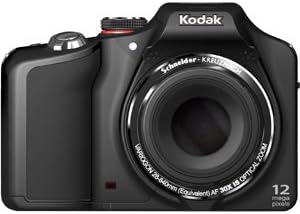
Рисунок 4.1: Передняя часть View
The front of the camera features the prominent 30x optical zoom lens, the built-in flash, and the autofocus assist lamp.
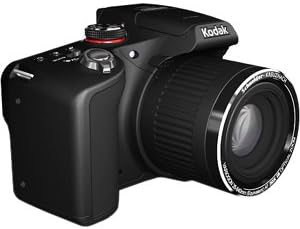
Рисунок 4.2: Сторона View
The side of the camera typically houses ports for USB and HDMI connectivity, as well as the memory card slot.
4.2. Верхние элементы управления

Рисунок 4.3: Элементы управления сверху
- Переключатель Вкл/Выкл: A momentary slide switch to power the camera on or off. The camera will automatically power off after about 20 seconds of inactivity if the lens cover is on.
- Диск выбора режимов: A rotary wheel with icons to select various shooting modes (e.g., Smart Capture, HDR, PASM, SCN).
- Кнопка спуска затвора: Press halfway to focus, fully to capture a photo.
- Рычаг зума: Surrounds the shutter button, used to zoom in (W) and out (T).
- Burst Mode Button: (Marked by 'pages' or 'frames') Activates continuous shooting.
- Macro/Focus Button: (Marked by a flower) Controls focusing bias (macro, super macro, infinity, manual focus).
- Self-Timer Button: Устанавливает задержку перед тем, как будет сделана фотография.
4.3. Rear Controls and LCD

Рисунок 4.4: Задние элементы управления
- 3.0-inch HVGA High-Resolution LCD: Дисплеи в прямом эфире view, меню и воспроизведение.
- Кнопка EVF/LCD: Переключатель между электронными режимами viewfinder and the LCD screen.
- Кнопка записи: (Silver/Red button) Initiates video recording.
- Navigation Pad (Square/Silver): Used to navigate menus and select options (Up, Down, Left, Right, OK/Center button).
- Кнопка DISP: Displays additional functionality or information on the screen.
- Кнопка вспышки: (Lightning bolt icon) Controls flash modes (Auto, Off, Fill, Red-eye reduction).
- Magic Wand Button: Displays creative effects available in the current mode.
- Trash Can Button: Deletes selected photos or videos in review режим.
- Кнопка воспроизведения: Switches between shooting mode and playback/review режим.
- Кнопка «Поделиться»: Pre-assigns pictures for sharing to social networks or email when connected to a computer.
5. Эксплуатация камеры
5.1. Basic Photography (Smart Capture Mode)
For quick and easy photo taking, use the Smart Capture mode. This mode automatically analyzes the scene and adjusts camera settings for optimal results.
- Поверните диск режимов в положение RED Camera ICON.
- Скомпонуйте кадр с помощью ЖК-экрана.
- Press the shutter button halfway down to allow the camera to focus. You will hear a beep once focus is achieved.
- Press the shutter button all the way down to capture the photo.
5.2. Advanced Shooting Modes (PASM)
The Z990 offers Program, Aperture Priority, Shutter Priority, and Manual modes for greater creative control.
- Program Auto Mode (P): The camera sets optimal shutter speed and aperture combination. You can adjust other settings like ISO, white balance, and color mode.
- Aperture Priority Mode (A): You choose the aperture (f/stop), and the camera sets the shutter speed for correct exposure. This mode is useful for controlling depth of field.
- Shutter Priority Mode (S): You choose the shutter speed, and the camera sets the aperture. This mode is ideal for controlling motion blur (fast shutter for freezing action, slow shutter for blurring motion).
- Ручной режим (М): You have full control over both aperture and shutter speed. Press the DISP button to view and adjust all manual settings on the LCD.
5.3. Scene Modes (SCN)
The SCN mode provides optimized settings for specific shooting situations. Turn the mode dial to ССН, then use the navigation pad to select from options like:
- Авто
- Спорт
- Portrait (including Night Portrait, Self)
- Landscape (including Night Landscape, Sunset)
- Яркий
- Фейерверк
- Подсветка
- Дети
- Stage
- Flower (Macro)
5.4. Creative Modes and Effects
Explore various creative options by turning the mode dial to the Paint Brush ICON or using the Magic Wand button.
- HDR (расширенный динамический диапазон): Captures multiple exposures and combines them for a single image with extended dynamic range. Hold the camera very steady for best results.
- Dramatic: Enhances color and contrast for a more impactful image.
- Night Scene Long Exposure: Optimizes settings for capturing details in low-light scenes with longer shutter times.
- Intelligent Portrait: Applies intelligent processing for improved portrait shots.
- Photobooth Capture: Takes a series of four consecutive photos, styled as if taken in a traditional photobooth.
- Automatic Panorama: Guides you to capture a series of images that the camera automatically stitches together into a wide panoramic shot (180-degree horizontal or 120-degree vertical).
- Киноэффекты: Apply classic film looks such as KODACHROME, KODACOLOR, EKTACHROME, TRI-X, T-MAX, and Sepia.
5.5. Серийная съемка (режим серийной съемки)
The camera can capture multiple frames per second for fast-moving subjects. Press the Burst Mode button on the top of the camera to activate. The camera can shoot up to 5 frames per second (fps) without flash, or up to 9 fps at 2 MP resolution (max 20 shots). Note that processing RAW files in burst mode may temporarily slow down camera responsiveness.
5.6. Запись видео
The Kodak EasyShare Z990 can record full 1080 HD video with stereo sound.
- Нажмите на серебро Кнопка записи (with the red bullseye) on the rear of the camera.
- The camera will immediately begin recording.
- Press the Record Button again to stop recording.
Features include audio capture, on-camera editing, and the ability to create action prints (9-up) from video frames.
5.7. Playback and Sharing
Чтобы повторноview Ваши фотографии и видео:
- Нажмите Кнопка воспроизведения (arrow icon) on the rear of the camera.
- Use the navigation pad to scroll through your images and videos.
- For videos, press the OK button to play. Sound will come from the camera's speaker.
To share your content:
- Нажмите Кнопка Share after taking a picture or during playback.
- Select your preferred sharing destinations (e.g., FACEBOOK, email, KODAK Gallery).
- Connect your camera to a computer via USB, and your content will automatically upload to the selected destinations.
6. Техническое обслуживание
6.1. Уход за аккумулятором
- Always use the included KODAK Ni-MH rechargeable batteries and charger.
- Ensure the battery compartment door is handled with care to prevent damage.
- Извлеките батарейки, если камера не будет использоваться в течение длительного времени.
6.2. Чистка камеры
- Для очистки корпуса камеры используйте мягкую безворсовую ткань.
- Для чистки линз используйте специальную салфетку и раствор. Избегайте прикосновения к поверхности линзы пальцами.
- Не используйте агрессивные химикаты или абразивные материалы.
7. Поиск Неисправностей
This section addresses common issues you might encounter with your Kodak EasyShare Z990.
- Камера не включается: Ensure batteries are correctly installed and fully charged. Check that the lens cap is removed.
- HDR mode not working as expected: HDR requires the camera to be held very steady during capture. Any movement can cause the merging process to fail. Ensure you are zoomed out for optimal results.
- Continuous shooting (burst mode) slows down: When shooting in high-resolution JPEG or RAW formats, the camera may temporarily pause to transfer data to the memory card. This is normal behavior. Using smaller JPEG resolutions will allow for faster continuous shooting.
- Battery charger indicator: The green light on the Kodak charger stays on even when batteries are fully charged. Batteries are typically charged when they feel warm to the touch.
- Difficulty navigating menus: To exit a menu, often you need to navigate back to the first item in the menu, then press the UP arrow or a dedicated 'Back' button if available.
- Проблемы с картой памяти: If a memory card is not recognized, try formatting it using the camera's 'Format' option in the setup menu (Wrench icon). Note that formatting will erase all data on the card.
8. Технические характеристики
| Особенность | Спецификация |
|---|---|
| Мегапиксели | 12 MP BSI CMOS |
| Оптический зум | 30x SCHNEIDER-KREUZNACH VARIOGON Lens |
| Цифровой зум | 5x |
| Размер дисплея | 3.0 in. HVGA high-resolution LCD |
| Стабилизация изображения | Оптический |
| Максимальная диафрагма | f/2.8 (wide) |
| Минимальное фокусное расстояние | 28 мм |
| Максимальное фокусное расстояние | 840 мм |
| ISO Equivalents | 125, 200, 400, 800, 1600, 3200, 6400 |
| Скорость затвора | 1/2000 sec. to 16 sec. (manual) |
| Разрешение видео | FHD 1080p (30 FPS) |
| Поддерживается File Форматы | JPEG, KDC (RAW), AVC (Video) |
| Внутренняя память | 128 МБ |
| Совместимые карты памяти | SD/SDHC |
| Тип батареи | AA (NiMH Rechargeable) |
| Связность | HDMI, USB |
| Масса | 0.98 фунта |
9. Гарантия и поддержка
For information regarding product warranty, technical support, and service, please refer to the official KODAK website or contact KODAK customer service directly. Specific warranty terms and support options may vary by region and purchase date.
Связанные документы - Z990
 |
Цифровая фотокамера KODAK EASYSHARE M853 с зумом: характеристики, спецификации и аксессуары. Всесторонний болееview Подробное описание цифровой фотокамеры KODAK EASYSHARE M853 Zoom, включая ее основные характеристики, технические параметры, комплектацию, системные требования и доступные аксессуары для улучшения фото- и фотосъемки. |
 |
Kodak EasyShare C713/C813/CD703 Zoom Digital Camera User Guide User guide for Kodak EasyShare C713, C813, CD703 digital cameras. Covers setup, shooting, media management, and troubleshooting. |
 |
Расширенное руководство пользователя для фотоаппарата KODAK EASYSHARE MAX Z990 Подробное руководство пользователя для фотокамеры KODAK EASYSHARE MAX Z990, охватывающее настройку, функции, эксплуатацию, устранение неполадок и технические характеристики. Узнайте, как снимать, перезаписывать и т.д.view, редактируйте и делитесь своими фотографиями и видео. |
 |
KODAK PIXPRO AZ405 Astro Zoom Digital Camera Specifications & Features Подробные характеристики, особенности и болееview of the KODAK PIXPRO AZ405 Astro Zoom digital camera, including 40x optical zoom, 20MP sensor, 1080p HD video capabilities, and more. |
 |
Manual do Usuário da Câmera Digital Kodak Z990: Recursos, Operação e Solução de Problemas Guia completo para a câmera digital Kodak Z990, cobrindo desde a configuração inicial, modos de disparo, visualização e compartilhamento de fotos, até solução de problemas e informações de garantia. |
 |
Цифровая камера Kodak EasyShare M1063 Bedienungsanleitung Подробные инструкции по установке, установке и настройке цифровой камеры Kodak EasyShare M1063, дополнительные советы по монтажу и видеосъемке. |