
1. Introducere
This manual provides detailed instructions for the LAUNCH Creader Elite V3.0 OBD2 Scanner, a professional diagnostic tool designed specifically for Land Rover and Jaguar vehicles. It covers device setup, operational procedures for various diagnostic and service functions, software updates, and troubleshooting tips. Please read this manual thoroughly before operating the device to ensure correct usage and optimal performance.
2. Produs terminatview
2.1. Ce se află în cutie
- 1 * LAUNCH Creader Elite V3.0 OBD2 Scanner for JLR
- 1 * OBD2 Diagnostic Cable
- 1 * Ghid de pornire rapidă
- 1 * Manual de utilizare
2.2. Caracteristici cheie
The LAUNCH Creader Elite V3.0 offers a comprehensive suite of features for vehicle diagnostics and maintenance:
- Hardware îmbunătățit: Features Android 8.1 operating system, 32GB ROM, 3000mAh battery, and 2.4&5GHz dual-band Wi-Fi for improved performance.
- DoIP Protocol Support: Supports the new DoIP protocol for Land Rover & Jaguar models manufactured after 2017 (requires an adapter).
- Full Systems Diagnostics: Provides in-depth scanning for all available vehicle modules, including engine, transmission, ABS, SRS, and more.
- Control bidirecțional (test activ): Allows control of vehicle components and systems for active testing, such as windows, mirrors, wipers, and horn.
- Comprehensive Service Functions: Includes Oil Reset, Electronic Parking Brake (EPB) Reset, Battery Management System (BMS) Reset, Steering Angle Sensor (SAS) Calibration, Injector Coding, Throttle Relearn, Height Calibration, Transmission Adaptation, Crankshaft/Camshaft Relearn, Sunroof Calibration, and more.
- Flux de date live 4 în 1: Displays real-time data from multiple sensors simultaneously in a graphical format, with recording and playback capabilities.
- Smart Diagnostic Functions: Features Auto VIN for automatic vehicle identification, DTC Lookup for code explanations, and the ability to generate and share diagnostic reports.
- Funcții OBD2 complete: Supports all 10 OBD2 test modes for universal vehicle compatibility (post-1996 models).
- Actualizări gratuite pe viață: Provides lifetime free software updates specifically for Land Rover and Jaguar vehicle brands.
2.3. Device Comparison
The Creader Elite V3.0 offers significant upgrades over previous versions:

Image: Comparison of Creader Elite V3.0, V2.0, and V1.0, highlighting V3.0's superior features like DoIP, Android 8.1, 32GB memory, and 2.4&5GHz WiFi.
2.4. Descriere fizică
The device features a durable orange casing with a 4-inch touchscreen display. The back of the device includes product identification details such as the model number, FCC ID, and serial number.
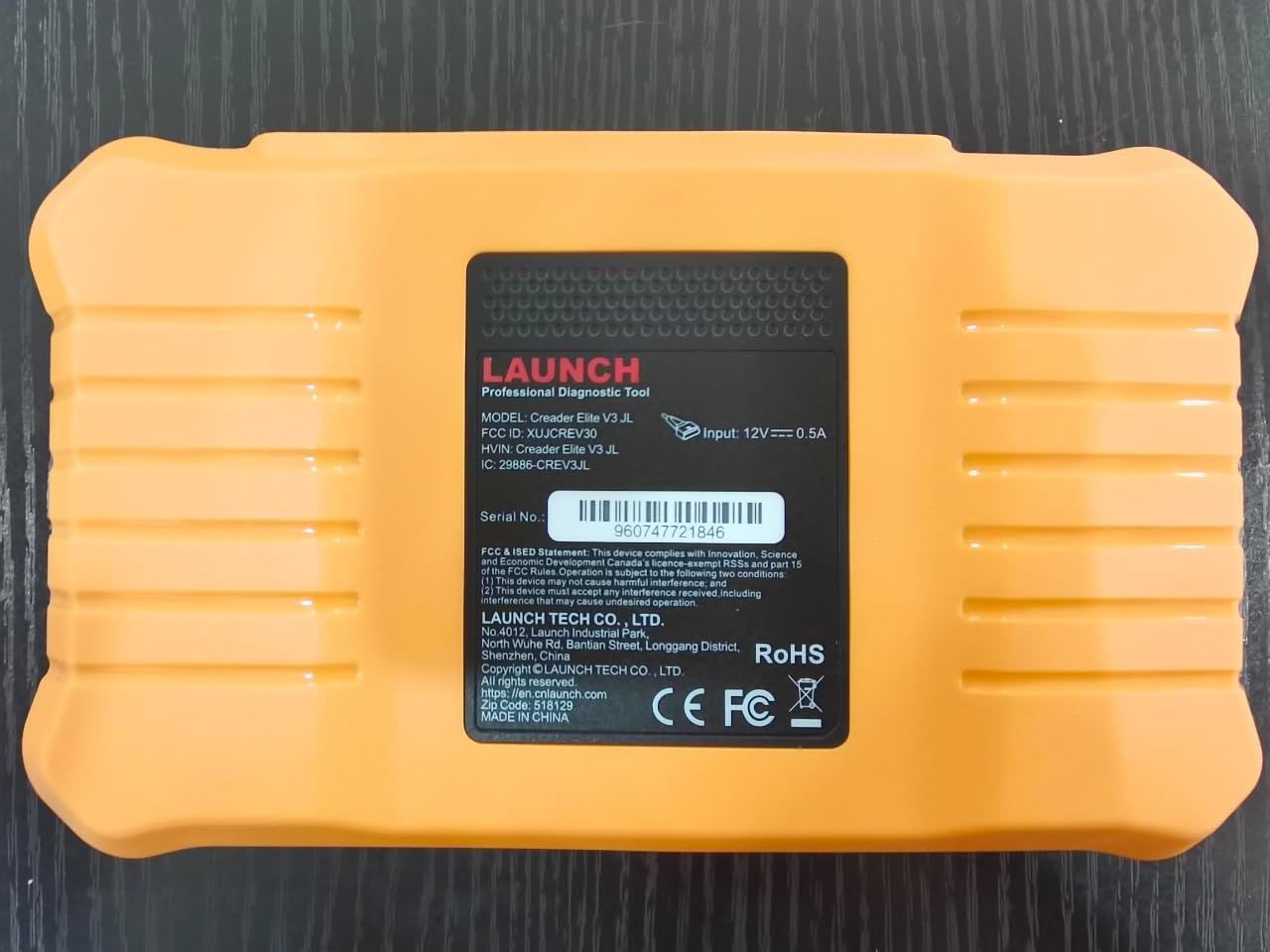
Imagine: Spate view of the LAUNCH Creader Elite V3.0, displaying the model number, FCC ID, and serial number (e.g., 960747721846).
3. Configurare
3.1. Pornirea inițială
- Asigurați-vă că dispozitivul este încărcat complet sau conectat la o sursă de alimentare.
- Apăsați și mențineți apăsat butonul de pornire până când ecranul se aprinde.
- Urmați instrucțiunile de pe ecran pentru a selecta limba și regiunea preferate.
3.2. Conexiune Wi-Fi
- Din meniul principal, navigați la Setări.
- Selecta Wifi și pornește-l.
- Alegeți rețeaua Wi-Fi dorită din listă și introduceți parola dacă vi se solicită.
- Confirm the connection. A stable internet connection is required for software updates and online resources.
3.3. Înregistrare și activare
Upon first use or after a factory reset, you may be prompted to register your device. Follow the on-screen instructions to create an account or log in. This step is crucial for accessing software updates and technical support.
4. Instrucțiuni de utilizare
4.1. Conectarea la vehicul
- Localizați portul de diagnosticare OBD2 al vehiculului, de obicei sub bordul de bord, pe partea șoferului.
- Asigurați-vă că aprinderea vehiculului este în poziția ON position (engine off or running, depending on the test).
- Connect the OBD2 diagnostic cable to the vehicle's OBD2 port and to the LAUNCH Creader Elite V3.0 device.
- The device will automatically power on or prompt you to do so.
4.2. Full Systems Diagnostics
This function allows you to scan all available electronic control units (ECUs) in the vehicle.

Image: Display showing OE-level all system diagnostics, including Auto VIN, fault codes, 4-in-1 live data, and MIL reset.
- Din meniul principal, selectați Diagnosticul local.
- Choose the vehicle brand (Land Rover or Jaguar).
- Selecta Căutare automată or Selectie manuala. Auto Search (Auto VIN) will attempt to automatically identify the vehicle.
- Once the vehicle is identified, select Raport de sănătate or Scanare sistem to perform a comprehensive scan of all modules.
- Review the diagnostic trouble codes (DTCs) and ECU information. You can then choose to clear codes if necessary.
4.3. Funcții de serviciu
The Creader Elite V3.0 provides numerous maintenance and reset services. Access these functions via Diagnose > Brand > System Selection > Special Function.

Imagine: Pesteview of various service functions including Oil Reset, Brake Reset, SAS Calibration, Start-Stop Reset, TPMS Reset, Injector Coding, Battery Reset, ABS Bleeding, Seat Calibration, and Height Calibration.
Common services include:
- Resetare ulei: Resetează sistemul de verificare a duratei de viață a uleiului de motor.
- Resetare EPB: Resets the electronic parking brake after replacement.
- Calibrare SAS: Calibrează senzorul de unghi de direcție.
- Codarea injectoarelor: Codifică noile numere de injectoare în ECU.
- Reînvățare accelerație: Reînvață poziția corpului clapetei de accelerație.
- Calibrarea înălțimii: Calibrates the vehicle's suspension height.
- Resetarea bateriei: Registers a new battery replacement.
- Sângerare ABS: Efectuează procedurile de aerisire a frânelor ABS.
Note: The availability of specific service functions may vary depending on the vehicle model and year. Always check compatibility before performing a service.
4.4. Control bidirecțional (teste active)
Active tests allow you to send commands to vehicle systems and components to verify their functionality.

Image: Depicts bi-directional active tests, showing the device sending commands to vehicle actuators like wipers, windows, clutch, and injectors to check their status.
- Navigate to the desired vehicle system within the diagnostic menu.
- Selecta Test activ or Control bidirecțional.
- Choose the specific component or system you wish to test (e.g., 'Wiper Test', 'Window Test', 'Horn Test').
- Urmați instrucțiunile de pe ecran pentru a activa și a observa răspunsul componentei.
4.5. Funcții OBD2 complete
For universal vehicle diagnostics (all OBD2 compliant vehicles after 1996), use the OBD II opțiunea de meniu.
- Citiți codurile: Preia coduri generice (P0, P2, P3, U0) și coduri specifice producătorului (P1, P3, U1).
- Coduri clare: Clears diagnostic trouble codes and turns off the Malfunction Indicator Light (MIL).
- Date live: Afișează fluxul de date în timp real de la senzorii vehiculului.
- Disponibilitate I / M: Verifică disponibilitatea monitoarelor legate de emisii.
- Blocare cadru: Afișează o imagine de ansamblu a condițiilor de funcționare în momentul unei defecțiuni legate de emisii.
- Test senzor O2: Preia rezultatele testelor de monitorizare a senzorului de O2.
- Test monitor de bord (Modul 6): Obține rezultate pentru componentele și sistemele sistemului de propulsie legate de emisii.
- Testul sistemului EVAP (Modul 8): Inițiază un test al sistemului de control al emisiilor prin evaporare.
- Informații despre vehicul: Preia numărul de identificare al vehiculului (VIN), ID-ul de calibrare (CALID) și numărul de verificare a calibrării (CVN).
4.6. Real-Time Monitoring and Data Stream
Monitor various vehicle parameters in real-time to diagnose intermittent issues or verify repairs.

Image: Real-time monitoring screen showing battery voltage, transmission oil temperature, coolant temperature, and vehicle speed, with a detailed 4-in-1 data stream graph below.
- Din meniul de diagnosticare, selectați Date live.
- Alegeți parametrii pe care doriți să îi monitorizați.
- The device can display up to four data streams simultaneously in a graphical format.
- Utilizați Înregistra şi Redare functions to capture and review data for later analysis.
4.7. Smart Diagnostic Features
The device includes features to streamline the diagnostic process:
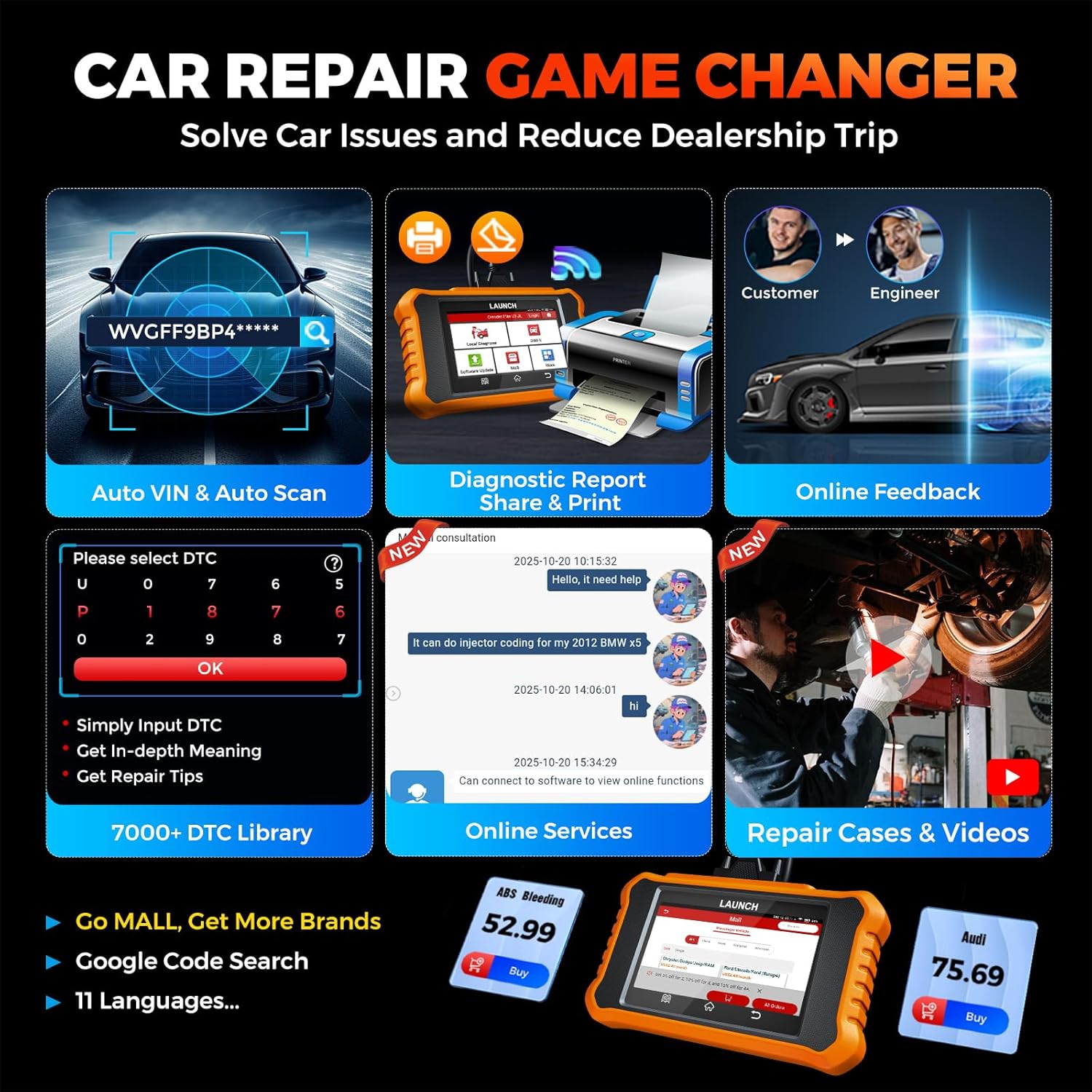
Image: Smart diagnostic features such as Auto VIN, diagnostic report generation and printing, online feedback, 7000+ DTC library, and access to online services.
- VIN auto: Automatically identifies vehicle information (year, make, model) for quicker diagnostics.
- Căutare DTC: Provides detailed explanations for diagnostic trouble codes.
- Raport de diagnostic: Generates a professional diagnostic report that can be shared or printed.
- Feedback online: Allows users to submit feedback or issues directly to technical support.
5. Întreținere și actualizări
5.1. Actualizări software
The LAUNCH Creader Elite V3.0 offers lifetime free software updates for Land Rover and Jaguar brands.
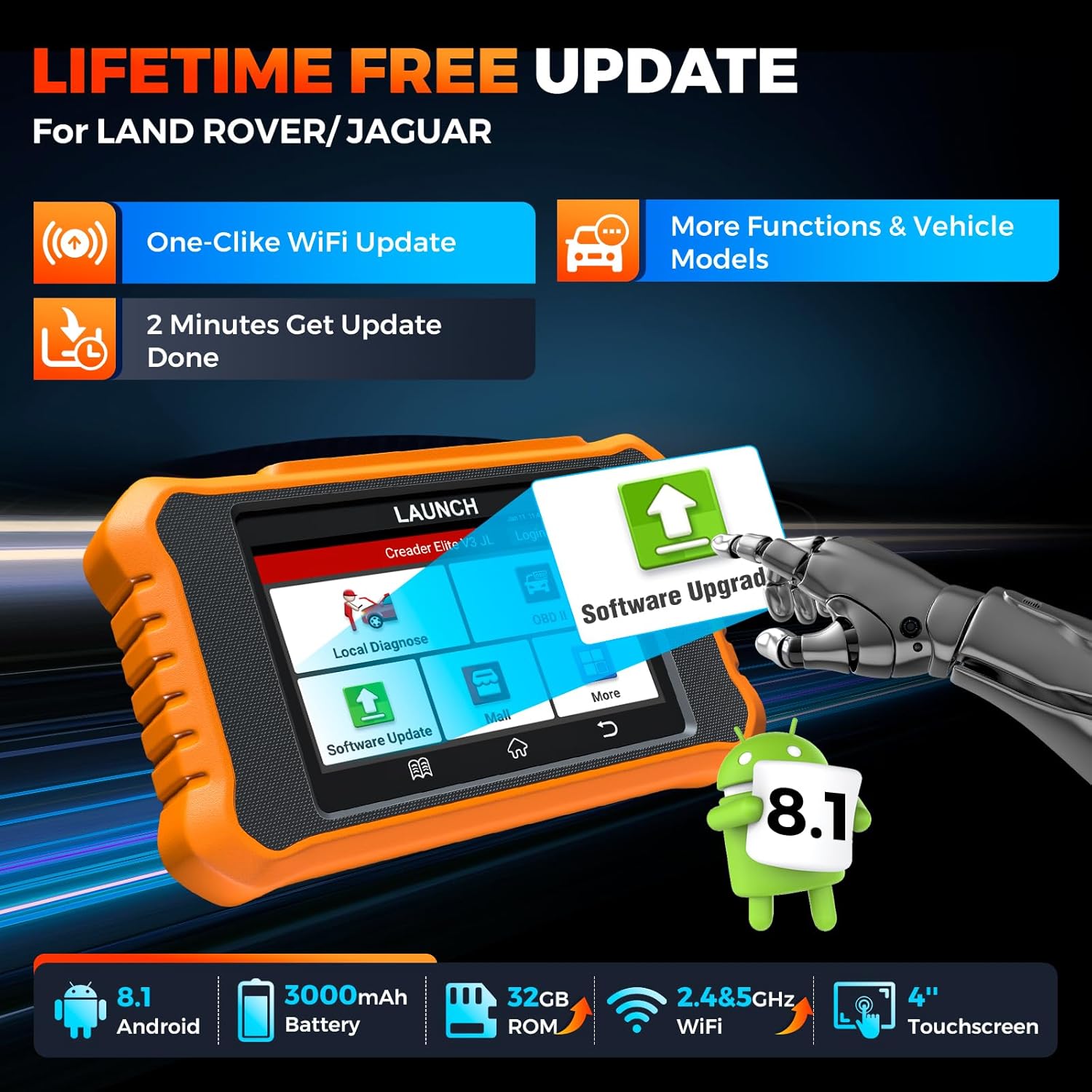
Image: Device screen illustrating the one-click Wi-Fi update process, emphasizing lifetime free updates for Land Rover/Jaguar and the ability to get more functions and vehicle models.
- Asigurați-vă că dispozitivul este conectat la o rețea Wi-Fi stabilă.
- Din meniul principal, selectați Actualizare software.
- Dispozitivul va verifica dacă există actualizări disponibile.
- Select the updates you wish to install and follow the on-screen prompts. Updates typically take a few minutes.
5.2. Expanding Vehicle Coverage (Mall)
If you require diagnostic capabilities for other vehicle brands beyond Land Rover and Jaguar, you can purchase additional software packages from the Mall application on the device. Please note that software purchased from the Mall is typically valid for one year and may require re-purchase after expiry.
5.3. Îngrijirea dispozitivului
- Păstrați dispozitivul curat și ferit de praf și umezeală.
- Evitați să scăpați dispozitivul sau să îl supuneți la impacturi puternice.
- Păstrați dispozitivul într-un loc răcoros și uscat atunci când nu este utilizat.
- Folosiți doar cablul de încărcare și accesoriile furnizate.
6. Compatibilitate
The LAUNCH Creader Elite V3.0 is primarily designed for:

Image: Device interface showing diagnostic options for Land Rover (Defender, Discovery, Range Rover, Evoque) and Jaguar (E-Pace, F-Pace, F-Type, S-Type, X-Type, XE, XF, XJ, XK) models, with a note on DoIP protocol for models after 2017.
- Land Rover: Compatible with models such as Defender, Discovery, Discovery Sport, Range Rover, Range Rover Evoque, etc.
- Jaguar: Compatible with models such as E-Pace, F-Pace, F-Type, S-Type, X-Type, XE, XF, XJ, XK, etc.
- Protocolul DoIP: Supports Land Rover & Jaguar models after 2017, requiring a separate DoIP adapter.
- Universal OBD2: Fully compatible with all OBD2 compliant vehicles manufactured after 1996 for basic OBD2 functions.
For specific vehicle compatibility, it is recommended to contact technical support via obdbox21@163.com.
7. Specificații
| Model | LAUNCH Creader Elite 3.0-JL |
| Sistem de operare | Android 8.1 |
| Dimensiunea ecranului | 4 inchi |
| Stocare internă (ROM) | 32 GB |
| Capacitatea bateriei | 3000mAh |
| Wifi | Bandă dublă de 2.4 și 5 GHz |
| Sursa de alimentare | Alimentat cu baterie |
| Greutatea articolului | 1.49 lire sterline |
| Dimensiuni pachet | 8 x 7.5 x 1.5 inci |
| Tip de potrivire auto | Universal Fit (for OBD2 functions) |
8. Depanare
8.1. Dispozitivul nu pornește
- Check battery level. Connect the device to a charger and allow it to charge for at least 30 minutes.
- Asigurați-vă că butonul de alimentare este apăsat și ținut apăsat corect.
- If connected to the vehicle, ensure the vehicle's ignition is on and the OBD2 cable is securely connected.
8.2. Eroare de comunicare cu vehiculul
- Verify the OBD2 cable is securely connected to both the device and the vehicle's port.
- Asigurați-vă că aprinderea vehiculului este în poziția ON poziţie.
- Confirm that the vehicle is OBD2 compliant (generally 1996 and newer for US vehicles).
- Try a different OBD2 compliant vehicle to rule out a vehicle-specific issue.
- Ensure the correct vehicle brand software is installed and up to date.
8.3. Software Update Failure
- Check your Wi-Fi connection for stability and signal strength.
- Ensure the device has sufficient battery charge or is connected to power during the update process.
- Verify that there is enough free storage space on the device.
- Reporniți dispozitivul și încercați din nou actualizarea.
8.4. Inaccurate Readings or Functions Not Working
- Ensure the vehicle's make, model, and year are correctly identified by the device.
- Verify that the specific function is supported for your vehicle model and year. Refer to the compatibility section or contact support.
- Ensure the device software is fully updated.
9. Garanție și asistență
9.1. Informații despre garanție
The LAUNCH Creader Elite V3.0 comes with an Extended 60-Day Return & Replacement policy and a 5-Year Quality Backup. Please retain your proof of purchase for warranty claims.
9.2. Suport tehnic
For any technical assistance, questions, or compatibility inquiries, please contact our support team:
- E-mail: obdbox21@163.com
- Our support team is available 24/7/365.
Note: Please direct all support inquiries to the provided email address. Do not contact LAUNCH Tech USA for support related to this specific product.