
Introducere
This manual provides essential information for setting up, operating, maintaining, and troubleshooting your Apple iPhone 17. This device is a renewed, unlocked US Version with 256GB storage and eSIM capability. Please read these instructions carefully to ensure optimal performance and longevity of your device.
Dispozitiv terminatview
The Apple iPhone 17 features a sleek design and powerful capabilities. Below are images highlighting key aspects of the device.
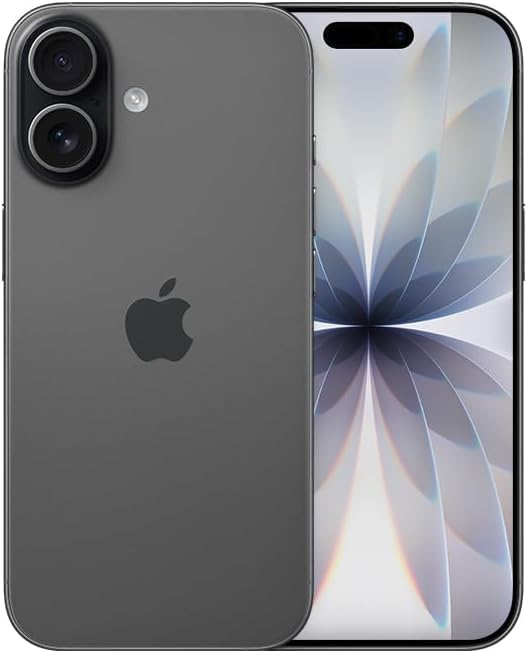
Imagine: față view of the Apple iPhone 17 in Black. This image displays the device's screen and overall form factor.

Image: Close-up of the dual camera system on the rear of the Apple iPhone 17. This highlights the camera lenses and flash module.

Imagine: Side profile of the Apple iPhone 17, showing the power button and volume controls. This view emphasizes the device's slim design.
Înființat
Follow these steps to set up your renewed Apple iPhone 17:
- Compatibilitate operator: This phone is unlocked and compatible with GSM and CDMA networks (e.g., AT&T, T-Mobile, Sprint, Verizon, US Cellular, Cricket, Metro, Tracfone, Mint Mobile). Before proceeding, verify compatibility with your chosen carrier.
- Activare eSIM: The iPhone 17 uses an eSIM. Your carrier will provide instructions for activating the eSIM. Often, this involves scanning a QR code. Important: Do not discard any QR stickers provided with your device, as they may be essential for eSIM activation.
- Pornire: Press and hold the power button on the side of the device until the Apple logo appears.
- Configurare inițială: Follow the on-screen prompts to select your language, region, connect to a Wi-Fi network, and transfer data from a previous device if applicable.
- Accesorii: The device includes a generic (Mfi certified) charger and charging cable. Headphones and a physical SIM card are not included.
Utilizarea iPhone-ului 17
Your iPhone 17 runs on iOS 18, offering a user-friendly interface and a wide range of features.
Navigare de bază
- Ecranul principal: Swipe up from the bottom of the screen to return to the Home Screen.
- Comutator de aplicații: Swipe up from the bottom and pause in the middle of the screen to view deschideți aplicații.
- Centru de control: Glisează în jos din colțul din dreapta sus pentru a accesa setările rapide.
- Notificări: Glisează în jos din centrul de sus către view notificări.
Caracteristicile camerei
The iPhone 17 is equipped with a powerful camera system:
- Camera spate: 48 MP sensor with LED flash and 10x digital zoom for high-quality photos and videos.
- Camera frontală: Single front-facing camera for selfies and video calls.
- Captură video: Supports 1080p and 4k video recording.
Afișaj și conectivitate
- Afişa: 6.3-inch OLED display with 2622 x 1206 resolution and a 120Hz refresh rate, providing vibrant visuals and smooth scrolling.
- Conectivitate: Supports 5G cellular technology, Bluetooth, NFC, USB Type C, and Wi-Fi for seamless communication and data transfer.
Security and Additional Features
- Securitate biometrică: Face Recognition for secure unlocking and authentication.
- Caracteristici suplimentare: Includes Always On Display, Built-In GPS, Dual SIM capability (via eSIM), and Wireless Charging.
Videoclipuri utile
Video: A comparison between the iPhone 17 and another phone model, highlighting design and features. This video is provided by Ersbit.
Video: O re-prezentare sincerăview of the Apple iPhone 17, discussing its performance and user experience. This video is provided by Dimitri.
Video: O analiză detaliatăview of the Apple iPhone 17, covering various aspects of the device. This video is provided by Bonfashion.
Video: Un scurt clip care prezintăasing the Lavender color variant of the iPhone 17. This video is provided by Veronika.
Video: Demonstrating the Apple iPhone 17 in daily use scenarios. This video is provided by Ericka Garcia Garcia.
Video: A design comparison between the iPhone 17 Pro and the standard iPhone 17. This video is provided by Ersbit.
Video: Un pesteview of the iPhone Air and iPhone 17's overall design. This video is provided by Ersbit.
Întreţinere
Proper maintenance ensures the longevity and performance of your iPhone 17.
- Sănătatea bateriei: Your renewed iPhone 17 is guaranteed to have a minimum battery capacity of 80%. To preserve battery life, avoid extreme temperatures and excessive charging cycles.
- curatenie: Folosiți o lavetă moale, fără scame, pentru a curăța ecranul și exteriorul. Evitați materialele abrazive sau substanțele chimice dure.
- Actualizări de software: Regularly update your iOS to the latest version to benefit from security patches, new features, and performance improvements.
- Managementul stocării: Periodic review și ștergeți inutilul files, apps, and media to optimize storage and performance.
Depanare
If you encounter issues with your iPhone 17, consider the following common solutions:
- Probleme de conectivitate la rețea: If you experience problems with calls, texts, or data, first ensure your eSIM is properly activated with your carrier. Some carriers may have specific requirements or known compatibility issues. Contact your carrier's support for assistance.
- Dispozitivul nu răspunde: Perform a force restart. The exact steps may vary slightly by iOS version, but typically involve pressing and quickly releasing the Volume Up button, then the Volume Down button, then pressing and holding the Side button until the Apple logo appears.
- Descarcarea bateriei: Check battery usage in Settings to identify apps consuming significant power. Adjust settings like screen brightness, background app refresh, and location services to optimize battery life.
- Probleme cu aplicația: If an app is not functioning correctly, try closing and reopening it. If the issue persists, delete and reinstall the app, or check for app updates in the App Store.
- Defecțiuni software: Ensure your device is running the latest iOS version. If problems persist, consider backing up your data and performing a factory reset.
Specificații
Detailed technical specifications for the Apple iPhone 17 (256GB, Unlocked, Renewed):
| Caracteristică | Caietul de sarcini |
|---|---|
| Marca | Măr |
| Numele modelului | iPhone 17 |
| Sistem de operare | iOS 18 |
| Capacitate de stocare a memoriei | 256 GB |
| Dimensiunea memoriei RAM instalate | 8 GB |
| Model CPU | Seria A |
| Viteza procesorului | 3.7 GHz |
| Dimensiunea ecranului | 6.3 inchi |
| Tip de afișare | OLED |
| Rezoluţie | 2622 x 1206 pixeli |
| Rata de reîmprospătare | 120 Hz |
| Display Pixel Density | 460 Pixels Per Inch (PPI) |
| Furnizor de servicii wireless | Deblocat |
| Tehnologia celulară | 5G |
| Tehnologia de conectivitate | Bluetooth, NFC, USB, Wi-Fi |
| Număr de sloturi pentru cartela SIM | E Sim |
| Tip conector | USB tip C |
| Rear Facing Camera Photo Sensor Resolution | 48 MP |
| Number of Rear Facing Cameras | 1 |
| Number of Front Cameras | 1 |
| Blițul camerei | LED |
| Zoom digital | 10.0 |
| Rezoluție captură video | 1080p, 4k |
| Capacitatea bateriei | 3600 Miliamp Ore |
| Descrierea bateriei | Litiu-Ion |
| Funcție de securitate biometrică | Recunoașterea feței |
| Caracteristici suplimentare | Always On Display, Built-In GPS, Dual SIM, Factory Unlocked, Wireless Charging |
| Nivel de rezistență la apă | Nu este rezistent la apă |
| Greutatea articolului | 14.88 uncii |
| Dimensiunile articolului | 6 x 4 x 2 inci |
| Anul modelului | 2025 |
| UPC | 756613503987 |
Garanție și suport
Your renewed Apple iPhone 17 is covered by a 90-Day Amazon Renewed Guarantee. This warranty ensures that your device is in excellent working condition and provides options for replacement or refund if issues arise within the warranty period.
For further assistance, please refer to the following:
- Asistență reînnoită Amazon: Visit the Amazon Renewed Store for information regarding your purchase and warranty claims.
- Asistență Apple: For general iOS and device functionality questions, visit the official Apple Support website-ul.
- Suport operator: Contact your mobile carrier for any network-related issues, eSIM activation, or service plan inquiries.