
Oakcastle IR200
Manual de utilizare pentru radioul internet Oakcastle IR200
Model: IR200
1. Introducere
Thank you for choosing the Oakcastle IR200 Internet Radio. This manual provides essential information for the safe and efficient operation of your device. Please read it thoroughly before use and retain it for future reference.
The Oakcastle IR200 is a versatile audio system offering multiple listening options, including Internet Radio, DAB+, FM, Bluetooth 5.3, and AUX input. It features a color display, remote control, and podcast support for a comprehensive audio experience.
2. Conținutul pachetului
Despachetați cu grijă cutia și asigurați-vă că toate articolele enumerate mai jos sunt prezente și în stare bună:
- Oakcastle IR200 Internet Radio Unit
- Cablu de alimentare
- Telecomanda
- Manual de utilizare (acest document)
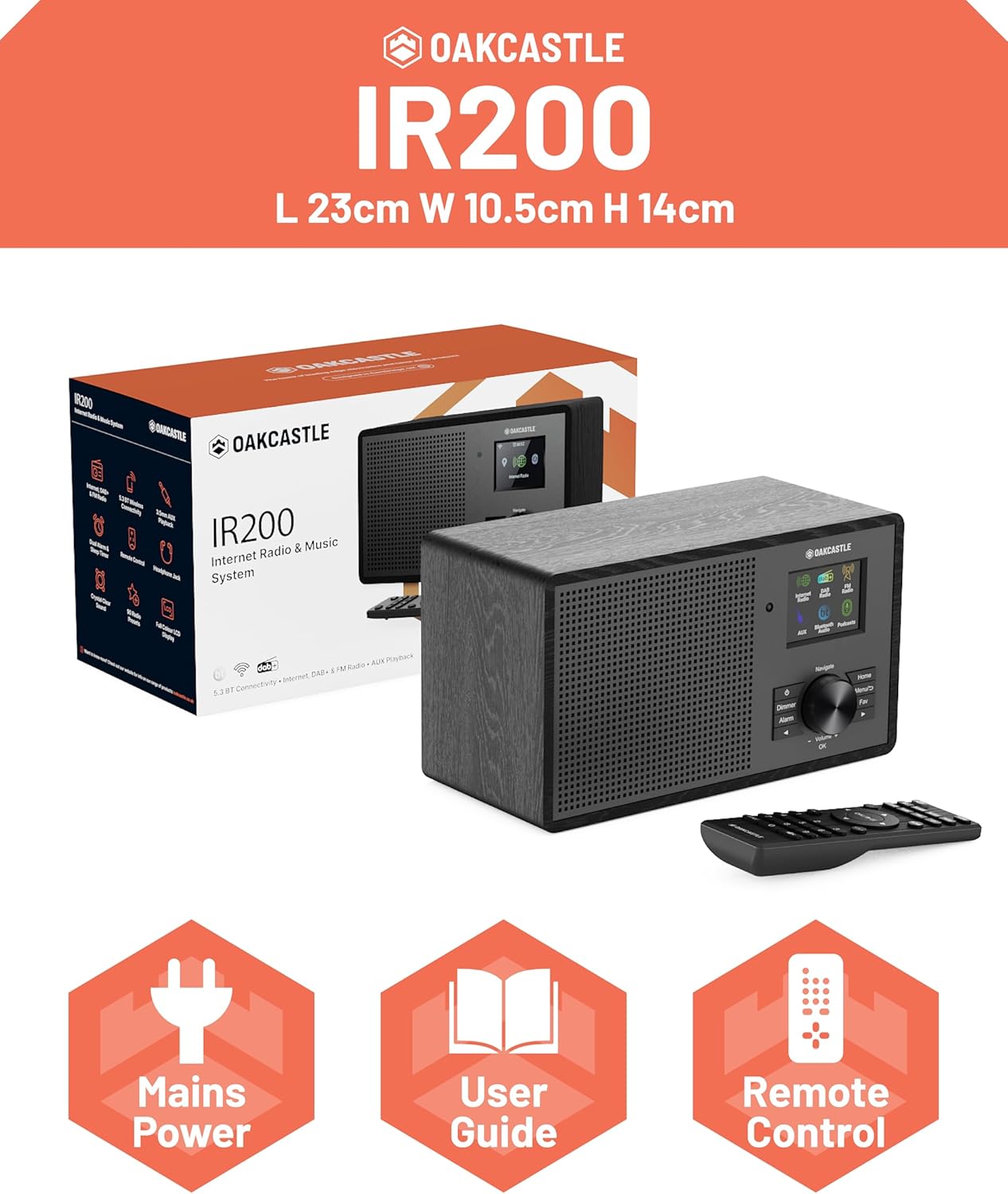
Image 2.1: Contents of the Oakcastle IR200 package, including the radio unit, its box, power cable, remote control, and user manual.
3. Produs terminatview
Familiarize yourself with the main components and controls of your Oakcastle IR200 radio.
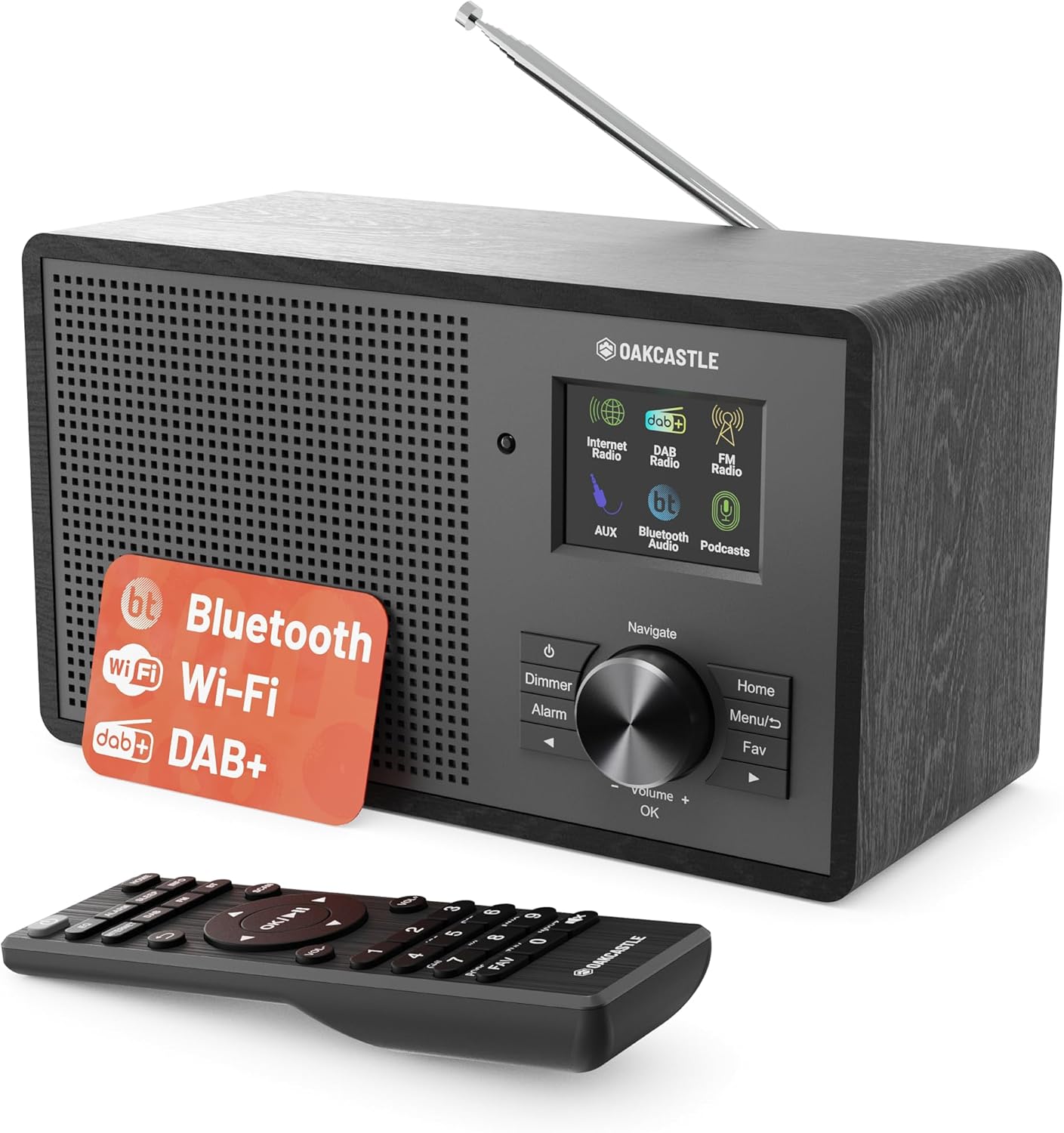
Imaginea 3.1: Față view of the Oakcastle IR200 radio, showcasing the display, control knob, buttons, and the included remote control.
3.1 Controale panoului frontal
- Ecran de afișare: Afișează informații despre stație, ora și opțiunile din meniu.
- Navigate/Volume/OK Knob: Rotate to navigate menus or adjust volume; press to confirm selections.
- Buton de alimentare: Turns the unit on/off or puts it into standby.
- Butonul Dimmer: Reglează luminozitatea afișajului.
- Buton alarmă: Accesează setările alarmei.
- Buton Acasă: Revine la meniul principal.
- Buton de meniu: Accesses mode-specific menus.
- Butonul Favorite: Accesses favorite station presets.
3.2 Conexiuni la panoul din spate

Imaginea 3.2: Spate view of the Oakcastle IR200, highlighting the headphone output and AUX input ports.
- Antena telescopica: For DAB+ and FM reception.
- Intrare AUX: Conectați dispozitive audio externe.
- Ieșire căști: Conectați căștile pentru ascultare privată.
- DC IN: Conexiune adaptor de alimentare.
4. Configurare inițială
4.1 Conexiune la alimentare
- Insert the power cable into the DC IN port on the rear of the radio.
- Plug the other end of the power cable into a wall socket.
- Apăsați butonul de pornire/oprire de pe panoul frontal sau de pe telecomandă pentru a porni radioul.
4.2 Reglarea antenei
For optimal DAB+ and FM reception, fully extend the telescopic antenna located at the rear of the unit.
4.3 Network Connection (for Internet Radio)
- Upon first power-on, the radio will guide you through the network setup.
- Select "Network Wizard" or "Wi-Fi Setup" from the menu.
- Radioul va scana rețelele Wi-Fi disponibile. Selectați rețeaua din listă.
- Enter your Wi-Fi password using the navigation knob and OK button.
- După conectare, radioul va afișa un mesaj de confirmare.
5. Moduri de operare
The Oakcastle IR200 offers several listening modes. Press the "Home" button to access the main menu and select your desired mode.
5.1 Internet Radio
Access thousands of global radio stations via your Wi-Fi connection.

Image 5.1: The radio's display screen in Internet Radio mode, showing station information.
- Din meniul principal, selectați „Radio pe internet”.
- You can browse stations by location, genre, or search by name.
- Rotate the Navigate knob to scroll through options and press OK to select.
- To save a station as a favorite, press the "Fav" button during playback.
Radio DAB+ 5.2
Bucurați-vă de emisiuni radio digitale de înaltă calitate.

Image 5.2: The radio's display screen in DAB+ Radio mode, showing the current station.
- From the main menu, select "DAB+ Radio".
- Radioul va scana automat posturile DAB+ disponibile.
- Use the Navigate knob to select a station from the list.
- To save a station as a favorite, press the "Fav" button during playback.
5.3 Radio FM
Ascultați emisiunile FM analogice tradiționale.
- Din meniul principal, selectați „Radio FM”.
- To auto-scan for stations, press and hold the OK button or use the scan function via the menu.
- To manually tune, rotate the Navigate knob.
- To save a station as a favorite, press the "Fav" button during playback.
5.4 Conectivitate Bluetooth
Redați audio fără fir de pe dispozitivele dvs. compatibile Bluetooth.

Image 5.3: The radio's display screen in Bluetooth mode, indicating readiness for pairing.
- Din meniul principal, selectați „Bluetooth”. Radioul va intra în modul de asociere.
- On your external device (e.g., smartphone), enable Bluetooth and search for "Oakcastle IR200".
- Select "Oakcastle IR200" to pair. Once connected, you can stream audio.
5.5 Intrare AUX
Conectați surse audio externe folosind un cablu audio de 3.5 mm.
- Conectați un capăt al unui cablu audio de 3.5 mm la portul AUX IN din spatele radioului.
- Conectați celălalt capăt la mufa pentru căști sau la ieșirea audio a dispozitivului extern.
- From the main menu, select "AUX".
- Controlați redarea de pe dispozitivul dvs. extern.
5.6 podcasturi
Browse and listen to a wide range of podcasts.
- From the main menu, select "Podcasts".
- Browse podcasts by category or search for specific titles.
- Select a podcast to start listening.
6. Setări și caracteristici
6.1 Setări de sistem
Access general system settings via the main menu to configure time, language, display, and more.
- Ora/Data: Set time format, synchronize time.
- Limbă: Selectați limba preferată pentru meniu.
- Afişa: Adjust backlight, color scheme.
- Reţea: Reconfigurați setările Wi-Fi.
- Actualizare software: Check for and install firmware updates.
6.2 Egalizator (EQ)
Customize the audio output to your preference using the equalizer settings, accessible via the remote control or system menu.
6.3 Presetări
The radio supports over 90 presets for your favorite Internet, DAB+, and FM stations. To recall a preset, press the "Fav" button and select from the list.
6.4 Alarme
Set alarms to wake up to your favorite radio station or a buzzer sound. Access alarm settings via the "Alarm" button on the front panel or remote.
7. Telecomanda
The included remote control provides convenient access to all radio functions from a distance.
Ensure batteries are correctly inserted. Point the remote control towards the front of the radio for optimal response.
7.1 Funcții de control de la distanță
- Putere: On/Off/Standby.
- Volum +/-: Reglați nivelul volumului.
- Butoane de navigare (Sus/Jos/Stânga/Dreapta): Navigați prin meniuri.
- OK: Confirmați selecția.
- Mode Buttons (Internet, DAB, FM, Bluetooth, AUX): Comutați între moduri.
- Butoane presetate (1-90+): Directly select saved favorite stations.
- EQ: Accesați setările egalizatorului.
- Meniu: Access mode-specific menus.
- Fav: Access favorite station list.
8. Întreținere
8.1 Curățare
To clean the radio, use a soft, dry cloth. Do not use abrasive cleaners, waxes, or solvents as these may damage the finish.
8.2 Îngrijire generală
- Păstrați unitatea departe de lumina directă a soarelui, surse de căldură și umiditate.
- Evitați să scăpați unitatea sau să o supuneți la impacturi puternice.
- Asigurați o ventilație adecvată în jurul unității.
9. Depanare
| Problemă | Cauza posibila | Soluţie |
|---|---|---|
| Fără putere | Power cable not connected; wall socket not active. | Check power cable connection; try a different wall socket. |
| Nici un sunet | Volum prea mic; Mut activat; Sursă incorectă selectată. | Increase volume; Check mute status; Select correct input mode. |
| Radioul de internet nu se conectează | Incorrect Wi-Fi password; Weak Wi-Fi signal; Router issue. | Re-enter Wi-Fi password; Move radio closer to router; Restart router. |
| Recepție DAB+/FM slabă | Antena nu este extinsă; Zonă cu semnal slab. | Fully extend antenna; Reposition radio for better signal. |
| Bluetooth nu se asociază | Radio not in pairing mode; Device too far; Device already paired. | Ensure radio is in Bluetooth mode; Move device closer; Unpair from other devices. |
10. Specificații
| Caracteristică | Detaliu |
|---|---|
| Marca | Oakcastle |
| Model | IR200 |
| Culoare | Negru |
| Tehnologia de conectivitate | Wi-Fi, Bluetooth 5.3, AUX |
| Tehnologie de reglare | Radio pe internet, DAB+, FM |
| Caracteristici speciale | Bluetooth, EQ, Podcasts, Internet Radio, Remote Control |
| Sursa de alimentare | Electric Cable (Mains) |
| Dimensiunile produsului (înălțime x lățime x adâncime) | 14 cm x 10.5 cm x 23 cm (aprox.) |
| Greutatea produsului | 0.94 kg |
| Dispozitive compatibile | Player MP3, Smartphone, Tabletă |
11. Garanție și asistență
11.1 Informații despre garanție
The Oakcastle IR200 comes with a standard warranty. An extended 3-year warranty is available upon product registration on the manufacturer's website. Please refer to the warranty card included in your package or visit the official Oakcastle website pentru detalii.
11.2 Asistență pentru clienți
For technical assistance, troubleshooting, or further inquiries, please contact Oakcastle customer support. Contact details can typically be found on the official Oakcastle webla fața locului sau pe cardul de garanție.
Ask a question about this manual
Ask about setup, troubleshooting, compatibility, parts, safety, or missing instructions. Manuals+ will review the question and use this page’s manual context to help answer it.