
1. Introducere
Mulțumesc pentru achizițieasing the MZEIBO KY2020D 80W Bluetooth 5.3 Detachable Sound Bar. This versatile audio system is designed to enhance your home entertainment experience with immersive stereo sound. Its unique 2-in-1 detachable design allows for flexible placement options, adapting to various room layouts and preferences. This manual provides essential information for setting up, operating, and maintaining your sound bar to ensure optimal performance.
2. Conținutul pachetului
Vă rugăm să verificați dacă toate articolele enumerate mai jos sunt incluse în pachetul dumneavoastră:
- MZEIBO KY2020D Sound Bar (2 detachable sections)
- Telecomanda
- Stand Bases (for vertical speaker setup)
- Cablu AUX
- Adaptor de alimentare
- Cablu optic
- Cablu HDMI
- Șuruburi și ancore de montare pe perete
- Ghidul utilizatorului (acest manual)

Figura 2.1: Included accessories for the MZEIBO Sound Bar.
3. Caracteristicile produsului
- Premium Dolby Sound: Experience clear dialogue and powerful bass with advanced Dolby audio technology.
- Detachable 2-in-1 Design: Use as a single horizontal soundbar or split into two separate vertical speakers for flexible placement.
- Opțiuni multiple de conectivitate: Supports Bluetooth 5.3, HDMI ARC, Optical, and 3.5mm AUX for broad compatibility.
- Putere de iesire 80W: Delivers robust audio performance for movies, music, and gaming.
- Compact și elegant: Sleek, modern design integrates seamlessly into any home decor.
- Optimized Sound Modes: Dedicated modes for Music, Movie, and News to enhance specific audio content.

Figura 3.1: Internal speaker configuration and audio specifications.
4. Configurare
4.1. Assembly and Placement
The MZEIBO Sound Bar offers two primary configurations:
- Single Sound Bar: Connect the two sections by aligning the connectors and gently pushing them together until they click into place. This configuration is ideal for placement directly below your TV on a tabletop or mounted on a wall.
- Two Vertical Speakers: Separate the two sound bar sections. Attach the provided stand bases to the bottom of each section. Place one speaker to the left and one to the right of your TV for a wider stereo soundstage.
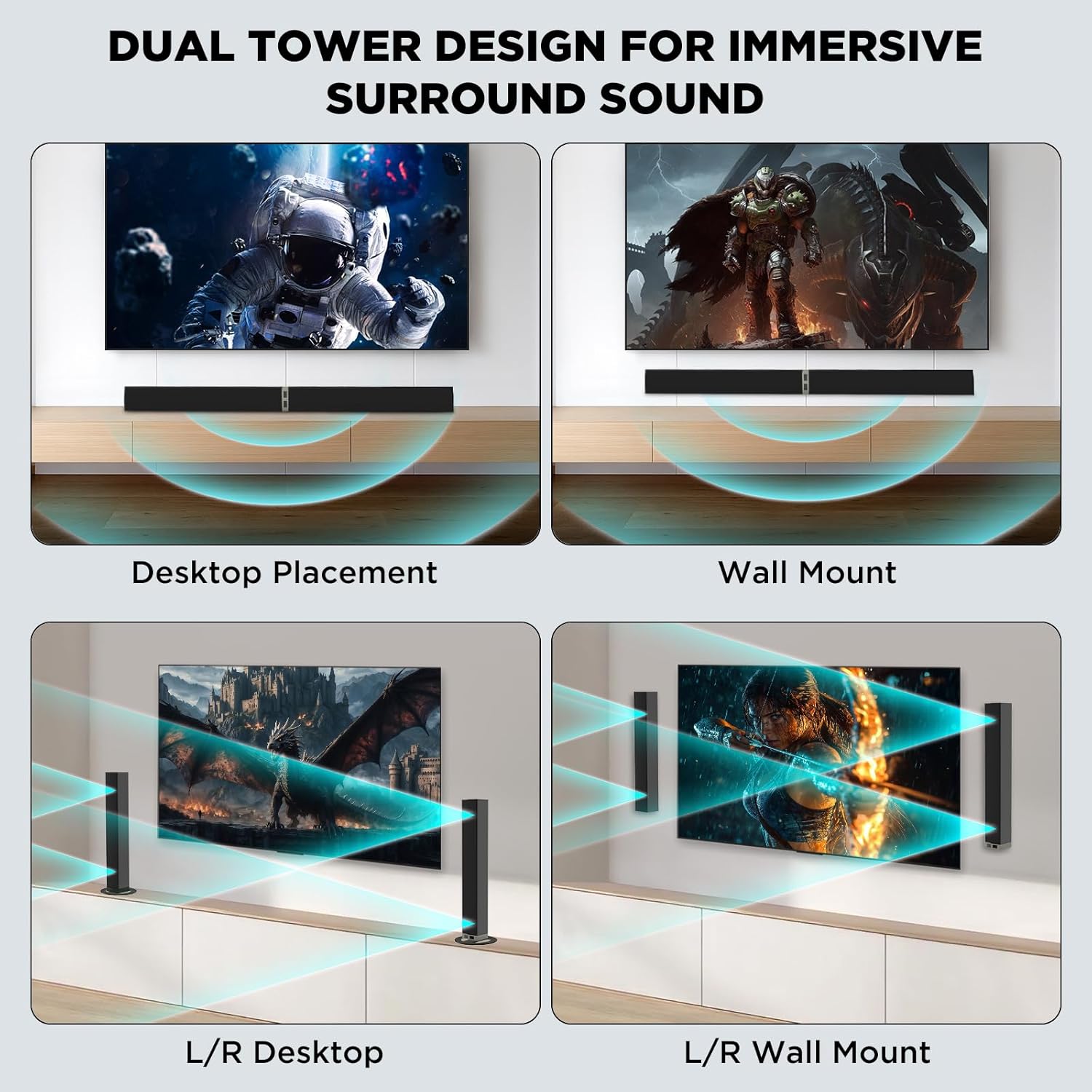
Figura 4.1: Versatile placement options for the sound bar.
4.2. Conectarea la putere
Connect the provided power supply adapter to the DC IN port on the sound bar and then plug it into a wall outlet.
4.3. Conexiuni audio
Choose one of the following methods to connect the sound bar to your audio source (TV, PC, etc.):
- ARC HDMI: Connect one end of the HDMI cable to the HDMI ARC port on your TV and the other end to the HDMI ARC port on the sound bar. Ensure your TV's HDMI ARC function is enabled.
- Optic: Connect one end of the optical cable to the Optical Out port on your TV and the other end to the OPTICAL port on the sound bar. Remove protective caps from the optical cable before use.
- 3.5 mm AUX: Connect one end of the 3.5mm AUX cable to the headphone jack or AUX Out port on your device and the other end to the AUX port on the sound bar.
- Bluetooth 5.3:
- Porniți bara de sunet.
- Press the 'BT' button on the remote control or the 'Mode' button on the sound bar until 'BT' appears on the display. The indicator light will flash, indicating pairing mode.
- On your device (e.g., smartphone, smart TV), enable Bluetooth and search for 'MZEIBO Soundbar'.
- Select 'MZEIBO Soundbar' to pair. Once connected, the indicator light will stop flashing and remain solid.
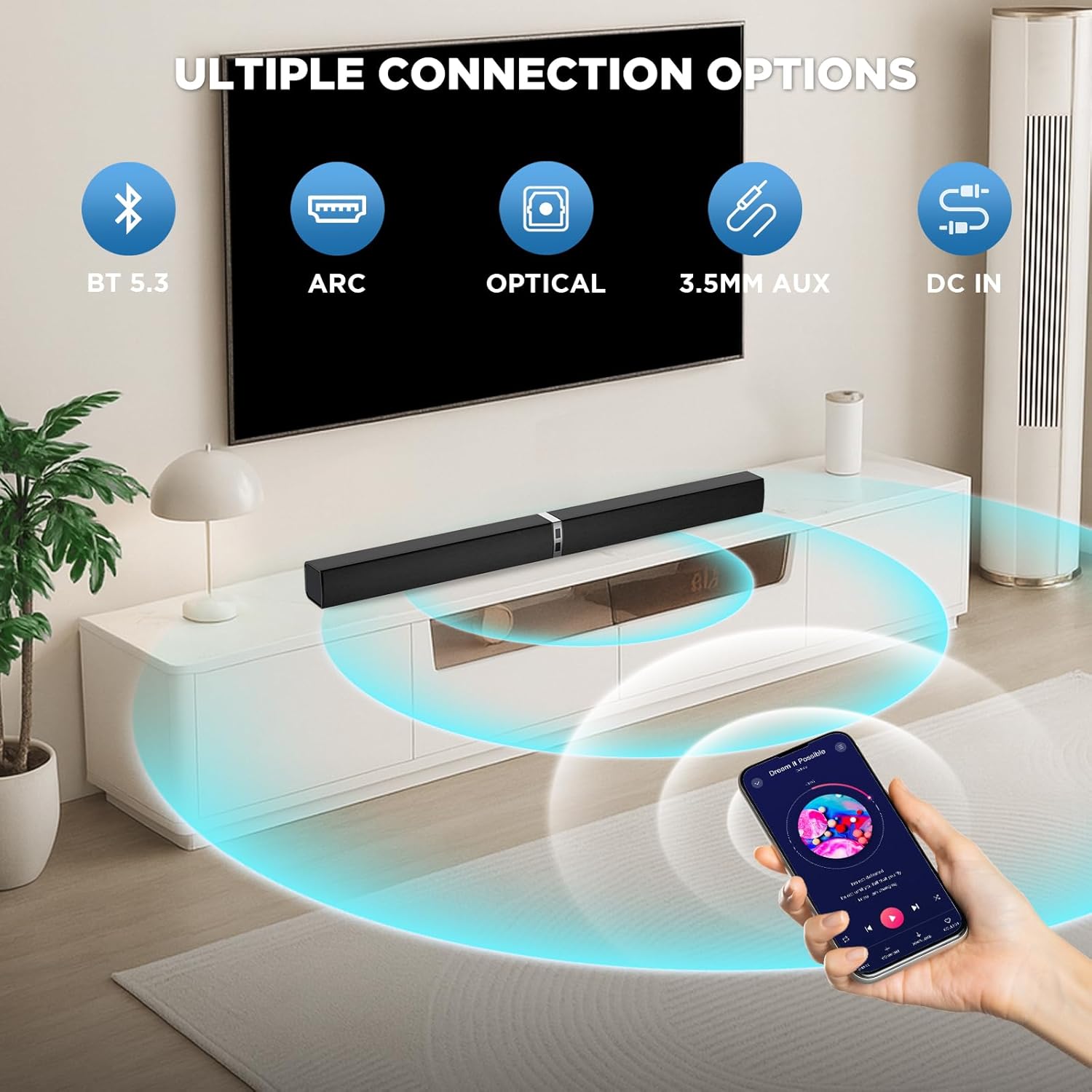
Figura 4.2: Available connection options for the sound bar.
5. Funcționare
5.1. Pornire/Oprire
Apăsați tasta Putere button on the remote control or the sound bar unit to turn it on or off.
5.2. Controlul volumului
Utilizați Volumul + şi Volum - buttons on the remote control or the sound bar unit to adjust the volume.
5.3. Selectarea sursei de intrare
Apăsați tasta Modul button on the remote control or the sound bar unit to cycle through available input sources: Bluetooth (BT), HDMI ARC, Optical (OPT), and AUX.
5.4. Moduri de sunet
The sound bar features optimized sound modes for different content types. Press the corresponding button on the remote control to select:
- Modul muzical: Enhances musical clarity and bass.
- Mod film: Provides an immersive cinematic experience with enhanced dialogue and effects.
- Modul Știri: Optimizes vocal clarity for news broadcasts and talk shows.

Figura 5.1: Sound modes for different content.
6. Întreținere
- curatenie: Folosiți o lavetă moale și uscată pentru a curăța suprafața barei de sunet. Nu utilizați agenți de curățare lichizi sau materiale abrazive.
- Depozitare: When not in use for extended periods, store the sound bar in a cool, dry place away from direct sunlight and extreme temperatures.
- Evitați lichidele: Keep the sound bar away from water and other liquids to prevent damage.
- Ventilare: Ensure proper ventilation around the sound bar to prevent overheating. Do not block any ventilation openings.
7. Depanare
If you encounter issues with your MZEIBO Sound Bar, please refer to the following common solutions:
- Fără sunet:
- Asigurați-vă că bara de sunet este pornită și că volumul nu este dezactivat sau setat prea jos.
- Verify that the correct input source (BT, ARC, OPT, AUX) is selected on the sound bar.
- Verificați toate cablurile audio (HDMI, optic, AUX) pentru conexiuni sigure.
- If using HDMI ARC, confirm that your TV's ARC function is enabled and the TV's audio output is set to the sound bar.
- Probleme de asociere Bluetooth:
- Asigurați-vă că bara de sunet este în modul de asociere Bluetooth (indicatorul luminos clipește).
- Asigurați-vă că Bluetooth-ul dispozitivului este activat și se află în raza de acțiune (de obicei, 10 metri).
- Dacă a fost asociat anterior, încercați să anulați asocierea și să o reasociați.
- Telecomanda nu funcționează:
- Check if the batteries are correctly inserted and not depleted. Replace if necessary (requires 2x AAA batteries, not included).
- Ensure there are no obstructions between the remote control and the sound bar's sensor.
8. Specificații
| Numele modelului | KY2020D |
| Marca | MZEIBO |
| Tip difuzor | Soundbar |
| Putere maximă de ieșire difuzor | 80 wați |
| Raspuns in frecventa | 20 KHz |
| Tehnologia de conectivitate | Bluetooth 5.3, Optical, HDMI ARC, 3.5mm AUX |
| Mod ieșire audio | Stereo |
| Dimensiunile produsului | 31" D x 2.35" L x 2.3" H |
| Greutatea articolului | 2.43 kilograme (5.35 de lire sterline) |
| Tip de montare | Suport de masă, suport de perete |
| Material | Plastic sau metal |
9. Garanție și asistență
MZEIBO offers a lifetime warranty for the KY2020D Sound Bar. This includes super free replacement for lost, defective, or damaged units, with no shipping fees and no return required. To activate your warranty, please scan the QR code provided on the product packaging or included documentation.
For further assistance or technical support, please refer to the contact information provided with your product or visit the official MZEIBO website-ul.