
Introducere
This manual provides comprehensive instructions for the ARCCTV C3 Solar Security Camera. This device is designed for outdoor surveillance, featuring a built-in solar panel for continuous power, 4MP resolution, PIR motion detection, and dual-band Wi-Fi connectivity. Please read this manual thoroughly before installation and operation to ensure proper use and optimal performance.
Produs terminatview
Conținutul pachetului
- ARCCTV C3 Solar Security Camera (Quantity may vary based on pack size)
- Suport de fixare
- Șuruburi și dopuri de perete
- Cablu de încărcare USB
- Manual de utilizare
Componentele camerei
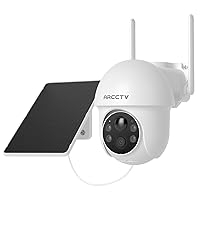
Familiarize yourself with the main components of your ARCCTV C3 camera:

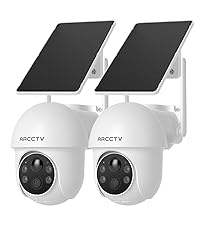
Image showing two ARCCTV C3 Solar Security Cameras, highlighting the integrated solar panel, camera lens, and motion sensor.

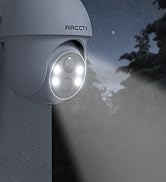
A închide view of the camera's front, detailing the 4MP lens, LED lights for night vision, and the PIR motion sensor.
- Panou solar: Integrated on top for continuous battery charging.
- Obiectivul camerei: 4MP resolution for clear video capture.
- Senzor de mișcare PIR: Detects human and animal movement.
- LED-uri cu infraroșu: Pentru vedere nocturnă alb-negru.
- Repere: Pentru vedere nocturnă colorată și descurajare.
- Microfon: Pentru intrare audio.
- Vorbitor: Pentru comunicare audio bidirecțională și sirenă.
- Port de încărcare USB: For initial charging or manual charging.
- Slot pentru card MicroSD: Pentru stocare video locală (cardul nu este inclus).
Instrucțiuni de configurare
1. Încărcarea inițială
Before first use, fully charge the camera battery using the provided USB charging cable. Connect the cable to the camera's USB port and a standard 5V/1A USB power adapter (not included). The charging indicator will show the battery status. The integrated solar panel will maintain the charge after installation, but an initial full charge ensures optimal performance.
2. Instalarea aplicației și crearea contului
Descărcați ARCCTV mobile application from your smartphone's app store (available for iOS and Android). Follow the on-screen prompts within the app to create a new user account and log in.
3. Împerecherea dispozitivului
A smartphone screen displaying the ARCCTV app's Wi-Fi setup interface, prompting for network name and password.
- Open the ARCCTV app and tap 'Add Device' or the '+' icon.
- Selectați modelul camerei din listă.
- Follow the in-app instructions to connect the camera to your Wi-Fi network. Ensure your smartphone is connected to the same Wi-Fi network (supports both 2.4GHz and 5GHz bands).
- The camera will automatically select the optimal Wi-Fi band for connection.
- După conectare, puteți denumi camera și puteți finaliza procesul de configurare.
4. Montarea camerei

A person installing the ARCCTV C3 camera on an outdoor wall, demonstrating the ease of installation.
- Selectarea locației: Choose a suitable outdoor location with good Wi-Fi signal strength and direct sunlight exposure for the solar panel. Avoid areas with heavy shade.
- Instalare: Use the provided mounting bracket, screws, and wall plugs to securely attach the camera to a wall, fence, or pole.
- Pozitionare: Adjust the camera angle to cover the desired surveillance area. Ensure the PIR motion sensor has a clear line of sight to the area you wish to monitor.
Instrucțiuni de operare
Trăi View și Înregistrare
Access the live video feed of your camera through the ARCCTV app. The camera records in 4MP (2560x1440p) resolution. Recordings are primarily triggered by motion detection events.
Vedere de noapte

A split image demonstrating the camera's day vision (left) and enhanced night vision (right) capabilities, showing clear visibility in low light.
The camera features advanced IR night vision, providing clear black and white video up to 33 feet in complete darkness. An optional color night mode, activated by the built-in spotlights, delivers vivid nighttime images when sufficient light is available or motion is detected.
Detectarea mișcării și alerte

An image depicting a security camera detecting a person, illustrating the instant alert feature with siren warning and two-way audio.
The integrated PIR motion sensor detects human and animal activity, sending instant push notifications to your smartphone. You can customize motion detection zones and sensitivity settings within the ARCCTV app to minimize false alerts.
Audio bidirecțional

A person using a tablet to communicate via the camera's two-way audio feature, showing a live video call interface.
Utilize the two-way audio feature via the ARCCTV app to communicate with individuals near the camera. This allows for direct interaction, such as speaking to delivery personnel or deterring unwanted visitors.
Opțiuni de stocare
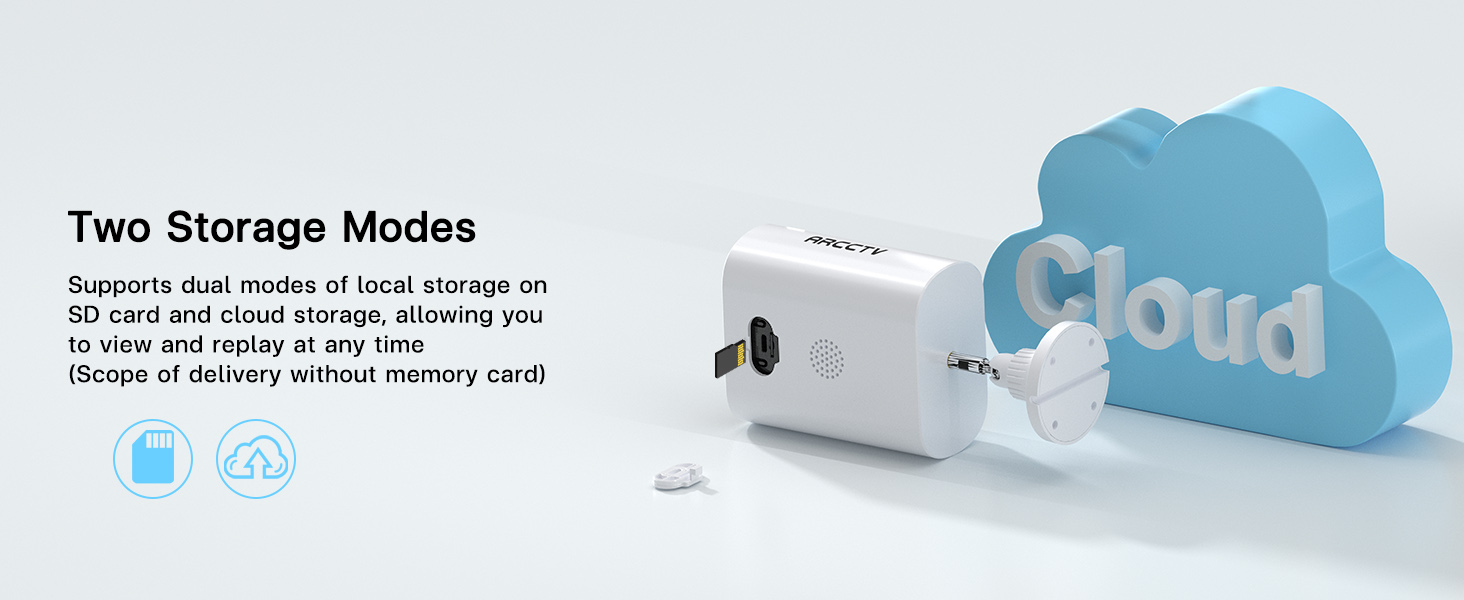
A close-up of the camera's side, showing the slot for a microSD card, indicating local storage capability.
An illustration showing the camera connected to a cloud icon, representing the cloud storage option for recorded footage.
The camera supports two storage modes:
- Stocare locală: Introduceți un card microSD (până la 128 GB, nu este inclus) în slotul prevăzut pentru înregistrare locală.
- Stocare în cloud: An optional cloud storage service is available via subscription for secure, off-site storage of your footage.
Acces partajat
A smartphone screen displaying live camera footage, surrounded by icons representing multiple users, indicating shared access functionality.
You can share camera access with family members or trusted individuals through the ARCCTV app, allowing multiple users to view live feeds and recorded surveillance simultaneously.
Întreţinere
Îngrijirea panourilor solare
Periodically clean the surface of the integrated solar panel to ensure maximum charging efficiency. Remove any dust, dirt, leaves, or debris that may obstruct sunlight. Use a soft, damp cârpă pentru curățare.
Managementul bateriei
While the solar panel provides continuous power, prolonged periods of low sunlight, heavy cloud cover, or high motion activity may lead to battery depletion. Monitor battery levels through the ARCCTV app. If the battery level becomes critically low, manually charge the camera using the USB port.
Rezistență la intemperii

A split image showing the camera in rainy and sunny conditions, illustrating its weatherproof design and ability to withstand extreme temperatures.
The camera is designed with weatherproof construction to withstand outdoor conditions, including temperatures from -4°F to 122°F. Ensure all covers and seals are securely closed after accessing ports (e.g., USB, microSD slot) to maintain water resistance.
Depanare
Camera Not Charging
- Asigurați-vă că panoul solar este expus la lumina directă a soarelui timp de câteva ore pe zi.
- Clean the solar panel surface if it is dirty or obstructed.
- If the issue persists, charge the camera manually using the USB cable.
Probleme de conectivitate Wi-Fi
- Verify your Wi-Fi network is operational and the camera is within range of your router.
- Asigurați-vă că vă conectați la o rețea de 2.4 GHz sau 5 GHz.
- Reporniți routerul Wi-Fi și camera, apoi încercați să le reconectați.
- If necessary, reset the camera and re-pair it with the app.
Detectarea mișcării nu funcționează
- Check the motion detection settings in the ARCCTV app; ensure it is enabled and sensitivity is adjusted appropriately.
- Ensure there are no physical obstructions blocking the PIR sensor.
- Test the detection by walking in front of the camera.
Calitate video slabă
- Curăţaţi obiectivul camerei cu o cârpă moale, fără scame.
- Check your Wi-Fi signal strength in the app; a weak signal can affect streaming quality.
- For night vision, ensure no strong light sources are directly facing the camera, as this can cause glare.
Specificații
| Caracteristică | Caietul de sarcini |
|---|---|
| Numele modelului | C3 |
| Utilizare în interior/exterior | În aer liber |
| Sursa de alimentare | Battery Powered & Solar Powered |
| Protocol de conectivitate | Wi-Fi (2.4GHz & 5GHz Dual Band) |
| Rezoluție captură video | 1440p (4MP) |
| Viewunghiul ing | 130 de grade |
| Dimensiuni articol (L x l x H) | 7.8 x 6.2 x 4.3 inci |
| Greutatea articolului | 2.05 lire sterline (0.93 kilograme) |
| Dimensiunea maximă acceptată pentru memorie flash | 128 GB (MicroSD card) |
| Capacități de înregistrare audio-vizuală | Audio și video |
| Caracteristica specială | Audio cu 2 căi |
| baterii | 1 baterie necesară (inclusă) |
| Interval de temperatură de funcționare | -4°F până la 122°F |
Garanție și suport
For detailed warranty information, technical assistance, and customer support, please visit the official ARCCTV website or contact customer service directly through the ARCCTV mobile application. Please retain your purchase receipt for warranty claims.