
HALO Bolt PaL 1000
Manual de utilizare pentru pornitorul auto portabil HALO Bolt PaL 1000
Model: Bolt PaL 1000
1. Informații importante privind siguranța
Please read and understand all safety information before using the HALO Bolt PaL 1000. Failure to follow these instructions may result in electric shock, fire, or serious injury.
- Do not operate the unit if it is damaged or modified.
- Nu expuneți unitatea la ploaie sau temperaturi extreme.
- Ensure proper polarity when connecting jumper cables to a vehicle battery. Incorrect connection can cause damage to the unit or vehicle.
- A nu se lăsa la îndemâna copiilor.
- Folosiți doar cablurile de pornire și accesoriile furnizate.
- Nu încercați să porniți o baterie înghețată.
- The unit is designed for 12-volt vehicle batteries only. Verify your vehicle battery voltage pentru compatibilitate.
2. Produs terminatview
The HALO Bolt PaL 1000 is a versatile device designed to provide emergency power for various situations. It functions as a portable car jump starter, a power bank for electronic devices, and features a detachable emergency flashlight.
- Aprindere rapidă: Oferă 1000 de puncte de vârf amps to jump start 12-volt car, ATV, or lawn mower batteries, suitable for up to 6L gas engines. Features patented smart safety protection and spark-proof clamps.
- Power Bank portabil: Equipped with USB-A and USB-C ports to charge smartphones, tablets, and other USB-powered devices.
- Detachable Flashlight: Includes a multi-mode flashlight with floodlight and SOS functions for illumination during emergencies.
- Ecran digital: An LCD color display provides real-time information, including battery voltage și starea de încărcare.

Image: The HALO Bolt PaL 1000 main unit (purple with iridescent finish), detachable flashlight, and jumper cables.
3. Ce este inclus
The HALO Bolt PaL 1000 package includes the following items:
- HALO Bolt PaL 1000 Jump Starter Unit
- Detachable Flashlight/Power Bank
- Set of HALO Jumper Cables
- 10W USB Wall Charging Adapter
- Cablu de încărcare USB-A la USB-C
- Husă de depozitare din microfibră

Image: All included accessories: HALO Bolt PaL 1000 unit, jumper cables, USB wall adapter, USB-A to USB-C cable, and microfiber storage pouch.
4. Configurare și încărcare
Before initial use, fully charge your HALO Bolt PaL 1000. It can be charged at home using the provided wall adapter or in a vehicle.
4.1. Încărcarea unității principale
- Connect the USB-C charging cable to the 'IN/OUT' USB-C port on the HALO Bolt PaL 1000.
- Connect the other end of the USB-C cable to the provided 10W USB Wall Charging Adapter.
- Conectați adaptorul de perete la o priză electrică standard.
- The digital display will show 'CHARGING' and the battery percentage will increase. A full charge is indicated by 100% and a steady 'CHARGING' icon.
4.2. Charging the Detachable Power Bank
The detachable power bank charges when connected to the main unit or via its own USB-C port.
- To charge via the main unit, simply attach the detachable power bank to the main HALO Bolt PaL 1000 unit.
- Alternatively, connect a USB-C cable to the power bank's USB-C input and a power source.
5. Instrucțiuni de utilizare
5.1. Pornirea asistată a unui vehicul
The HALO Bolt PaL 1000 features an error-proof design with spark-proof clamps and a comprehensive safety check before each jump.
- Ensure the HALO Bolt PaL 1000 is fully charged.
- Connect the jumper cables to the jump start port on the HALO Bolt PaL 1000.
- Atașați roşu (positive) clamp la borna pozitivă (+) a bateriei vehiculului.
- Atașați negru (negative) clamp la borna negativă (-) a bateriei vehiculului.
- Press the 'JUMP START' button on the HALO Bolt PaL 1000. The digital display will show 'JUMP START READY' or similar confirmation.
- Porniți vehiculul în 90 de secunde.
- Once the vehicle starts, immediately disconnect the jumper cables from the vehicle battery, then from the HALO Bolt PaL 1000.

Image: Detail of the HALO Bolt PaL 1000's jump start interface, highlighting the 'JUMP START' button and the digital display showing vehicle battery voltage și taxa procentualătage.
5.2. Utilizarea ca baterie externă portabilă
The HALO Bolt PaL 1000 can charge multiple devices simultaneously.
- Connect your device's charging cable to either the USB-A (5VΛ2.4A) or USB-C (5VΛ2A Max) output ports on the main unit.
- The detachable power bank also has USB-A and USB-C output ports (5VΛ1A each) for charging smaller devices.

Imagine: Un prim-plan view of the HALO Bolt PaL 1000's side panel, displaying the USB-A and USB-C output ports for charging external devices.
5.3. Using the Detachable Flashlight
The detachable flashlight provides various lighting modes for different needs.
- Press the power button on the flashlight to cycle through modes: White Flashlight, White Floodlight, Red Floodlight, Red SOS.
- The flashlight can be used independently as it contains its own power bank.
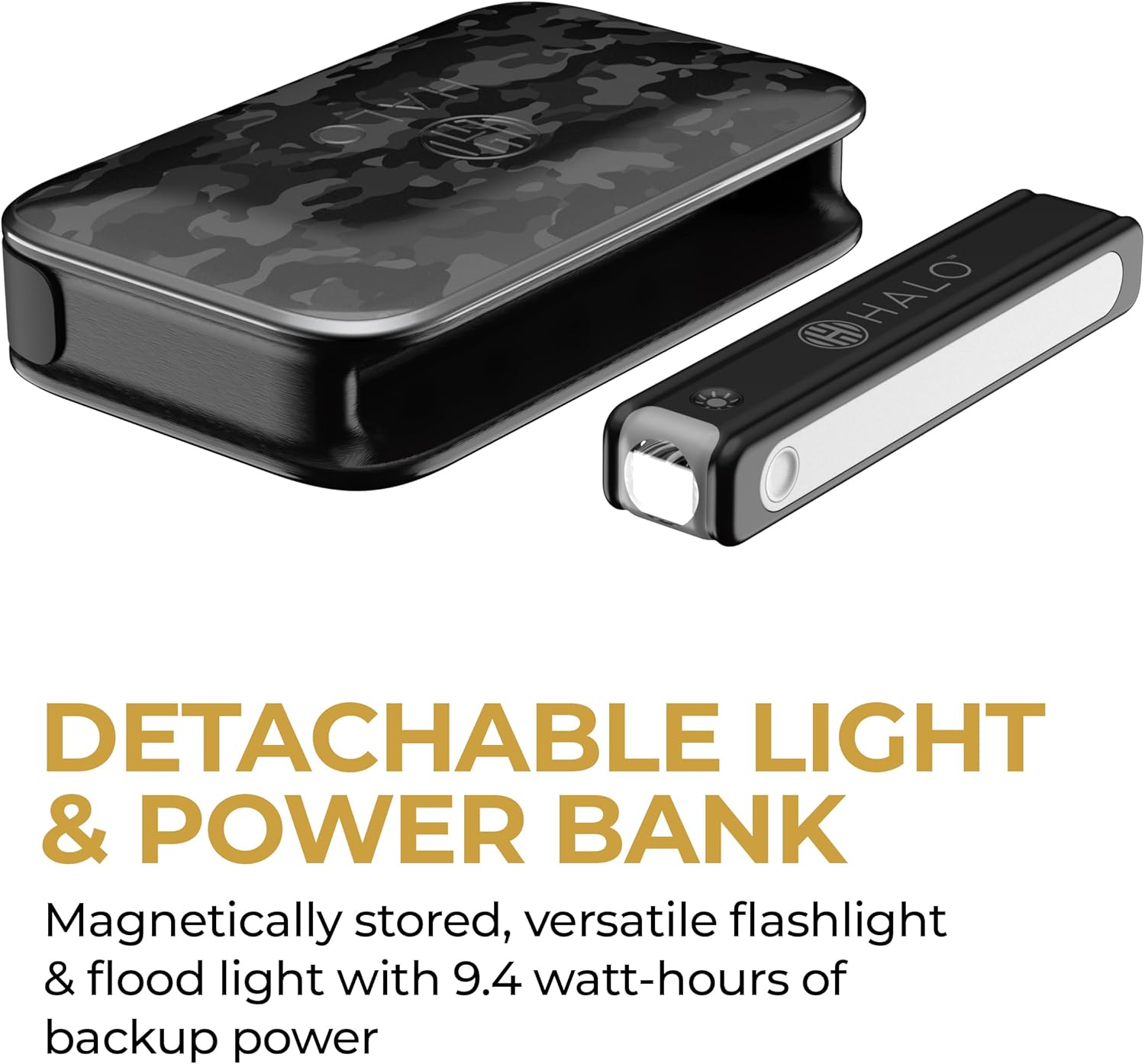
Image: The HALO Bolt PaL 1000 main unit alongside its detached flashlight, illustrating its modular design.

Image: The detachable flashlight in operation, showcasing its red floodlight mode, useful for emergency signaling or low-light visibility.
6. Întreținere
Proper maintenance ensures the longevity and optimal performance of your HALO Bolt PaL 1000.
- Depozitare: Depozitați unitatea într-un loc răcoros și uscat, ferit de lumina directă a soarelui și de temperaturi extreme.
- Încărcare: For best results, fully charge the unit every 3 months, even if not in use, to maintain battery health.
- curatenie: Ștergeți unitatea cu un dispozitiv moale, damp pânză. Nu utilizați substanțe chimice dure sau materiale abrazive.
- Îngrijirea cablului: Inspect jumper cables and charging cables regularly for any signs of damage. Replace if necessary.
7. Depanare
If you encounter issues with your HALO Bolt PaL 1000, refer to the following common solutions:
| Problemă | Cauza posibila | Soluţie |
|---|---|---|
| Unit does not turn on or charge | Battery is completely depleted; charging cable or adapter is faulty. | Ensure the unit is connected to a working power source with the provided charging cable and adapter. Allow a few minutes for the display to activate if deeply discharged. |
| Vehiculul nu pornește asistat | Incorrect cable connection; unit battery too low; vehicle battery severely damaged; 'SAFETY CHECK FAIL' on display. | Verify jumper cable connections (red to positive, black to negative). Ensure the HALO Bolt PaL 1000 is fully charged. If 'SAFETY CHECK FAIL' appears, disconnect and re-connect cables, then press 'JUMP START' again. If the vehicle battery is completely dead or damaged, it may not accept a jump. |
| Digital display shows 'BATT TOO LOW' | The internal battery of the HALO Bolt PaL 1000 is low. | Recharge the HALO Bolt PaL 1000 immediately. It cannot perform a jump start when its internal battery is too low. |
| USB devices not charging | Unit battery low; incorrect cable; device not compatible. | Ensure the HALO Bolt PaL 1000 has sufficient charge. Try a different USB cable or device. |

Imagine: O imagine detaliată view of the HALO Bolt PaL 1000's dynamic digital display, showing indicators for charging status, temperature, safety check, and vehicle battery voltage.
8. Specificații
Technical specifications for the HALO Bolt PaL 1000:
| Caracteristică | Detaliu |
|---|---|
| Numărul de model | HBFL-29970 |
| Vârf Ampepoca | 1000 Amps |
| Capacitatea bateriei | 29.97Wh (2700mAh, 11.1V Lithium-Polymer or 8100mAh 3.7V equivalent) |
| Compatibilitate vehicul | 12V vehicles, up to 6L gas engines |
| Bolt Input (Charging) | 1x USB-C (10W) |
| Bolt Output (Charging Devices) | 1x USB-C (10W Max: 5VΛ2A), 1x USB-A (5VΛ2.4A) |
| Detachable Power Bank Input | 1x POGO PIN (5W), 1x USB-C (5W) |
| Detachable Power Bank Output | 1x USB-C (5VΛ1A), 1x USB-A (5VΛ1A) |
| Integrated Voltmeter Range | 1V – 26V DC |
| Dimensiuni | 7.13" D x 4.33" L x 1.69" H |
| Greutatea articolului | 1.5 livre (aprox. 0.68 kg) |
| UPC | 044435926023 |
9. Garanție și asistență
For warranty information, product support, or to purchase replacement parts, please visit the official HALO website or contact HALO customer service. Keep your proof of purchase for warranty claims.
For additional assistance, refer to the HALO Store on Amazon.
Ask a question about this manual
Ask about setup, troubleshooting, compatibility, parts, safety, or missing instructions. Manuals+ will review the question and use this page’s manual context to help answer it.