1. Introducere
This manual provides detailed instructions for the installation, operation, and maintenance of the Generic MT7925 WiFi 7 Network Card. This M.2 NGFF wireless adapter offers WiFi 7 (802.11be) connectivity with tri-band support (2.4GHz, 5GHz, 6GHz) and Bluetooth 5.3 capabilities, designed for Windows 10 and Windows 11 systems.
2. Informații de siguranță
- Deconectați întotdeauna alimentarea de la computer înainte de a instala sau de a scoate orice componente interne.
- Handle the network card by its edges to avoid touching the gold connectors or sensitive components.
- Folosiți măsuri antistatice adecvate (de exemplu, o curea antistatică pentru încheietura mâinii) pentru a preveni deteriorarea cauzată de descărcările electrostatice (ESD).
- Păstrați dispozitivul departe de umiditate și temperaturi extreme.
3. Conținutul pachetului
Verificați dacă toate articolele sunt prezente în colet:
- 1 x MT7925 WiFi Card
4. Configurare și instalare
4.1 Listă de verificare preinstalare
- Ensure your computer has an available M.2 NGFF slot (Key E).
- Confirm your operating system is Windows 10 or Windows 11 (64-bit).
- Download the latest drivers for the MT7925 from the manufacturer's or chipset provider's website onto a USB drive or accessible location before installation.
4.2 Instalare fizică
The MT7925 network card is designed for M.2 NGFF Key E slots found in both desktop motherboards and laptops.

Imagine: Față și verso view of the MT7925 WiFi 7 network card, highlighting the Key E connector for installation.
- Opriți computerul și deconectați toate cablurile.
- Open your computer case (for desktop) or access the M.2 slot compartment (for laptop). Refer to your computer's manual for specific instructions.
- Locate an available M.2 NGFF slot (Key E).
- Carefully insert the MT7925 card into the M.2 slot at a slight angle.
- Gently press down the card and secure it with the screw provided with your motherboard or laptop.
- Connect the antenna cables (if applicable) to the corresponding 'Main' and 'Aux' connectors on the card.
- Close your computer case or compartment.
- Reconectați toate cablurile și porniți computerul.
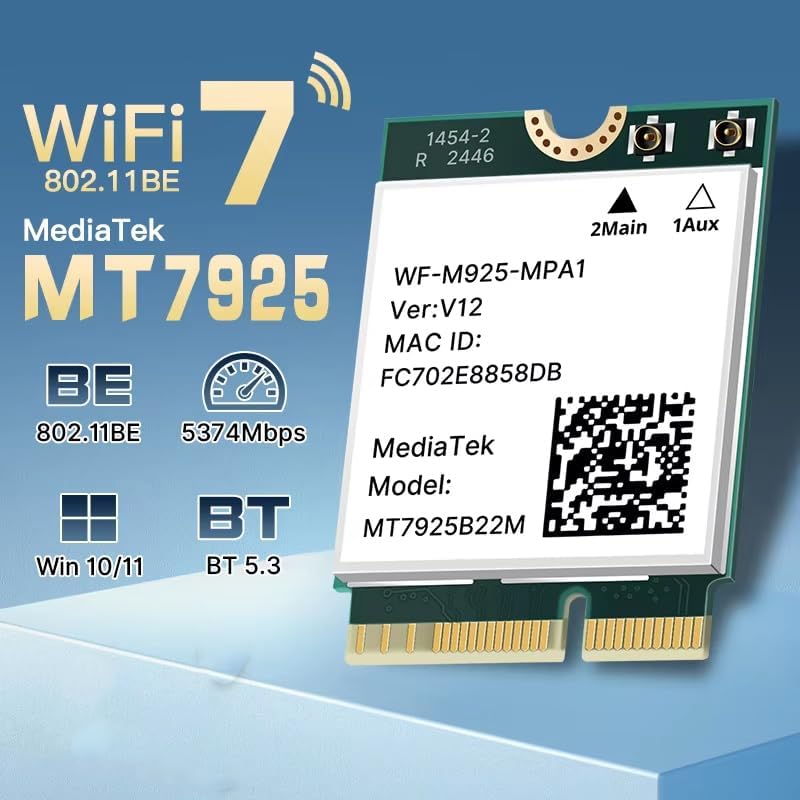
Image: Illustration of M.2 slot availability for both desktop and laptop installations. The image indicates 'Available' and 'Unavailable' slots for clarity.
4.3 Instalarea driverului
- After booting into Windows, open Device Manager.
- Look for an unknown device or a network adapter with a yellow exclamation mark under 'Network adapters' or 'Other devices'.
- Right-click on the device and select 'Update driver'.
- Choose 'Browse my computer for drivers' and navigate to the folder where you saved the downloaded drivers.
- Urmați instrucțiunile de pe ecran pentru a finaliza instalarea driverului.
- Reporniți computerul dacă vi se solicită.
5. Instrucțiuni de utilizare
5.1 Conectarea la Wi-Fi
Once drivers are installed, the MT7925 card will enable Wi-Fi functionality. You can connect to available networks:
- Faceți clic pe pictograma Wi-Fi din bara de activități Windows.
- Selectați rețeaua dorită din listă.
- Enter the network password if required and click 'Connect'.
- The MT7925 supports tri-band operation (2.4GHz, 5GHz, 6GHz) for optimal performance.

Image: Visual representation of the MT7925's data rates across different frequency bands: 6GHz (2400Mbps), 5GHz (2400Mbps), and 2.4GHz (574Mbps).
5.2 Asociere Bluetooth
The MT7925 also provides Bluetooth 5.3 connectivity.
- Accesați Setări Windows > Dispozitive > Bluetooth și alte dispozitive.
- Asigurați-vă că Bluetooth este activat.
- Faceți clic pe „Adăugați Bluetooth sau alt dispozitiv” și selectați „Bluetooth”.
- Puneți dispozitivul Bluetooth în modul de asociere.
- Selectați dispozitivul din listă și urmați instrucțiunile de pe ecran pentru a finaliza asocierea.

Image: An illustration demonstrating the compatibility of the upgraded Bluetooth 5.3 with various devices, including printers, keyboards, gamepads, mice, headsets, speakers, cell phones, and tablets.
5.3 Compatibilitatea sistemului de operare
The MT7925 network card is compatible with 64-bit versions of Windows 10 and Windows 11.

Image: Logos for Windows 10 and Windows 11, confirming support for 64-bit versions of these operating systems.
6. Întreținere
- Actualizări ale driverului: Regularly check for updated drivers on the manufacturer's or chipset provider's website pentru a asigura performanță și securitate optime.
- Inspectie fizica: Periodically inspect the card and antenna connections (if external) for any signs of damage or loose connections.
- curatenie: If necessary, gently clean the card with compressed air to remove dust buildup. Ensure the computer is powered off and unplugged before cleaning.
7. Depanare
7.1 No Wi-Fi or Bluetooth Connectivity
- Verificați Managerul de dispozitive: Verify that the MT7925 card is recognized and has no error symbols. Reinstall drivers if necessary.
- Conexiune fizică: Ensure the card is securely seated in the M.2 slot and any antenna cables are properly connected.
- Setări BIOS/UEFI: Some motherboards may require enabling the M.2 slot or Wi-Fi/Bluetooth functionality in the BIOS/UEFI settings.
7.2 Viteze Wi-Fi lente
- Actualizare driver: Asigurați-vă că aveți instalate cele mai recente drivere.
- Plasarea routerului: Move closer to your Wi-Fi router or ensure there are no significant obstructions.
- Banda de frecventa: Connect to the 5GHz or 6GHz band for higher speeds, if available and supported by your router.
- Interferență: Other electronic devices can cause interference. Try changing your router's Wi-Fi channel.
7.3 Bluetooth Device Not Pairing
- Bluetooth activat: Confirm Bluetooth is enabled in Windows settings.
- Mod de asociere a dispozitivelor: Asigurați-vă că dispozitivul Bluetooth este în modul de asociere.
- Distanţă: Keep the Bluetooth device close to your computer during pairing.
- Interferență: Minimize other wireless devices nearby during pairing.
8. Specificații
| Model | MT7925 |
| standard wireless | WiFi 7 (802.11be) |
| Rata de transfer de date | Până la 5400 Mbps (2400 Mbps pe 6 GHz, 2400 Mbps pe 5 GHz, 574 Mbps pe 2.4 GHz) |
| Benzi de frecvență | 2.4 GHz, 5 GHz, 6 GHz (Tri-Band) |
| Versiune Bluetooth | Bluetooth 5.3 |
| Interfață | M.2 NGFF (Key E) |
| Sisteme de operare compatibile | Windows 10 (64 de biți), Windows 11 (64 de biți) |
| Protocoale fără fir | 802.11n, 802.11ax (WiFi 6), 802.11a/g, 802.11ac, 802.11be (WiFi 7) |
| Interfață hardware | 802.11 ac/b/g/n |
| Greutatea articolului | 0.48 uncii (13.61 g) |
9. Garanție și asistență
This product is sold under the 'Generic' brand. For specific warranty terms and conditions, please refer to the seller or retailer from whom you purchased this product. Keep your proof of purchase for any warranty claims.
For technical support, driver updates, or further assistance, please visit the website of the chipset manufacturer (MediaTek) or contact your product vendor.


