
Introducere
This manual provides comprehensive instructions for the setup, operation, and maintenance of your ELEGOO Saturn 4 Ultra 16K Resin 3D Printer and ELEGOO Mercury XS Wash and Cure Station. Please read this manual thoroughly before using the devices to ensure proper function and safety.
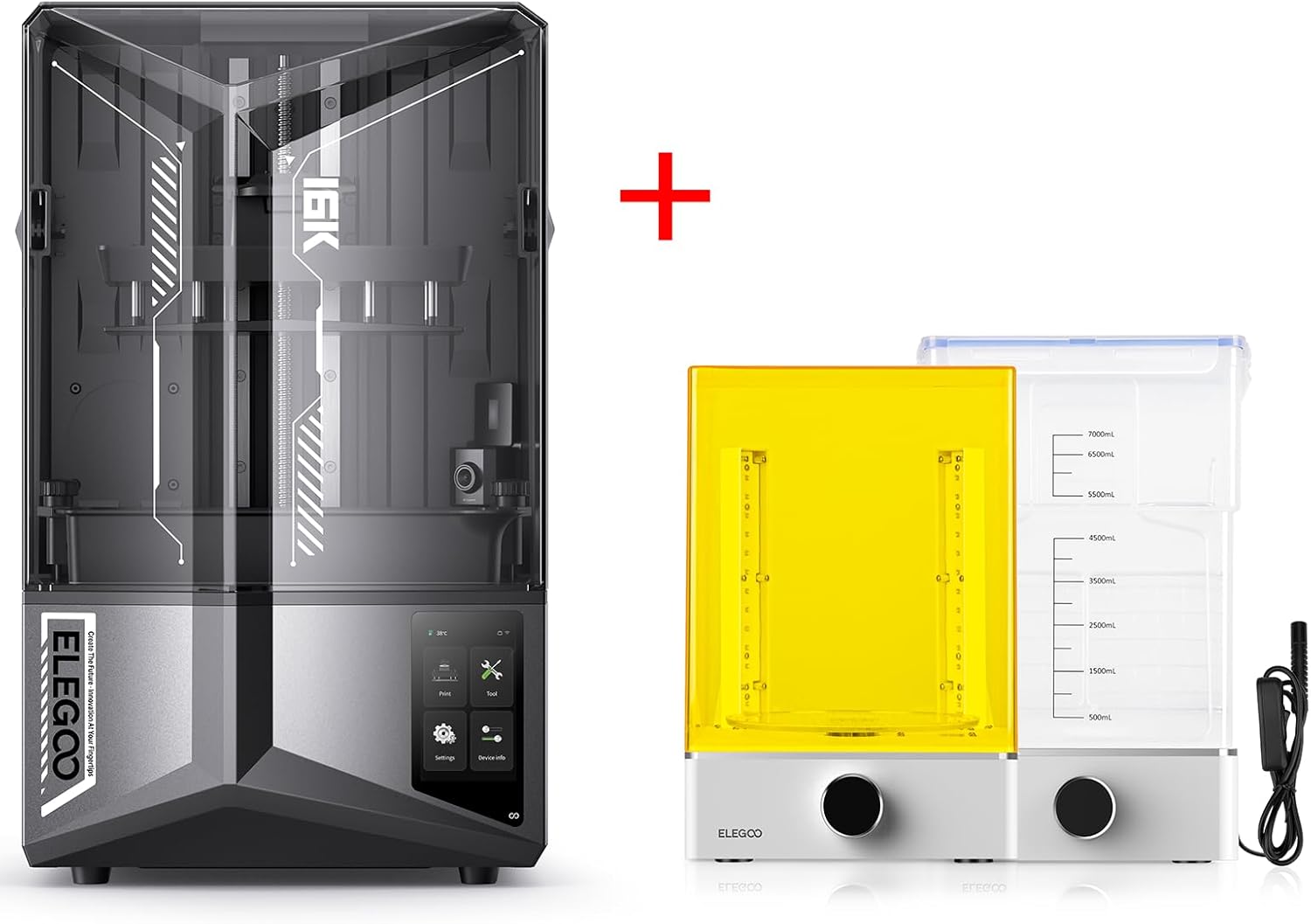
Image: The complete ELEGOO Saturn 4 Ultra 16K Resin 3D Printer and Mercury XS Wash and Cure Station bundle.
Informații de siguranță
Always prioritize safety when operating 3D printers and handling resin. Failure to follow these guidelines may result in injury or damage to the equipment.
- Wear appropriate personal protective equipment (PPE), including gloves and safety goggles, when handling liquid resin.
- Operate the printer and wash/cure station in a well-ventilated area to minimize exposure to resin fumes.
- Keep resin away from direct sunlight and heat sources. Store it in a cool, dark place.
- Do not ingest resin. If contact with skin occurs, wash thoroughly with soap and water. If resin gets into eyes, flush immediately with plenty of water and seek medical attention.
- Asigurați-vă că alimentarea cu energie electrică este deconectată înainte de a efectua orice operațiune de întreținere sau curățare.
- Keep children and pets away from the operating equipment.
Conținutul pachetului
Verificați dacă toate componentele sunt prezente la despachetare:
ELEGOO Saturn 4 Ultra 16K Resin 3D Printer:
- Saturn 4 Ultra 3D Printer Unit
- Cuva de rasina
- Construiți placa
- Unitate USB
- Adaptor de alimentare
- Trusă de scule (chei Allen, răzuitor etc.)
- Funnel and Filter
- Gloves and Mask
ELEGOO Mercury XS Wash and Cure Station:
- Mercury XS Base Unit
- Wash Bucket with Lid
- Curing Platform
- Coș de spălat
- Adaptor de alimentare
- UV L portabilamp
- UV Protection Goggles

Image: The ELEGOO Mercury XS Wash and Cure Station with its separate wash bucket, curing platform, and handheld UV lamp.
Produs terminatview
ELEGOO Saturn 4 Ultra 16K Resin 3D Printer Features:
- 16K LCD Screen: Offers enhanced resin 3D printing accuracy with a resolution of 15120x6230 pixels.
- Încălzire inteligentă a rezervorului: Continuously heats the resin tank to 30°C to improve printing success rates, especially with temperature-sensitive resins.
- Imprimare de mare viteză: Capable of printing at speeds up to 150mm/h.
- Large Printing Size: Provides a build volume of 8.33 x 4.66 x 8.66 inches.
- Flip-up Lid: Convenient access to the build area.
- Cameră nouă cu inteligență artificială și lumină: Allows for monitoring prints remotely, day or night.

Imagine: Prim-plan view of the 16K LCD screen, highlighting its high resolution for detailed prints.

Image: Illustration of the smart tank heating system maintaining resin temperature at 30°C for optimal printing.

Image: The new AI camera with integrated light, enabling continuous monitoring of the printing process.
ELEGOO Mercury XS Wash and Cure Station Features:
- Separate Wash and Cure Functions: Allows for dedicated washing and curing processes, preventing cross-contamination.
- Capacitate mare: Designed for large resin 3D printed models, compatible with Saturn and Mars LCD 3D Printers.
- Întărire eficientă: Features 4 UV lamps (405nm) under the plate bottom for faster and more even curing, with 360° timed exposure.
- Rotatable Curing Platform: Ensures uniform curing from all angles.
- UV L portabilamp: Included for curing hard-to-reach areas or internal structures.

Image: Diagram illustrating the UV lamp arrangement and rotatable platform for comprehensive curing in the Mercury XS.
Înființat
1. ELEGOO Saturn 4 Ultra 3D Printer Setup:
- Despachetarea: Scoateți cu grijă toate componentele din ambalaj. Verificați dacă există deteriorări în timpul transportului.
- Plasare: Place the printer on a stable, level surface in a well-ventilated area, away from direct sunlight.
- Instalarea plăcii de construcție: Attach the build plate to the Z-axis arm and tighten the securing knob.
- Leveling the Build Plate:
- Loosen the leveling screws on the build plate.
- Place a piece of A4 paper on the LCD screen.
- Lower the build plate until it presses firmly against the paper.
- Tighten the leveling screws while applying pressure to the build plate.
- Raise the build plate and remove the paper.
- Instalare cuvă de rășină: Place the resin vat onto the LCD screen, ensuring it is seated correctly and securely.
- Conexiune de alimentare: Conectați adaptorul de alimentare la imprimantă și la o priză de alimentare adecvată.
2. ELEGOO Mercury XS Wash and Cure Station Setup:
- Plasarea unității de bază: Place the Mercury XS base unit on a stable surface.
- Wash Bucket Preparation: Fill the wash bucket with an appropriate cleaning solution (e.g., 95% IPA or ELEGOO Resin Wash). Do not overfill.
- Curing Platform: Ensure the curing platform is clean and ready for use.
- Conexiune de alimentare: Connect the power adapter to the Mercury XS unit and a power outlet.
Instrucțiuni de operare
1. ELEGOO Saturn 4 Ultra 3D Printer Operation:
- Pregătire software: Use a compatible slicing software (e.g., Chitubox) to prepare your 3D model. Import the STL or OBJ file, add supports if necessary, and slice the model for the Saturn 4 Ultra. Save the sliced file pe unitatea USB.
- Adăugați rășină: Pour resin into the resin vat, ensuring it does not exceed the maximum fill line.
- Începeți imprimarea: Insert the USB drive into the printer. Select your file from the printer's touchscreen interface and start the print.
- Monitorizare: Utilize the built-in AI camera to monitor the printing progress remotely.
- Post-printare: Once printing is complete, carefully remove the build plate. Use the provided scraper to detach the printed model from the build plate.
2. ELEGOO Mercury XS Wash Station Operation:
- Modelul locului: Place the detached 3D print into the wash basket. You can also hang the build plate with the print attached directly into the wash bucket if it fits.
- Selectați modul: Set the Mercury XS to "Wash" mode.
- Setați ora: Adjust the washing time using the control knob (typically 2-5 minutes depending on model size and resin type).
- Start Wash: Apăsați butonul de pornire pentru a începe ciclul de spălare.
- Scoateți și uscați: Once complete, remove the model and allow it to air dry or use compressed air to remove excess IPA.
3. ELEGOO Mercury XS Cure Station Operation:
- Modelul locului: Place the dried 3D print onto the rotating curing platform.
- Selectați modul: Set the Mercury XS to "Cure" mode.
- Setați ora: Adjust the curing time using the control knob (typically 2-10 minutes depending on resin type and model thickness).
- Start Cure: Press the start button to begin the curing cycle. The platform will rotate, and UV lights will activate.
- UV L portabilamp: For models with intricate details or internal cavities, use the handheld UV lamp to ensure complete curing. Wear UV protection goggles when using the handheld lamp.
- Finished Model: Once cured, the model will be hardened and ready for further processing (sanding, painting, etc.).

Image: Comparison of a 3D printed model before and after undergoing the washing and curing process, showing improved finish and material performance.
Întreţinere
ELEGOO Saturn 4 Ultra 3D Printer Maintenance:
- Resin Vat Cleaning: After each print, inspect the resin vat for cured resin bits. Use a plastic scraper to gently remove them. Filter unused resin back into its bottle. Clean the vat with IPA if changing resin types or for long-term storage.
- Curățarea plăcii de construcție: Clean the build plate with IPA after each print to remove any resin residue.
- LCD Screen Protection: Keep the LCD screen clean and free of dust. If resin spills on the screen, clean it immediately with IPA. Avoid scratching the screen.
- FEP Film Replacement: The FEP film in the resin vat is a consumable part. Replace it if it becomes cloudy, scratched, or punctured. Refer to the printer's specific instructions for FEP film replacement.
- Z-axis Lubrication: Periodically apply a small amount of lithium grease to the Z-axis lead screw to ensure smooth operation.
ELEGOO Mercury XS Wash and Cure Station Maintenance:
- Cleaning Solution Management: Replace the cleaning solution in the wash bucket when it becomes heavily contaminated with resin. Do not pour contaminated IPA down the drain; dispose of it according to local regulations.
- Wash Bucket Cleaning: Clean the wash bucket and wash basket regularly to prevent resin buildup.
- UV Lamp curatenie: Păstrați UV-ulamps and curing platform clean to ensure optimal curing performance.
Depanare
| Problemă | Cauza posibila | Soluţie |
|---|---|---|
| Imprimeurile nu se lipesc de placa de construcție | Build plate not leveled; insufficient bottom exposure time; cold resin; dirty build plate. | Re-level the build plate; increase bottom exposure time in slicer; ensure resin is at optimal temperature (use smart tank heating); clean build plate thoroughly. |
| Print failures (partial prints, detached layers) | Insufficient supports; incorrect exposure time; FEP film issues; resin contamination. | Add more/thicker supports; adjust normal exposure time; inspect/replace FEP film; filter resin. |
| Washed prints are still sticky/tacky | Insufficient washing time; contaminated cleaning solution; not fully dried before curing. | Increase wash time; replace cleaning solution; ensure prints are dry before curing. |
| Cured prints are brittle or soft | Insufficient curing time; uneven curing. | Increase curing time; ensure all surfaces are exposed to UV light (use handheld lamp for complex areas). |
| Imprimanta nu pornește | Power cable loose; power outlet issue; faulty power adapter. | Check all power connections; try a different outlet; contact support if adapter is suspected faulty. |
Specificații
ELEGOO Saturn 4 Ultra 16K Resin 3D Printer:
- Tehnologia de imprimare: MSLA (Masked Stereolithography Apparatus)
- Ecran LCD: 16K Monochrome LCD (15120 x 6230 pixels)
- Volum de construcție: 8.33 x 4.66 x 8.66 inchi (211.68 x 118.5 x 220 mm)
- Viteza de imprimare: Up to 150 mm/h
- Precizie pe axa Z: 0.01mm
- Grosimea stratului: 0.01-0.2 mm
- Conectivitate: USB
- Sprijinit File Format: STL, OBJ
- Material: Răşină
- Culoare: Negru
- Dispozitive compatibile: Laptop, computer personal, smartphone
ELEGOO Mercury XS Wash and Cure Station:
- Funcţie: Washing and Curing
- Curing Light Source: 405nm UV LED (4 pcs UV lamp under plate bottom)
- Dimensiunea maximă de întărire: 200 mm x 260 mm (7.87 x 10.24 inci)
- Wash Bucket Capacity: Approximately 7000mL (7L)
- Dimensions (Wash Station): 230mm (W) x 183mm (D) x 248mm (H) / 9.05 x 7.2 x 9.76 inches
- Dimensions (Cure Station): 246mm (W) x 195mm (D) x 362.5mm (H) / 9.68 x 7.67 x 14.31 inches
- Putere de intrare: AC 100-240V, 50/60Hz

Image: Detailed dimensions for the ELEGOO Mercury XS Wash and Cure Station components.
Garanție și suport
ELEGOO products typically come with a manufacturer's warranty. Please refer to the warranty card included with your product or visit the official ELEGOO website-ul pentru termenii și condițiile detaliate ale garanției.
For technical support, troubleshooting assistance, or spare parts, please contact ELEGOO customer service through their official website or the contact information provided in your product packaging. When contacting support, please have your product model number (Saturn 4 Ultra, Mercury XS) and purchase information ready.
Puteți vizita Magazinul ELEGOO pe Amazon pentru mai multe informații și actualizări ale produsului.