
1. Introducere
Welcome to the user manual for your new XIAOMI Poco X7 Pro 5G smartphone. This guide provides essential information on setting up, operating, maintaining, and troubleshooting your device. Please read this manual thoroughly to ensure optimal performance and longevity of your smartphone.
The Poco X7 Pro is a high-performance 5G smartphone featuring the MediaTek Dimensity 8400-Ultra chipset, built with a 4nm process technology and ARM Cortex-A725 CPU architecture. It is designed for speed and efficiency.
2. Conținutul pachetului
Upon unboxing your Poco X7 Pro, please verify that the following items are included:
- XIAOMI Poco X7 Pro 5G Smartphone
- Protective film (pre-applied or in box)
Note: Other accessories such as a power adapter, charging cable, or SIM ejector tool may be sold separately and are not always included in the standard package. Please check the product packaging for a complete list of included items.
3. Dispozitiv terminatview
Familiarize yourself with the physical components of your Poco X7 Pro 5G.

Figura 3.1: Față view of the Poco X7 Pro 5G smartphone, highlighting its storage capacity.
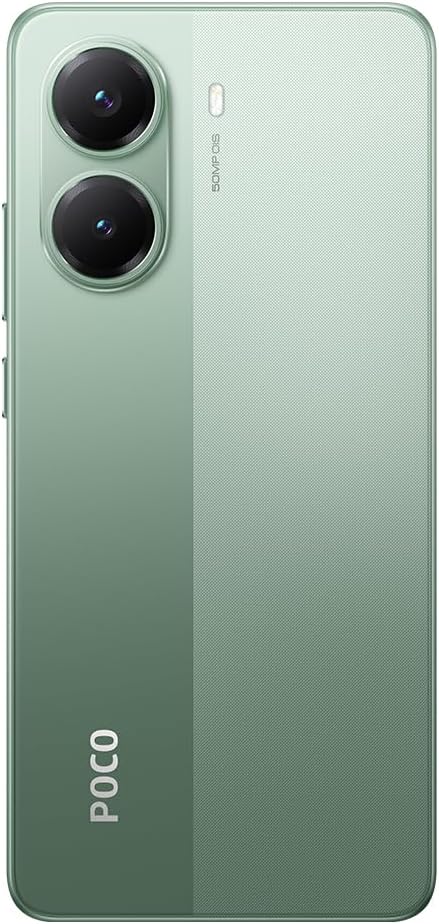
Figura 3.2: Spate view din Poco X7 Pro 5G, prezentareasing the camera setup and design.
3.1. Componente fizice
- Afişa: 6.67-inch AMOLED screen with 2712x1220 resolution and 120Hz refresh rate. Protected by Gorilla Glass 7i.
- Camera spate: 50 MP main camera with OIS (Optical Image Stabilization) and f/1.5 aperture, utilizing a Sony IMX882 sensor. Supports 4K video recording at 60fps with dual OIS and EIS stabilization.
- Camera frontală: (Specific MP not detailed in features, but typically located at the top center of the display).
- Butoane: Power button and volume rockers typically located on the side.
- Porturi: Port USB-C pentru încărcare și transfer de date.
- Tavă SIM: Slot for inserting SIM cards.
4. Configurare inițială
4.1. Introducerea cartelei SIM
- Localizați tava cartelei SIM pe lateralul dispozitivului.
- Insert the SIM ejector tool (if available, otherwise a thin pin) into the small hole next to the tray to open it.
- Introduceți cartela (cartelele) Nano-SIM în tavă cu contactele aurii în jos.
- Împingeți cu grijă tava înapoi în slot până când se aliniază cu dispozitivul.
4.2. Pornirea dispozitivului
- Press and hold the Power button (usually on the right side) until the XIAOMI logo appears on the screen.
- Urmați instrucțiunile de pe ecran pentru a finaliza configurarea inițială, inclusiv selectarea limbii, conectarea la Wi-Fi și conectarea la contul dvs. Google.
4.3. Încărcarea bateriei
Your device comes with a 6,000 mAh battery. For optimal performance, fully charge the device before first use.

Figure 4.1: Illustration of the 6000 mAh battery and 90W HyperCharge capability, allowing a full charge in approximately 42 minutes.
- Connect a compatible USB-C charging cable to the device's charging port.
- Connect the other end of the cable to a compatible power adapter (sold separately) and plug it into a power outlet.
- The device supports 90W fast wired charging, capable of charging from 0% to 100% in approximately 42 minutes.
5. Operare de bază
5.1. Gesturi pe ecranul tactil
- Robinet: Selectați un element sau activați o funcție.
- Atingeți și mențineți apăsat: Accesați meniurile contextuale sau mutați elemente.
- Beţivan: Navigați prin ecrane sau liste.
- Ciupire: Măriți sau micșorați imaginile și web pagini.
5.2. Funcțiile camerei
Your Poco X7 Pro features an advanced camera system.

Figure 5.1: Detail of the 50 MP main camera with OIS and the 20 MP front camera.
- Camera spate: The 50 MP main camera with OIS (Optical Image Stabilization) and f/1.5 aperture uses Sony's IMX882 sensor. It supports 4K video recording at 60fps with dual OIS and EIS stabilization for clear and steady footage.
- Camera frontală: Capture high-quality selfies and video calls.
- Moduri camere: Explore various modes such as Portrait, Night, Pro, and Panorama for diverse photographic experiences.
5.3. Caracteristici de afișare
The device's display offers exceptional visual quality.

Figure 5.2: Key display specifications including brightness, refresh rate, and resolution.
- Luminozitate: Advertised to reach up to 3,200 nits of peak brightness for excellent visibility even in bright conditions.
- Rata de reîmprospătare: Features a 120Hz refresh rate for smooth scrolling and fluid animations.
- Atingeți SampRată ling: Offers a 2,560 Hz touch sampling rate for highly responsive touch input.
- Rezoluţie: 2712 x 1220 pixels, providing sharp and detailed visuals.
6. Întreținere
6.1. Curățarea dispozitivului
- Folosește o lavetă moale, fără scame, pentru a șterge ușor ecranul și carcasa telefonului.
- Evitați utilizarea substanțelor chimice dure, a agenților de curățare abrazivi sau a aerului comprimat.
- The Poco X7 Pro has an IP68 dust and water resistance rating, meaning it can withstand immersion in up to 1.5 meters of fresh water for up to 30 minutes. However, it is not recommended for use in water and water damage is not covered under warranty.
6.2. Actualizări software
Regularly check for and install software updates to ensure your device has the latest features, security patches, and performance improvements. Your device runs on Android 15.
- Du-te la Setări > Despre telefon > Versiunea MIUI (or similar) to check for updates.
- Asigurați-vă că dispozitivul este conectat la Wi-Fi și are bateria suficient încărcată înainte de a începe o actualizare.
7. Depanare
Dacă întâmpinați probleme cu dispozitivul, încercați următoarele soluții comune:
- Dispozitivul nu pornește: Asigurați-vă că bateria este încărcată. Conectați dispozitivul la un încărcător timp de cel puțin 15 minute, apoi încercați să îl porniți din nou.
- Aplicațiile se blochează sau se blochează: Close the problematic app and reopen it. If the issue persists, restart your phone. You can also clear the app's cache or reinstall it.
- Conectivitate slabă la rețea: Check if your SIM card is properly inserted. Try toggling Airplane Mode on and off. If the issue persists, contact your network provider.
- Bateria se descarcă rapid: Reduce screen brightness, disable unnecessary background apps, and turn off features like Bluetooth or GPS when not in use. Check battery usage in settings to identify power-hungry apps.
- Ecranul tactil nu răspunde: Restart your device. If the screen remains unresponsive, a factory reset might be necessary (back up your data first).
Pentru probleme mai complexe, consultați asistența oficială XIAOMI. website-ul sau contactați serviciul pentru clienți.
8. Specificatii tehnice
Detailed specifications for the XIAOMI Poco X7 Pro 5G:
| Caracteristică | Caietul de sarcini |
|---|---|
| Marca | XIAOMI |
| Numele modelului | POCO X7 PRO |
| Sistem de operare | Android 15 |
| Tip procesor | Snapdragon (MediaTek Dimensity 8400-Ultra) |
| Viteza procesorului | 3.25 GHz |
| Dimensiunea RAM | 8 GB |
| Capacitate de stocare | 256 GB |
| Dimensiunea ecranului | 6.67 inchi |
| Tip de afișare | AMOLED |
| Rezoluţie | 2712 x 1220 |
| Rata de reîmprospătare | 120 Hz |
| Capacitatea bateriei | 6000 mAh (Lithium-Ion) |
| Încărcare | 90W Fast Wired Charging |
| Camera spate | 50 MP with OIS, f/1.5 aperture, Sony IMX882 sensor |
| Rezoluție video | 4K at 60fps (with dual OIS and EIS stabilization) |
| Conectivitate | 5G, Bluetooth, NFC, USB, Wi-Fi |
| Rezistenta la apa/praf | IP68 |
| Greutate | 400 g |
| Anul modelului | 2025 |
9. Informații de siguranță
Vă rugăm să respectați următoarele măsuri de siguranță pentru a preveni vătămările corporale sau deteriorarea dispozitivului:
- Nu expuneți dispozitivul la temperaturi extreme, la lumina directă a soarelui sau la flăcări deschise.
- Evitați să scăpați dispozitivul sau să îl supuneți la impacturi puternice.
- Folosiți doar încărcătoare și accesorii aprobate.
- Nu încercați să dezasamblați sau să reparați dispozitivul singur. Adresați-vă personalului de service autorizat.
- Țineți dispozitivul departe de dispozitivele medicale, deoarece poate interfera cu funcționarea acestora.
- Aruncați dispozitivul și bateria acestuia în mod responsabil, în conformitate cu reglementările locale.
10. Garanție și asistență
Your XIAOMI Poco X7 Pro 5G is covered by a limited warranty. For specific warranty terms and conditions, please refer to the warranty card included with your product or visit the official XIAOMI website-ul.
For technical support, service, or further assistance, please contact XIAOMI customer service or visit their official support channels. You can find contact information on the XIAOMI website-ul.