
Introducere
This manual provides essential information for the safe and efficient use of your new CANDY FIDC X502IT electric built-in oven. This appliance features a 65-liter capacity, convection cooking, and grill functions, designed for modern kitchen integration. Please read these instructions carefully before installation and use, and keep them for future reference.

Imagine: față view of the CANDY FIDC X502IT electric built-in oven, showcasing its black and stainless steel design.
Informații importante privind siguranța
Respectați întotdeauna măsurile de siguranță de bază atunci când utilizați aparate electrice pentru a reduce riscul de incendiu, electrocutare, arsuri sau vătămări corporale.
- Siguranta electrica: Ensure the oven is properly grounded. Do not use adapters or extension cords. Disconnect power before servicing.
- Siguranța copiilor: Keep children away from the oven during operation and cooling. The oven surfaces become hot.
- Pericol de arsură: Use oven mitts when handling hot dishes and oven accessories. Do not touch hot surfaces directly.
- Pericol de incendiu: Never leave the oven unattended while cooking. Do not store flammable materials in or near the oven. Clean grease and food debris regularly to prevent fires.
- Utilizare adecvată: Use the oven only for its intended purpose of cooking food. Do not use it for heating the room.
- Ventilare: Asigurați o ventilație adecvată în jurul aparatului, conform instrucțiunilor de instalare.
Instalare și configurare
The CANDY FIDC X502IT is a built-in electric oven. Installation should be performed by a qualified technician in accordance with local safety regulations and the provided installation template.
Despachetarea
- Scoateți cu grijă cuptorul din ambalaj.
- Inspect the oven for any damage during transit. Report any damage to your retailer immediately.
- Remove all packaging materials, including protective films and accessories, from inside the oven cavity.
Conexiune electrica
- Asigurați-vă că rețeaua voltagcorespunde cu plăcuța cu datele tehnice de pe aparat.
- The oven must be connected to a properly grounded electrical outlet.
- The electrical circuit must be protected by a suitable circuit breaker.
Montarea cuptorului
- Install the oven into a suitable cabinet opening, ensuring proper clearances for ventilation.
- Fixați cuptorul pe dulap folosind șuruburile furnizate.
- Ensure the oven is level before final tightening.

Imagine: Laterală view of the CANDY FIDC X502IT oven, showing its built-in design and ventilation slots.
Instrucțiuni de operare
Your CANDY FIDC X502IT oven features intuitive knob controls for function selection, temperature, and a mechanical timer.
Panou de control terminatview

Image: Close-up of the oven's control panel with three rotary knobs for function, temperature, and timer settings.
- Butonul din stânga: Function Selector (e.g., Convection, Grill, Conventional).
- Butonul din mijloc: Temperature Control (adjustable from 50°C to 250°C).
- Butonul din dreapta: Cronometru mecanic (până la 60 de minute).
Prima utilizare
Before cooking food, heat the empty oven for approximately 30 minutes at maximum temperature (250°C) using the conventional cooking mode. This helps to burn off any manufacturing residues and odors. Ensure the kitchen is well-ventilated during this process.
Moduri de gătit
- Gătitul convențional: Heat from top and bottom elements. Ideal for baking cakes, bread, and roasting meats.
- Convection Cooking (Fan-Assisted): Heat distributed evenly by a fan. Suitable for cooking multiple dishes simultaneously, or for faster, more even cooking.
- Grătar: Intense heat from the top element. Perfect for grilling meats, toasting, and browning dishes.
- Defrosting (Hot Air): Uses the fan to circulate ambient air for gentle defrosting.

Image: The CANDY FIDC X502IT oven installed in a kitchen, actively cooking a pizza on a rack inside.

Image: The CANDY FIDC X502IT oven installed in a kitchen, actively cooking a pie on a rack inside.
Setarea temporizatorului
The mechanical timer can be set for up to 60 minutes. Turn the right knob clockwise to the desired cooking time. The oven will automatically switch off when the timer reaches zero, and an audible signal will sound.
Îngrijire și întreținere
Curățarea și întreținerea regulată vor asigura longevitatea și performanța optimă a cuptorului dumneavoastră.
Curățarea interiorului cuptorului
- Asigurați-vă întotdeauna că cuptorul este răcit și deconectat de la sursa de alimentare înainte de curățare.
- Ștergeți interiorul cu reclamăamp cloth and mild detergent after each use to prevent food residue from baking on.
- For stubborn stains, use a specialized oven cleaner, following the product instructions carefully. Avoid abrasive cleaners or scourers.
- The oven features a polished stainless steel finish. Clean with a soft cloth and non-abrasive cleaner.
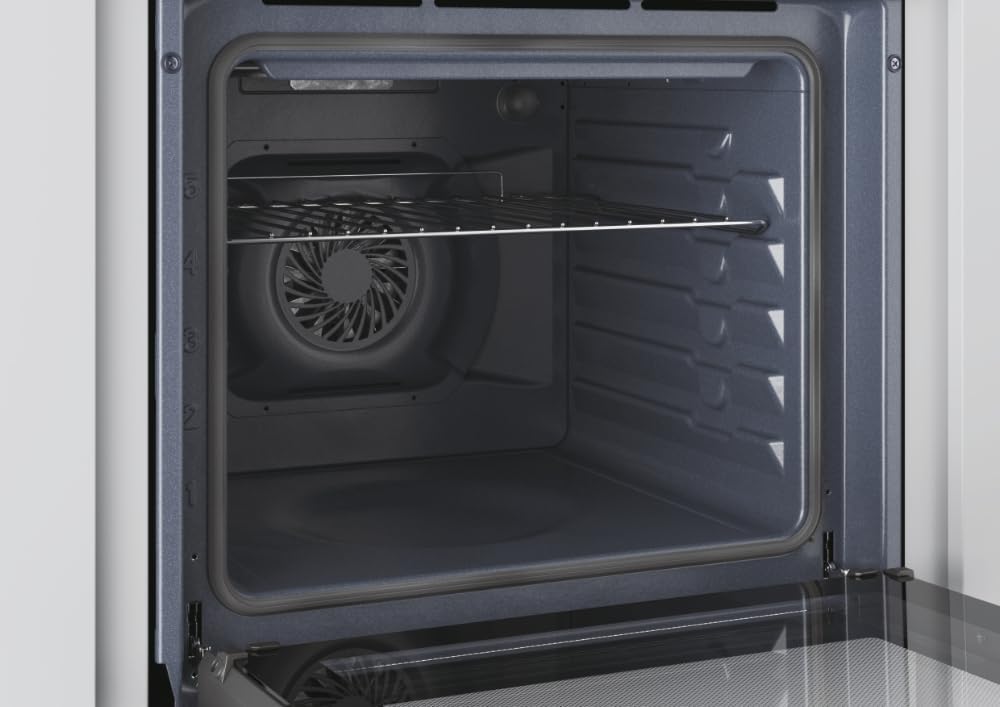
Imagine: Interior view of the CANDY FIDC X502IT oven, showing the removable wire rack and the fan at the back.
Accesorii de curățare
- Remove oven racks and the grill tray. Wash them in warm soapy water or in a dishwasher.
- The included grill rack is designed for easy cleaning.

Image: A standard black enamel baking tray, typically included with the oven.
Înlocuirea becului cuptorului
Ensure the oven is cool and disconnected from the power supply. Unscrew the protective glass cover, replace the bulb with a new oven-specific bulb (check wattage and type in specifications), and reattach the cover.
Ghid de depanare
Înainte de a contacta serviciul clienți, vă rugăm să consultați tabelul următor pentru problemele frecvente și soluțiile aferente.
| Problemă | Cauza posibila | Soluţie |
|---|---|---|
| Cuptorul nu se încălzește. | Fără alimentare cu energie electrică; cuptorul nu este pornit; cronometrul nu este setat. | Check power connection and circuit breaker. Ensure function and temperature knobs are set. Set the mechanical timer. |
| Mâncarea se gătește neuniform. | Incorrect temperature or cooking mode; improper rack position; overloaded oven. | Adjust temperature/mode. Use recommended rack position. Avoid overcrowding the oven. |
| Lumina cuptorului nu funcționează. | Becul este defect sau slăbit. | Replace or tighten the oven light bulb (see Maintenance section). |
| Fum excesiv în timpul gătitului. | Scurgeri de alimente sau acumulări de grăsime. | Clean the oven interior thoroughly. Avoid excessive grease. |
Specificatii tehnice
| Caracteristică | Detaliu |
|---|---|
| Numele modelului | FIDC X502IT |
| Marca | BOMBOANE |
| Tip cuptor | Electric, Built-in |
| Capacitate | 65 litri |
| Clasa de eficienta energetica | A |
| Tip control | Buton |
| Metode de încălzire | Convection, Grill, Conventional |
| Caracteristici speciale | Convection cooking, grill, LED indicator, adjustable temperature, mechanical timer, hot air defrosting |
| Culoare | Negru, Oțel inoxidabil |
| Material | Oţel inoxidabil |
| Greutatea articolului | 24.4 kilograme |
| Componente incluse | Gratar |
| Direcția de deschidere a ușii | Corect |
Garanție și suport
Garanția produsului
This CANDY FIDC X502IT oven comes with a Garanție de 2 an de la producător from the date of purchase. This warranty covers manufacturing defects and material faults under normal domestic use. Please retain your proof of purchase for warranty claims. The warranty does not cover damage caused by improper installation, misuse, neglect, or unauthorized repairs.
Asistență pentru clienți
For technical assistance, spare parts, or warranty claims, please contact CANDY customer service. You can find contact details on the official CANDY website or through your local retailer. When contacting support, please have your oven's model number (FIDC X502IT) and serial number ready.