
1. Produs terminatview
The COUGAR FV150 RGB is a mid-tower gaming case designed for high-performance PC builds. It features a dual-chamber design, separating the main components from cables, storage drives, and the power supply unit (PSU) for a clean aesthetic and improved airflow. The case supports various motherboard form factors and offers extensive cooling options, including pre-installed ARGB fans.
Caracteristici cheie:
- Dual-Chamber Design: Oferă o claritate view of your build through glass panels while concealing cables and other components.
- Suport GPU: Accommodates graphics cards up to 400mm in length, with options for vertical GPU orientation.
- Compatibilitate placa de baza: Supports Mini-ITX, Micro-ATX, and ATX motherboards.
- Engineered Bottom Fan Bracket: Simplifies fan installation by allowing attachment prior to setup.
- Extensive Fan & Water Cooling Support: Multiple fan mounting points and radiator support up to 360mm.
- Seamless RGB Synchronization: Integrated universal fan hub for easy ARGB lighting control.
- Panou I/O modern: Includes 2 x USB Type-A and 1 x USB 3.2 Type-C ports.
- Depozitare flexibilă: Supports combinations of 3.5" HDDs and 2.5" SSDs.
- Filtre magnetice de praf: Located on the top and right side for easy maintenance.

Imaginea 1.1: Înclinată view of the COUGAR FV150 RGB case, highlighting its dual-chamber design and pre-installed ARGB fans.
2. Configurare și instalare
Follow these steps for proper installation of your PC components into the COUGAR FV150 RGB case.
2.1 Despachetarea și inspecția inițială
- Scoateți cu grijă carcasa din ambalaj.
- Inspect the case for any signs of damage during transit.
- Remove the tempered glass side panel by unscrewing the thumb screws, if present, or by releasinmecanismul de zăvor.
2.2 Instalarea plăcii de bază
- Ensure the correct standoffs are installed for your motherboard form factor (Mini-ITX, Micro-ATX, or ATX).
- Plasați ecranul I/O în deschiderea din spate a carcasei.
- Aliniați cu grijă placa de bază cu distanțierele și ecranul I/O, apoi fixați-o cu șuruburi.
2.3 Instalarea unității de alimentare (PSU).
- The FV150 RGB supports bottom-mount PSUs.
- Slide the PSU into its designated compartment in the secondary chamber from the rear of the case.
- Secure the PSU with screws from the exterior rear of the case.
2.4 Instalarea unității de stocare
- Locate the drive bays in the secondary chamber.
- For 3.5" HDDs, slide the drive into the appropriate tray and secure it.
- For 2.5" SSDs, mount them to the designated brackets or trays.
2.5 Instalarea plăcii grafice (GPU)
- Scoateți capacele sloturilor de expansiune necesare din spatele carcasei.
- Insert your GPU into the PCIe slot on the motherboard and secure it with screws.
- The case supports GPUs up to 400mm. For vertical GPU mounting, a separate riser cable and bracket (not included) are required.
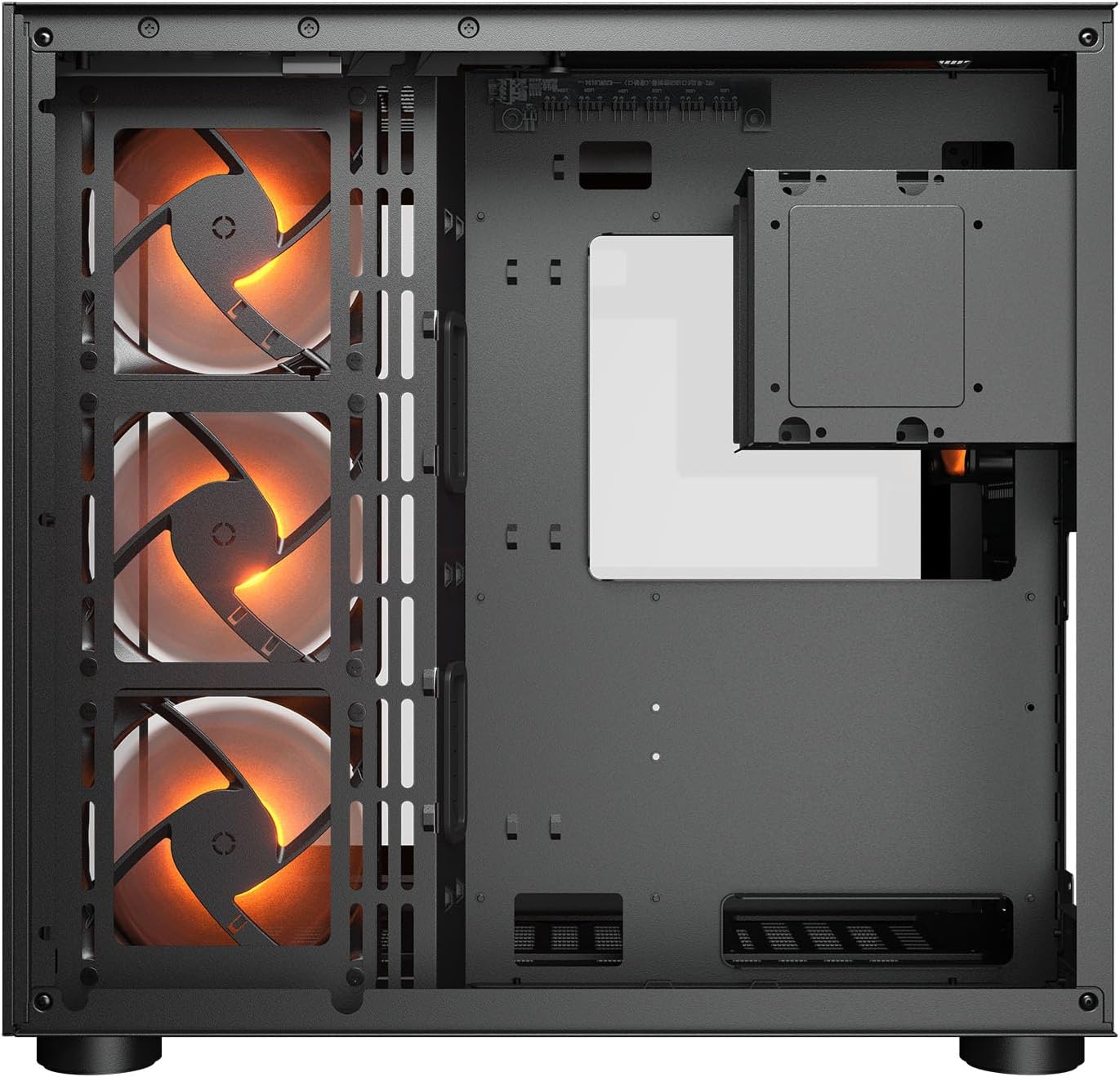
Imaginea 2.1: Intern view illustrating the main chamber for motherboard and GPU installation, with pre-installed side fans.
2.6 Instalarea ventilatorului și a radiatorului
- The case comes with 3 x 120mm ARGB side fans and 1 x 120mm ARGB rear fan pre-installed.
- Additional fans can be installed at the top (3 x 120mm or 2 x 140mm) and bottom (3 x 120mm or 2 x 140mm).
- Utilize the engineered bottom fan bracket for easier installation of bottom fans.
- For water cooling, radiators up to 360mm can be mounted on the top and 240mm on the side.

Image 2.2: Top internal view, showing potential mounting locations for additional cooling fans or radiators.
2.7 Managementul cablurilor
- Route all power and data cables through the cutouts to the secondary chamber.
- Utilizați ample space and tie-down points in the secondary chamber to organize cables for optimal airflow and a clean appearance.
2.8 Connecting Front I/O Panel
- Connect the front panel cables (USB 3.2 Type-C, USB Type-A, audio, power, reset, LED) to the corresponding headers on your motherboard.
3. Instrucțiuni de utilizare
După ce toate componentele sunt instalate și conectate, puteți porni sistemul.
3.1 Pornire
- Asigurați-vă că comutatorul sursei de alimentare este în poziția „ON”.
- Press the power button on the front I/O panel of the case.
3.2 Controlul iluminării RGB
- The integrated universal fan hub allows for easy synchronization of ARGB lighting.
- Connect the hub to your motherboard's ARGB header (5V 3-pin) to control lighting effects via motherboard software.
- Alternatively, use the dedicated RGB button on the front I/O panel to cycle through pre-set lighting modes if not connected to a motherboard header.
4. Întreținere
Întreținerea regulată ajută la asigurarea performanței optime și a longevității componentelor PC-ului.
4.1 Curățarea filtrului de praf
- The COUGAR FV150 RGB features magnetic dust filters on the top and right side, along with a ventilated bottom cover.
- Gently remove the magnetic dust filters.
- Clean them using compressed air or by rinsing with water (ensure they are completely dry before reattaching).
- Periodically clean the ventilated bottom cover.
4.2 Curățare generală
- Folosiți o lavetă moale și uscată pentru a șterge suprafețele exterioare ale carcasei.
- For tempered glass panels, use a glass cleaner and a microfiber cloth to avoid streaks.
- Evitați utilizarea substanțelor chimice dure sau a materialelor abrazive care ar putea deteriora finisajul.
5. Depanare
Această secțiune oferă soluții pentru problemele comune pe care le-ați putea întâmpina.
5.1 Sistemul nu pornește
- Check PSU: Ensure the power supply unit is properly connected to the wall outlet and the PSU switch is in the 'ON' position.
- Conexiuni la panoul frontal: Verify that the power button cable from the case is correctly connected to the motherboard's front panel header.
- Internal Power Cables: Confirm all necessary power cables (24-pin ATX, 8-pin CPU, PCIe for GPU) are securely connected to the motherboard and components.
5.2 Ventilatoarele nu se învârt sau RGB-ul nu funcționează
- Conexiuni ventilator: Ensure all fan power cables are securely connected to the fan hub or motherboard headers.
- RGB Connections: Verify the ARGB cables are correctly connected to the fan hub and the hub is connected to a 5V 3-pin ARGB header on the motherboard.
- Software/Button: If connected to the motherboard, check your motherboard's RGB control software. If not, try pressing the RGB button on the case's I/O panel to cycle modes.
5.3 Porturile USB nu funcționează
- Internal USB Headers: Confirm that the USB 3.0 and USB Type-C cables from the front I/O panel are correctly plugged into the corresponding headers on your motherboard.
- Drivere pentru placa de bază: Ensure you have installed the latest chipset and USB drivers for your motherboard.
6. Specificații
Detailed technical specifications for the COUGAR FV150 RGB Gaming Case.

Image 6.1: Case dimensions for planning your setup.
| Caracteristică | Caietul de sarcini |
|---|---|
| Numele produsului | FV150 RGB |
| Factor de formă de caz | Mid Tower |
| Compatibilitate cu placa de baza | Mini-ITX, Micro-ATX, ATX |
| Dimensiuni (L x A x A) | 300 x 400 x 415 mm (11.8" x 15.7" x 16.3") |
| Panoul I/O | USB 3.2 Gen 2 Type-C x 1, USB-A 3.0 x 2, 4 Pole Headset Audio Jack, RGB Button |
| 3.5" Drive Bay | 2 |
| 2.5" Drive Bay | 1+1 (converted from 3.5" drive bays) |
| Sloturi de expansiune | 7+3 |
| Suport GPU vertical | Da |
| Cooling Fan Support (Top) | 3 x 120 mm sau 2 x 140 mm |
| Cooling Fan Support (Bottom) | 3 x 120 mm sau 2 x 140 mm |
| Cooling Fan Support (Side) | 3 x 120 mm |
| Cooling Fan Support (Rear) | 1 x 120 mm |
| Pre-installed Fans (Side) | 3 x 120mm ARGB (Reversed) |
| Pre-installed Fans (Rear) | 1 x 120mm ARGB |
| Pre-installed Fan Speed | 1000 (± 10%) RPM |
| Pre-installed Fan Connector | 5V 3 Pin (ARGB) / 3 Pin (Fan) |
| Numărul maxim de ventilatoare | 10 |
| Water Cooling Support (Top) | 360mm / 280mm / 240mm |
| Water Cooling Support (Side) | 240 mm / 120 mm |
| Water Cooling Support (Rear) | 120mm |
| RGB Hub Sync with M/B | Da |
| Max. Lungimea plăcii grafice | 400 mm (15.7 inchi) |
| Max. Înălțimea răcitorului CPU | 180 mm (7.1 inchi) |
| Max. Lungimea PSU | 210 mm (8.3 inchi) |
| Material | Metal |
| Greutatea articolului | 6.83 kilograme |
7. Informații despre garanție
COUGAR products are manufactured to the highest quality standards. This product is covered by a manufacturer's warranty against defects in materials and workmanship. The specific duration and terms of the warranty may vary by region and retailer. Please retain your proof of purchase for warranty claims.
For detailed warranty information, please refer to the official COUGAR website-ul web sau contactați distribuitorul local.
8. Suport
If you encounter any issues or have questions regarding your COUGAR FV150 RGB Gaming Case that are not covered in this manual, please contact COUGAR customer support.
- Visit the official COUGAR website pentru întrebări frecvente, descărcări de drivere și informații de contact pentru asistență.
- Contact your retailer for assistance with product returns or exchanges.