
1. Introducere
This manual provides detailed instructions for the operation and maintenance of your Volorful V68 144GB Digital Voice Recorder. Please read this guide thoroughly to ensure proper use and to maximize the device's capabilities. Keep this manual for future reference.
2. Produs terminatview
2.1 Conținutul pachetului
La despachetare, verificați dacă sunt prezente toate articolele:
- 1 x Volorful V68 Digital Voice Recorder
- 1 x cablu USB-C la USB-C
- 1 x 3.5mm Transcription Cable
- 1 x cablu USB-C la USB-A
- 1 x 128GB TF Memory Card (pre-inserted or separate)
- 1 x Snur
- 1 x Manual de utilizare

2.2 Aspectul dispozitivului și comenzile
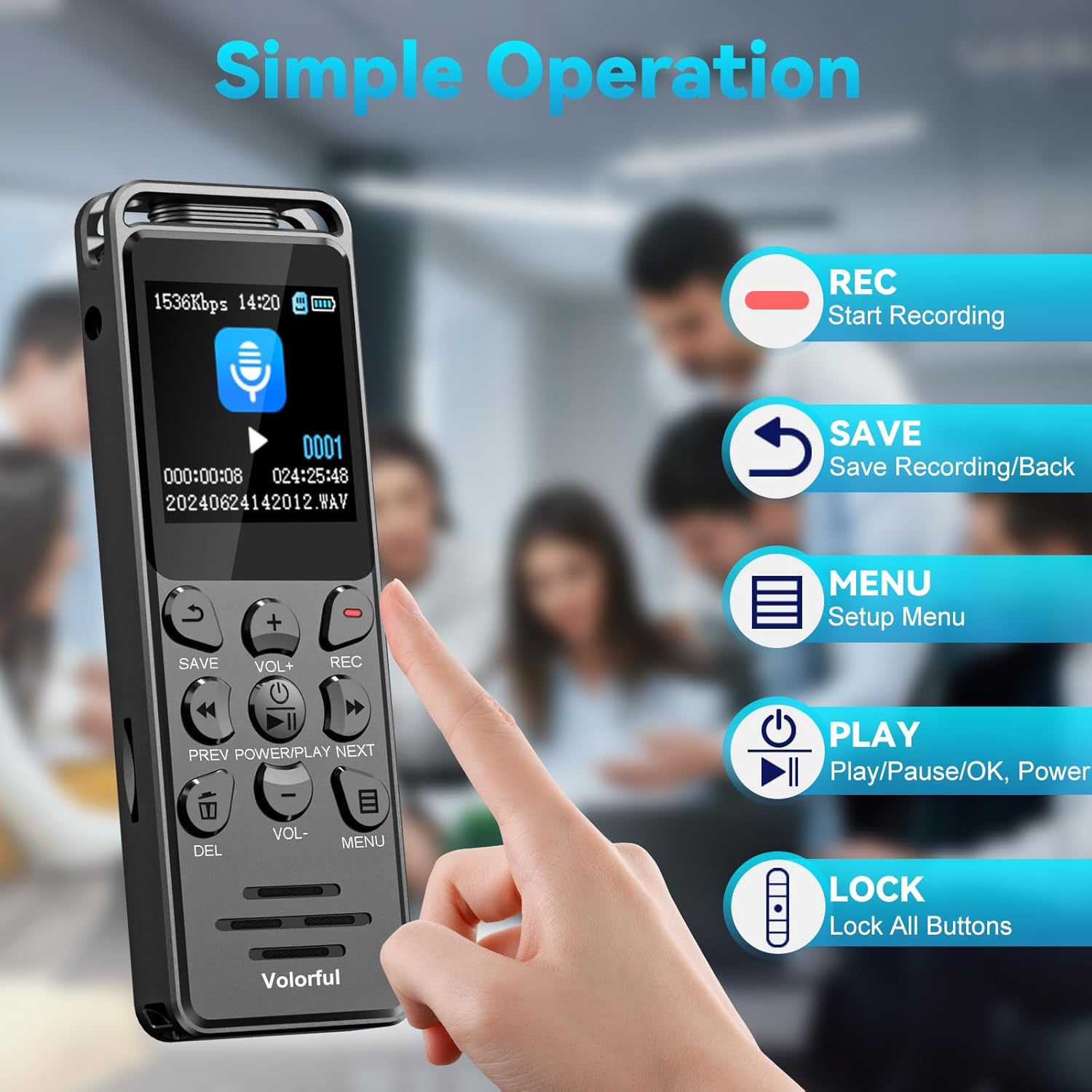
The Volorful V68 recorder features a user-friendly design with clearly labeled buttons and a 1.44-inch color screen.

Key buttons and their functions:
- Buton REC: Inițiază înregistrarea.
- Butonul SALVARE: Saves the current recording and returns to the previous menu.
- PLAY/PAUSE/OK/POWER Button: Powers the device on/off, plays/pauses audio, and confirms selections.
- Butoane VOL+ / VOL-: Ajustează nivelurile de volum.
- Butoane PREV / NEXT: Navigați prin files or fast-forwards/rewinds during playback.
- Butonul DEL: Șterge selecțiile files.
- Butonul MENU: Accesses the setup menu.
- LOCK Switch (Side): Locks or unlocks all buttons to prevent accidental operation.

3. Configurare
3.1 Încărcarea dispozitivului
Before first use, fully charge the recorder. Connect the device to a power source (computer USB port or USB wall adapter) using the provided USB-C cable. The built-in 580 mAh battery typically charges completely in approximately 2 hours.
3.2 Pornire/Oprire
- Pentru a porni: Țineți apăsat butonul PLAY/PAUSE/OK/POWER buton.
- Pentru a opri: Țineți apăsat butonul PLAY/PAUSE/OK/POWER butonul până când ecranul se stinge.
3.3 Setări inițiale
Upon first power-on or after a full battery discharge, you may need to set the date and time. Navigate to the 'Settings' menu using the MENIU button and adjust these parameters for accurate file ori mai multamps.
3.4 Managementul memoriei
The recorder comes with 16GB of internal storage and includes a 128GB TF (microSD) card, providing a total of 144GB storage capacity. This allows for up to 9,000 hours of 32 kbps recording or storage for approximately 30,000 MP3 songs.
4. Instrucțiuni de utilizare
4.1 Înregistrarea audio
The Volorful V68 features a 2159 professional recording chip and DSP 7-level intelligent noise reduction for clear audio capture.
- Începeți înregistrarea: Apăsați tasta REC button. The screen will indicate that recording has begun.
- Salvați înregistrarea: Apăsați tasta SALVA button to stop and save the current recording.
- Formate de înregistrare: You can select between MP3 (32~160Kbps) and WAV (256~1536Kbps) formats in the settings menu. WAV offers higher fidelity.
4.2 Redare
- Redare/Pauză: În file list, select a recording and press the PLAY/PAUSE/OK/POWER butonul pentru a porni sau întrerupe redarea.
- Reglați volumul: Utilizați VOL+ şi VOL- butoane.
- Navigați: Utilizați PREV şi URMĂTORUL buttons to skip between files or fast-forward/rewind within a track.
- Redare cu viteză variabilă: This feature allows you to adjust the playback speed of recordings. Access this option through the playback menu.
4.3 File management
- Acces Files: Navigați la 'Files' or 'Recordings' section from the main menu.
- Şterge Files: Selectați a file și apăsați tasta DEL Confirmați ștergerea când vi se solicită.
- File Denumire: Înregistrat files are automatically named with a timestamp (YYYY-MM-DD-HH-MM-SS) for easy organization.
4.4 Navigare prin meniu
Apăsați tasta MENIU button to access the device's settings. Use the PREV şi URMĂTORUL buttons to scroll through options and the PLAY/PAUSE/OK/POWER butonul pentru a selecta.
5. Caracteristici avansate
5.1 Voice Activated Recording (VOR)
The VOR function allows the recorder to automatically start recording when sound is detected and pause when silence occurs, conserving memory and battery life. There are 6 adjustable sensitivity levels.

5.2 A-B Repeat Function
This feature allows you to repeatedly play a specific segment of an audio file, useful for learning or transcription.
5.3 Protecție prin parolă
Secure your recordings with a 6-digit password. This feature can be enabled in the settings menu to protect sensitive information.
5.4 Line-in Recording
The device supports line-in recording, allowing you to record audio directly from external sources such as MP3 players, smartphones, or computers using the 3.5mm transcription cable. Ensure the 'Line-in' option is selected in the recording source settings.

5.5 Timed Recording
Schedule recordings to start and stop at specific times, ideal for capturing lectures or meetings automatically.
5.6 Funcționalitatea playerului MP3
The Volorful V68 can also function as an MP3 player, supporting various audio formats including MP3, FLAC, WMA, APE, OGG, and WAV. Transfer your music files to the device's storage to use this feature.
6. Întreținere
- curatenie: Folosiți o lavetă moale și uscată pentru curățarea dispozitivului. Evitați substanțele de curățare lichide sau materialele abrazive.
- Depozitare: Depozitați reportofonul într-un loc răcoros și uscat, ferit de lumina directă a soarelui și de temperaturi extreme.
- Îngrijirea bateriei: Pentru a prelungi durata de viață a bateriei, evitați descărcarea completă frecventă a bateriei. Încărcați dispozitivul în mod regulat, chiar dacă nu îl utilizați pentru perioade lungi de timp.
- Backup de date: Faceți în mod regulat copii de rezervă ale înregistrărilor importante pe un computer pentru a preveni pierderea datelor.

7. Depanare
| Problemă | Cauza posibila | Soluţie |
|---|---|---|
| Dispozitivul nu pornește. | Baterie descărcată; dispozitiv blocat. | Charge the device for at least 30 minutes. If unresponsive, press and hold the power button for 10-15 seconds to force a restart. |
| Nu se poate înregistra. | Memory full; incorrect recording source selected; device locked. | Check available memory and delete unnecessary files. Ensure 'Microphone' is selected as the recording source in settings, not 'Line-in' unless an external source is connected. Check the lock switch on the side. |
| Calitate slabă a înregistrării. | Noise reduction settings; microphone placement; recording format. | Adjust noise reduction levels in settings. Ensure the microphone is not obstructed and is close enough to the sound source. Consider using WAV format for higher quality. |
| Date/Time resets after battery discharge. | Internal clock battery (if applicable) or main battery fully depleted. | Recharge the device and reset the date and time in the settings menu. Keep the device charged to maintain settings. |
| Filenu apare pe computer. | Improper USB connection; driver issue. | Ensure the USB cable is securely connected. Try a different USB port or cable. The device should appear as a removable disk. |
8. Specificații
- Model: V68
- Marca: Volorful
- Capacitate de stocare a memoriei: 144 GB (16GB internal + 128GB TF card)
- Interfață hardware: USB tip C
- Dispozitive compatibile: MP3 Player, Personal Computer, Smartphone
- Tehnologia de afișare: LCD
- Dimensiunea ecranului în picioare: 1.44 inchi
- Format microfon: Încorporat
- Durata medie a bateriei: 70 Hours (continuous recording at 512Kbps)
- Compoziția celulei bateriei: Polimer de litiu
- Format media: Audio MP3, WAV
- Mufă pentru căști: 3.5 de milimetri
- Dimensiuni produs: 9.9 x 3.3 x 1.2 cm; 65 g
9. Garanție și asistență
For warranty information or technical support, please refer to the contact details provided with your purchase or reach out to the seller, Volorful-CA, directly through the platform where the product was purchased. Keep your proof of purchase for any warranty claims.