
Introducere
Thank you for choosing the Oakcastle HIFI150 Stereo System. This manual provides essential information for setting up, operating, and maintaining your device. Please read it thoroughly before use and retain it for future reference.
Informații de siguranță
Pentru a asigura o funcționare în siguranță și a preveni deteriorarea, vă rugăm să respectați următoarele măsuri de siguranță:
- Nu expuneți unitatea la ploaie, umezeală sau temperaturi extreme.
- Nu deschideți c.asing. Apelați la personal calificat pentru toate lucrările de service.
- Asigurați o ventilație corespunzătoare în jurul unității. Nu blocați nicio deschidere de ventilație.
- Utilizați numai adaptorul de alimentare furnizat împreună cu unitatea.
- Keep the unit away from heat sources such as radiators, stoves, or other heat-producing appliances.
- Curăţaţi unitatea numai cu o cârpă uscată.
Conținutul pachetului
Vă rugăm să verificați dacă toate articolele sunt prezente în coletul dumneavoastră:
- Oakcastle HIFI150 Stereo System
- Telecomanda
- Baterii pentru telecomanda
- Cablu de alimentare
- Manual de utilizare
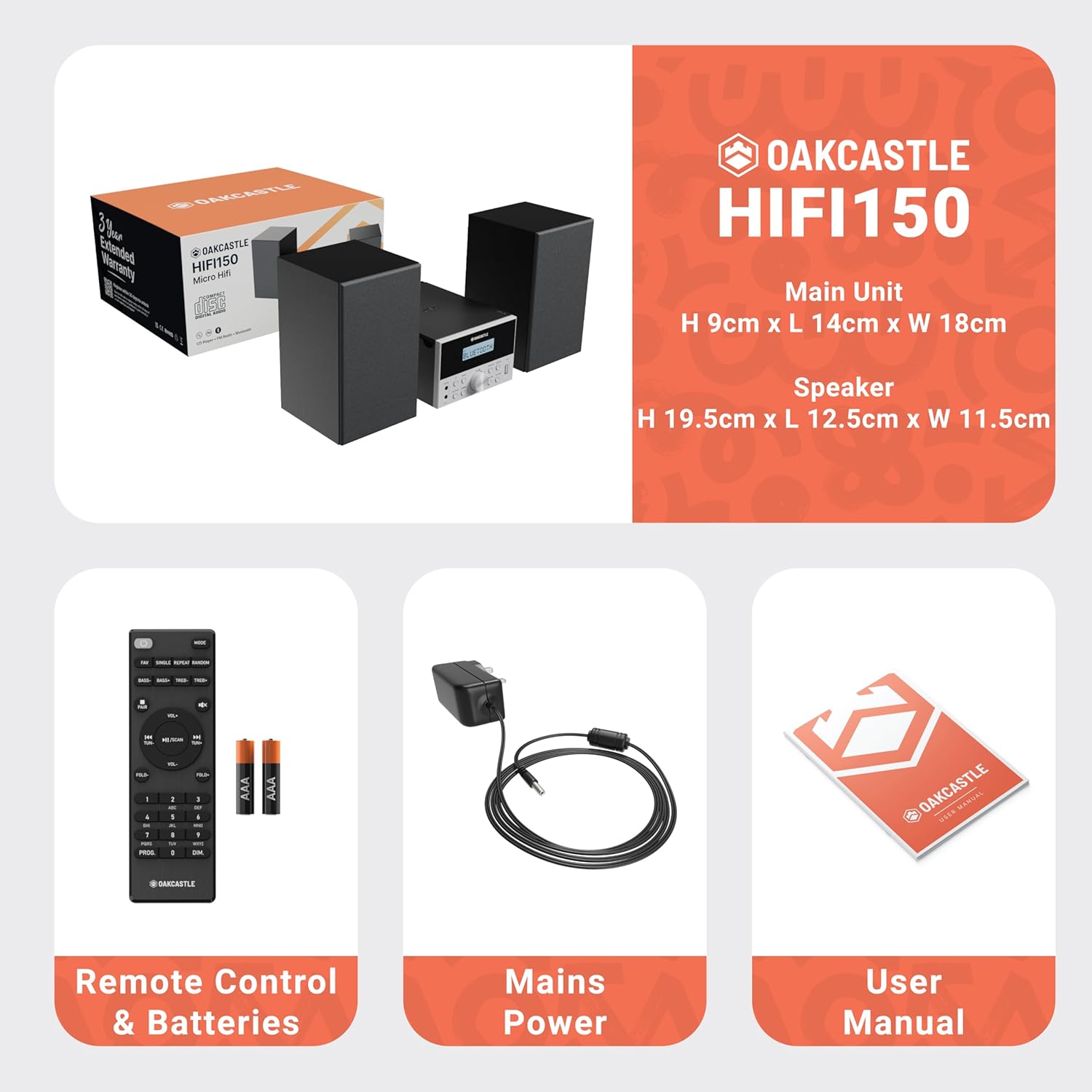
Image: The Oakcastle HIFI150 package contents, showing the main unit, two speakers, remote control with batteries, power adapter, and user manual.
Produs terminatview
The Oakcastle HIFI150 features a compact design with intuitive controls and multiple connectivity options.
Comenzi și afișaj de pe panoul frontal

Image: A close-up of the Oakcastle HIFI150 main unit's front panel, highlighting the digital display, central volume knob, mode selection buttons, and front-facing AUX In and USB ports. The display shows 'BLUETOOTH'.
- Afişa: Afișează modul curent, informații despre piesă și frecvența radio.
- Buton de alimentare: Pornește sau oprește unitatea.
- Butonul de mod: Cycles through input sources (CD, FM, Bluetooth, AUX, USB).
- Buton de volum: Reglează volumul principal.
- Buton Redare/Pauză: Controlează redarea pentru CD, USB și Bluetooth.
- Butoane Salt/Acord: Navighează printre piese sau reglează frecvențe radio.
- Port AUX In: Pentru conectarea dispozitivelor audio externe printr-un cablu de 3.5 mm.
- Port USB: Pentru redarea audio files de pe o unitate USB.
Conexiuni la panoul din spate
The rear panel includes connections for speakers and power.
Înființat
1. Conectarea difuzoarelor
Connect the included speakers to the speaker terminals on the rear of the main unit. Ensure correct polarity (red to red, black to black) for optimal sound quality.
2. Conexiune la alimentare
Conectați cablul de alimentare la intrarea CA din spatele unității principale, apoi conectați celălalt capăt la o priză standard de perete.
Instrucțiuni de operare
Pornire/Oprire
Apăsați tasta Putere butonul de pe panoul frontal sau de pe telecomandă pentru a porni sau opri unitatea.
Selectarea modului
Apăsați tasta Modul button on the front panel or remote control repeatedly to cycle through the available input sources: CD, Radio FM, Bluetooth, AUX, și USB.
Funcționare Bluetooth
- Selecta Bluetooth mode using the Mode button. The display will show 'BLUETOOTH' and the unit will enter pairing mode.
- Pe smartphone sau pe alt dispozitiv Bluetooth, activați Bluetooth și căutați dispozitivele disponibile.
- Select 'OAKCASTLE HIFI150' from the list. Once connected, the unit will confirm the connection.
- You can now stream audio wirelessly from your device to the HIFI150.
Redare CD

Image: The Oakcastle HIFI150 with its top-loading CD player mechanism open, revealing a compact disc placed inside. The display shows 'CD'.
- Deschideți capacul compartimentului CD-ului.
- Place a CD (MP3, CD, WMA, or CD-R format) onto the spindle with the label side facing up.
- Închideți capacul compartimentului CD.
- Selecta CD mode. The unit will read the disc and begin playback automatically.
- Folosiți butoanele Redare/Pauză și Salt pentru a controla redarea.
Funcționare radio FM

Image: The Oakcastle HIFI150 main unit with its telescopic antenna extended, displaying an FM radio frequency on its screen. The unit is placed between two speakers.
- Selecta Radio FM modul.
- Extindeți antena telescopică pentru o recepție mai bună.
- Auto scanare: Press and hold the Play/Pause button to automatically scan and save available FM stations (up to 30 presets).
- Reglare manuală: Use the Skip/Tune buttons to manually adjust the frequency.
- Recall presetări: Use the 'FAV/PROG' button on the remote to cycle through saved stations.
Redare USB
- Introduceți o unitate USB în portul USB de pe panoul frontal.
- Selecta USB mode. The unit will automatically detect and begin playing compatible audio files (MP3, WMA).
- Folosiți butoanele Redare/Pauză și Salt pentru a controla redarea.
Intrare AUX
- Conectați un dispozitiv audio extern (de exemplu, un player MP3, un smartphone) la AUX In port on the front panel using a 3.5mm audio cable (not included).
- Selecta AUX modul.
- Controlați redarea de pe dispozitivul extern conectat.
Controlul volumului
Rotiți Buton de volum on the front panel or use the VOL +/- butoanele de pe telecomandă pentru a regla nivelul sunetului.
Utilizarea telecomenzii
The included remote control provides full functionality for the HIFI150. Ensure batteries are correctly inserted. Point the remote control towards the front panel of the main unit for optimal response.
Întreţinere
Curatenie
- Ștergeți unitatea cu o cârpă moale și uscată.
- Nu utilizați agenți de curățare abrazivi, ceară sau solvenți, deoarece aceștia pot deteriora finisajul.
Depozitare
Dacă unitatea nu este utilizată pentru o perioadă lungă de timp, deconectați-o de la priză și depozitați-o într-un loc răcoros și uscat.
Depanare
If you encounter issues with your HIFI150, please refer to the following common problems and solutions:
| Problemă | Cauza posibila | Soluţie |
|---|---|---|
| Fără putere | Cablul de alimentare nu este conectat; Priză defectă | Asigurați-vă că este conectat corect cablul de alimentare; Încercați o altă priză. |
| Nici un sunet | Volume too low; Incorrect input mode; Speakers not connected | Increase volume; Select correct input mode; Check speaker connections. |
| CD-ul nu se redă | CD inserted incorrectly; Disc scratched/dirty; Incorrect format | Reinsert CD correctly; Clean or replace disc; Ensure disc is compatible (MP3, CD, WMA, CD-R). |
| Bluetooth nu se conectează | Bluetooth mode not selected; Device too far; Device already connected to another unit | Selectați modul Bluetooth; Mutați dispozitivul mai aproape; Deconectați-vă de la alte dispozitive și încercați din nou. |
| Recepție FM slabă | Antena nu este extinsă; Semnal slab | Fully extend the telescopic antenna; Try repositioning the unit. |
Specificații
| Numărul de model | 1000002971 |
| Marca | Oakcastle |
| Conectivitate | Bluetooth 5.2, USB, AUX |
| Ieșire audio | 20W |
| Media acceptate | CD, MP3, WMA, CD-R, USB |
| Radio | FM Radio with 30 Presets |
| Dispozitive compatibile | Player MP3, Smartphone, Tabletă |
| Material dulap | Lemn |
| Culoare | Negru |
| Dimensiuni articol (L x l x H) | 13.7 x 17.8 x 9 cm |
| Greutatea articolului | 2 kilograme |
Garanție și suport
The Oakcastle HIFI150 comes with an extended 3-year warranty. Registration is required to activate the full warranty period. Please refer to the warranty card included in your package or visit the official Oakcastle website for registration details and support information.
For technical assistance or further inquiries, please contact Oakcastle customer support through their official channels.