
1. Introducere
This manual provides detailed instructions for the AGPTEK A65 64GB MP3 Player. Please read this manual carefully before using the device to ensure proper operation and to maximize its features. This device is designed for portable audio playback, recording, and other functions, ideal for sports and daily use.

Figura 1: Pesteview of AGPTEK A65 MP3 Player's multi-functional capabilities.
2. Produs terminatview
The AGPTEK A65 MP3 Player is a compact and lightweight device featuring a clip design for easy portability during activities like running or sports. It offers 64GB of internal storage, expandable up to 128GB via a TF card, and supports Bluetooth 5.3 for wireless audio.

Figura 2: Față și laterală view of the AGPTEK A65 MP3 Player, highlighting its compact design and integrated clip.

Figure 3: The AGPTEK A65 MP3 Player's clip design allows for secure attachment during physical activity.

Figure 4: The compact size of the AGPTEK A65 MP3 Player makes it easy to handle and carry.
3. Configurare
3.1 Încărcarea dispozitivului
Before first use, fully charge the MP3 player. Connect the device to a computer or a USB wall adapter using the provided USB-C cable. The battery icon on the screen will indicate charging status.
3.2 Loading Music and Files
Connect the MP3 player to your computer using the USB-C cable. The device will appear as a removable disk. Drag and drop your music files (MP3, WMA, APE, FLAC, WAV, DRM, ACELP, M4A, AAC) or other supported files into the appropriate folders on the device. For Bluetooth playback, supported formats are MP3, WMA, WAVE, FLAC, APE, M4A, AAC.
3.3 Introducerea unui card TF
The device supports TF (Micro SD) cards up to 128GB for expanded storage. Locate the TF card slot on the side of the player and gently insert the card until it clicks into place. Ensure the card is inserted correctly to avoid damage.
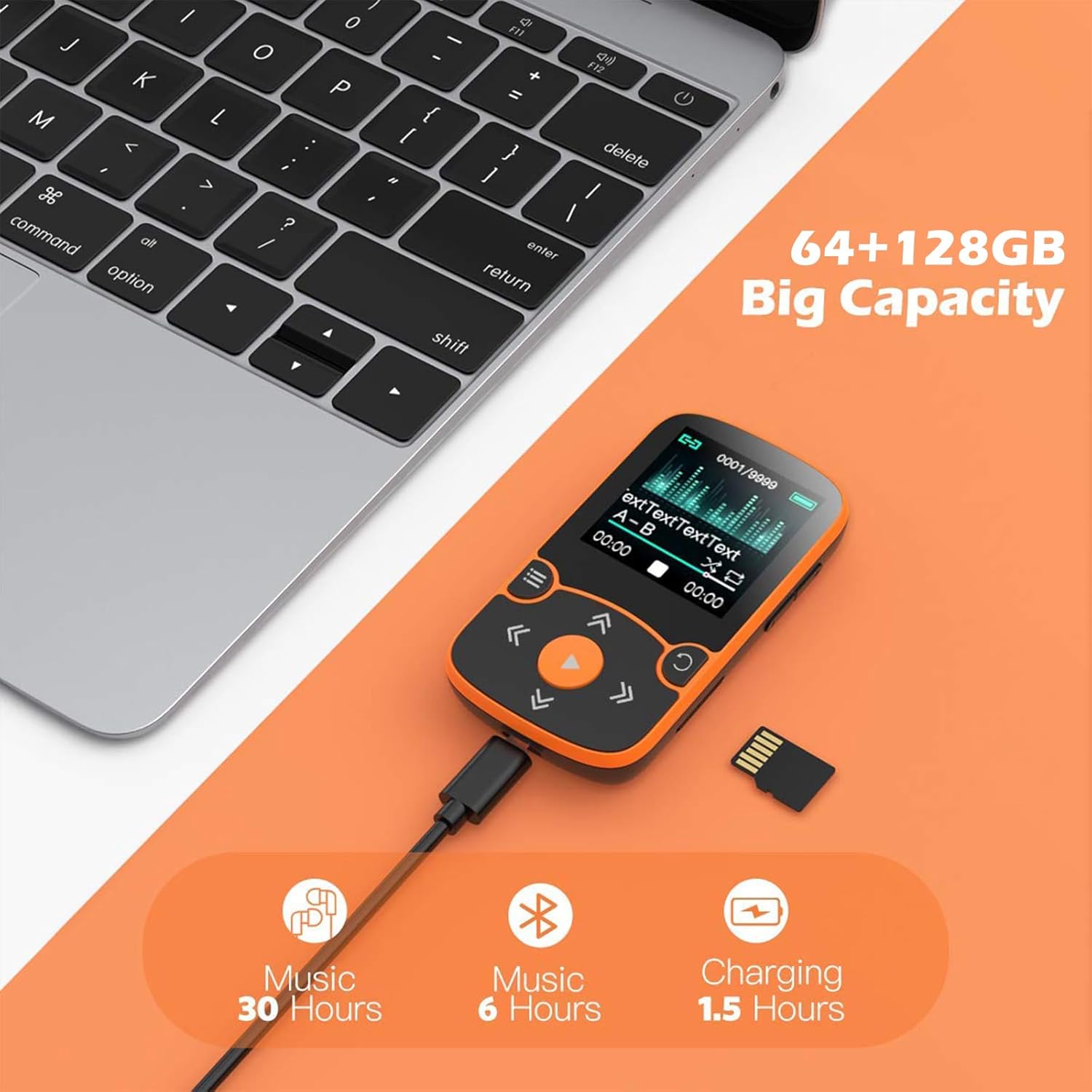
Figure 5: Connecting the MP3 player to a computer for charging and file transfer, and the option to expand storage with a TF card.
4. Instrucțiuni de utilizare
4.1 Navigare de bază
Use the physical buttons on the device to navigate through menus and control playback. The central play button initiates playback and confirms selections. The arrow buttons are used for navigation and volume control, while the menu button accesses options.
4.2 Redarea muzicii
From the main menu, select 'Music' to browse your audio files. You can play, pause, skip tracks, and adjust volume. The device supports various audio formats, ensuring high-fidelity lossless sound quality.
4.3 Conectivitate Bluetooth
The AGPTEK A65 features Bluetooth 5.3 for wireless connection to headphones or speakers. To pair:
- Go to the 'Bluetooth' menu on your MP3 player.
- Activați Bluetooth și căutați dispozitivele disponibile.
- Selectați căștile sau difuzorul Bluetooth din listă pentru a le asocia.
Nota: This device cannot connect to cell phones or cars via Bluetooth. An audio line can be used for car connections.

Figure 6: Bluetooth 5.3 connectivity for wireless audio experience.
4.4 Radio FM
Access the 'FM Radio' function from the main menu. You can auto-scan for stations or manually tune to your preferred frequencies. Ensure wired headphones are connected as they often act as the antenna.
4.5 Înregistrare vocală
Select 'Voice Recorder' to capture audio. The device has a built-in microphone. Recordings are saved internally and can be managed through the file browser.
4.6 Modul pedometru
Activate 'Pedometer Mode' to track your steps during physical activity. The device records data when running, providing a basic fitness tracking function.

Figure 7: The AGPTEK A65 MP3 Player is suitable for sports activities, offering Hi-Fi audio on the go.
4.7 Alte funcții
- Video Play: Supports video playback on its 1.5-inch screen.
- Photo Browsing: View images stored on the device.
- E-carte: Citiți textul files (TXT format only).
- AB Repet: Loop a specific section of an audio track.
- Ceas deșteptător și calendar: Funcții utilitare de bază.
- File Foldere: Manage your stored filedirect pe dispozitiv.
- Difuzor încorporat: Pentru redarea audio fără căști.
- Economizor de ecran timp: Customize screen display settings.
5. Întreținere
- Păstrați dispozitivul uscat. Umiditatea poate deteriora componentele electronice.
- Evitați temperaturile extreme.
- Curățați ecranul și carcasa cu o lavetă moale și uscată. Nu utilizați substanțe chimice dure.
- Handle the device gently to prevent physical damage.
- Regularly back up important data to a computer.
6. Depanare
6.1 Dispozitivul nu pornește
- Asigurați-vă că bateria este încărcată. Conectați la o sursă de alimentare și încercați din nou.
- If unresponsive, try resetting the device (refer to the device's specific reset method, usually a small pinhole button or holding the power button for an extended period).
6.2 Nu se poate conecta la dispozitivul Bluetooth
- Ensure the Bluetooth device (headphones/speaker) is in pairing mode.
- Verify the MP3 player's Bluetooth is enabled and scanning.
- Mutați dispozitivele mai aproape unul de celălalt.
- Restart both the MP3 player and the Bluetooth device.
- Remember, the MP3 player cannot connect to cell phones or car systems via Bluetooth.
6.3 Files Not Appearing or Playing
- Verificați dacă files are in a supported format (MP3, WMA, APE, FLAC, WAV, DRM, ACELP for earphones; MP3, WMA, WAVE, FLAC, APE, M4A, AAC for Bluetooth).
- Asigura files are transferred to the correct folders on the device or TF card.
- Verify the TF card is properly inserted and recognized.
7. Specificații
| Caracteristică | Detaliu |
|---|---|
| Numele modelului | A65 |
| Marca | AGPTEK |
| Capacitate de stocare a memoriei | 64 GB (expandable up to 128 GB via Micro SD/TF card) |
| Tehnologia de conectivitate | Bluetooth 5.3 |
| Dimensiunea ecranului | 1.5 inchi |
| Caracteristica specială | Built-In Clip, Pedometer, FM Radio, Voice Recorder, E-book |
| Dispozitive compatibile | Căști |
| Tip media | Micro SD |
| Dimensiunile produsului | 0.47 x 1.42 x 2.36 inci |
| Greutatea articolului | 5.3 uncii |
| baterii | Este necesară 1 baterie cu litiu polimer |
| Componente incluse | Player MP3 |
8. Garanție și asistență
For warranty information and customer support, please refer to the documentation included in your product packaging or visit the official AGPTEK website-ul. Păstrați chitanța de achiziție pentru cererile de garanție.