
Volorful V68
Manual de utilizare pentru înregistratorul vocal digital
Brand: Volorful | Model: V68
1. Introducere
This manual provides comprehensive instructions for the Volorful V68 Digital Voice Recorder. Designed for high-quality audio capture, this device is ideal for meetings, lectures, interviews, and language learning. Please read this manual thoroughly before operating the device to ensure optimal performance and longevity.

Imagine: față view of the Volorful V68 Digital Voice Recorder, showcasing its screen and button layout.
2. Caracteristicile produsului
- Massive 144GB Storage Capacity: Includes 16GB internal memory and a 128GB TF card, capable of storing up to 9000 hours of 32kbps recordings or 30,000 MP3 songs. This ample storage eliminates concerns about running out of space.

Image: Visual representation of the recorder's 144GB memory, indicating storage for 9000 hours of recording or 30,000 songs, and its 1.44-inch display.
- Clear 1536Kbps Recording: Equipped with a professional 2159 recording chip, featuring 7-stage DSP intelligent noise reduction and 7-level recording amplification for clearer, more realistic sound reproduction. Supports MP3 (32-160kbps) and WAV (256-1536kbps) formats.

Image: Diagram illustrating the recorder's high-fidelity 1536Kbps PCM recording, professional chip, noise reduction, and recording gain features.
- Design ușor de utilizat: Features a large 1.45-inch color screen with adjustable brightness and an intuitive blue user interface for excellent readability. Physical buttons with text labels and a durable metal casing provide a comfortable and robust feel.
- Ultra-Long 70-Hour Battery Life: A built-in 580mAh battery provides up to 70 hours of continuous recording at 512kbps on a 2-hour full charge, suitable for extended recording sessions.
- Multi-functional Assistant: Supports TF card insertion, USB-C connectivity, A-B repeat, segmented recording, variable playback speed, timed recording, password protection, voice activation, MP3 playback, multiple playback modes, and line-in recording.

Image: Icons and text detailing the recorder's diverse functionalities, including timer recording, password protection, and voice activation.
3. Conținutul pachetului
Pachetul include următoarele articole:
- 1 × Volorful Digital Voice Recorder
- 1 × USB Type-C Data Cable
- 1 × Manual de utilizare (engleză)
4. Mementouri importante
- Vă rugăm să citiți cu atenție acest manual înainte de utilizare.
- Charge the device for two hours for a full charge before initial use.
- Before using the voice recorder for the first time, or after inserting a new memory card, you must format it within the recorder's menu. Failure to do so may prevent recording functionality.
- Do not format the voice recorder or memory card using a computer. Always use the device's internal formatting function.
- To maximize storage, set the recording priority to save files directly to the TF card.
- Avoid frequent replacement of the memory card. It is recommended to use the original memory card provided.
5. Configurare
5.1 Încărcare inițială
Before first use, connect the Volorful V68 Digital Voice Recorder to a power source using the provided USB Type-C data cable. Allow approximately two hours for a full charge. The battery indicator on the screen will show charging status.

Image: The recorder connected to a laptop, illustrating charging and file capacități de transfer.
5.2 Memory Card Formatting
If you are using the included 128GB TF card for the first time, or any new TF card, it must be formatted directly on the device.
- Porniți dispozitivul.
- Navigate to the "Menu" settings.
- Locate and select the "Format" option for the TF card.
- Confirm the formatting process. This will erase all data on the card.
Important: Do not format the memory card using a computer, as this may cause compatibility issues with the recorder.
6. Instrucțiuni de utilizare
6.1 Operare de bază
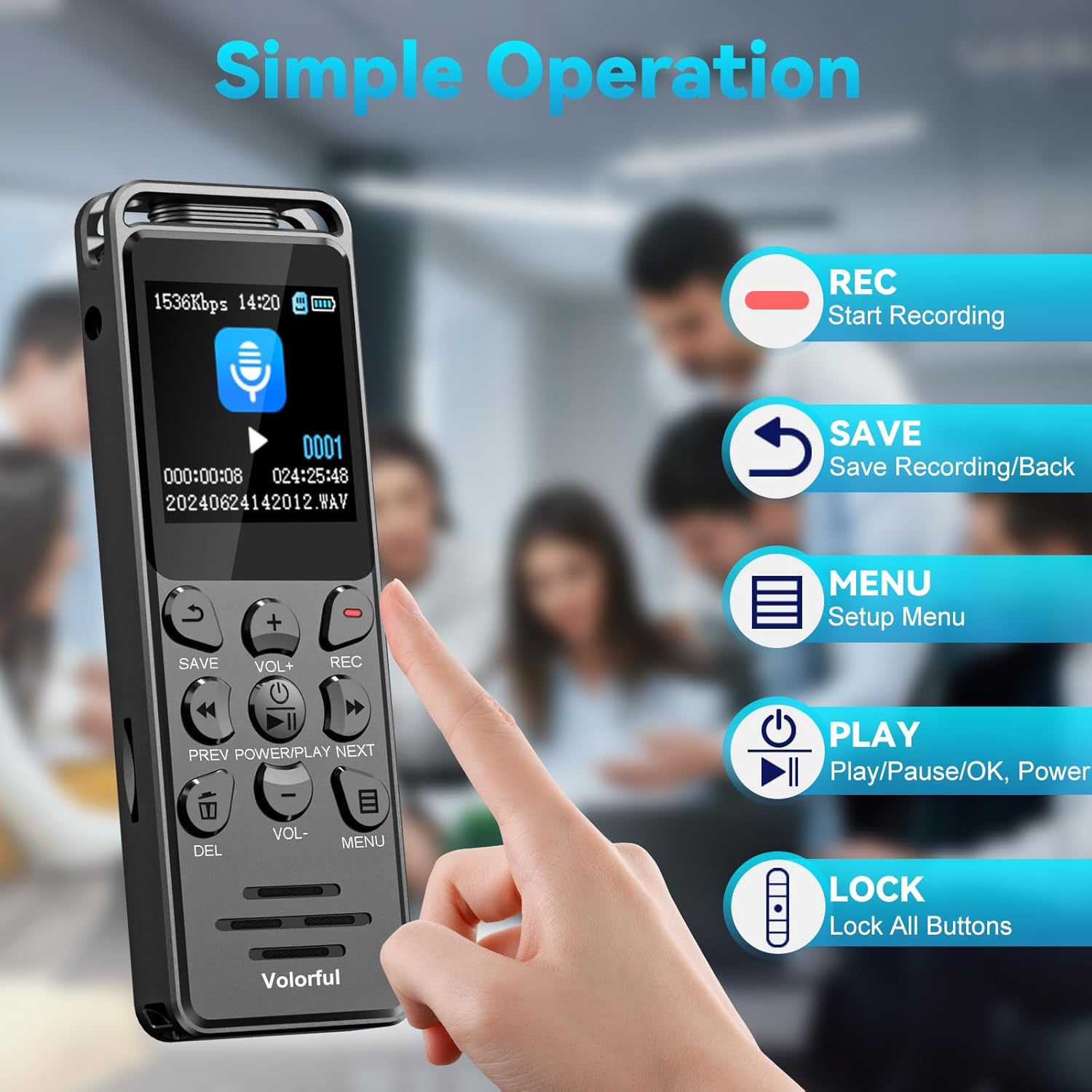
Image: Diagram illustrating the main control buttons for simple operation: REC, SAVE, MENU, PLAY, and LOCK.
- Pornire/Oprire: Țineți apăsat butonul PUTERE/JOC butonul pentru a porni sau opri dispozitivul.
- Începeți înregistrarea: Apăsați tasta REC pentru a începe înregistrarea. Indicatorul de înregistrare se va aprinde.
- Salvați înregistrarea: Apăsați tasta SALVA button to stop and save the current recording.
- Redare: În modul de așteptare, apăsați tasta JUCA button to access recorded files. Folosește PREV şi URMĂTORUL buttons to navigate. Press JUCA again to start/pause playback.
- Reglarea volumului: Utilizați VOL+ şi VOL- buttons to adjust playback volume.
- Navigare prin meniu: Apăsați tasta MENIU button to enter the settings menu. Use PREV / NEXT să navigheze și JUCA pentru a confirma.
- Butoane de blocare: Folosește dedicatul BLOCARE switch on the side to prevent accidental button presses.
6.2 Voice Activated Recording (VOR)
The device supports voice-activated recording, which automatically starts recording when sound is detected and pauses when silence occurs. This feature helps save storage space and battery life.

Image: Illustration of the voice-activated recording function, demonstrating adjustable sensitivity levels from 60dB to 85dB.
- Du-te la MENIU.
- Select "Voice Activated" or "VOR" setting.
- Choose your desired sensitivity level (e.g., Level 1 for low sensitivity, Level 6 for high sensitivity).
- Activate the VOR mode.
6.3 External Microphone / Line-in Recording
The Volorful V68 supports external microphone and line-in recording via its 3.5mm jack.

Image: The recorder connected to an external microphone and a smartphone, demonstrating its external input capabilities. Note: Only 3.5mm 4-pole (TRRS) external microphone is supported (not included).
- Plug a 3.5mm 4-pole (TRRS) external microphone (not included) or a line-in cable from another audio source into the 3.5mm jack on the left side of the recorder.
- Start recording as usual. The device will capture audio from the external source.
Nota: Bluetooth microphones are not supported. The connected device must support the 3.5mm jack.
6.4 File Transfer
Pentru a transfera înregistrarea files la computerul dvs.:
- Connect the recorder to your computer using the provided USB Type-C cable.
- Înregistratorul va apărea ca o unitate de disc amovibilă pe computer.
- Locate the "RECORD" or "VOICE" folder to find your audio files.
- Trageți și plasați files to your computer or vice versa.
Înregistrat files are typically named with the date and time (e.g., YYYYMMDDHHMMSS).
7. Întreținere
- Păstrați dispozitivul uscat și ferit de temperaturi extreme.
- Curățați dispozitivul cu o lavetă moale și uscată. Nu utilizați agenți de curățare lichizi sau aerosoli.
- Evitați scăderea sau supunerea dispozitivului la impacturi puternice.
- Nu încercați să dezasamblați sau să reparați dispozitivul singur. Aceasta va anula garanția.
- Depozitați dispozitivul într-un loc sigur atunci când nu îl utilizați.
8. Depanare
| Problemă | Cauză/Soluție posibilă |
|---|---|
| Dispozitivul nu pornește. | Battery may be depleted. Charge the device for at least 2 hours. |
| Nu se poate înregistra. |
|
| Calitate slabă a înregistrării. |
|
| Dispozitivul nu este recunoscut de computer. |
|
9. Specificații
| Caracteristică | Detaliu |
|---|---|
| Marca | Volorful |
| Numărul de model | V68 |
| Dimensiunile produsului | 9.9 x 3.3 x 1.2 cm (3.9 x 1.3 x 0.5 țoli) |
| Greutatea articolului | 65 de grame |
| Capacitate de stocare a memoriei | 144 GB (16GB internal + 128GB TF card) |
| Tip baterie | 1 Lithium Polymer (included), 580 mAh |
| Durata de încărcare | 2 de ore |
| Timp de înregistrare continuă | Up to 70 hours (at 512kbps) |
| Afişa | 1.45-inch (3.7 cm) 128 x 128 LCD color screen |
| Formate de înregistrare | MP3 (32-160kbps), WAV (256-1536kbps) |
| Factor de formă a microfonului | Încorporat |
| Interfață hardware | USB tip C |
| Mufă pentru căști | 3.5 mm |
| Dispozitive compatibile | Computer personal |
10. Garanție și asistență
The Volorful V68 Digital Voice Recorder comes with a garantie de doi ani de la data achiziției. Această garanție acoperă defectele de fabricație și defecțiunile în condiții normale de utilizare.
For technical support, troubleshooting assistance, or warranty claims, please contact Volorful customer service through the retailer where you purchased the product. Please have your purchase receipt and product model number (V68) ready when contacting support.
Ask a question about this manual
Ask about setup, troubleshooting, compatibility, parts, safety, or missing instructions. Manuals+ will review the question and use this page’s manual context to help answer it.