
1. Introducere
This manual provides essential information for the safe and effective operation of your FrSky TW SR8 Receiver. Please read this manual thoroughly before using the product to ensure proper setup, operation, and maintenance. The FrSky TW SR8 is an advanced 8/24-channel receiver designed for remote control applications, offering robust signal reception, integrated stabilization, and comprehensive telemetry features.
2. Informații de siguranță
- Always ensure proper polarity when connecting power to the receiver. Incorrect polarity can cause permanent damage.
- Verify all connections are secure before operation to prevent signal loss or malfunction.
- Keep the receiver away from moisture, dust, and extreme temperatures.
- Do not attempt to modify or disassemble the receiver. Unauthorized modifications will void the warranty.
- Ensure your radio transmitter and receiver are properly bound and tested before flight or operation of any model.
- Always perform a range check before operating your model to ensure reliable control.
3. Conținutul pachetului
The FrSky TW SR8 Receiver package typically includes:
- 1x FrSky TW SR8 Receiver unit
- 1x Manual de utilizare (acest document)
4. Produs terminatview
The FrSky TW SR8 Receiver is a compact and feature-rich unit. Below are images illustrating its physical appearance and dimensions, along with descriptions of its various ports and indicators.
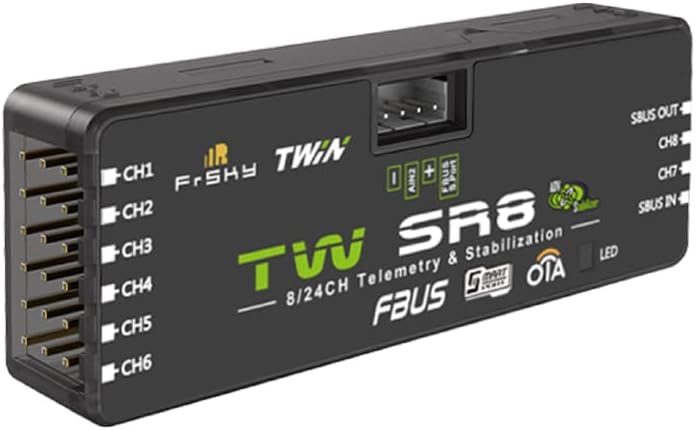
Figure 4.1: FrSky TW SR8 Receiver
This image displays the main body of the FrSky TW SR8 receiver. Visible ports include CH1 through CH6 on one side, and SBUS OUT, CH7, CH8, SBUS IN, FBUS/S.PORT, and AIN2 on the opposite side. An LED indicator is also present. The receiver features 'TWIN' technology, '8/24CH Telemetry & Stabilization', 'FBUS', 'S.PORT', and 'OTA' capabilities printed on its casing.

Figure 4.2: FrSky TW SR8 Receiver Dimensions
This diagram provides the physical dimensions of the FrSky TW SR8 receiver. The length is approximately 54mm, the width is approximately 20mm, and the thickness is approximately 10mm. The diagram also indicates the location of the REG button and the antenna connections (LoRa and FSK).
4.1 Port and Indicator Descriptions
- CH1-CH8: Standard PWM output channels for connecting servos or other devices.
- SBUS OUT: S.BUS output for connecting to flight controllers or other S.BUS compatible devices.
- SBUS IN: S.BUS input for connecting multiple receivers or other S.BUS devices.
- FBUS/S.PORT: FrSky Bus (FBUS) and Smart Port (S.PORT) for telemetry data and firmware updates.
- AIN2: Analog input for external voltagMonitorizarea.
- LED: Status indicator light (e.g., solid green for bound, flashing for binding mode).
- REG Button: Used for binding and entering firmware update mode.
5. Configurare
5.1 Asocierea receptorului
To establish communication between your FrSky TW SR8 receiver and your FrSky radio transmitter, you must perform a binding procedure:
- Power on your FrSky radio transmitter and navigate to the binding menu (refer to your transmitter's manual for specific steps).
- Select the appropriate mode (e.g., ACCESS, TWIN) and receiver number.
- Țineți apăsat butonul REG Button on the TW SR8 receiver while connecting power to it. The LED on the receiver should flash rapidly, indicating it is in binding mode.
- On your transmitter, initiate the binding process.
- Once binding is successful, the LED on the receiver will turn solid green.
- Disconnect power from the receiver and then reconnect it normally to confirm the binding.
5.2 Connecting to a Flight Controller/Servos
Connect the TW SR8 receiver to your flight controller or directly to servos using the appropriate ports:
- For digital protocols (S.BUS, FBUS), connect the respective output from the receiver to the corresponding input on your flight controller.
- For PWM outputs, connect individual servos to channels CH1-CH8.
- Ensure the receiver receives power from a stable 3.5V-10V source, typically from the flight controller's BEC or a dedicated power distribution board.
6. Operare
6.1 Operare de bază
After successful binding and connection, the receiver will establish a link with your transmitter. The solid green LED indicates a stable connection. Control signals from your transmitter will be relayed to your model's servos or flight controller.
6.2 Telemetry Functions
The TW SR8 supports various telemetry functions, providing real-time data back to your FrSky transmitter. These may include:
- RSSI (Received Signal Strength Indication): Indicates the strength of the signal received by the receiver.
- Voltage: Monitors the receiver's input voltage or external voltage via AIN2.
- Temperatură: Internal temperature monitoring.
- OSD (On-Screen Display) Data: Can transmit data for display on compatible OSD systems.
Refer to your FrSky transmitter's manual for details on setting up and displaying telemetry data.
6.3 Stabilization Features
The TW SR8 includes integrated stabilization. Configuration of these features typically requires connecting the receiver to a computer via its USB port (if available) or through the S.PORT/FBUS connection using FrSky's configuration software (e.g., FrSky S.Port Tool or Ethos Suite). Consult FrSky's official website for the latest software and detailed instructions on configuring stabilization modes and parameters.
7. Întreținere
- curatenie: Use a soft, dry cloth to clean the receiver. Avoid using solvents or abrasive cleaners.
- Depozitare: Store the receiver in a cool, dry place, away from direct sunlight and extreme temperatures.
- Actualizări firmware: Periodically check the FrSky official website for firmware updates. Updates can improve performance, add new features, or fix bugs. Firmware can typically be updated via the S.PORT/FBUS or a dedicated USB port using FrSky's software.
8. Depanare
| Problemă | Cauza posibila | Soluţie |
|---|---|---|
| LED-ul receptorului nu se aprinde | No power or incorrect polarity | Check power connections and ensure correct polarity. Verify power source is active. |
| Receiver LED flashing rapidly | Binding mode or no signal from transmitter | If binding, proceed with transmitter binding. If not binding, ensure transmitter is on and bound. |
| Nici un răspuns de control | Not bound, incorrect channel mapping, or faulty connection | Re-bind receiver. Check channel mapping on transmitter and flight controller. Verify all servo/signal connections. |
| Poor range or signal loss | Antenna placement, interference, or damaged antenna | Ensure antennas are positioned correctly (90-degree angle, away from carbon fiber/metal). Check for local interference. Inspect antennas for damage. |
9. Specificații
- Model: TW SR8
- Canale: 8/24CH (PWM/SBUS/FBUS)
- Vol. De operaretage Gama: 3.5-10V (typical, check official FrSky documentation for precise range)
- Curent de funcționare: [Not specified, typically low mA]
- Dimensiuni: Approximately 54mm x 20mm x 10mm (2 x 3 x 2 inches as per product listing)
- Greutate: [Not specified, typically very light]
- Compatibilitate: FrSky TWIN series modules/radios (ACCESS protocol)
- Caracteristici: Telemetry (RSSI, Voltage, Temperature), Stabilization, FBUS, S.PORT, OTA (Over-The-Air) firmware updates.
- Vârsta recomandată de producător: 14 ani în sus
10. Garanție și asistență
FrSky products are designed and manufactured to high-quality standards. For warranty information, technical support, and the latest firmware updates, please visit the official FrSky website or contact your authorized FrSky dealer. Keep your proof of purchase for warranty claims.
FrSky Oficial Website: www.frsky-rc.com