
Medion KB313U
Medion KB313U Spanish QWERTY Keyboard User Manual
Model: KB313U | Brand: Medion
1. Introducere
This manual provides comprehensive instructions for the setup, operation, maintenance, and troubleshooting of your Medion KB313U Spanish QWERTY Keyboard. Please read this manual carefully before using the product to ensure proper functionality and longevity.

Figura 1: De sus în jos view of the Medion KB313U Spanish QWERTY Keyboard, showing the full layout and attached USB cable.
2. Caracteristicile produsului
The Medion KB313U keyboard is designed for daily use with its ergonomic and slim profileCaracteristicile cheie includ:
- Model: Medion KB313U
- Aspect tastatură: Spanish QWERTY
- Conexiune: USB-A cu fir
- Stare: Produs nou
- Proiecta: Height-adjustable and slim design for ergonomic comfort.
- Număr de chei: 104 chei
- Material: Construcție din plastic

Figura 2: lateral view of the Medion KB313U keyboard, illustrating its slim and ergonomic design.
3. Ghid de instalare
Setting up your Medion KB313U keyboard is a simple plug-and-play process.
- Despachetați tastatura: Carefully remove the keyboard from its packaging. Ensure all components are present and undamaged.
- Conectați-vă la computerul dvs.: Locate an available USB-A port on your computer (PC). Insert the USB connector of the keyboard firmly into the USB port.
- Instalare driver: The operating system (e.g., Windows, macOS, Linux) will automatically detect and install the necessary drivers. This process usually takes a few seconds. No manual driver installation is typically required.
- Verificați funcționalitatea: Once the drivers are installed, the keyboard is ready for use. Open a text editor or any application that accepts text input and test typing to ensure all keys are functioning correctly.

Figure 3: Close-up of the USB-A connector of the Medion KB313U keyboard, used for connecting to a computer.
4. Instrucțiuni de utilizare
The Medion KB313U keyboard operates as a standard Spanish QWERTY layout keyboard. Familiarize yourself with the key functions:
- Standard Typing Keys: All alphanumeric keys, punctuation marks, and symbols function as expected for the Spanish QWERTY layout.
- Taste funcționale (F1-F12): These keys perform various functions depending on the application or operating system. Common uses include help (F1), renaming files (F2), searching (F3), etc.
- Taste multimedia: Located typically above the numeric keypad or as secondary functions on F-keys, these keys control media playback (play/pause, stop, next/previous track) and volume.
- Tastatură numerică: For efficient data entry, use the dedicated numeric keypad on the right side of the keyboard. Ensure "Num Lock" is active.
- Caractere speciale: To type special Spanish characters like 'ñ' or accented vowels, use the dedicated keys or combinations with the 'Alt Gr' key as per the Spanish keyboard standard.
5. Întreținere
Întreținerea corectă asigură longevitatea și performanța optimă a tastaturii dumneavoastră.
- curatenie:
- Deconectați tastatura de la computer înainte de curățare.
- Folosiți o cârpă moale, fără scame dampClătiți cu apă sau o soluție de curățare blândă pentru a șterge capacele tastelor și suprafața.
- Evitați pulverizarea lichidelor direct pe tastatură.
- Folosește aer comprimat pentru a îndepărta praful și resturile dintre taste.
- Depozitare: Depozitați tastatura într-un loc răcoros și uscat, ferit de lumina directă a soarelui și de temperaturi extreme, atunci când nu o utilizați pentru perioade lungi de timp.
- Manipulare: Evitați să scăpați tastatura sau să o expuneți la o forță excesivă, deoarece aceasta poate deteriora componentele interne.
6. Depanare
If you encounter issues with your Medion KB313U keyboard, refer to the following common troubleshooting steps:
| Problemă | Cauza posibila | Soluţie |
|---|---|---|
| Tastatura nu răspunde | Conexiune USB slăbită, port USB defect, problemă cu driverul. |
|
| Tastele sunt lipicioase sau nu răspund | Dirt or debris under keycaps, liquid spill. |
|
| Incorrect character output (e.g., @ instead of ") | Incorrect keyboard layout selected in operating system. |
|
7. Specificații
Detailed technical specifications for the Medion KB313U keyboard:
| Numărul de model | KB313U |
| Marca | Medion (Generic) |
| Aspectul tastaturii | Spanish QWERTY |
| Tehnologia de conectivitate | USB-A cu fir |
| Dispozitive compatibile | PC |
| Caracteristici speciale | Ergonomic, Height Adjustable |
| Culoare | Black (schwarz) |
| Numărul de chei | 104 |
| Dimensiunile produsului | 43.5L x 16W x 2H centimetri |
| Material | Plastic |
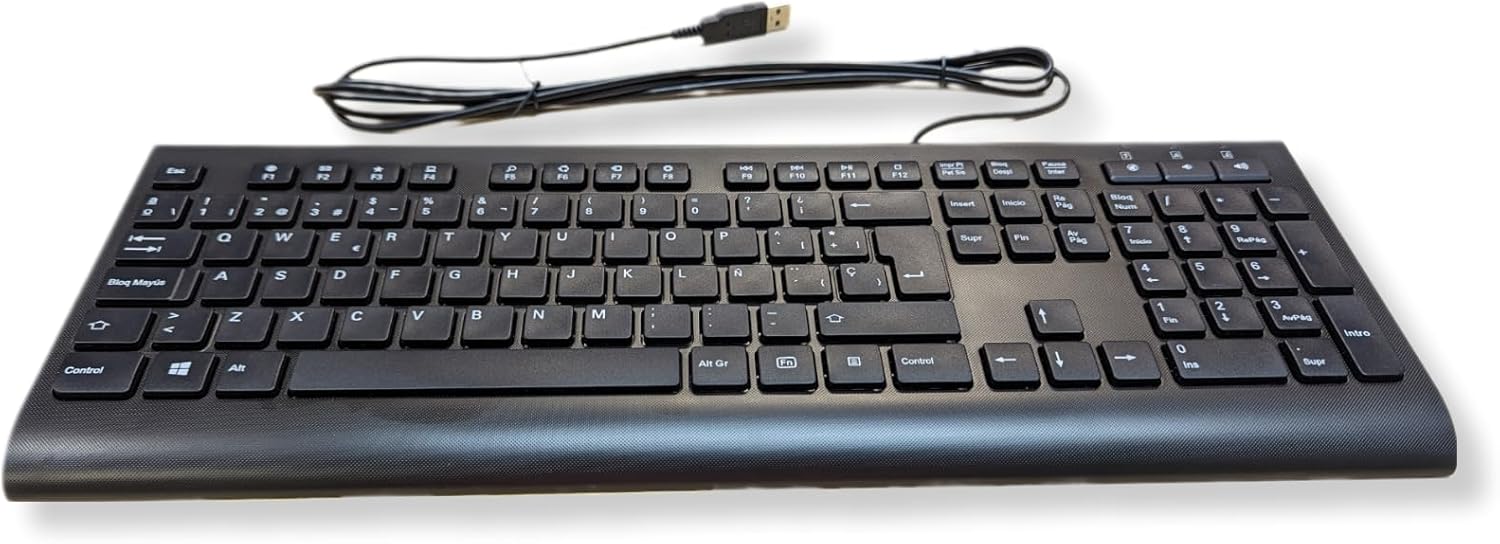
Figura 4: Complet view of the Medion KB313U keyboard, showcasing the Spanish QWERTY layout.
8. Garanție și asistență
Information regarding product warranty and customer support is typically provided by the seller or manufacturer at the time of purchase. Please refer to your purchase documentation or the official Medion website for the most accurate and up-to-date warranty terms and support contact information.
For technical assistance or further inquiries, please contact the retailer or the manufacturer's customer service department.
Figura 5: Example of product packaging or label, which may contain model and serial number information. (Note: This image is a placeholder for a packaging image, using the main product image as a substitute since no specific packaging image was provided in the input beyond the main product image itself.)
Ask a question about this manual
Ask about setup, troubleshooting, compatibility, parts, safety, or missing instructions. Manuals+ will review the question and use this page’s manual context to help answer it.