
Lenco CR-650
Lenco CR-650 DAB+ Alarm Clock Radio
Manual de utilizare
Introducere
Mulțumesc pentru achizițieasing the Lenco CR-650 DAB+ Alarm Clock Radio. This device combines a modern DAB+ and FM radio with an alarm clock, Bluetooth connectivity, USB/Micro SD playback, and a convenient wireless charging pad. This manual provides detailed instructions for setup, operation, maintenance, and troubleshooting to ensure optimal performance and longevity of your device.
Informații de siguranță
Please read these safety instructions carefully before using the device and keep them for future reference. Improper use may result in electric shock, fire, or other hazards.
- Do not expose the device to rain, moisture, or direct sunlight.
- Asigurați o ventilație corespunzătoare în jurul unității. Nu blocați nicio deschidere de ventilație.
- Nu așezați dispozitivul în apropierea surselor de căldură, cum ar fi calorifere, registre de căldură, sobe sau alte aparate (inclusiv ampliificatori) care produc căldură.
- Utilizați numai atașamente/accesorii specificate de producător.
- Deconectați dispozitivul în timpul furtunilor cu fulgere sau atunci când nu este utilizat pentru perioade lungi.
- Consultați toate lucrările de service către personalul de service calificat. Întreținerea este necesară atunci când aparatul a fost deteriorat în vreun fel.
Conținutul pachetului
Verificați dacă toate articolele sunt prezente în colet:
- Lenco CR-650 DAB+ Alarm Clock Radio
- Adaptor de alimentare
- Manual de utilizare (acest document)
Produs terminatview
Faţă View

Figura 1: Față view of the Lenco CR-650, highlighting the LCD display and speaker grilles.
The front of the CR-650 features a clear LCD display that shows time, radio station information, and various settings. The large speaker grilles on either side of the display provide audio output.
Top View (Controls and Wireless Charging)
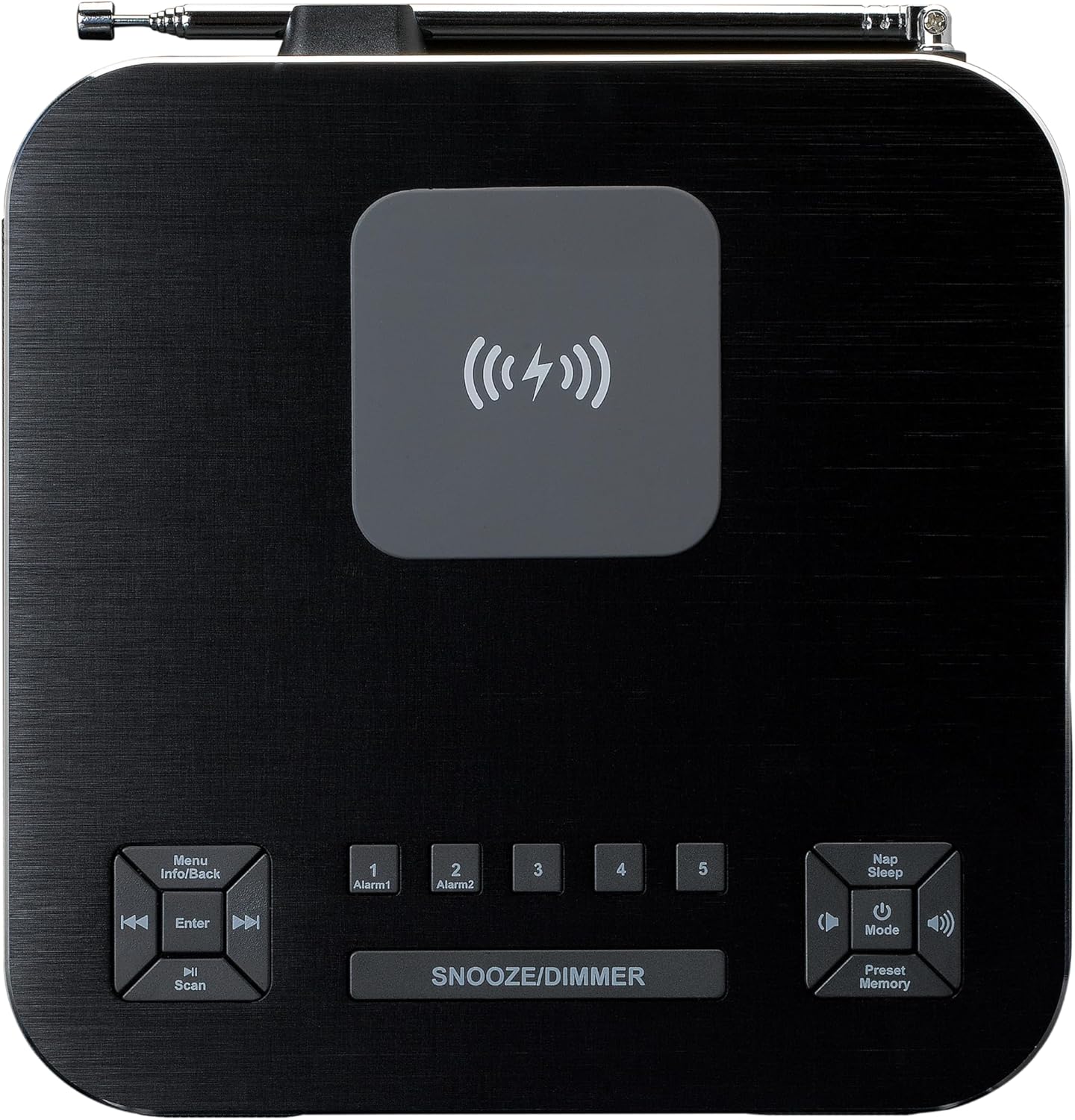
Figura 2: Sus view of the Lenco CR-650, illustrating the control buttons and the central wireless charging area.
The top panel houses all the control buttons and the integrated wireless charging pad. Key controls include:
- Menu/Info/Back: Navigates menus, displays information, or goes back.
- Enter/Scan: Confirms selections or initiates station scans.
- Alarma 1 / Alarma 2: Buttons for setting and activating the two independent alarms.
- Amânare/Reducere intensitate: Activează amânarea în timpul unei alarme sau ajustează luminozitatea afișajului.
- Nap/Sleep: Sets a short nap timer or sleep timer.
- Power/Mode/Volume: Power on/off, switches between modes (DAB+, FM, Bluetooth, USB, Micro SD, AUX), and adjusts volume.
- Presetare/Memorie: Accesează și salvează presetările radio.
- Pad de încărcare fără fir: Central area for Qi-compatible device charging.
Spate View (Conexiuni)

Figura 3: Spate view of the Lenco CR-650, detailing the various input ports and the telescopic antenna.
The rear panel provides essential connection ports:
- Slot pentru card Micro SD: Pentru redarea audio filede pe un card Micro SD.
- Port USB: Pentru redarea audio files de pe o unitate USB.
- Intrare AUX (3.5 mm): Pentru conectarea dispozitivelor audio externe.
- Intrare de alimentare DC 5V: Se conectează la adaptorul de alimentare furnizat.
- Antena telescopica: Pentru recepție optimă DAB+ și radio FM.
Înființat
- Conexiune de alimentare: Insert the DC plug of the provided power adapter into the DC 5V input port on the rear of the CR-650. Plug the other end of the adapter into a standard wall outlet.
- Configurarea antenei: Fully extend the telescopic antenna located on the rear of the unit for best radio reception. Adjust its position as needed to improve signal quality.
- Pornire inițială: Apăsați tasta Putere/Mod button on the top panel to turn on the device. The display will light up.
- Setarea orei și datei: The device should automatically set the time and date via DAB+ signal. If not, refer to the "Operating Instructions - System Settings" section to set it manually.
Instrucțiuni de operare
Radio Functions (DAB+/FM)
The CR-650 supports both DAB+ digital radio and traditional FM radio.
- Moduri de comutare: Apăsați tasta Modul apăsați butonul în mod repetat pentru a comuta între modurile radio DAB+ și FM.
- Scanarea posturilor:
- În modul DAB+, apăsați tasta Scanează button to perform a full scan for available DAB+ stations. The display will show "Station scan".
- În modul FM, țineți apăsat butonul Scanează button to auto-scan and stop at the next strong station.
- Reglare manuală: Utilizați Anterior/Următorul buttons to manually tune frequencies in FM mode or navigate through DAB+ stations.
- Salvarea presetărilor:
- Acordați postul dorit.
- Țineți apăsat butonul Presetat/Memorie buton.
- Utilizați Anterior/Următorul butoane pentru a selecta un număr presetat (1-20).
- Presa Intră pentru a confirma și salva postul.
- Reamintirea presetărilor: Apăsați scurt pe Presetat/Memorie , apoi utilizați butonul Anterior/Următorul buttons to select the desired preset and press Intră.

Figure 4: Display during DAB+ station scanning.
Funcționare Bluetooth
Redați audio fără fir de pe dispozitivul dvs. compatibil Bluetooth.
- Intrați în modul Bluetooth: Apăsați tasta Modul button until "Bluetooth" appears on the display. The device will enter pairing mode, indicated by a blinking Bluetooth icon.
- Asociere: On your smartphone or other Bluetooth device, enable Bluetooth and search for "Lenco CR-650". Select it to pair. Once connected, the Bluetooth icon will stop blinking.
- Redare: Start playing audio on your connected device. The sound will be streamed to the CR-650. Use the volume controls on the CR-650 or your device to adjust the sound level.

Figure 5: Display showing Bluetooth pairing name.
Redare USB/Micro SD
Redați audio filedirect de pe o unitate flash USB sau un card Micro SD.
- Introduceți suportul media: Insert a USB flash drive into the USB port or a Micro SD card into the Micro SD slot on the rear of the unit.
- Selectați modul: Apăsați tasta Modul button until "USB" or "Micro SD" appears on the display. The device will automatically start playing compatible audio files.
- comenzi: Utilizați Anterior/Următorul buttons to skip tracks. Use the Redare/Pauză button (often integrated with Power/Mode or Enter) to pause/resume playback.
Funcții de alarmă
The CR-650 features dual alarms and various wake-up options.
- Setarea alarmelor:
- Apăsați fie pe Alarma 1 or Alarma 2 buton.
- Utilizați Anterior/Următorul butoane și Intră to set the alarm time, alarm source (DAB+, FM, Buzzer, Nature Sounds), and alarm volume.
- Confirm settings to activate the alarm. An alarm icon will appear on the display.
- Funcție de amânare: Când sună o alarmă, apăsați butonul Amânare/Dimmer pentru a dezactiva temporar alarma pentru o perioadă setată (de exemplu, 9 minute). Alarma va suna din nou după perioada de amânare.
- Oprirea unei alarme: Pentru a opri o alarmă care sună, apăsați butonul Putere Alarma se va reseta pentru ziua următoare.
- Disabling Alarms: To completely disable an alarm, press the corresponding Alarma 1 or Alarma 2 apăsați butonul până când pictograma alarmei dispare de pe afișaj.
Setări de afișare
Adjust the brightness of the LCD display for comfortable viewing.
- Reglarea luminozității: Apăsați scurt pe Amânare/Dimmer pentru a comuta între diferite niveluri de luminozitate (de exemplu, Ridicat, Mediu, Scăzut, Oprit).
Wireless Charging (Qi)
The Lenco CR-650 features a built-in Qi wireless charging pad on its top surface.

Figure 6: Smartphone wirelessly charging on the Lenco CR-650.
- Plasare: Place your Qi-compatible smartphone or device directly onto the wireless charging pad located in the center of the top panel.
- Indicator de încărcare: Your device's screen should indicate that it is charging. Ensure the phone is centered on the pad for optimal charging.
- Troubleshooting Charging: If your device does not charge, try repositioning it. Remove any thick cases that might interfere with wireless charging.
Întreţinere
- curatenie: Folosiți o lavetă moale și uscată pentru a curăța suprafața unității. Nu utilizați produse de curățare abrazive, ceruri sau solvenți.
- Depozitare: Dacă depozitați unitatea pentru o perioadă lungă de timp, deconectați-o de la priză și depozitați-o într-un loc răcoros și uscat.
- Îngrijirea antenei: Handle the telescopic antenna carefully to prevent bending or breaking.
Depanare
| Problemă | Cauza posibila | Soluţie |
|---|---|---|
| Fără putere | Power adapter not connected or outlet is dead. | Asigurați-vă că adaptorul de alimentare este conectat corect la unitate și la o priză de perete funcțională. |
| Recepție radio slabă | Antena nu este extinsă sau semnalul în zonă este slab. | Fully extend the telescopic antenna and try repositioning the unit. Perform a full station scan. |
| Dispozitivul Bluetooth nu se conectează | CR-650 not in pairing mode or device too far. | Ensure CR-650 is in Bluetooth mode and blinking. Move devices closer. Forget "Lenco CR-650" on your device and try pairing again. |
| Încărcarea fără fir nu funcționează | Phone not aligned or case is too thick. | Reposition the phone on the charging pad. Remove thick phone cases. Ensure phone is Qi-compatible. |
| Alarma nu sună | Alarma nu este activată sau volumul este prea scăzut. | Check if the alarm icon is displayed. Verify alarm time and source. Increase alarm volume. |
Specificații
| Caracteristică | Detaliu |
|---|---|
| Numărul de model | CR-650 (A004976) |
| Marca | Lenco |
| Tuner radio | DAB+, FM |
| Presetări | 20 (5 quick dial) |
| Versiune Bluetooth | 5.0 |
| Gama Bluetooth | Până la 10 metri |
| Putere de ieșire | 2 x 2 W RMS |
| Afişa | 2-inch LCD with adjustable brightness |
| Conectivitate | USB, Micro SD, AUX (3.5mm), Bluetooth |
| Încărcare fără fir | Compatibil cu Qi |
| Dimensiuni (Îl x l x A) | 75 x 170 x 180 mm (aproximativ 2.95 x 6.69 x 7.09 inchi) |
| Greutate | 1.34 kg (aproximativ 2.95 lbs) |
| Material | Aluminiu |
Garanție și suport
Lenco products are designed and manufactured to the highest quality standards. In the unlikely event of a problem with your product, please refer to the warranty terms provided with your purchase documentation or visit the official Lenco website pentru asistență și informații de contact.
For technical assistance or service inquiries, please contact Lenco customer support. Keep your proof of purchase for warranty claims.
Ask a question about this manual
Ask about setup, troubleshooting, compatibility, parts, safety, or missing instructions. Manuals+ will review the question and use this page’s manual context to help answer it.