
1. Produs terminatview
The Apple Watch Series 8 is an advanced smartwatch designed to enhance daily life through health monitoring, fitness tracking, and seamless connectivity. It features a durable design, a bright Always-On Retina display, and a suite of sensors for comprehensive health insights.

Image: Apple Watch Series 8 in Midnight Aluminum with Midnight Sport Band.
2. Ce se află în cutie
- Apple Watch Series 8 (Midnight Aluminum Case with Midnight Sport Band, M/L)
- Magnetic Fast Charger to USB-C Cable (1m)
3. Ghid de instalare
3.1 Despachetare și încărcare inițială
- Carefully remove the Apple Watch and charging cable from the packaging.
- Connect the Magnetic Fast Charger to USB-C Cable to a compatible USB-C power adapter (sold separately) and plug it into a power outlet.
- Place the back of your Apple Watch on the magnetic charger. The watch will begin charging and display a charging indicator.
3.2 Împerecherea cu iPhone-ul
The Apple Watch Series 8 requires an iPhone 8 or later with the latest iOS version for setup and full functionality.
- Porniți Apple Watch apăsând lung butonul lateral până când apare logo-ul Apple.
- Apropie-ți iPhone-ul de Apple Watch. Pe iPhone va apărea un ecran de asociere. Atinge „Continuă”.
- Poziționează-ți iPhone-ul astfel încât Apple Watch-ul să apară în viewfinder of the Camera app. This will pair the devices.
- Follow the on-screen instructions on both your iPhone and Apple Watch to complete the setup, including setting up a passcode, Apple ID, and preferred settings.
Video: Un pesteview of the Apple Watch Series 8, including unboxing and initial setup steps.
4. Operating Your Apple Watch Series 8
4.1 Navigare de bază
- Coroana digitala: Rotate to scroll, zoom, or adjust values. Press once to go to the watch face or app launcher. Double-press to switch between recently used apps. Press and hold for Siri.
- Buton lateral: Press once to open the Dock (recently used apps). Press and hold to access Emergency SOS, Medical ID, or power options. Double-press for Apple Pay.
- Afișaj tactil: Tap to select, swipe to navigate, force touch for additional options (depending on the app).
4.2 Key Features and Applications
- Ecran Retina mereu activ: The display remains visible even when your wrist is down, showing time and complications.
- Monitorizarea sănătății: Advanced sensors provide insights into heart rate, blood oxygen levels, and temperature changes.
- Urmărire fitness: Enhanced Workout app with advanced metrics and activity rings to track daily movement.
- Conectivitate: Make calls, send texts, listen to music, and receive notifications directly from your wrist.
- Caracteristici de siguranță: Includes Fall Detection, Emergency SOS, and Crash Detection for urgent assistance.
Video: A user demonstrating various features of the Apple Watch Series 8, including Siri activation and fitness tracking rings.
5. Health Features
The Apple Watch Series 8 is equipped with advanced health sensors to help you better understand your body.
- Sensoarea temperaturii: Provides retrospective ovulation estimates and advanced cycle tracking features. This sensor works primarily during sleep to track baseline temperature changes.
- Aplicația pentru oxigenul din sânge: Măsurați-vă nivelul de oxigen din sânge la cerere.
- Aplicație ECG: Take an electrocardiogram anytime, anywhere, to check for signs of atrial fibrillation.
- Monitorizarea ratei cardiace: Receive high and low heart rate notifications and irregular rhythm notifications.
- Urmărirea somnului: Monitorizați-vă somnultages (REM, Core, Deep) to gain insights into your sleep patterns.

Imagine: Pesteview of Apple Watch Series 8 health and safety features.

Image: Close-up of the Apple Watch Series 8 display showing a temperature reading.
6. Monitorizarea fitnessului
The enhanced Workout app and Activity rings help you stay active and motivated.
- Inele de activitate: Track your daily Move, Exercise, and Stand goals. Close your rings to achieve daily activity targets.
- Aplicație de antrenament: Choose from a variety of workout types, including running, cycling, swimming, yoga, and more. Get advanced metrics for your performance.
- GPS: Built-in GPS accurately tracks your outdoor workouts without needing your iPhone.

Image: Apple Watch Series 8 showing the Workout app interface.
7. Connectivity and Communication
Stay connected with your Apple Watch Series 8.
- Apeluri și mesaje: Make and receive calls, and send and reply to text messages directly from your wrist when connected to your iPhone or Wi-Fi.
- Siri: Activate Siri by raising your wrist and speaking, or by pressing and holding the Digital Crown.
- Apple Pay: Make secure payments instantly by double-pressing the side button.
- Notificări: Receive alerts from your favorite apps, calendar events, and more.
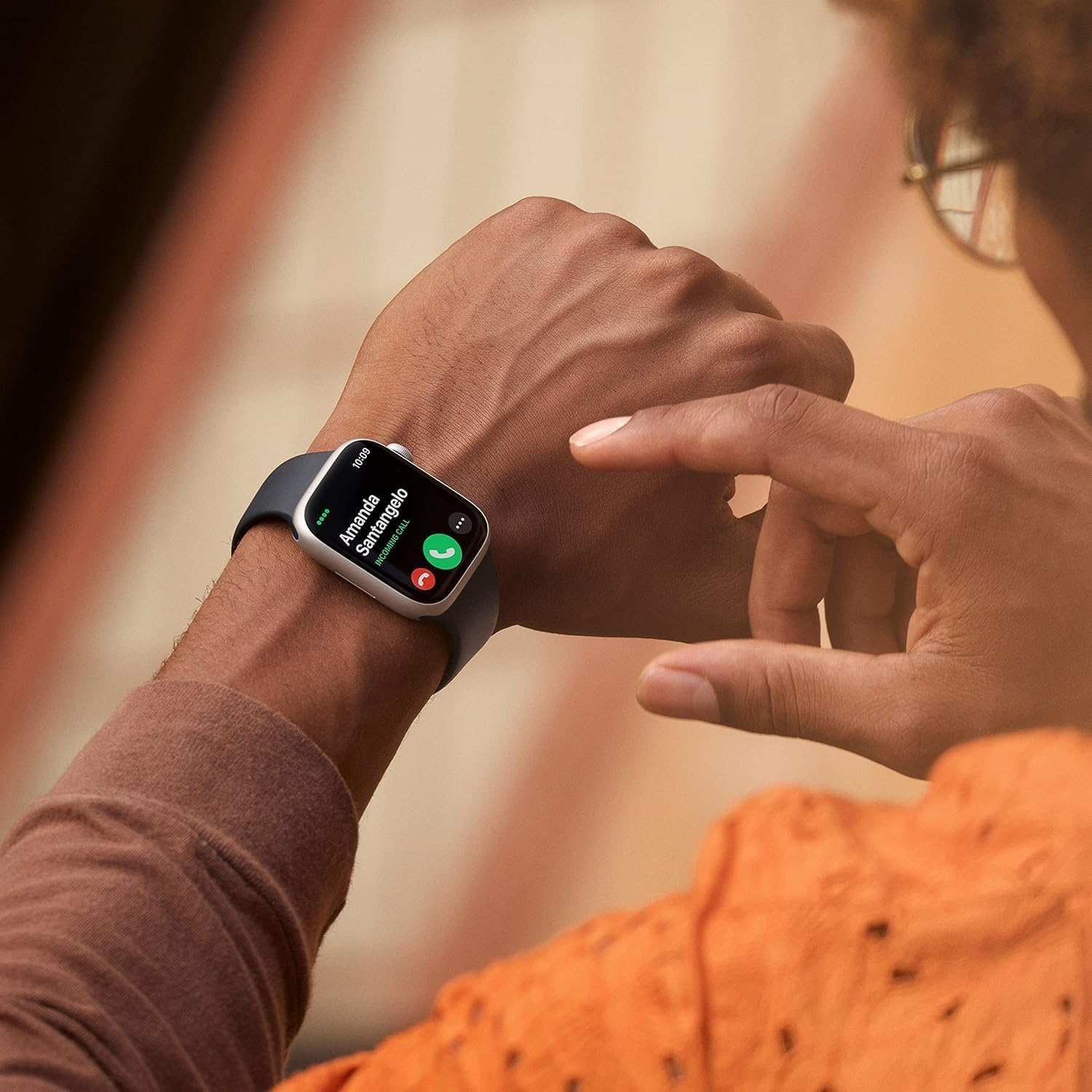
Image: A user answering a call on their Apple Watch Series 8.
8. Durabilitate și rezistență la apă
The Apple Watch Series 8 is built for everyday use and various activities.
- Crack Resistant: Features a highly crack-resistant front crystal.
- Rezistenta la praf: IP6X-certified for dust resistance.
- Rezistenta la apa: Swimproof with WR50 water resistance, suitable for shallow-water activities like swimming in a pool or ocean. Not recommended for scuba diving, waterskiing, or other high-velocity water activities.
9. Baterie și încărcare
The Apple Watch Series 8 offers all-day battery life and fast charging capabilities.
- Durata de viață a bateriei: Up to 18 hours of typical use.
- Încărcare rapidă: Charges from 0% to 80% in approximately 45 minutes with the Magnetic Fast Charger to USB-C Cable and a compatible 20W USB-C Power Adapter (sold separately).
10. Personalizare
Personalize your Apple Watch Series 8 to match your style and needs.
- Benzi: Easily interchangeable bands allow you to switch styles. The Midnight Sport Band (M/L) is included, fitting 150–200mm wrists.
- Vizionați fețele: Choose from a wide variety of watch faces and customize complications to display information important to you.
Image: Apple Watch Series 8 with its default Midnight Sport Band.
11. Specificații
| Caracteristică | Detaliu |
|---|---|
| Numele modelului | Urmărește seria 8 |
| Numărul de model | A2770 |
| Dimensiunea carcasei | 41mm |
| Materialul carcasei | Aluminiu |
| Culoarea benzii | Miezul nopţii |
| Sistem de operare | WatchOS |
| Capacitate de stocare a memoriei | 32 GB |
| Dimensiunea ecranului | 1.8 inchi |
| Tip de afișare | AMOLED |
| Tehnologia de conectivitate | Bluetooth |
| GPS | GPS încorporat |
| Adâncimea de rezistență la apă | 50 metri |
| Durata medie a bateriei | 18 de ore |
| Dimensiunile articolului | 1.61 x 1.37 x 0.42 inci |
12. Întreținere
- curatenie: Ștergeți Apple Watch-ul și cureaua cu o lavetă moale, fără scame. Dacă este necesar, ștergeți ușor.ampen the cloth with fresh water. Do not use soaps or other cleaning products.
- Uscare: Ensure your Apple Watch is completely dry after exposure to water or cleaning.
- Actualizări de software: Menține software-ul Apple Watch actualizat la cea mai recentă versiune pentru performanță și securitate optime. Actualizările pot fi gestionate prin intermediul aplicației Watch de pe iPhone.
13. Depanare
- Ceasul nu se pornește: Ensure the watch is charged. Place it on the magnetic charger for at least 30 minutes.
- Probleme de asociere: Make sure your iPhone's Bluetooth is on and both devices are close to each other. Restart both devices if necessary.
- Citiri inexacte: Ensure the watch is worn snugly on your wrist. Clean the back of the watch regularly.
- Bateria se descarcă rapid: Check for background app refresh settings. Enable Low Power Mode if needed.
14. Garanție și asistență
This renewed Apple Watch Series 8 comes with a garanție limitată de 90 de zile. For detailed warranty information and support, please refer to the documentation provided with your purchase or visit the official Apple support website-ul.
For additional assistance, you can contact Apple Support or visit an authorized Apple service provider.