
1. Introducere
The ORICO 4-Port USB 3.0 Hub (Model: PW4U-U3-015-BK) is designed to expand a single USB 3.0 port into four USB 3.0 ports, allowing for the connection of multiple USB-A devices to your computer or compatible device. This hub supports high-speed data transfer and is compatible with various operating systems.
2. Caracteristicile produsului
- Transfer de date de mare viteză: Supports data transfer speeds up to 5Gbps, which is 10 times faster than USB 2.0 (480 Mbps).
- 4-Port Expansion: Converts one USB 3.0 port into four USB 3.0 ports for connecting multiple peripherals.
- Plug & Play: No additional drivers are required for installation. Supports hot-plugging.
- Compatibilitate largă: Compatible with Windows, Mac OS 10.X and above, Linux, Android, and other systems.
- Suport OTG: Enables connection of USB devices (mouse, keyboard, USB stick) to compatible USB-C phones or tablets (requires mobile phone OTG support).
- Design compact: Slim and lightweight, designed for portability and efficient use of space.
- Indicator LED: Features a blue LED indicator to confirm connection status.
3. Conținutul pachetului
- ORICO 4-Port USB 3.0 Hub (Model: PW4U-U3-015-BK)
4. Instrucțiuni de configurare
- Conectați hub-ul: Plug the USB-A connector of the ORICO 4-Port USB 3.0 Hub into an available USB 3.0 port on your laptop, desktop computer, or compatible device.
- Verificați conexiunea: The blue LED indicator on the hub will illuminate, confirming that the hub is powered and connected.
- Conectați periferice: Insert your USB-A devices (e.g., USB flash drives, mouse, keyboard, external hard drives) into the available USB 3.0 ports on the hub.
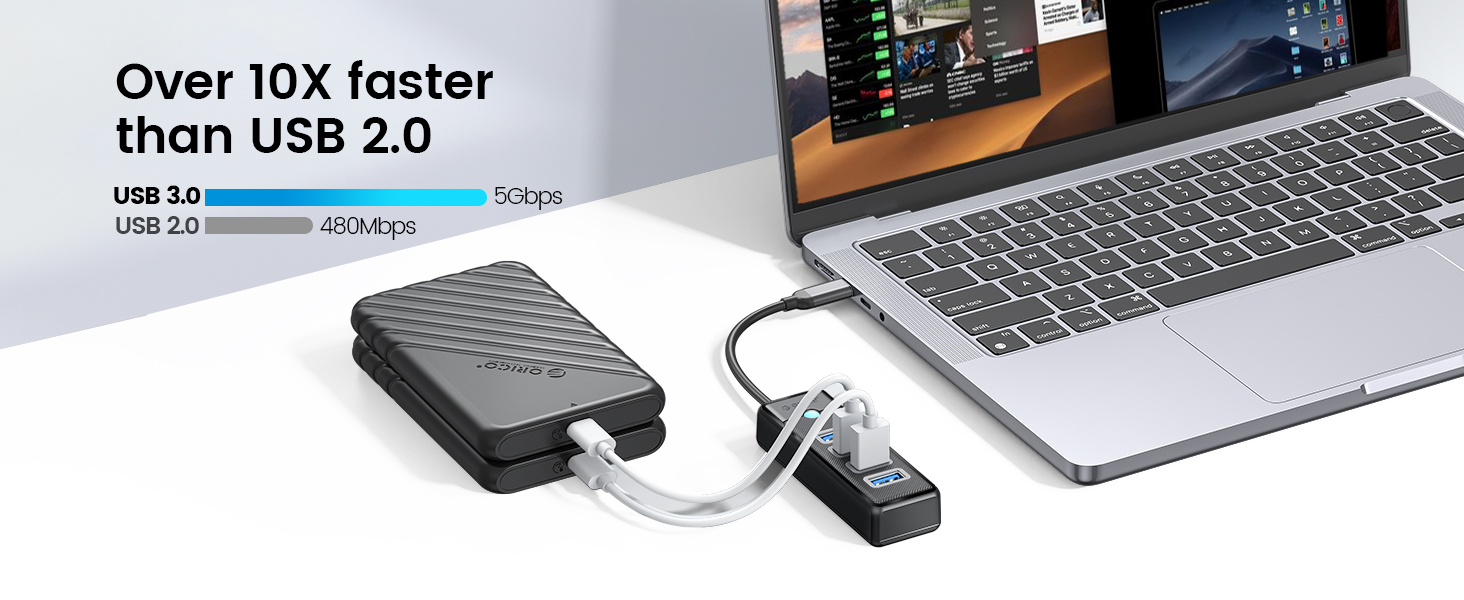
Image: The ORICO 4-Port USB 3.0 Hub connected to a laptop, illustrating connections for a printer, USB disk, keyboard, mouse, HDD, USB fan, data line, and webcam. Note: The hub does not support charging.

Imagine: Un fostample of the ORICO 4-Port USB 3.0 Hub connected via USB-A to a laptop, with a smartphone connected to the hub for data transfer.

Imagine: Un fostample of the ORICO 4-Port USB 3.0 Hub connected via USB-C to a laptop, with a smartphone connected to the hub for data transfer.
5. Instrucțiuni de utilizare
- Transfer de date: Insert your USB 3.0 compatible devices into the hub's ports. Data transfer will occur automatically at speeds up to 5Gbps, provided both the connected device and the host port support USB 3.0.
- Conexiune cu mai multe dispozitive: The hub allows simultaneous connection and operation of up to four USB-A devices. For optimal performance with high-power devices like external hard drives, ensure the host port provides sufficient power.
- Funcționalitate OTG: If your mobile phone or tablet supports OTG (On-The-Go), you can connect the hub to your mobile device (using an appropriate adapter if necessary) to connect USB peripherals like a mouse, keyboard, or USB flash drive. Ensure your mobile device's OTG function is enabled.
- Notă importantă privind încărcarea: This hub is designed for data synchronization and does not support charging. It is not recommended for charging smartphones, tablets, or other devices.
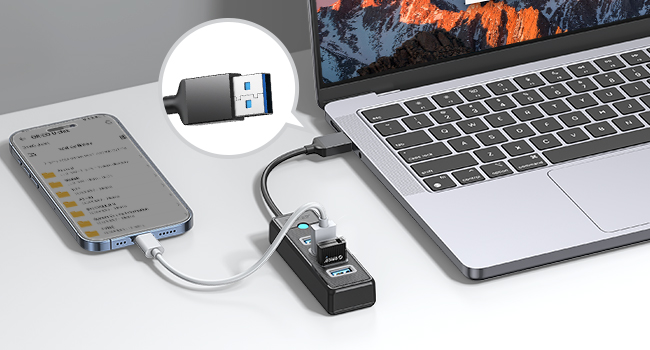
Image: The ORICO 4-Port USB 3.0 Hub connected to a laptop, demonstrating stable connection and simultaneous reading of two 1TB 2.5-inch SSDs without external power.
6. Întreținere
- curatenie: Use a soft, dry cloth to clean the surface of the hub. Avoid using liquid cleaners or solvents.
- Depozitare: Depozitați hub-ul într-un loc răcoros și uscat, ferit de lumina directă a soarelui și de temperaturi extreme.
- Manipulare: Avoid dropping or subjecting the hub to strong impacts. Do not attempt to disassemble the device.
7. Depanare
- Dispozitiv nerecunoscut:
- Ensure the hub is securely plugged into a functioning USB port on your computer.
- Încercați să conectați dispozitivul direct la portul USB al computerului pentru a confirma că dispozitivul în sine funcționează.
- Reporniți computerul și reconectați hub-ul.
- Transfer lent de date:
- Ensure both the hub and the connected device are utilizing USB 3.0 ports and cables. USB 2.0 connections will operate at slower speeds.
- Evitați conectarea simultană a mai multor dispozitive cu lățime de bandă mare dacă întâmpinați încetiniri.
- Indicatorul LED nu este aprins:
- Check the connection between the hub and your computer.
- Încercați un alt port USB pe computer.
8. Specificații
| Numărul de model | PW4U-U3-015-BK |
| Marca | ORICO |
| Interfață hardware | USB 3.0 |
| Porturi | 4 x USB 3.0 tip A mamă |
| Viteza de transfer de date | Până la 5 Gbps |
| Dimensiunile produsului | 3.66 x 1.18 x 0.59 inchi (9.3 x 3.0 x 1.5 cm) |
| Greutatea articolului | 2.47 uncii (70 grame) |
| Lungimea cablului | Approximately 0.49 ft (15 cm) |
| Culoare | Negru |
| Caracteristici speciale | Indicator Light, Lightweight, Plug and Play, Portable |
| Dispozitive compatibile | Laptops, Desktops, Card Readers, Keyboards, Mouse, XBOX, PS4, HDD, USB Fan, etc. |

Image: The ORICO 4-Port USB 3.0 Hub displaying its compact dimensions and short cable length.

Image: Universal compatibility for the USB 3.0 (Male) connector with devices like PC, Car, Host, PS3/PS4, and for USB 3.0 (Female) ports with Mouse, Camera, Keyboard, Card Reader, HDD.

Image: Universal compatibility for the USB-C (Male) connector with devices like MacBook, Galaxy, iPad, and for USB 3.0 (Female) ports with USB Flash Drive, Keyboard, Printer, PS3/PS4, Mouse, 2.5" HDD.
9. Informații despre garanție
ORICO products typically come with a standard manufacturer's warranty. Please refer to the product packaging or the official ORICO webConsultați site-ul pentru termenii și condițiile specifice de garanție aplicabile regiunii și datei achiziției dvs. Păstrați dovada achiziției pentru solicitările de garanție.
10. Suport
For technical support, product inquiries, or further assistance, please visit the official ORICO website or contact their customer service through the channels provided on their website. Puteți găsi mai multe informații la Magazinul ORICO pe Amazon.