
1. Introducere
The BOYA BY-M1S is a professional omnidirectional lavalier condenser microphone designed for high-quality audio recording. It is compatible with a wide range of devices, including smartphones, DSLR cameras, camcorders, audio recorders, and personal computers. This manual provides detailed instructions for setting up, operating, and maintaining your BY-M1S microphone.
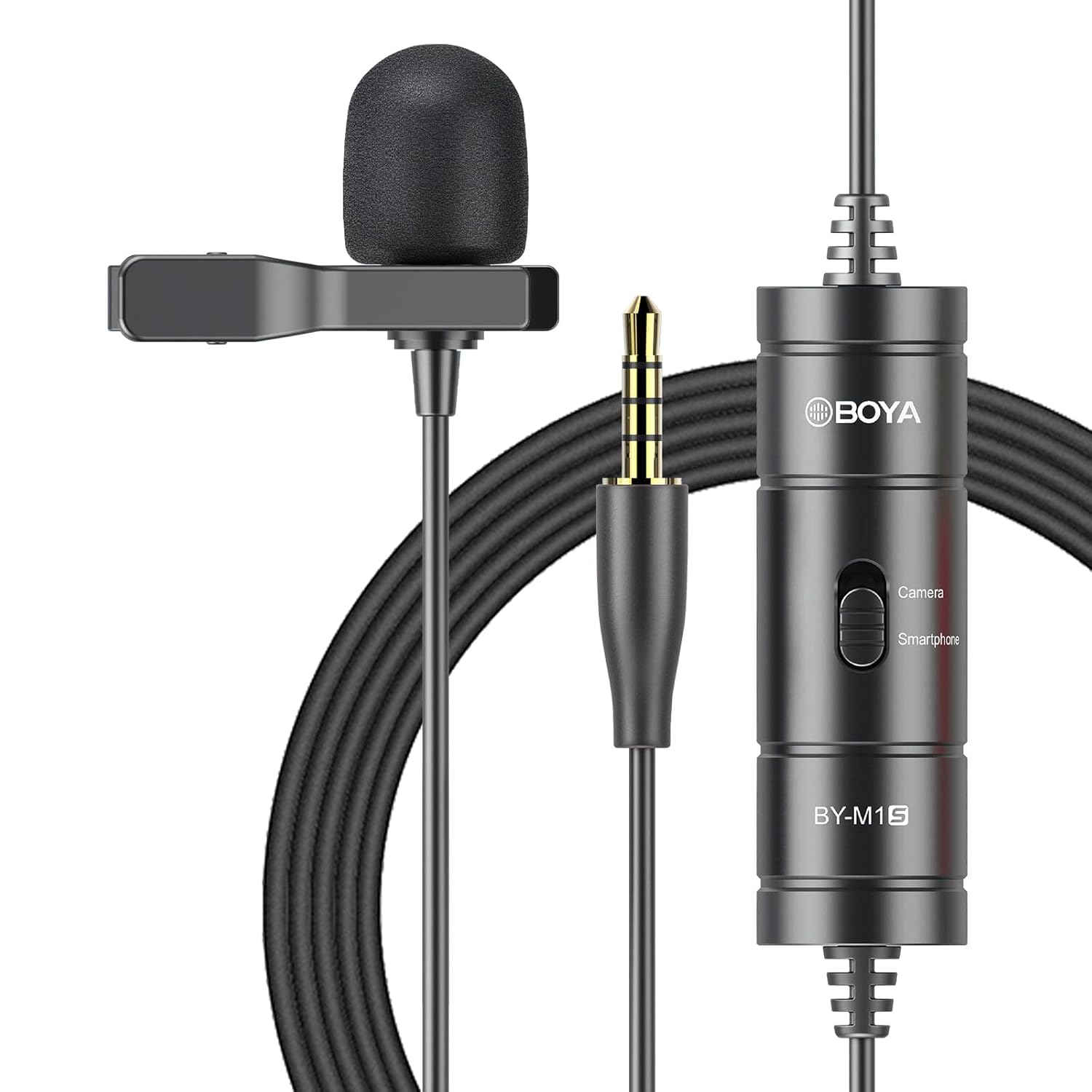
2. Caracteristicile produsului
- Omnidirectional Capsule: Captures broadcast-quality sound from a 360-degree range.
- Plug and Play: No batteries or drivers required for most smartphone applications.
- Cablu lung: Features a 6-meter (20-foot) cable for extended reach.
- Compatibilitate largă: Supports smartphones, DSLR cameras, camcorders, audio recorders, tablets, and laptops.
- Device Mode Switch: Easily switch between "Smartphone" and "Camera" modes.
- Accesorii incluse: Comes with a metal clip for secure attachment and a foam windscreen to reduce wind noise.

3. Conținutul pachetului
The BOYA BY-M1S package includes the following items:
- BY-M1S Lavalier Microphone
- Clip pentru rever
- Parbriz din spumă
- Carrying Pouch (may vary by region)
4. Instrucțiuni de configurare
4.1 Atașarea microfonului
- Attach the metal clip to the microphone body.
- Securely clip the microphone to your clothing, approximately 15-20 cm (6-8 inches) from your mouth, for optimal sound capture.
- Place the foam windscreen over the microphone capsule to reduce plosives and wind noise.

4.2 Conectarea la dispozitive
The BY-M1S features a 3.5mm TRRS connector for broad compatibility.
- Pentru smartphone-uri/tablete:
Plug the 3.5mm connector directly into your device's headphone/microphone jack. Ensure the switch on the microphone's control module is set to "Smartphone" mode. For iOS devices without a 3.5mm jack, a 3.5mm to Lightning adapter (not included) is required.
- For DSLR Cameras/Camcorders/Audio Recorders/PCs:
Plug the 3.5mm connector into the microphone input jack of your device. Set the switch on the microphone's control module to "Camera" mode. For PCs with separate headphone and microphone jacks, you may need a 3.5mm TRRS to TRS adapter (not included).

5. Instrucțiuni de utilizare
5.1 Selectarea modului
The control module on the microphone cable features a switch to select the appropriate operating mode:
- Smartphone Mode: Use this setting when connecting to smartphones, tablets, or other devices that use a TRRS input.
- Mod cameră: Use this setting when connecting to DSLR cameras, camcorders, audio recorders, or other devices that use a TRS input.
Always ensure the switch is set to the correct mode for your recording device to prevent audio issues.
5.2 Recording Tips
- Plasarea microfonului: For clear audio, position the microphone approximately 6-8 inches (15-20 cm) from the sound source.
- Mediu: Record in a quiet environment to minimize background noise. The omnidirectional pattern picks up sound from all directions, including ambient noise.
- Organizare de cabluri: Use the included cable tie to manage the extra-long cable and prevent tangles or accidental disconnections.
- Monitorizare: If your recording device allows, monitor your audio with headphones during recording to ensure optimal sound levels and quality.
6. Întreținere
- curatenie: Use a soft, dry cloth to clean the microphone body and cable. Do not use liquid cleaners or solvents.
- Depozitare: Store the microphone in its carrying pouch when not in use to protect it from dust and physical damage. Avoid extreme temperatures and humidity.
- Îngrijirea cablului: Do not sharply bend or pull the cable. Coil it loosely for storage.
7. Depanare
| Problemă | Cauza posibila | Soluţie |
|---|---|---|
| Niciun sunet sau volum redus. |
|
|
| Calitate audio slabă (de exemplu, înăbușit, distorsionat). |
|
|
| Microphone not recognized by iOS device. |
|
|
8. Specificații
| Caietul de sarcini | Detaliu |
|---|---|
| Model polar | Omnidirecțional |
| Raspuns in frecventa | 18 KHz |
| Sensibilitate Audio | 30 de decibeli |
| Raportul semnal-zgomot | 78 dB |
| Impedanta | 1000 ohmi |
| Lungimea cablului | 6 metri (20 picioare) |
| Tip conector | 3.5 mm TRRS Jack |
| Sursa de alimentare | Battery Powered (no internal battery, powered by device in smartphone mode, or external battery for camera mode if applicable) |
| Greutatea articolului | 68 grame |
| Dimensiuni (L x l x H) | 12 x 6 x 15 Centimeters (Product Dimensions) |
9. Garanție și asistență
BOYA oferă o garanție de un an for the BY-M1S microphone. This warranty covers manufacturing defects and ensures product quality.
For technical support, warranty claims, or any questions regarding your BOYA BY-M1S microphone, please contact BOYA customer service through their official website or the retailer where the product was purchased. Please have your purchase receipt and product model number (BY-M1S) available when contacting support.