
Introducere
This manual provides comprehensive instructions for the use and care of your new Remote brand compatible remote control. This remote is specifically designed to function seamlessly with Nordmende ND40S3000J SMART televisions, offering full functionality without the need for complex programming.
Please read this manual carefully to ensure proper setup and operation of your remote control.
Înființat
1. Instalarea bateriei
The remote control requires alkaline batteries (not included). Follow these steps to install them:
- Localizați capacul compartimentului bateriei de pe spatele telecomenzii.
- Glisați capacul în jos sau apăsați zăvorul pentru a-l deschide.
- Insert two new alkaline batteries, ensuring the positive (+) and negative (-) terminals match the diagrams inside the compartment.
- Puneți la loc capacul compartimentului bateriei, glisându-l înapoi în poziție până când se aude un clic sigur.
Important: Always use new alkaline batteries for optimal performance. Do not mix old and new batteries, or different types of batteries.
2. Initial Use (No Programming Required)
This compatible remote control is pre-programmed for the Nordmende ND40S3000J SMART TV model. No additional programming or setup steps are required. Once batteries are installed, the remote is ready for immediate use with your television.
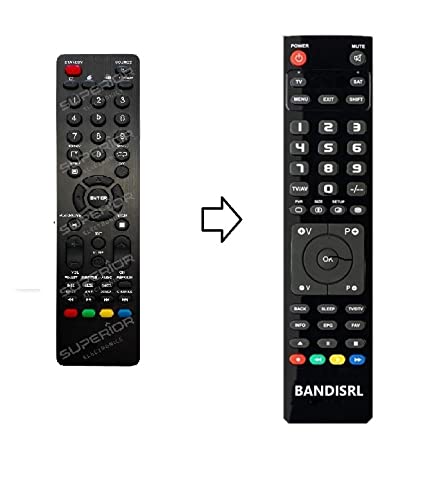
Figura 1: The Remote compatible remote control. This image displays the layout of the buttons and the overall design of the remote, ready for use with your Nordmende TV.
Instrucțiuni de operare
To operate your Nordmende ND40S3000J SMART TV with this remote control, point the remote directly at the television's infrared receiver. Ensure there are no obstructions between the remote and the TV.
- Buton de alimentare: Apăsați pentru a porni sau opri televizorul.
- Volum sus/jos: Reglează volumul audio.
- Canal sus/jos: Schimbă canalele TV secvențial.
- Butoane numerice (0-9): Selectați direct canalele TV.
- Butoane de navigare (taste săgeată, OK): Navigați prin meniuri și selectați opțiuni.
- Butoane Smart TV: Access specific Smart TV functions or applications (e.g., Home, Apps, Netflix, YouTube, etc., depending on the remote's layout and TV's features).
- Buton mut: Dezactivează sunetul televizorului.
- Buton sursă/intrare: Parcurge ciclic sursele de intrare disponibile (HDMI, AV etc.).
Refer to your Nordmende TV's original user manual for specific details on its menu structure and Smart TV functionalities.
Întreţinere
Curățarea telecomenzii
Pentru a curăța telecomanda, folosiți o cârpă moale și uscată. Pentru murdărie persistentă, ștergeți ușorampen the cloth with water. Do not use abrasive cleaners, alcohol, or solvents, as these can damage the remote's surface and internal components.
Înlocuirea bateriei
Replace batteries when the remote control's response becomes sluggish or stops working. Always replace both batteries simultaneously with new alkaline batteries. Dispose of used batteries according to local regulations.
Depozitare
Depozitați telecomanda într-un loc răcoros și uscat, ferit de lumina directă a soarelui și de temperaturi extreme. Dacă telecomanda nu va fi utilizată pentru o perioadă lungă de timp, este recomandabil să scoateți bateriile pentru a preveni scurgerile.
Depanare
- Telecomanda nu funcționează:
- Verificați dacă bateriile sunt introduse corect, respectând polaritatea (+/-).
- Replace the batteries with new alkaline batteries.
- Ensure there are no obstructions between the remote control and the TV's infrared receiver.
- Asigurați-vă că îndreptați telecomanda direct spre televizor.
- Verificați dacă televizorul este pornit.
- Some buttons are not responding:
- This remote is designed for the Nordmende ND40S3000J SMART TV. If you are using it with a different model, some advanced functions may not be compatible.
- Ensure the buttons are clean and free from debris.
- TV responds intermittently:
- Bateriile pot fi descărcate; înlocuiți-le.
- Ensure a clear line of sight to the TV's infrared sensor.
- Avoid strong light sources (like direct sunlight) that might interfere with the infrared signal.
If troubleshooting steps do not resolve the issue, please refer to the Support section.
Specificații
| Marca: | Remote (Manufacturer: Bandisrl) |
| Dispozitive compatibile: | Nordmende ND40S3000J SMART Television |
| Tehnologie de conectivitate: | infraroșu (IR) |
| Caracteristica speciala: | Nu este necesară programarea |
| Tip baterie: | Alcalin |
| Baterii incluse: | Nu |
| Culoare: | Negru |
| Număr de butoane: | 25 |
| Tipul controlerului: | Buton de control |
Garanție și suport
Informații despre garanție
Specific warranty details for this compatible remote control are not provided in this manual. Please refer to the purchase documentation or contact the seller/manufacturer (Bandisrl) for information regarding warranty coverage and terms.
Asistență pentru clienți
For further assistance, technical support, or inquiries regarding compatibility with other TV models, please contact the manufacturer, Bandisrl. Contact information can typically be found on the product packaging or the seller's website-ul.
If you own a different TV model than the Nordmende ND40S3000J SMART, it is recommended to contact Bandisrl to confirm compatibility before purchase or use.