
ARMODD Squarz 9 Pro Gold
Manual de utilizare pentru ceasul inteligent ARMODD Squarz 9 Pro
Model: Squarz 9 Pro Gold
Introducere
Welcome to the user manual for your new ARMODD Squarz 9 Pro Smart Watch. This guide provides comprehensive instructions on how to set up, operate, and maintain your smartwatch, ensuring you get the most out of its advanced features. The ARMODD Squarz 9 Pro is designed for both men and women, featuring a vibrant 1.72-inch touch screen, IP68 waterproofing, and a wide array of health and fitness tracking capabilities.
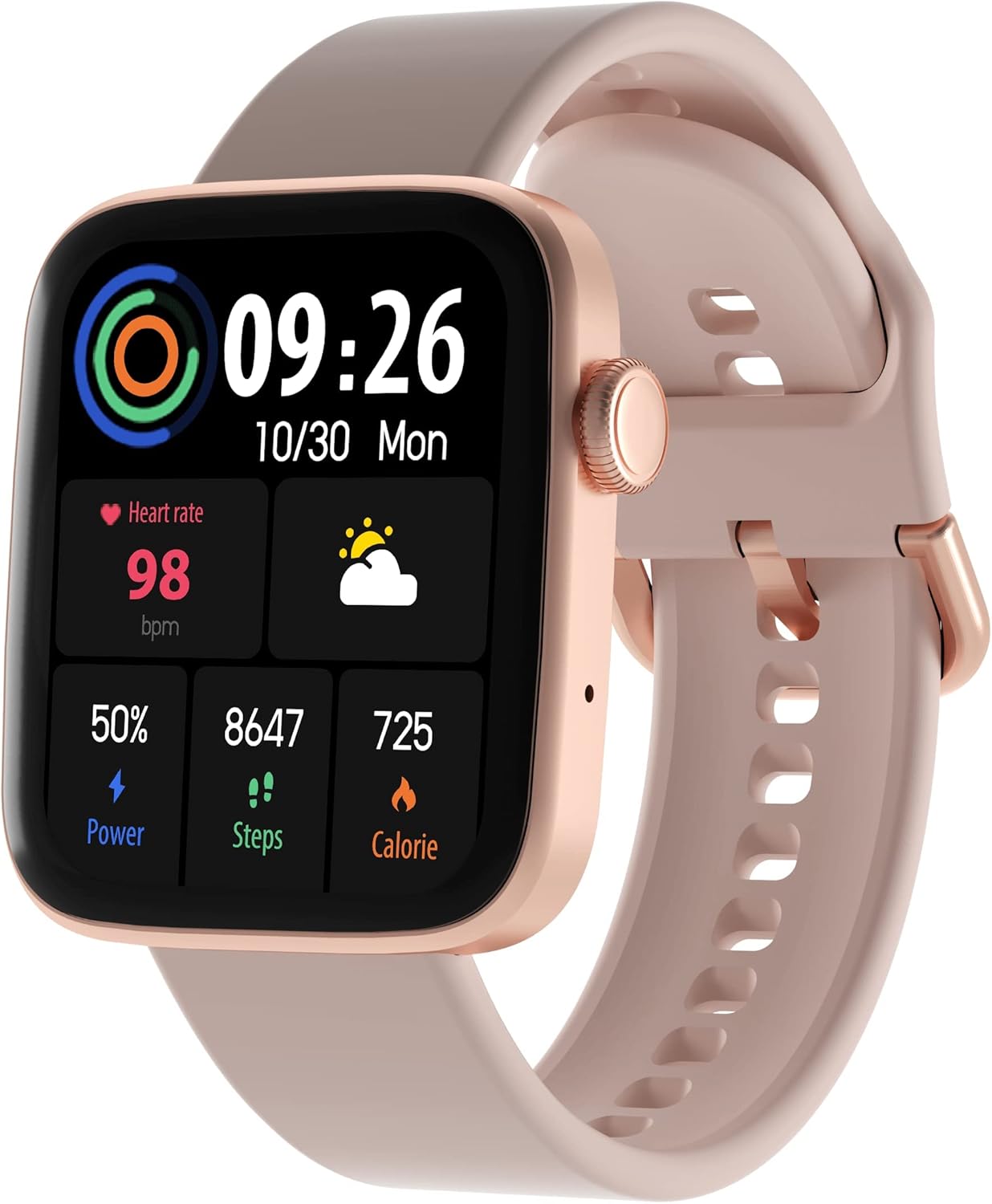
Figure 1: ARMODD Squarz 9 Pro Smart Watch with its main display showing various metrics.
Înființat
1. Încărcarea ceasului inteligent
Before first use, fully charge your ARMODD Squarz 9 Pro Smart Watch.
- Conectați cablul de încărcare la portul de încărcare de pe spatele ceasului.
- Conectați capătul USB al cablului la un adaptor de alimentare USB standard (se recomandă 5V/1A) sau la portul USB al unui computer.
- The watch display will show a charging indicator. A full charge typically takes about 2 hours.
2. Împerecherea cu smartphone-ul
To unlock all features and synchronize data, pair your smartwatch with the dedicated mobile application.
- Descărcați aplicația: Caută the "WearPro" app (or the app specified in your watch's quick start guide) on the App Store (iOS) or Google Play Store (Android).
- Activați Bluetooth: Asigurați-vă că Bluetooth este activat pe smartphone-ul dvs.
- Deschideți aplicația: Lansați aplicația descărcată și urmați instrucțiunile de pe ecran pentru a crea un cont sau a vă conecta.
- Adăugați dispozitiv: In the app, navigate to the "Device" or "Add Device" section. The app will search for nearby Bluetooth devices.
- Selectați-vă ceasul: Select "ARMODD Squarz 9 Pro" from the list of found devices.
- Confirmați împerecherea: O solicitare de asociere poate apărea atât pe telefon, cât și pe ceas. Confirmați asocierea pe ambele dispozitive.
- Sincronizare: Odată asociat, ceasul va sincroniza ora și datele cu telefonul.

Figura 2: Example of the mobile application interface for the ARMODD Squarz 9 Pro.
Instrucțiuni de operare
Navigare de bază
- Touch screen: Glisați stânga/dreapta, în sus/jos pentru a naviga prin meniuri și funcții. Atingeți pentru a selecta.
- Buton lateral/Coroană: Press the side button to wake the screen, return to the home screen, or access the main menu. Rotate the crown to scroll through options or change watch faces.
Personalizarea cadranelor ceasului
The ARMODD Squarz 9 Pro offers over 100 watch faces and the ability to upload your own photos.
- La ceas: From the home screen, long-press the display to enter watch face selection mode. Swipe left/right to browse pre-installed faces and tap to select.
- Prin aplicație: Open the mobile app, go to the "Watch Faces" or "Dial Market" section. Browse and download new watch faces, or select an image from your phone's gallery to set as a custom watch face.

Figure 3: The smartwatch displaying a customizable watch face.
Apelarea Bluetooth
Make and receive calls directly from your smartwatch when connected to your smartphone via Bluetooth.
- Ensure your watch is connected to your phone's Bluetooth.
- Access the "Phone" or "Dialer" function on your watch.
- You can dial numbers directly or access your phone's contacts/call history through the watch.
- Apelurile primite vor fi afișate pe ceas, permițându-vă să le răspundeți sau să le respingeți.

Figure 4: The smartwatch displaying the Bluetooth calling function.
Monitorizarea sănătății
The watch monitors various health metrics to help you stay informed about your well-being.
- Ritmul cardiac: Access the heart rate monitor function on the watch to measure your current heart rate. Continuous monitoring can be enabled via the app.
- Urmărirea somnului: Wear the watch to bed to automatically track your sleep patterns, including deep sleep, light sleep, and awake times. View rapoarte detaliate în aplicație.
- Blood Pressure & Blood Oxygen (SpO2): The watch can estimate blood pressure and blood oxygen levels. For medical accuracy, consult professional medical devices.

Figure 5: Heart rate monitoring feature in action.
Moduri sportive și monitorizare a activității
Track your workouts and daily activity with multiple sports modes and a built-in pedometer.
- Pedometru: Ceasul numără automat pașii, distanța și caloriile arse pe parcursul zilei.
- Moduri sportive: Select from various sports modes (e.g., running, walking, cycling) to get real-time data during your activity.
- Sincronizarea datelor: All activity data is synchronized with the mobile app for detailed analysis and historical records.

Figure 6: Tracking sports activity with the smartwatch.
Notificări
Receive notifications from your smartphone directly on your watch.
- Enable app notifications in your phone's settings and within the smartwatch app.
- The watch will vibrate and display incoming calls, messages, and app alerts.
Întreţinere
Curățarea ceasului inteligent
Curățarea regulată ajută la menținerea aspectului și funcționalității ceasului.
- Ștergeți ecranul și carcasa ceasului cu o lavetă moale, fără scame.
- Pentru pete încăpățânate, ușor dampClătiți cârpa cu apă. Evitați utilizarea substanțelor chimice dure sau a materialelor abrazive.
- Curățați periodic contactele de încărcare pentru a asigura o încărcare corectă.
Rezistență la apă (IP68)
The ARMODD Squarz 9 Pro is IP68 waterproof, meaning it is resistant to dust and can withstand immersion in water up to 1.5 meters for up to 30 minutes.
- Este potrivit pentru utilizare zilnică, cum ar fi spălarea mâinilor, ploaie și înot superficial.
- Evitați apa fierbinte, aburul sau imersiunea prelungită în ape adânci.
- Nu acționați butoanele ceasului sub apă.
- După expunerea la apă, ștergeți ceasul înainte de încărcare.
Depanare
| Problemă | Cauză/Soluție posibilă |
|---|---|
| Ceasul nu pornește | Este posibil ca bateria să fie descărcată. Încărcați ceasul timp de cel puțin 30 de minute. |
| Nu se poate conecta cu smartphone-ul |
|
| Date inexacte despre sănătate |
|
| Notificări nu au primit |
|
| Durată scurtă de viață a bateriei |
|
Specificații
| Caracteristică | Detaliu |
|---|---|
| Numele modelului | Squarz 9 Pro Gold |
| Marca | ARMODD |
| Dimensiunea afișajului | 1.72 inchi |
| Tehnologia de conectivitate | Bluetooth |
| Rezistenta la apa | IP68 |
| Caracteristici speciale | Time Display, Pedometer, Alarm Clock, Heart Rate Monitor, Sleep Monitor, Bluetooth Calling |
| Dispozitive compatibile | Smartphone (iOS / Android) |
| Baterie | 1 baterie litiu-ion (inclusă) |
Garanție și suport
For warranty information and customer support, please refer to the documentation included with your purchase or visit the official ARMODD website-ul.
Ask a question about this manual
Ask about setup, troubleshooting, compatibility, parts, safety, or missing instructions. Manuals+ will review the question and use this page’s manual context to help answer it.