
ELEFOCUS RC-815S, TX-8030, RC-816S, RC-903S, RC-904S, TX-8160, TX-8050, TX-8140
ELEFOCUS Replacement Remote Control User Manual
For Onkyo RC-815S, TX-8030, RC-816S, RC-903S, RC-904S, TX-8160, TX-8050, TX-8140 Network Audio/Video AV Stereo Receivers
Introducere
This manual provides essential information for the proper use and maintenance of your ELEFOCUS replacement remote control. This remote is designed as a direct replacement for various Onkyo Network Audio/Video AV Stereo Receivers, including models RC-815S, TX-8030, RC-816S, RC-903S, RC-904S, TX-8160, TX-8050, and TX-8140.
Please note that this is a replacement item and while it functions out of the box with compatible models, some advanced or specific functions of your original remote may not be fully supported. No complex programming is required; simply insert batteries to begin use.
Înființat
1. Instalarea bateriei
Telecomanda necesită două (2) baterii AAA (nu sunt incluse). Urmați acești pași pentru a le instala:
- Localizați compartimentul bateriei de pe spatele telecomenzii.
- Apăsați pe clapetă și glisați capacul bateriei în jos pentru a-l deschide.
- Introduceți două baterii AAA, asigurându-vă că bornele pozitive (+) și negative (-) se aliniază corect cu marcajele din interiorul compartimentului.
- Glisați capacul bateriei înapoi în poziție până când se fixează cu un clic.
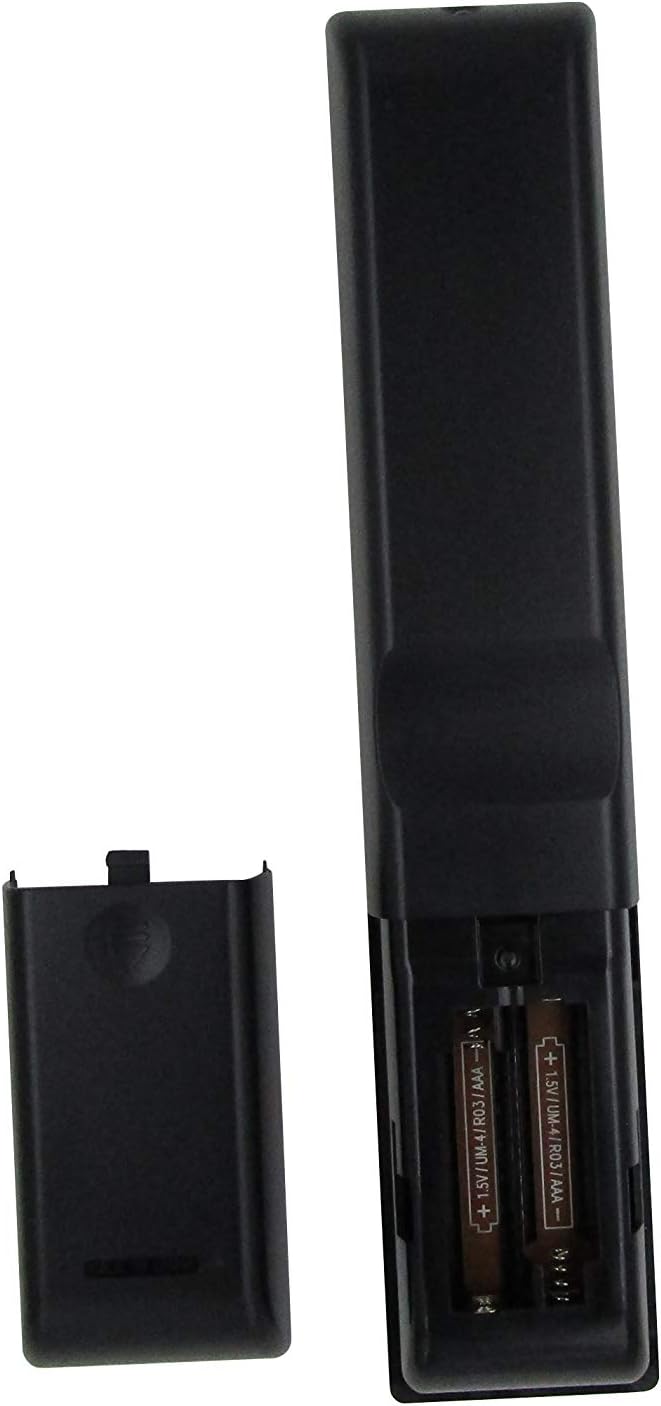
Figura 1: Compartiment pentru baterii cu baterii AAA. Asigurați polaritatea corectă la introducerea bateriilor.
Once batteries are installed, the remote is ready for use. No additional programming or setup is typically required for compatible Onkyo receiver models.
Instrucțiuni de operare
This replacement remote control provides essential functions for your Onkyo receiver. Point the remote directly at the receiver's infrared (IR) sensor for optimal performance.

Figura 2: Pesteview of the remote control layout.
Funcții cheie:
- Butonul de pornire (⏻): Pornește sau oprește receptorul.
- Input Selector Buttons (BD/DVD, CBL/SAT, PC, Game, TV/Tape, CD, Phono, Tuner, NET, Bluetooth): Selects the desired audio/video input source.
- Volum sus/jos (▲ / ▼): Reglează nivelul volumului principal.
- Dezactivare: Dezactivează sau activează sunetul ieșirii audio.
- Tastatură de navigare (Sus, Jos, Stânga, Dreapta, Enter): Used to navigate menus and confirm selections on your receiver's display.
- Meniu: Accesează meniul principal al receptorului.
- Înființat: Enters the setup menu for configuration.
- Reveni: Revine la meniul sau ecranul anterior.
- Audio: Cycles through audio modes or settings.
- Playback Controls (Rewind, Play/Pause, Fast Forward, Stop, Previous Track, Play, Next Track): Controls media playback for connected devices.
- Repeta: Comută modul de redare repetată.
- Aleatoriu: Toggles random/shuffle playback mode.
- Difuzor A/B: Selects speaker output groups.
- Tastatură numerică (0-9): For direct input of numbers, such as radio frequencies or track numbers.
- Caps: Functionality may vary by receiver model.
- > 10: For entering numbers greater than 9 on some systems.
- D.TUN: Direct tuning for radio.
- Afişa: Changes display information on the receiver.
- variator: Reglează luminozitatea afișajului receptorului.
- Dormi: Sets a sleep timer for the receiver.
- CLR: Șterge intrarea sau selecția curentă.
Notă importantă:
As a replacement remote, some advanced or specific functions present on your original Onkyo remote may not be replicated or fully functional. This remote is designed to cover the primary and most commonly used features.
Întreţinere
1. Înlocuirea bateriei
Înlocuiți bateriile când răspunsul telecomenzii devine lent sau nu mai funcționează. Înlocuiți întotdeauna ambele baterii simultan cu baterii AAA noi. Nu amestecați baterii vechi cu baterii noi sau baterii de tipuri diferite.
2. Curatenie
Pentru a curăța telecomanda, folosiți o lavetă moale și uscată. Pentru murdăria persistentă, ștergeți ușorampen the cloth with water or a mild, non-abrasive cleaner. Do not use harsh chemicals, solvents, or abrasive cleaning pads, as these can damage the remote's surface or internal components.
3. Depozitare
When not in use for extended periods, it is recommended to remove the batteries to prevent leakage, which can damage the remote. Store the remote in a cool, dry place away from direct sunlight and extreme temperatures.
Depanare
| Problemă | Cauza posibila | Soluţie |
|---|---|---|
| Telecomanda nu funcționează deloc. |
|
|
| Unele funcții nu funcționează. |
|
|
| Telecomanda funcționează intermitent. |
|
|
If your specific Onkyo receiver model is not listed in the product title (RC-815S, TX-8030, RC-816S, RC-903S, RC-904S, TX-8160, TX-8050, TX-8140), this remote may not be compatible. Please verify compatibility before purchase.
Specificații
- Marca: ELEFOCUS
- Dispozitive compatibile: Onkyo Network Audio/Video AV Stereo Receivers (Models: RC-815S, TX-8030, RC-816S, RC-903S, RC-904S, TX-8160, TX-8050, TX-8140)
- Tehnologie de conectivitate: infraroșu (IR)
- Sursa de alimentare: 2 x baterii AAA (nu sunt incluse)
- Caracteristica speciala: Design ergonomic
- Numărul maxim de dispozitive acceptate: 1 (specific Onkyo receiver)
Informații despre garanție
Specific warranty details for this ELEFOCUS replacement remote control are not provided in the product information. Please refer to the seller's return policy or contact the seller directly for information regarding warranty coverage and terms.
Asistență pentru clienți
For further assistance or inquiries regarding your ELEFOCUS replacement remote control, please contact the seller directly through the platform where the purchase was made. As this is a third-party replacement product, direct manufacturer support may not be available.
For general information about your Onkyo receiver, please refer to the original user manual provided with your receiver or visit the official Onkyo support website-ul.
Produs suplimentar Views

Figura 3: Înclinat view a telecomenzii.

Figura 4: Close-up of the upper section of the remote, showing input and media controls.
Videoclipuri oficiale despre produse
No official product videos from the seller were provided for this item.
Ask a question about this manual
Ask about setup, troubleshooting, compatibility, parts, safety, or missing instructions. Manuals+ will review the question and use this page’s manual context to help answer it.