
Ipro EPro A25
Manual de utilizare pentru telefonul mobil Ipro EPro A25
Model: EPro A25
1. Introducere
This manual provides essential information for the safe and efficient use of your Ipro EPro A25 cell phone. Please read it thoroughly before operating your device.
The Ipro EPro A25 is a compact cellular phone designed for daily use, featuring dual SIM card slots, a memory card slot for expanded storage, and an integrated camera to capture moments.
2. Conținutul pachetului
Vă rugăm să verificați pachetul pentru următoarele articole:
- Ipro EPro A25 Cell Phone
- Baterie
- Încărcător
- Manual de utilizare (acest document)
- (Other accessories may vary by region)
3. Dispozitiv Dispozitiv
Familiarize yourself with the physical components of your Ipro EPro A25 phone.
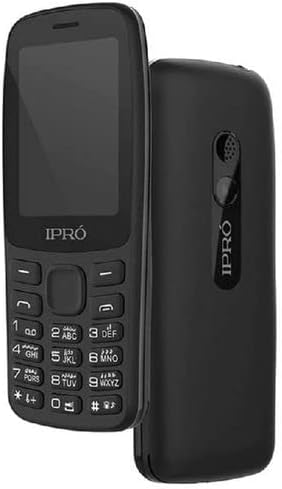
Figura 3.1: Fata si spate view of the Ipro EPro A25 cell phone. The front displays the screen and keypad, while the rear shows the speaker and IPRO branding.
- Faţă: Display screen, navigation keys, alphanumeric keypad.
- Spate: Speaker, IPRO branding.
- Laturi: (Implied, but not visible in image) Charging port, headphone jack.
4. Configurare
4.1. Instalarea cartelei (cartelelor) SIM
Your phone supports dual SIM cards. Ensure the phone is powered off before installation.
- Scoateți capacul din spate al telefonului.
- Scoateți cu grijă bateria.
- Insert the SIM card(s) into the designated slot(s) with the gold contacts facing down.
- Ensure the SIM card(s) are securely seated.
4.2. Instalarea cardului de memorie
To expand storage for photos and other files, install a memory card (MicroSD).
- With the back cover and battery removed, locate the memory card slot.
- Introduceți cardul de memorie în slot până când se fixează cu un clic.
4.3. Installing the Battery and Charging
- Introduceți bateria în compartimentul său, aliniind contactele.
- Puneți la loc capacul din spate.
- Connect the charger to the phone's charging port and plug it into a power outlet.
- Lăsați telefonul să se încarce complet înainte de prima utilizare.
5. Operare de bază
5.1. Pornire/Oprire
- Pentru a porni: Press and hold the Power key (usually the red 'End Call' key) until the screen lights up.
- Pentru a opri: Press and hold the Power key until the power-off options appear, then select 'Power Off'.
5.2. Efectuarea și primirea apelurilor
- Pentru a efectua un apel: Enter the phone number using the keypad and press the 'Call' key (usually the green 'Send Call' key).
- Pentru a primi un apel: Press the 'Call' key when the phone rings.
- Pentru a încheia un apel: Press the 'End Call' key.
5.3. Mesagerie (SMS)
- Navigați la meniul „Mesaje”.
- Select 'Write Message' or 'New Message'.
- Introduceți mesajul folosind tastatura.
- Enter the recipient's number or select from contacts, then send.
5.4. Utilizarea camerei
- Accesați aplicația camerei din meniul principal.
- Încadrează-ți fotografia folosind ecranul.
- Apăsați tasta desemnată „Captură” sau „OK” pentru a face o fotografie.
- Photos are saved to the phone's memory or the installed memory card.
6. Conectivitate
6.1. Bluetooth
The phone supports Bluetooth for wireless connection to compatible devices like headsets or other phones.
- Go to 'Settings' > 'Connectivity' > 'Bluetooth'.
- Activați Bluetooth-ul.
- Caută dispozitivele disponibile și asociați-le cu dispozitivul dorit.
6.2. Conexiune USB
Conectați-vă telefonul la un computer folosind un cablu USB pentru a transfera files sau încărcați dispozitivul.
- Connect one end of the USB cable to the phone's USB port and the other to your computer.
- The phone may prompt you to select a connection mode (e.g., Mass Storage, Charge Only).
7. Întreținere și îngrijire
- Păstrați telefonul uscat. Umiditatea poate deteriora circuitele electronice.
- Evitați temperaturile extreme. Temperaturile ridicate pot scurta durata de viață a dispozitivelor electronice și pot deforma sau topi anumite materiale plastice.
- Nu utilizați substanțe chimice dure, solvenți de curățare sau detergenți puternici pentru a curăța telefonul.
- Folosiți o lavetă moale și uscată pentru a curăța suprafața telefonului.
- Manevrați telefonul cu grijă. Nu îl scăpați, nu îl loviți și nu îl scuturați.
8. Depanare
| Problemă | Soluție posibilă |
|---|---|
| Telefonul nu pornește. | Asigurați-vă că bateria este instalată și încărcată corect. Încercați să încărcați telefonul timp de cel puțin 30 de minute. |
| Nu pot efectua sau primi apeluri. | Check if the SIM card is properly inserted. Verify network signal strength. Contact your service provider if the issue persists. |
| Calitate slabă a imaginii de la cameră. | Asigurați-vă că obiectivul camerei este curat și fără pete. Verificați condițiile de iluminare. |
| Cardul de memorie nu a fost detectat. | Reinsert the memory card. Ensure it is compatible with the phone. Try formatting the card (this will erase all data). |
9. Specificații
| Caracteristică | Detaliu |
|---|---|
| Model | EPro A25 |
| Producător | Ipro |
| Dimensiunea ecranului | 2.4 inchi |
| Tehnologia celulară | 2G |
| Tehnologia de conectivitate | Bluetooth, USB, Wi-Fi |
| Culoare | Negru |
| Număr de sloturi pentru cartela SIM | SIM dual |
| Factor de formă | Bar |
| Descrierea camerei | Spate |
| Data primului disponibil | 19 aprilie 2022 |
10. Garanție și asistență
For warranty information and customer support, please refer to the warranty card included with your product or contact your retailer. Keep your purchase receipt as proof of purchase.
Ask a question about this manual
Ask about setup, troubleshooting, compatibility, parts, safety, or missing instructions. Manuals+ will review the question and use this page’s manual context to help answer it.