
Introducere
This manual provides essential information for the safe installation, operation, and maintenance of your Eglo connect.z Smart Home LED Ceiling Light Totari-Z. Please read these instructions carefully before installation and retain them for future reference.
The Eglo connect.z Totari-Z is a smart home LED ceiling light with a white metal body and a round illuminated surface made of white plastic with a sparkling crystal effect. It offers adjustable light color, dimmable functionality, and can be controlled via Bluetooth, app, and compatible voice assistants using ZigBee 3.0 technology.

Image: The Eglo connect.z Totari-Z LED Ceiling Light, showcasing its round design and illuminated surface.
Informații de siguranță
For detailed safety instructions, please refer to the official safety document provided by Eglo. It is crucial to follow all safety guidelines during installation and operation to prevent accidents or damage.
Conținutul pachetului
Pachetul produsului include:
- Eglo connect.z Smart Home LED Ceiling Light Totari-Z
- Manual de utilizare
Please ensure all components are present and undamaged before proceeding with installation.
Configurare și instalare
The Eglo connect.z Totari-Z ceiling light requires assembly and ceiling mounting. Professional installation is recommended for electrical connections.
Instalare fizică
- Preparare: Asigurați-vă că alimentarea cu energie electrică a zonei de instalare este întreruptă de la întrerupătorul principal.
- Montare: Securely attach the light fixture to the ceiling using appropriate hardware.
- Cablaj: Connect the electrical wires according to local electrical codes and the wiring diagram provided in the full safety manual.
- Asamblare: Attach the light diffuser and any decorative elements to the main fixture.
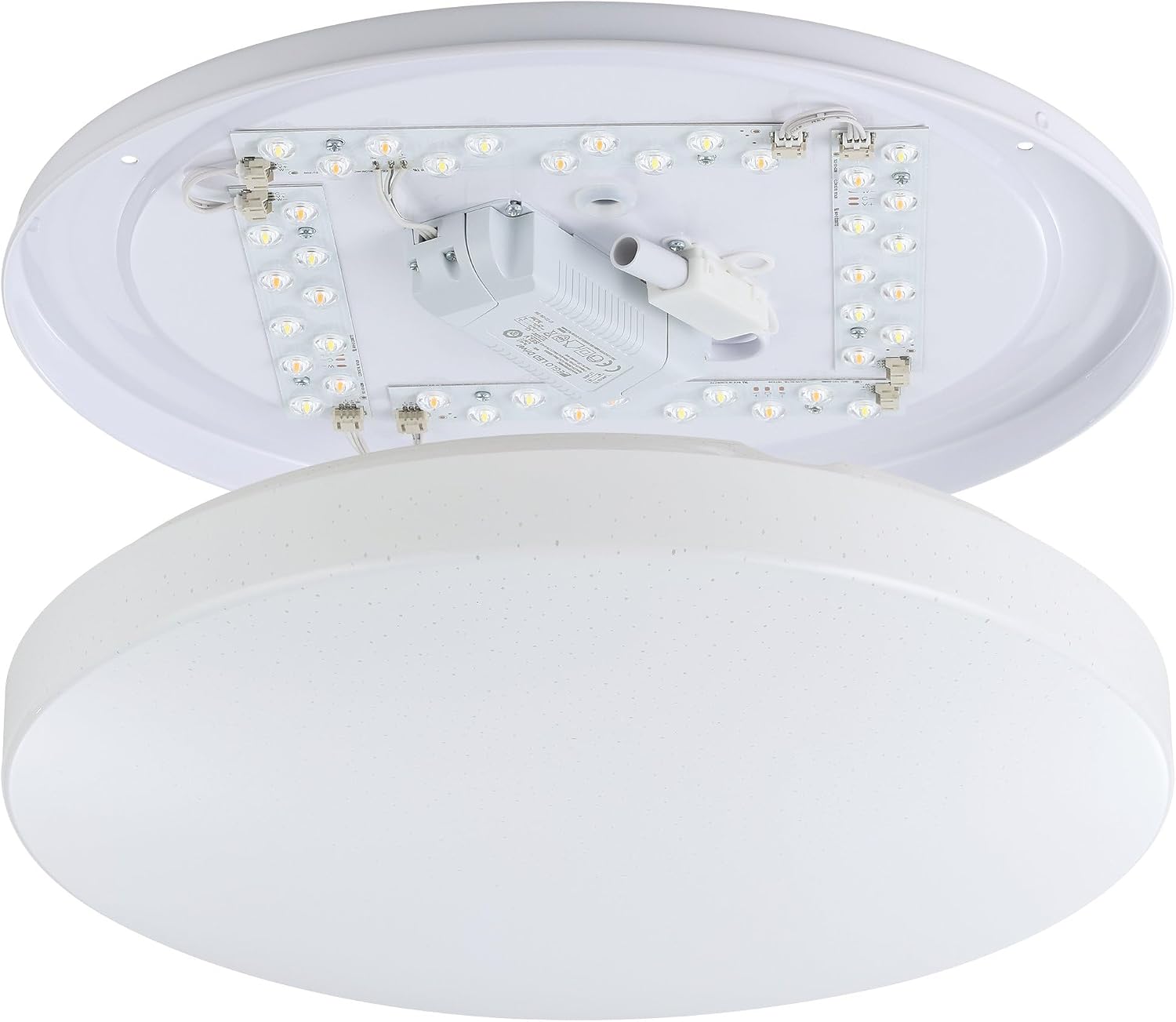
Imagine: Internă view of the Eglo connect.z Totari-Z ceiling light, showing LED strips and wiring components. This illustrates the internal structure for installation.

Image: Visual guide illustrating easy installation and setup steps for Eglo connect.z smart lighting, including app integration.
Integrare Smart Home
The light can be controlled via the AwoX Home Control app, a separate connect.z remote control (EGLO 99099, sold separately), or compatible voice assistants through ZigBee 3.0.
For App Control:
- Download the free AwoX Home Control app (available for iOS 13+ and Android 8+).
- Follow the in-app instructions to pair your Totari-Z light.
For Voice Control (e.g., Amazon Alexa):
- Ensure you have a compatible voice assistant device with an integrated ZigBee bridge (e.g., Amazon Echo or Echo Plus).
- Follow the instructions provided by your voice assistant platform to discover and connect new devices.
- The Eglo connect.z products are compatible with other ZigBee products.

Image: A compatibility chart showing various Amazon Alexa (Echo 4th Gen, Echo 1st-3rd Gen, Echo Flex, Echo Dot, Echo Show) and Google Home (Nest Audio, Home mini, Nest mini, Nest Hub) devices and their compatibility with Eglo connect.z lights, indicating whether a WiFi + Zigbee Gateway is required.
Instrucțiuni de operare
The Eglo connect.z Totari-Z offers a range of lighting options and smart features.
Basic Functions (via App or Remote Control)
- intensității luminoase: Reglați luminozitatea luminii.
- Reglarea temperaturii culorii: Change the light color from warm white (2700 Kelvin) to neutral white and cool white (up to 6500 Kelvin).
- Selecție culoare RGB: Choose from a wide selection of RGB colors to set the mood.
- Saving Favorites: Salvați setările de lumină preferate pentru acces rapid.
- Grouping Lights: Create groups of lights for synchronized control.

Image: A diagram illustrating the various functionalities of Eglo connect.z smart lights, including timer, dimming, color temperature change, RGB selection, night light, favorite modes, disco function, light alarm, presence simulation, and light group creation. It also shows the AwoX APP interface and the optional connect.z remote control (EGLO 99099).
Advanced App Features (AwoX Home Control App)
- Cronometru: Programați lumina să se aprindă sau să se stingă la anumite ore.
- Lumină de noapte: Activate a soft, low-intensity light for nighttime.
- Simulare amurg: Mimic the natural progression of light from dusk to dawn.
- Alarmă luminoasă: Folosește lumina pentru a te trezi ușor.
- Simulare prezență: Make it appear as if someone is home by turning lights on and off randomly.
- Modul Disco: Dynamic light effects for entertainment.
Control vocal
Once integrated with a compatible voice assistant (e.g., Amazon Alexa), you can control the light using voice commands. Exampfișierele includ:
- „Alexa, aprinde lumina de tavan.”
- "Alexa, set the ceiling light to warm white."
- „Alexa, reduce intensitatea luminii de tavan la 50%.”
- "Alexa, change the ceiling light to blue."

Image: This image displays various smart home devices like Amazon Echo, Google Nest, and a tablet, illustrating the voice control capabilities of Eglo connect.z smart lights. It highlights voice commands and remote control options for smart home integration.
Întreţinere
To maintain the appearance and functionality of your Eglo connect.z Totari-Z ceiling light:
- curatenie: Disconnect power before cleaning. Use a soft, dry cloth to wipe the surface. Do not use abrasive cleaners or solvents.
- LED-uri: The integrated LED light source is not user-replaceable. If the LEDs fail, the entire fixture may need to be replaced.
Depanare
| Problemă | Cauza posibila | Soluţie |
|---|---|---|
| Lumina nu se aprinde. | Fără curent, conexiune slăbită, întrerupător defect. | Check power supply, ensure connections are secure, test the switch. |
| Cannot connect to AwoX Home Control app. | Bluetooth/Wi-Fi off, light not in pairing mode, app issues. | Ensure Bluetooth/Wi-Fi is enabled on your device. Power cycle the light. Restart the app. Refer to the app's help section for pairing instructions. |
| Comanda vocală (Alexa/Google Home) nu funcționează. | No ZigBee bridge, incorrect setup, network issues. | Verify your voice assistant device has an integrated ZigBee bridge or is connected to one. Re-run device discovery in your voice assistant app. Check your home Wi-Fi network. |
| Light color/dimming not responding. | Connectivity issue, remote battery low, app glitch. | Check app/remote connection. Replace remote batteries if applicable. Power cycle the light. |
If problems persist, please contact Eglo customer support.
Specificații
| Caracteristică | Detaliu |
|---|---|
| Marca | Eglo |
| Numele modelului | TOTARI-Z |
| Numărul de model | 900001 |
| Dimensiuni (L x l x H) | 38L x 38W x 7H cm (Ø 38 cm) |
| Culoare | Alb |
| Material | Crystal, Metal, Plastic |
| Stil | Modern |
| Tip sursă de lumină | LED |
| Numărul de lumini | 4 |
| Putere | 4 x 4.8 Watt (Total 19.2W) |
| Flux luminos | 1900 lumens (2160 lm max) |
| Temperatura de culoare | 2700-6500 Kelvin (Warm White to Cool White) |
| Caracteristică de culoare | Selectarea culorilor RGB |
| Reglabil | Da |
| Protocol de conectivitate | Zigbee 3.0, Bluetooth |
| Metoda de control | Voice (Amazon Alexa), App (AwoX Home Control), Remote Control (optional) |
| Clasa de eficienta energetica | F |
| Tip de instalare | Montare pe tavan |
| Utilizare în interior/exterior | De interior |
| Asamblare necesară | Da |
| Țara de origine | China |

Image: Diagram showing the dimensions of the Eglo connect.z Totari-Z ceiling light: 38 cm (14.96 inches) diameter and 7 cm (2.76 inches) height.
garanție
Acest produs vine cu un Garanție de 2 an de la producătorVă rugăm să păstrați dovada achiziției pentru reclamațiile în garanție. Garanția acoperă defectele de materiale și de fabricație în condiții normale de utilizare.
Suport și Contact
For further assistance, technical support, or warranty inquiries, please contact Eglo customer service or visit their official website-ul.
- Eglo Official Store: Visit Eglo Store on Amazon
- Informații de siguranță: Descărcați informațiile de siguranță (PDF)