
1.view
The Nokia XR20 is a rugged 5G smartphone designed for durability and performance. This manual provides essential information for its setup, operation, and maintenance.

Imaginea 1.1: Față și spate view of the Nokia XR20 5G smartphone.
Caracteristici cheie:
- Design robust: MIL-STD-810H compliant, IP68 dust and water resistance, Corning Gorilla Glass Victus.
- Afişa: 6.67-inch FHD+ (1080x2400) display.
- Camera: 48MP main camera with 13MP ultrawide lens, 8MP front camera.
- Performanţă: Qualcomm Snapdragon 480 5G processor, 6GB RAM, 128GB internal storage (expandable up to 512GB with MicroSD).
- Conectivitate: 5G, Wi-Fi 6, Bluetooth 5.1, NFC, GPS.
- Baterie: 4630 mAh battery with 18W wired and 15W wireless charging support.
- Sistem de operare: Android 11 (upgradable to Android 14), with guaranteed OS upgrades and security updates.
2. Noțiuni introductive
2.1. Despachetarea și conținutul pachetului
Înainte de a începe, asigurați-vă că toate articolele sunt prezente în pachet:

Image 2.1: Contents of the Nokia XR20 package, including the phone, power adapter, USB-C cable, SIM tray ejector, and screen protector.
- Nokia XR20 Smartphone
- Adaptor de alimentare
- Cablu USB de tip C
- Ejector tavă SIM
- Protector de ecran (preaplicat sau inclus)
2.2. Introducerea cardurilor SIM și MicroSD
- Locate the SIM/MicroSD card tray on the side of the phone.
- Introduceți instrumentul de ejectare a tăvii SIM în orificiul mic de lângă tavă și apăsați ferm până când tava iese afară.
- Place your Nano-SIM card(s) and/or MicroSD card into the designated slots on the tray. Ensure the gold contacts face downwards. The Nokia XR20 supports Dual SIM functionality.
- Împingeți cu grijă tava înapoi în telefon până când se fixează în poziție cu un clic.
2.3. Încărcarea inițială și pornirea
- Connect the USB Type-C cable to the phone's charging port and the power adapter. Plug the adapter into a wall outlet.
- Allow the phone to charge for at least 30 minutes before first use, or until the battery indicator shows sufficient charge.
- To power on, press and hold the Power button (located on the side) until the Nokia logo appears.
2.4. Compatibilitatea operatorilor
The Nokia XR20 is an unlocked device compatible with all GSM carriers, including AT&T, Boost, Cricket, H2O Wireless, Metro, Net10, Simple Mobile, T-Mobile, and Tracfone. It is not compatible with Verizon. Please confirm 5G network availability with your preferred carrier.

Image 2.2: The Nokia XR20 is compatible with various GSM carriers.
3. Using Your Phone
3.1. Navigare de bază
The Nokia XR20 runs on Android 11 (upgradable). Navigate using on-screen gestures or the navigation bar at the bottom of the display.
- Ecranul principal: Glisați la stânga sau la dreapta pentru a accesa diferite ecrane de pornire.
- Sertarul de aplicații: Glisați în sus din partea de jos a ecranului la view toate aplicațiile instalate.
- Notificări și setări rapide: Glisează în jos din partea de sus a ecranului pentru a accesa notificările și setările rapide.
3.2. Funcțiile camerei
The Nokia XR20 features a dual rear camera system (48MP main, 13MP ultrawide) and an 8MP front camera.

Image 3.1: The Nokia XR20 features a 48MP dual camera system with ZEISS optics.
- Deschide aplicația Cameră din ecranul de pornire sau din sertarul de aplicații.
- Atingeți butonul declanșator pentru a face o fotografie.
- Glisați la stânga sau la dreapta pe viewfinder to switch between photo, video, and other modes (e.g., Portrait, Night, Panorama).
- Atingeți pictograma de comutare a camerei pentru a comuta între camera din spate și cea frontală.
- Utilize the 13MP ultrawide lens for broader landscape shots or group photos.
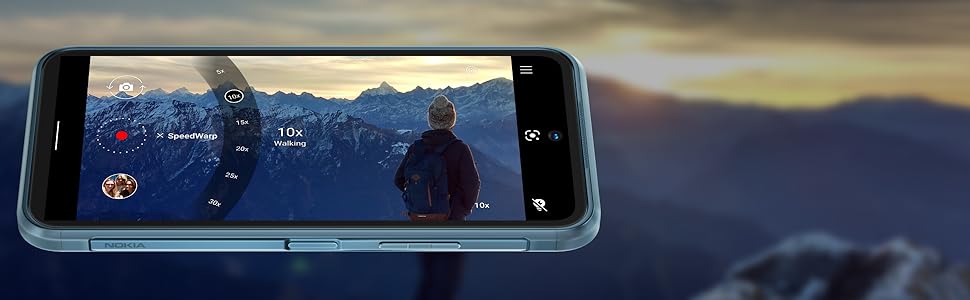
Image 3.2: The camera interface offers various modes and settings for capturing photos and videos.
3.3. Conectivitate 5G
The Nokia XR20 supports 5G networks, offering faster download and upload speeds where available. Ensure your SIM card and mobile plan support 5G.

Image 3.3: Experience superfast 5G connectivity for quick data transfers.
3.4. Asistent Google
Access Google Assistant by saying "Hey Google" or by long-pressing the dedicated Google Assistant button on the side of the device. Use it for voice commands, information retrieval, and smart home control.

Image 3.4: Google Assistant provides hands-free help and information.
3.5. Senzor de amprentă
The fingerprint sensor is integrated into the side power button for convenient and secure unlocking. To set it up, go to Setări > Securitate > Deblocare cu amprentă și urmați instrucțiunile de pe ecran.
4. Îngrijire și întreținere
4.1. Caracteristici de durabilitate
The Nokia XR20 is built to withstand challenging environments:
- Evaluare IP68: Oferă protecție împotriva pătrunderii prafului și imersiunii în apă până la 1.5 metri adâncime timp de 60 de minute.
- Conform cu standardul MIL-STD-810H: Tested against military standards for drops, temperature extremes, and other environmental factors.
- Corning Gorilla Glass Victus: The display is protected by the toughest Gorilla Glass available, offering enhanced scratch and drop resistance.

Image 4.1: The Nokia XR20 is designed to be water-resistant.
4.2. Curățarea dispozitivului
To clean your Nokia XR20, use a soft, lint-free cloth. For stubborn dirt or smudges, slightly dampen the cloth with water. Avoid using harsh chemicals, abrasive cleaners, or compressed air, as these can damage the device's protective coatings or seals.
4.3. Actualizări software
Nokia provides 2 years of OS upgrades and up to 4 years of monthly security updates for the XR20 to ensure your device remains secure and up-to-date with the latest features.

Image 4.2: Regular software updates ensure your phone remains secure and performs optimally.
4.4. Îngrijirea bateriei
The Nokia XR20 is equipped with a 4630 mAh non-removable battery. To maximize battery life:
- Evitați temperaturile extreme.
- Use the provided charger or a compatible 18W wired or 15W wireless charger.
- Optimize screen brightness and disable unnecessary features like GPS or Bluetooth when not in use.
5. Depanare
This section addresses common issues you might encounter with your Nokia XR20.
5.1. Dispozitivul nu pornește
- Asigurați-vă că bateria este încărcată. Conectați telefonul la încărcător și așteptați câteva minute înainte de a încerca să îl porniți din nou.
- Apăsați și mențineți apăsat butonul de pornire timp de cel puțin 10-15 secunde pentru a efectua o repornire forțată.
5.2. Probleme de conectivitate la rețea
- Check if your SIM card is correctly inserted (refer to Section 2.2).
- Verify that your mobile data is enabled in Quick Settings or Setări > Rețea și internet > Rețea mobilă.
- Ensure your device is compatible with your carrier (refer to Section 2.4).
- Reporniți telefonul.
5.3. Probleme de încărcare
- Asigurați-vă că cablul de încărcare și adaptorul sunt conectate corect atât la telefon, cât și la priză.
- Try using a different compatible USB-C cable and power adapter.
- Inspectați portul de încărcare pentru orice resturi sau daune.
5.4. Ecranul nu răspunde
- Efectuați o repornire forțată apăsând și ținând apăsat butonul de pornire timp de 10-15 secunde.
- Dacă problema persistă, contactați asistența pentru clienți.
6. Specificatii tehnice

Image 6.1: Physical dimensions and weight of the Nokia XR20.
| Caracteristică | Caietul de sarcini |
|---|---|
| Numărul de model | TA-1371 |
| Dimensiuni | 171.6 x 81.5 x 10.6 mm (6.76 x 3.21 x 0.42 inchi) |
| Greutate | 248 g (8.75 uncii) |
| Sistem de operare | Android 11 (upgrade la Android 14) |
| Procesor | Qualcomm SM4350 Snapdragon 480 5G (8 nm) Octa-core |
| RAM | 6 GB |
| Stocare internă | 128 GB |
| Stocare extensibilă | MicroSDXC up to 512 GB (uses shared SIM slot) |
| Afişa | 6.67 inches IPS LCD, 1080 x 2400 pixels (FHD+), 20:9 ratio, Corning Gorilla Glass Victus |
| Camera spate | 48 MP, f/1.8 (wide) + 13 MP, f/2.4 (ultrawide) with ZEISS optics |
| Cameră frontală | 8 MP, f/2.0 (obiectiv larg) |
| Baterie | Li-Po 4630 mAh, nedetașabilă |
| Încărcare | 18W wired, 15W wireless |
| Conectivitate | Wi-Fi 802.11 a/b/g/n/ac/6, Bluetooth 5.1, NFC, GPS (L1+L5), USB Type-C 3.0 |
| Senzori | Side-mounted Fingerprint, Accelerometer, Gyro, Proximity, Compass, Barometer |
| Durabilitate | IP68 dust/water resistant, MIL-STD-810H compliant, Corning Gorilla Glass Victus |
7. Garanție și asistență
7.1. Garanția producătorului
The Nokia XR20 comes with a manufacturer's warranty. Please refer to the warranty card included in your product packaging or visit the official Nokia webpentru termeni și condiții detaliate, inclusiv perioada de acoperire și procedurile de service.
7.2. Asistență pentru clienți
Pentru asistență suplimentară, asistență tehnică sau solicitări de service, vă rugăm să vizitați pagina oficială de asistență Nokia. website or contact their customer service helpline. Contact information can typically be found on the Nokia webpe site sau în documentația produsului dumneavoastră.