
Introducere
Welcome to your new Gembird GHS-U-5.1-01 USB 5.1 Surround Headset. This manual provides essential information for setup, operation, and maintenance to ensure optimal performance and an immersive audio experience.
Conținutul pachetului
Pachetul ar trebui să conțină următoarele articole:
- Gembird GHS-U-5.1-01 USB 5.1 Surround Headset

Image: Retail packaging for the Gembird GHS-U-5.1-01 USB 5.1 Surround Headset, showing the headset inside a clear window.
Produs terminatview
The Gembird GHS-U-5.1-01 is a USB headset designed for immersive audio experiences with 5.1 surround sound. It features an adjustable microphone, built-in volume control, comfortable ear pads, and an adjustable headband for extended use.
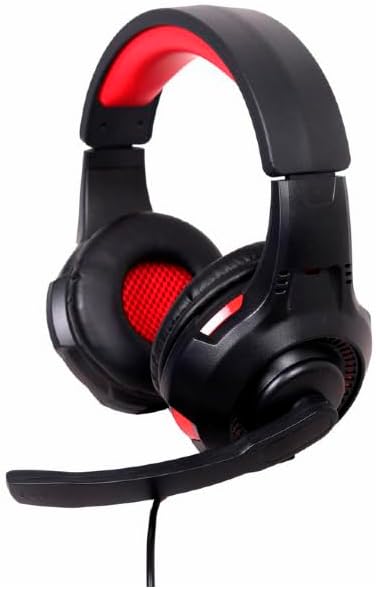
Imagine: Înclinată view of the Gembird GHS-U-5.1-01 USB 5.1 Surround Headset, showcasing its black and red design with the microphone boom extended.

Imagine: față view of the Gembird GHS-U-5.1-01 USB 5.1 Surround Headset, highlighting the adjustable headband and earcups.

Image: Close-up of the in-line control unit for the Gembird GHS-U-5.1-01 headset, showing volume up/down and microphone mute buttons.
Înființat
Conectarea setului cu cască
The Gembird GHS-U-5.1-01 headset connects via a standard USB port.
- Găsiți un port USB disponibil pe computer.
- Conectați conectorul USB al căștilor la portul USB.
- Sistemul dumneavoastră de operare ar trebui să detecteze și să instaleze automat driverele necesare. Acest proces poate dura câteva momente.
- Once installed, the headset will be ready for use as an audio input and output device.
Audio Settings Configuration
For optimal 5.1 surround sound experience, you may need to configure your computer's audio settings.
- Windows: Go to "Sound Settings" (right-click speaker icon in taskbar) > "Sound Control Panel" > "Playback" tab. Select the Gembird headset, click "Configure," and choose "5.1 Surround."
- MacOS: Go to "System Preferences" > "Sound" > "Output" tab. Select the Gembird headset.
Instrucțiuni de operare
Controlul volumului
The headset features an in-line remote control for easy volume adjustment.
- Utilizați „+” butonul pentru a crește volumul.
- Utilizați „-” butonul pentru a reduce volumul.
Utilizarea microfonului
The adjustable microphone boom allows for precise positioning.
- Position the microphone approximately 1-2 inches from your mouth for clear voice capture.
- Use the microphone mute button on the in-line remote to toggle the microphone on or off.
Ajustare confort
Adjust the headband to fit comfortably on your head. The ear pads are designed for extended use.
Întreţinere
To ensure the longevity and performance of your headset, follow these maintenance guidelines:
- curatenie: Folosiți o lavetă moale și uscată pentru a șterge setul cu cască. Nu utilizați substanțe chimice dure sau produse de curățare abrazive.
- Depozitare: Store the headset in a clean, dry place away from extreme temperatures.
- Îngrijirea cablului: Evitați îndoirile bruște sau tragerea excesivă a cablului USB pentru a preveni deteriorarea.
Depanare
Fără sunet sau microfonul nu funcționează
- Verificați conexiunea USB: Asigurați-vă că conectorul USB este introdus complet în port. Încercați un alt port USB.
- Verificați nivelurile de volum: Verify that the volume on the in-line control, your computer's system volume, and application-specific volumes are not muted or set too low.
- Verificați setările audio: Confirm that the Gembird headset is selected as the default playback and recording device in your computer's sound settings.
- Reporniți computerul: Sometimes a simple restart can resolve driver or software conflicts.
Probleme de calitate a sunetului
- Actualizare driver: Asigurați-vă că driverele sistemului de operare sunt actualizate.
- Calitatea sursei: Poor audio quality may stem from the audio source itself. Test with different audio files sau aplicații.
Specificații
| Numele modelului | GHS-U-5.1-01 |
| Conectivitate | USB cu fir |
| Factor de formă | La ureche |
| Culoare | Negru |
| Material | Aluminum (Enclosure) |
| Greutate | 0.4 kilograme |
| Caracteristici suplimentare | Adjustable microphone boom, Built-in volume control, Comfortable ear pads, Adjustable headband |
Informații despre garanție
This Gembird headset comes with a 24 Month Manufacturer Guarantee. Please retain your proof of purchase for warranty claims. For detailed warranty terms and conditions, refer to the documentation provided with your product or contact Gembird customer support.
Sprijin
If you encounter issues not covered in this manual or require further assistance, please visit the official Gembird website or contact their customer support for technical assistance.