
Launch CRP239
Manual de utilizare LAUNCH CRP239 PREMIUM CITITOARE DE CODURI
Model: CRP239
1. Introducere
The LAUNCH CRP239 is an intelligent and networkable automotive diagnostic tool designed for passenger cars. It offers comprehensive OBD II full functionality and rapid testing capabilities for four major vehicle systems: Engine, Automatic Transmission (A/T), Anti-lock Braking System (ABS), and Supplemental Restraint System (SRS). Additionally, the CRP239 includes advanced reset functions such as Oil Reset, Steering Angle Reset, Brake-Pad Reset, Battery Matching, Throttle Adaptation, and Diesel Particulate Filter (DPF) Regeneration, catering to the needs of professional technicians and DIY enthusiasts.
2. Informații de siguranță
Always observe the following safety precautions when operating the LAUNCH CRP239:
- Asigurați-vă că contactul vehiculului este oprit înainte de a conecta sau deconecta instrumentul de diagnosticare.
- Nu utilizați unealta în condiții de umiditate sau în apropierea lichidelor sau gazelor inflamabile.
- Purtați echipament individual de protecție adecvat, cum ar fi ochelari de protecție, atunci când lucrați la vehicule.
- Consultați manualul de service al vehiculului pentru proceduri specifice de diagnosticare și avertismente de siguranță.
- Keep the tool away from strong magnetic fields.
- Folosiți doar cablurile și accesoriile furnizate.
3. Conținutul pachetului
Verificați dacă toate articolele sunt prezente în colet:
- LAUNCH CRP239 Main Unit
- Cablu de diagnosticare OBD II
- Cablu USB
- Manual de utilizare
- Husă de transport

Figure 3.1: Contents of the LAUNCH CRP239 package, showing the diagnostic tool, cables, and storage case.
4. Produs terminatview
The LAUNCH CRP239 features a robust design with a 5.0-inch 720p touch screen for intuitive navigation. It includes physical buttons for common operations and a durable rubber exterior for protection.

Figura 4.1: Față view of the LAUNCH CRP239, highlighting the touch screen display and navigation buttons.
4.1. Componente
- Ecran tactil de 5.0 inci: High-resolution display for clear data presentation and touch input.
- Butoane de navigare: Directional pad, OK button, and Return button for menu navigation.
- Conector OBD II: Conector standard cu 16 pini pentru comunicarea cu vehiculul.
- Port USB: For connecting to a computer for updates or data transfer.
- Indicator de alimentare: LED care indică starea alimentării.
5. Configurare
Follow these steps for initial setup of your LAUNCH CRP239:
- Încărcați dispozitivul: Connect the CRP239 to a power source using the provided USB cable to ensure the internal 4000mAh lithium-polymer battery is fully charged before first use.
- Pornire: Apăsați și mențineți apăsat butonul de pornire pentru a porni dispozitivul.
- Selectarea limbii: On the initial setup screen, select your preferred language. The device supports multilingual operation.
- Conexiune Wi-Fi: Navigate to the 'Settings' menu and select 'Wi-Fi'. Connect to an available wireless network to enable online updates and diagnostic report sharing.
- Actualizare software: It is recommended to perform a software update immediately after connecting to Wi-Fi to ensure you have the latest features and vehicle coverage. Navigate to the 'Update' section and follow the on-screen prompts.

Figure 5.1: The LAUNCH CRP239 with its diagnostic cable connected, ready for vehicle communication.
6. Instrucțiuni de utilizare
The LAUNCH CRP239 provides a comprehensive suite of diagnostic functions. Below are instructions for common operations.
6.1. Conectarea la vehicul
- Locate the vehicle's 16-pin OBD II diagnostic port (usually under the dashboard).
- Asigurați-vă că contactul vehiculului este oprit.
- Connect the OBD II diagnostic cable to the vehicle's OBD II port and to the CRP239.
- Turn the vehicle's ignition to the ON position (engine off). The CRP239 will power on automatically.
6.2. Navigare prin meniul principal
Din meniul principal, puteți accesa diverse funcții:
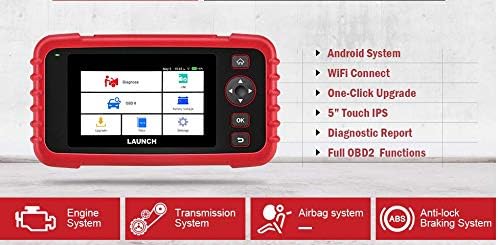
Figure 6.1: The main menu interface of the LAUNCH CRP239, providing access to all primary functions.
- Diagnostica: For full system diagnostics (Engine, A/T, ABS, SRS).
- IM: Readiness status for emissions.
- OBD II: Standard OBD II functions (read/clear DTCs, live data, freeze frame, O2 sensor test, etc.).
- Resetați: Access various maintenance reset functions.
- Volumul baterieitage: Displays real-time vehicle battery voltage.
- Actualizare: For software and firmware updates via Wi-Fi.
- Date: Review saved diagnostic data and reports.
- Setări: Configure device settings such as language, Wi-Fi, and display.
6.3. Efectuarea unei scanări de diagnosticare
- Din meniul principal, selectați "Diagnose".
- The tool will attempt to automatically identify the vehicle via VIN scan. If unsuccessful, you may need to manually select the vehicle make, model, and year.
- Choose the system you wish to diagnose (e.g., Engine, Transmission, ABS, SRS).
- Selecta "Read Fault Codes" la view Diagnostic Trouble Codes (DTCs).
- Selecta "Clear Fault Codes" to erase DTCs after repairs have been made. Caution: Clearing codes without addressing the underlying issue will result in the codes reappearing.
- Selecta "Read Data Stream" la view live sensor data.
6.4. Using Reset Functions
The CRP239 supports several common maintenance reset functions:
- Resetare ulei: Resetează memento-ul privind durata de viață a uleiului după un schimb de ulei.
- Resetare unghi de direcție: Resets the steering angle sensor after alignment or component replacement.
- Brake-Pad Reset (EPB): Resetează sistemul electronic de frână de parcare după înlocuirea plăcuțelor de frână.
- Adaptarea bateriei (BMS): Înregistrează o baterie nouă în sistemul de gestionare a bateriei vehiculului.
- Adaptarea clapetei de accelerație: Reînvață poziția corpului clapetei de accelerație după curățare sau înlocuire.
- Regenerarea DPF-ului: Inițiază procesul de regenerare a filtrului de particule diesel.
To use a reset function, select "Reset" from the main menu, then choose the desired function and follow the on-screen instructions.
6.5. Actualizări software
The CRP239 supports one-click Wi-Fi updates for software and vehicle coverage, ensuring you always have the latest diagnostic capabilities.
- Asigurați-vă că dispozitivul este conectat la o rețea Wi-Fi stabilă.
- Din meniul principal, selectați "Update".
- The device will check for available updates. Select the updates you wish to install and confirm.
- Allow the update process to complete without interruption. The device may restart during this process.

Figure 6.2: The update screen on the LAUNCH CRP239, showing available software updates for various vehicle brands.
6.6. Diagnostic Report Generation
The CRP239 can automatically generate diagnostic reports, which can be shared via email.
- After completing a diagnostic session, the tool will prompt you to generate a report.
- Confirm to generate the report.
- Navigați la "Data" meniu la view saved reports.
- Select a report and choose the option to share via email. Ensure your Wi-Fi is connected and email settings are configured in the 'Settings' menu.
7. Întreținere
Proper maintenance ensures the longevity and optimal performance of your LAUNCH CRP239:
- curatenie: Folosiți o lavetă moale și uscată pentru a curăța dispozitivul. Nu utilizați substanțe de curățare abrazive sau solvenți.
- Depozitare: Store the device in its carrying case in a cool, dry place when not in use. Avoid extreme temperatures.
- Îngrijirea bateriei: Încărcați bateria în mod regulat, chiar dacă dispozitivul nu este utilizat frecvent, pentru a menține starea bateriei. Evitați descărcarea completă a bateriei pentru perioade lungi de timp.
- Verificarea cablului: Periodically inspect the diagnostic and USB cables for any signs of damage. Replace damaged cables immediately.
8. Depanare
This section addresses common issues you might encounter with the LAUNCH CRP239.
| Problemă | Cauza posibila | Soluţie |
|---|---|---|
| Dispozitivul nu pornește. | Low battery; faulty connection to vehicle. | Charge the device fully. Ensure the OBD II cable is securely connected to both the CRP239 and the vehicle. Check vehicle's ignition is ON. |
| Nu se poate comunica cu vehiculul. | Incorrect vehicle protocol; faulty OBD II port; damaged cable. | Verify vehicle compatibility. Check the vehicle's OBD II port for power. Try a different vehicle or cable if available. Ensure vehicle ignition is ON. |
| Actualizarea software-ului eșuează. | Conexiune Wi-Fi instabilă; spațiu de stocare insuficient. | Asigurați o conexiune Wi-Fi puternică și stabilă. Verificați spațiul de stocare disponibil pe dispozitiv. Reporniți procesul de actualizare. |
| Ecranul nu răspunde. | Eroare software; daune fizice. | Perform a soft reset by holding the power button until the device restarts. If the issue persists, contact customer support. |
9. Specificații
| Caracteristică | Detaliu |
|---|---|
| Model | CRP239 (CREADER PROFESSIONAL 239) |
| Afişa | 5.0-inch 720p Touch Screen |
| Baterie | 4000mAh Rechargeable Lithium Polymer (included) |
| Conectivitate | OBD II, Wi-Fi, USB |
| Acoperire vehicul | Domestic, Asian, European vehicles (1996 and newer OBD2) |
| Sisteme suportate | Engine, Automatic Transmission (A/T), ABS, SRS |
| Funcții speciale | Oil Reset, Steering Angle Reset, Brake-Pad Reset (EPB), Battery Matching (BMS), Throttle Adaptation, DPF Regeneration |
| Dimensiuni | 32.4 x 25.4 x 8 cm (Pachet) |
| Greutatea articolului | 560 g |
| Material exterior | Cauciuc |
10. Informații despre garanție
The LAUNCH CRP239 comes with a standard manufacturer's warranty. For specific warranty terms and conditions, please refer to the warranty card included in your product package or visit the official Launch webPăstrați bonul fiscal ca dovadă a achiziției pentru reclamații în garanție.
Opțiuni de garanție extinsă pot fi disponibile de la furnizori terți. De exempluampAdică, pentru acest produs se oferă garanții extinse de 1 an și 2 ani de la Salama Care.
11. Suport
For technical assistance, product inquiries, or support, please contact Launch customer service through their official website or the contact information provided in your product documentation. Ensure you have your product model number (CRP239) and serial number ready when contacting support.
Pentru resurse suplimentare, vizitați Launch Official Website-ul.