
ZOSI 8MM-106W4S-10-US
ZOSI H.265+ 1080p Home Security Camera System User Manual
Marca: ZOSI | Model: 8MM-106W4S-10-US
1. Introducere
This manual provides detailed instructions for setting up, operating, and maintaining your ZOSI H.265+ 1080p Home Security Camera System. This system is designed to provide comprehensive surveillance with advanced features for both indoor and outdoor environments.
Caracteristicile cheie includ:
- Detecție inteligentă a mișcării prin inteligență artificială: Distinguishes between people and vehicles to reduce false alerts.
- 5MP 3K Lite Extendable System: Features an 8-channel DVR with a pre-installed 1TB HDD and four 1080p weatherproof bullet cameras, expandable up to 8 cameras.
- Local and Remote Access: View and control your system via a monitor, PC software, or the ZOSI Smart mobile application.
- Customizable Record Modes: Offers continuous, scheduled, motion-activated, and recycle recording options.
- Compresie video avansată H.265+: Optimizes storage space and provides smoother viewing compared to H.264.
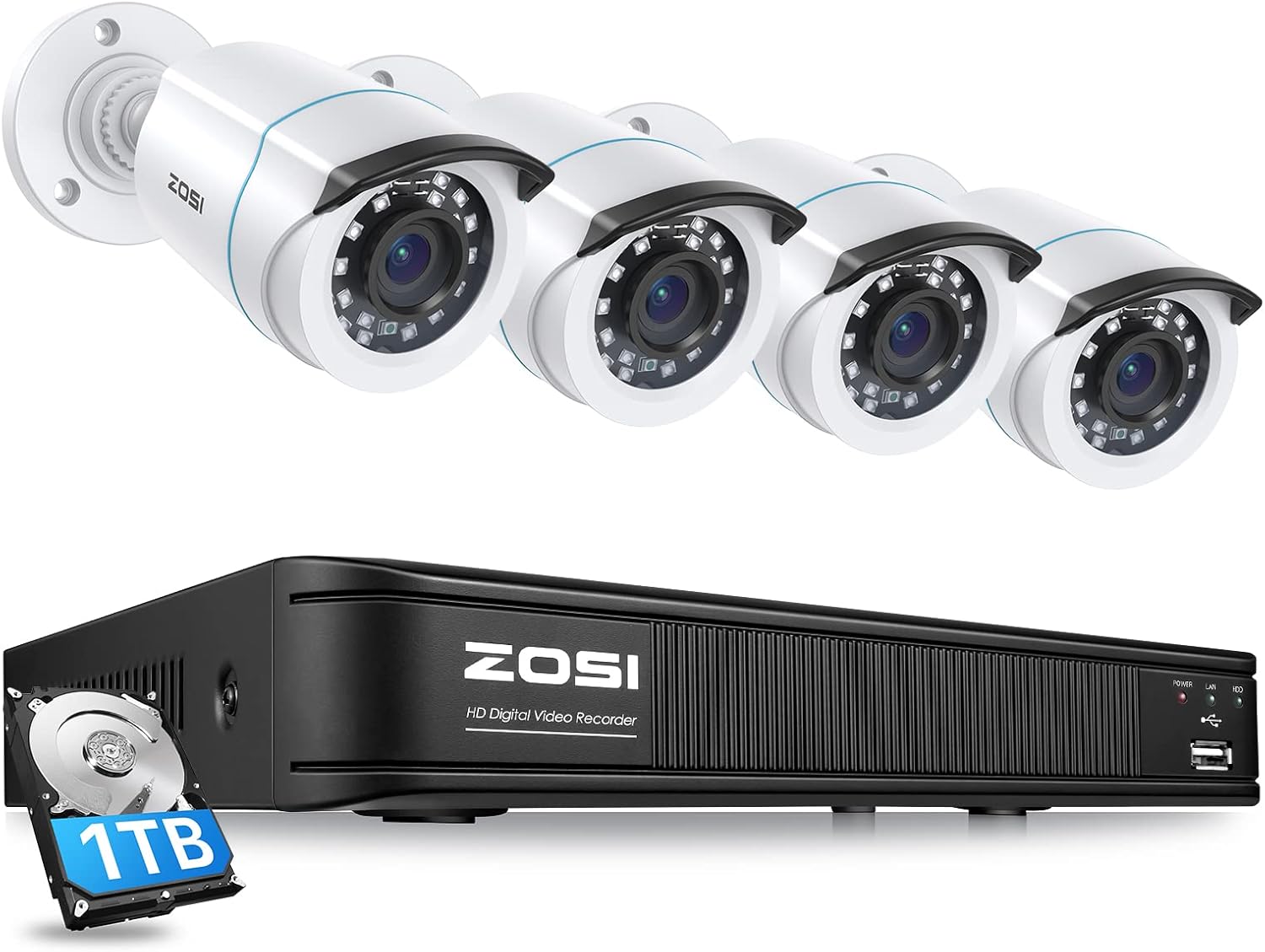
Figure 1.1: ZOSI H.265+ 1080p Home Security Camera System components including DVR and four bullet cameras.
2. Conținutul pachetului
Vă rugăm să verificați dacă toate articolele enumerate mai jos sunt incluse în pachetul dumneavoastră:
- 1 x 8-Channel 5MP-Lite DVR Recorder (with 1TB HDD pre-installed)
- 4 x 1080p Weatherproof Bullet Cameras
- 4 x 60FT BNC+DC CCTV Cables
- 1 x 1-to-4 Power Splitter
- 1 x cablu Ethernet
- 2 x Power Adapters (for DVR and cameras)
- 1 x mouse USB
- 4 x Saci pentru șuruburi de montare
- 4 x Mounting Templates
- 4 x Autocolante de avertizare
- 1 x Ghid de pornire rapidă

Figura 2.1: Reprezentare vizuală a conținutului pachetului.
3. Ghid de instalare
Follow these steps to set up your ZOSI security camera system:
3.1 Conexiune hardware
- Conectați camerele: Connect each camera to a BNC+DC CCTV cable. Then, connect the BNC end of the cable to an available video input port on the DVR. Use the 1-to-4 power splitter to connect the camera power cables to a single power adapter.
- Conectare la monitor: Connect your monitor to the DVR using either an HDMI or VGA cable.
- Conectați-vă la rețea: Pentru telecomandă viewing, connect the DVR to your WiFi router using the provided Ethernet cable.
- Conectați mouse-ul USB: Plug the USB mouse into an available USB port on the DVR.
- Pornire: Connect the DVR to its power adapter and plug it into an electrical outlet. The system will begin initialization.

Figure 3.1: Hardware connection diagram for the DVR and cameras.
Video 3.1: This video demonstrates how to connect the ZOSI 2MP TVI system, including camera and DVR connections.
3.2 Configurația inițială a sistemului
Upon first power-up, the DVR will display a setup wizard on the connected monitor. Follow the on-screen prompts to configure basic settings such as language, date/time, network settings, and password for your system.
4. Operarea sistemului dumneavoastră
4.1 Detectarea mișcării prin inteligență artificială
Your ZOSI system features advanced AI motion detection capable of distinguishing between human and vehicle shapes. This helps in significantly reducing false alarms triggered by animals, falling leaves, or other non-threatening movements. You can customize motion detection zones for each camera through the DVR interface or the mobile app.

Figure 4.1: AI Human & Vehicle Detection capabilities.
4.2 Moduri de înregistrare
The DVR offers four primary recording modes:
- Înregistrare continuă: Înregistrări footagdisponibil 24/7.
- Înregistrare programată: Înregistrări numai în perioadele de timp specificate.
- Înregistrare detectare mișcare: Înregistrează doar când este detectată mișcare.
- Reciclați înregistrarea: Suprascrie cea mai veche mâncaretage când hard disk-ul este plin.
You can configure different recording modes for each camera individually.
4.3 Local and Remote Access
Access your security system locally by connecting a monitor directly to the DVR. For remote access, download the free ZOSI Smart application on your smartphone or tablet, or use the ZOSI Client software on your PC.
To set up remote access via the ZOSI Smart app:
- Download and install the ZOSI Smart app from your device's app store.
- Înregistrați un cont și conectați-vă.
- Atingeți pictograma „+” pentru a adăuga un dispozitiv nou.
- Select 'DVR' and follow the on-screen instructions to scan the QR code on your DVR or enter the device UID manually.
- Odată adăugat, puteți view fluxuri live, redare înregistrări și gestionare setări de la distanță.

Figure 4.2: Remote access setup using the ZOSI Smart mobile application.
4.4 Funcția de redare
The system allows you to playback recorded footage. You can search for specific events by date, time, or motion detection triggers. This feature is crucial for reviewing security incidents or capturing important moments.
Video 4.1: Demonstration of ZOSI Camera Playback Function capturing strong wind conditions.
Video 4.2: Demonstration of ZOSI Camera Playback Function capturing mischievous puppies.
5. Întreținere
5.1 Îngrijirea camerei
The cameras are weatherproof (IP66 rated) and designed for both indoor and outdoor use. To ensure optimal performance and longevity:
- Curățați regulat lentilele camerei cu o lavetă moale,amp o lavetă pentru a îndepărta praful, murdăria sau petele de apă care ar putea obstrucționa view.
- Evitați utilizarea substanțelor chimice dure sau materiale abrazive pentru curățare.
- Ensure all cable connections are secure and free from moisture or damage.

Figure 5.1: ZOSI cameras are suitable for both indoor and outdoor environments due to their IP66 weatherproof rating.
5.2 DVR Maintenance
- Păstrați DVR-ul într-o zonă bine ventilată pentru a preveni supraîncălzirea.
- Ensure the DVR is placed on a stable, flat surface.
- Periodically check the hard drive status through the DVR's system settings to ensure proper recording.
- Faceți o copie de rezervă a alimentelor importantetage regularly to an external USB drive.
6. Depanare
If you encounter issues with your ZOSI security system, refer to the following common problems and solutions:
6.1 Fără afișaj video
- Verificați conexiunile: Ensure all BNC cables are securely connected to both the cameras and the DVR. Verify that the HDMI/VGA cable is properly connected between the DVR and the monitor.
- Alimentare electrică: Confirm that both the DVR and cameras are receiving power. Check power adapters and outlets.
- Intrare monitor: Ensure your monitor is set to the correct input source (HDMI or VGA).
6.2 Fără acces de la distanță
- Conexiune retea: Verify that the DVR is connected to your router via Ethernet cable and that the router has an active internet connection. Check the network status in the DVR's settings.
- Stare aplicație: Ensure the ZOSI Smart app is updated to the latest version. Try restarting the app or your mobile device.
- Setări firewall: Check your router's firewall settings; they might be blocking the DVR's access. Consult your router's manual or ISP for assistance.
6.3 Alerte false de mișcare
- Reglați sensibilitatea: Reduce the motion detection sensitivity in the DVR settings or app.
- Refine Detection Zones: Adjust the motion detection zones to exclude areas with frequent non-threatening movements (e.g., trees swaying, busy roads).
- Detectare AI: Ensure AI Human/Vehicle Detection is enabled if available for the specific camera channel.
7. Specificații
| Caracteristică | Caietul de sarcini |
|---|---|
| Marca | ZOSI |
| Numărul de model | 8MM-106W4S-10-US |
| Tehnologia de conectivitate | Cablat |
| Rezoluție captură video | 3K (5MP-Lite) |
| Caracteristica specială | Night Vision, AI Human/Vehicle Detection |
| Numărul de canale | 8 |
| Capacitate de stocare a memoriei | 1 TB (HDD preinstalat) |
| Sursa de alimentare | Electric cu fir |
| Dimensiuni articol (L x l x H) | 17.2 x 11.93 x 7.56 inci |
| Greutatea articolului | 9.97 lire sterline |
| Tehnologie cu lumină scăzută | 80ft Night Vision |
| Intrare video | BNC |
| Voltage | 12 volți |
8. Garanție și asistență
8.1 Garanția produsului
Your ZOSI Home Security Camera System is guaranteed with a 2 an garanție de la data achiziției. Această garanție acoperă defectele de fabricație și asigură că produsul îndeplinește standardele de performanță specificate.
8.2 Money Back Guarantee
ZOSI offers a Garanție de rambursare a banilor de 90 de zile. If you are not satisfied with your purchase within 90 days, you may be eligible for a full refund.
8.3 Suport tehnic
ZOSI provides asistență tehnică gratuită pe viață for all its products. If you encounter any issues or have questions regarding the setup, operation, or maintenance of your security system, please contact ZOSI customer service. Support is available to assist you with troubleshooting and provide guidance.
ZOSI, founded in 2012, specializes in security cameras and solutions, serving millions of customers globally. The company integrates product design, R&D, manufacturing, sales, and service to ensure comprehensive customer protection.
Ask a question about this manual
Ask about setup, troubleshooting, compatibility, parts, safety, or missing instructions. Manuals+ will review the question and use this page’s manual context to help answer it.