
KOMVOX GT60-Y-2P
KOMVOX Professional Walkie Talkies User Manual
Model: GT60-Y-2P
1. Introducere
Thank you for choosing KOMVOX Professional Walkie Talkies. These two-way radios are designed for reliable and clear communication in various environments, from outdoor adventures like camping and hiking to professional use. Featuring 36 channels, NOAA weather alerts, and a rechargeable design, they are built for convenience and safety.

Image: Two KOMVOX Professional Walkie Talkies, showcasindatorită designului lor compact și durabil.
Ce este în cutie:
- Two KOMVOX Walkie Talkies
- Manual de utilizare (acest document)
- Cablu de încărcare (USB tip C)
2. Caracteristici cheie
- Comunicare îmbunătățită: 36 channels and 142 CTCSS privacy codes provide 3,124 channel options, minimizing interference for clear and private conversations.
- Convenient Rechargeable Design: Built-in rechargeable battery with Type-C USB charging support for extended use.
- VOX (Schimb telefonic operat prin voce): Easy voice and sound activation transmission with 3 sensitivity levels for hands-free operation.
- Vizibilitate mare: Bold yellow faceplate ensures easy location and use in various scenarios.
- Canale meteo NOAA: Stay informed with NOAA emergency radio support. The NOAA Weather Scan feature automatically scans 10 weather band channels and locks onto the strongest signal for severe weather updates.
- Long Range Coverage: Up to 10 KM at sea, 5 KM in wooded areas, and 2 KM in town. Actual distance may vary based on environment.
- 3.5mm Jack Headset Compatible: Supports most standard 3.5mm jack headsets.
- LED încorporat Lamp: Oferă iluminare în condiții de lumină slabă.

Image: Visual representation of the walkie talkie's multiple features, including VOX, NOAA, Scan, 36 Channels, Rechargeable, and LED Lamp.

Image: Demonstrates the long-range communication capability of the walkie talkies in an open, outdoor environment.
3. Ghid de instalare
3.1. Încărcarea bateriei
Your KOMVOX walkie talkies come with a built-in rechargeable battery. Before first use, fully charge the device.
- Locate the Type-C USB charge socket on the side of the walkie talkie.
- Connect the provided Type-C USB charging cable to the walkie talkie.
- Conectați celălalt capăt al cablului la un adaptor de alimentare USB compatibil (nu este inclus) sau la un port USB al computerului.
- The battery indicator on the LCD panel will show charging status. It will typically indicate full charge when complete.
3.2. Pornire/Oprire
To power on or off the walkie talkie, press and hold the Buton de alimentare (usually labeled with a power symbol or "SCAN" button, as it often doubles as a scan button when pressed briefly).
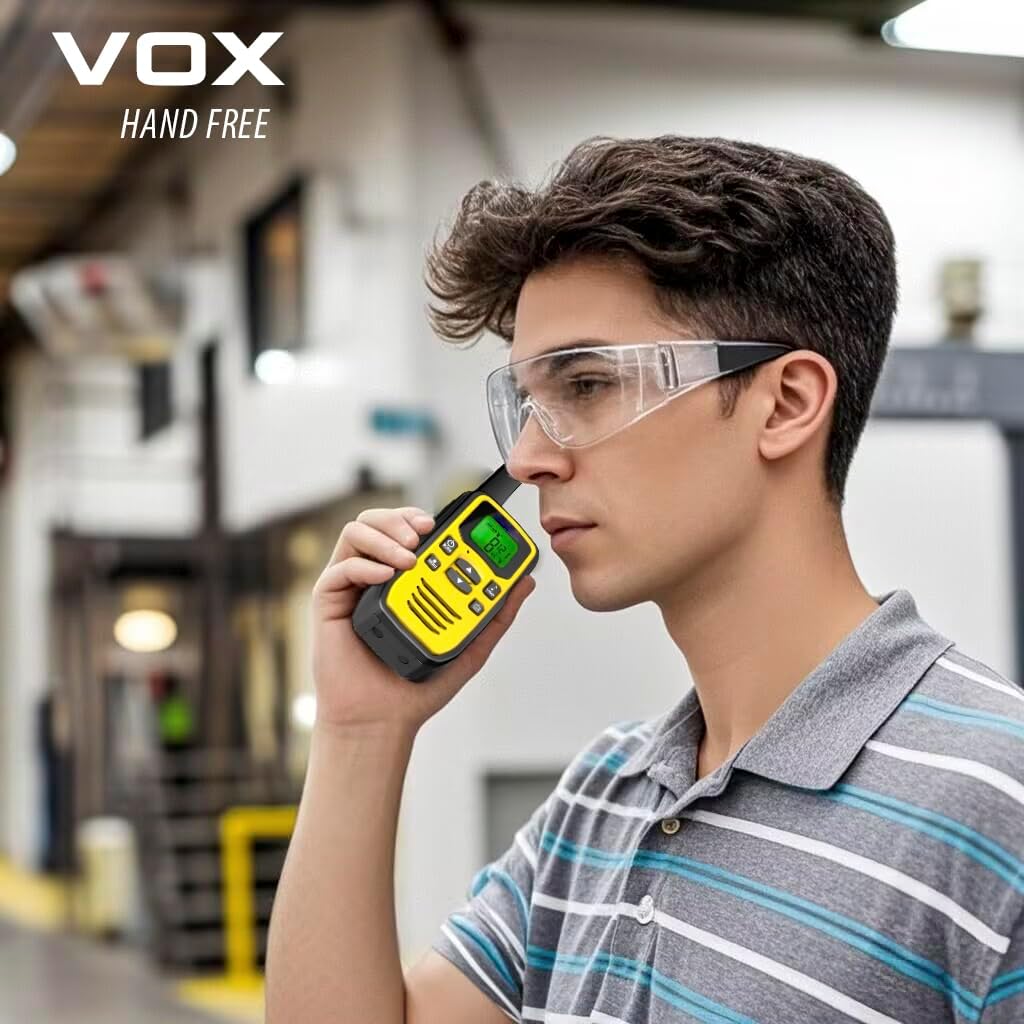
Image: Detailed diagram illustrating the various parts and buttons of the KOMVOX walkie talkie.
4. Instrucțiuni de utilizare
4.1. Selectarea unui canal
Your walkie talkie has 36 available channels. To communicate with another walkie talkie, both devices must be on the same channel and privacy code.
- Apăsați tasta MENIU button once. The channel number on the LCD display will start flashing.
- Utilizați UP (▲) sau JOS (▼) pentru a selecta canalul dorit (1-36).
- Apăsați tasta MENIU button again to confirm the channel selection, or wait a few seconds for it to automatically set.
4.2. Setting CTCSS Privacy Codes
CTCSS (Continuous Tone-Coded Squelch System) codes help filter out unwanted conversations on a channel. There are 142 CTCSS codes.
- After selecting a channel (step 4.1), press the MENIU button twice. The CTCSS code number will start flashing.
- Utilizați UP (▲) sau JOS (▼) buttons to select your desired CTCSS code (01-142).
- Apăsați tasta MENIU button again to confirm, or wait for automatic setting.
4.3. Transmiterea și recepționarea
- Ensure your walkie talkie is powered on and set to the same channel and privacy code as the other party.
- Pentru a transmite, apăsați și mențineți apăsat butonul Buton PTT (Apăsare pentru a vorbi). located on the side of the device. Speak clearly into the microphone.
- Eliberați Buton PTT să oprească transmisia și să aștepte un răspuns.
4.4. Funcția VOX (Centrală operată prin voce)
VOX allows for hands-free transmission. When VOX is enabled, the radio will transmit automatically when it detects your voice.
- Apăsați tasta MENIU button until "VOX" appears on the display.
- Utilizați UP (▲) sau JOS (▼) buttons to select the VOX sensitivity level (1-3, with 3 being most sensitive) or "OFF" to disable.
- Apăsați tasta Buton PTT or MENIU butonul pentru a confirma.

Image: Demonstrates hands-free communication using the VOX feature.
4.5. Alertă meteo NOAA
The NOAA Weather Alert feature provides real-time weather updates and alerts.
- Apăsați tasta NOAA Weather Button (often integrated with another button, refer to the parts diagram).
- The radio will automatically scan through 10 available weather band channels.
- It will lock onto the strongest weather channel to provide alerts for severe weather.

Image: Highlights the NOAA Weather Radio feature, useful for outdoor activities.
4.6. Utilizarea LED-ului Lamp
To activate the built-in LED lamp, apăsați tasta LAMP Buton (refer to the parts diagram for location). Press again to turn off.

Image: The walkie talkie's LED torch providing light in a dark camping mediu.
5. Întreținere
- curatenie: Folosiți un moale, damp o lavetă pentru curățarea exteriorului stației walkie-talkie. Nu utilizați substanțe chimice dure sau produse de curățare abrazive.
- Depozitare: Store the walkie talkies in a cool, dry place when not in use. Avoid extreme temperatures.
- Îngrijirea bateriei: For optimal battery life, avoid fully discharging the battery frequently. Recharge regularly, especially if storing for long periods.
- Rezistenta la apa: Note that these walkie talkies are NU este rezistent la apă. Avoid exposure to rain, splashes, or submersion in water.
6. Depanare
| Problemă | Soluție posibilă |
|---|---|
| Fără putere | Ensure the battery is charged. Press and hold the Power Button to turn on. |
| Nu se poate comunica cu alte radiouri | Verify both radios are on the same channel and CTCSS privacy code. Check battery levels. Ensure you are within range. |
| Calitate audio slabă / Sens static | Move closer to the other radio. Change to a different channel. Ensure no obstructions are blocking the signal. Check for strong interference sources. |
| VOX nu se activează | Adjust VOX sensitivity to a higher level. Speak clearly and directly into the microphone. |
7. Specificații
| Caracteristică | Detaliu |
|---|---|
| Marca | KOMVOX |
| Numărul de model | GT60-Y-2P |
| Culoare | Galben |
| Numărul de canale | 36 |
| Codurile CTCSS | 142 |
| Gama de frecvente | 400-512 MHz |
| Raza de vorbire maximă | 10 KM (Sea), 5 KM (Wooded), 2 KM (Town) |
| Baterie | 1 Lithium Polymer battery (built-in) |
| Încărcare | Tip-C USB |
| Greutatea articolului | 8.8 uncii |
| Dimensiunile produsului | 1.6 x 2.2 x 6.5 inci |
| Nivel de rezistență la apă | Nu este rezistent la apă |
| Caracteristici speciale | NOAA Weather Alert, VOX, LED Lamp, 3.5mm Headset Jack |
8. Garanție și asistență
Garantie: This product comes with a 1-Year Manufacturer's Warranty.
For technical support, troubleshooting assistance, or warranty claims, please contact KOMVOX customer service through the retailer's platform or visit the official KOMVOX website-ul.
Pentru mai multe informații, vizitați KOMVOX Store on Amazon.
Ask a question about this manual
Ask about setup, troubleshooting, compatibility, parts, safety, or missing instructions. Manuals+ will review the question and use this page’s manual context to help answer it.