
1. Introducere
The DJI Phantom 4 Pro is an advanced quadcopter drone designed for professional aerial photography and videography. It features a high-resolution camera, intelligent flight modes, and enhanced obstacle sensing capabilities to ensure a safe and stable flight experience. This manual provides essential information for setting up, operating, maintaining, and troubleshooting your Phantom 4 Pro drone.

Figure 1: DJI Phantom 4 Pro Quadcopter Drone. This image shows the white drone with four propellers, landing gear, and a camera gimbal mounted underneath.
2. Configurare
2.1 Despachetare și inspecție inițială
Carefully remove all components from the packaging. Verify that all items listed in the "What's in the Box" section are present and undamaged. If any components are missing or damaged, contact customer support immediately.
2.2 Încărcarea bateriei
Ensure the Intelligent Flight Battery and remote controller battery are fully charged before first use. Use only the official DJI charger provided with the drone. Connect the charger to a power outlet and then to the battery. The charging indicator lights will show the charging status.
2.3 Instalarea elicei
Attach the propellers to the corresponding motor mounts. Propellers are color-coded (silver and black) to match the motor caps. Ensure they are securely fastened by pushing down and twisting in the direction indicated on the propeller base until locked.
2.4 Configurarea telecomenzii
Install your mobile device (smartphone or tablet) into the remote controller's device holder. Connect the mobile device to the remote controller using a USB cable. Power on the remote controller by pressing the power button once, then pressing and holding it for two seconds.
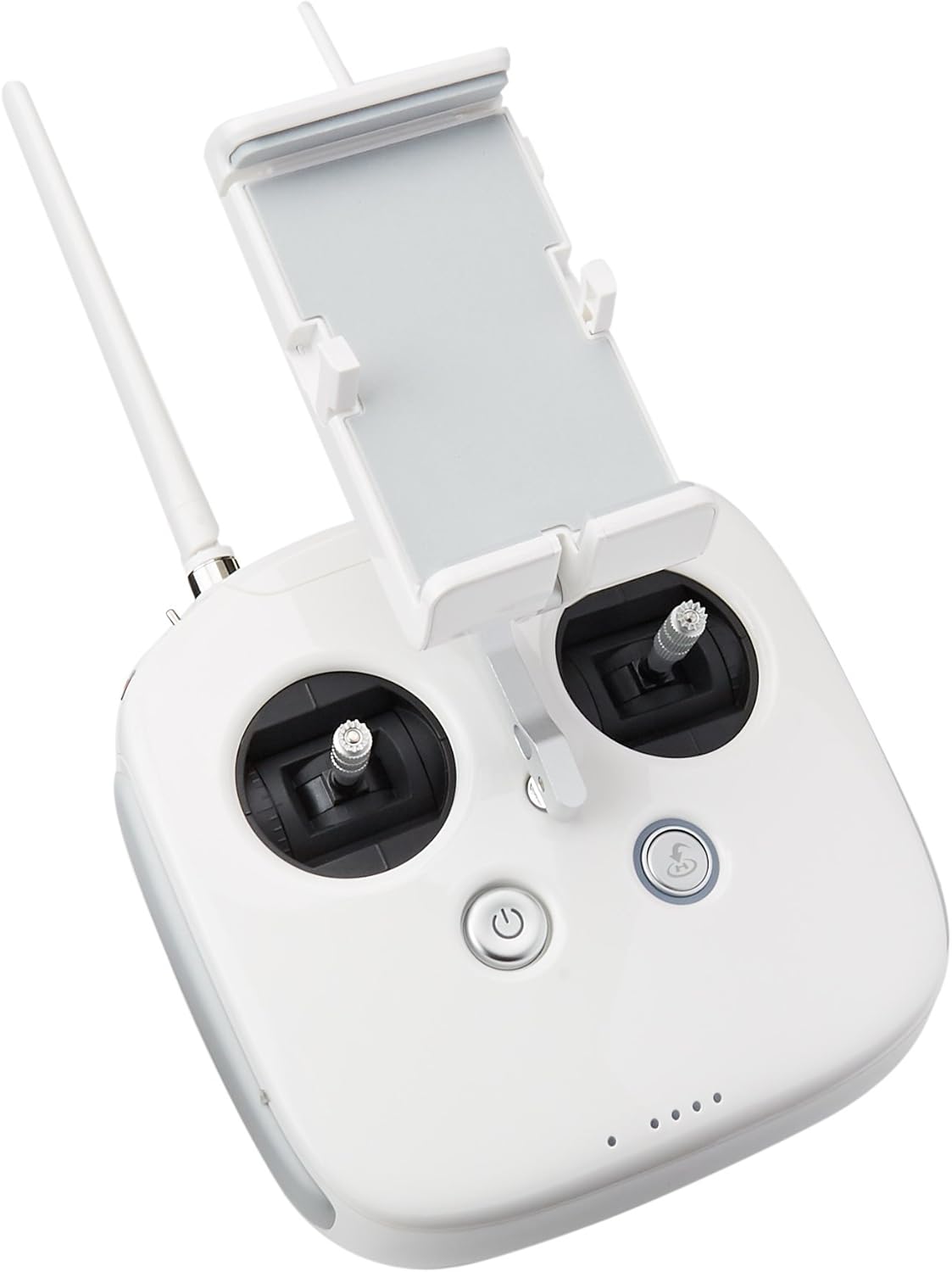
Figure 2: DJI Phantom 4 Pro Remote Controller (Front View). This image displays the front of the white remote controller with joysticks, buttons, and a mobile device holder.

Figure 3: DJI Phantom 4 Pro Remote Controller (Side View). This image shows the side of the white remote controller, highlighting the antennas, USB port, and various switches.
2.5 DJI GO 4 App Installation
Download and install the DJI GO 4 app on your mobile device from the official app store (App Store for iOS or Google Play Store for Android). This app is essential for controlling the drone, accessing intelligent flight modes, and viewînregistrarea fluxului camerei.
3. Instrucțiuni de utilizare
3.1 Lista de verificare înainte de zbor
- Ensure batteries are fully charged (drone and remote controller).
- Elicele sunt instalate corect și fixate.
- Gimbal clamp este eliminat.
- MicroSD card is inserted into the camera.
- GPS signal is strong (at least 7 satellites).
- Compass is calibrated (if prompted by the app).
- Check for any firmware updates in the DJI GO 4 app.
3.2 Decolare și aterizare
To take off, place the drone on a flat, open surface. Power on the drone and remote controller. Open the DJI GO 4 app. Once the system status indicator is green, tap the auto-takeoff icon in the app or perform the Combination Stick Command (CSC) by pushing both sticks to the bottom inner or outer corners. To land, either tap the auto-landing icon or slowly pull down the left stick (Mode 2) until the drone lands and motors stop.
3.3 Moduri de zbor inteligente
The Phantom 4 Pro features several intelligent flight modes for enhanced control and cinematic shots:
- ActiveTrack: Follows a subject automatically.
- TapFly: Fly to a designated point on the screen with a tap.
- Remiză: Draw a route on the screen for the drone to follow.
- Gesture Mode: Control the drone with hand gestures for selfies.
- Întoarcerea la domiciliu (RTH): Automatically returns the drone to its recorded home point.
Refer to the DJI GO 4 app for detailed instructions on activating and using each mode.
3.4 Obstacle Sensing System
The Phantom 4 Pro is equipped with a 5-directional obstacle sensing system, providing 4-way obstacle avoidance. This system uses vision sensors and infrared sensors to detect obstacles and either stop or bypass them, enhancing flight safety. Always maintain visual line of sight and do not rely solely on the obstacle sensing system.
4. Întreținere
4.1 Curățare
Regularly clean the drone body, propellers, and camera lens. Use a soft, dry cloth for the body and a lens cleaning cloth for the camera. Avoid using harsh chemicals or abrasive materials.
4.2 Inspecția și înlocuirea elicei
Inspect propellers for cracks, bends, or damage before each flight. Damaged propellers can affect flight stability and safety. Replace any damaged propellers immediately with genuine DJI Phantom 4 Pro propellers.
4.3 Îngrijirea bateriei
Store Intelligent Flight Batteries in a cool, dry place. Do not overcharge or over-discharge batteries. If storing for extended periods, discharge batteries to 50-60% capacity. Avoid exposing batteries to extreme temperatures.
4.4 de actualizări de firmware
Periodically check for firmware updates for the drone and remote controller via the DJI GO 4 app. Keeping firmware updated ensures optimal performance, new features, and improved safety.
5. Depanare
| Problemă | Cauza posibila | Soluţie |
|---|---|---|
| Drona nu pornește. | Baterie descărcată; Bateria nu este introdusă corect. | Charge the Intelligent Flight Battery; Reinsert battery firmly. |
| Fără semnal GPS. | Flying indoors; Obstruction from tall buildings/trees. | Fly in an open outdoor area; Wait for more satellites to connect. |
| Gimbal shaking or abnormal movement. | Gimbal clamp not removed; Gimbal overloaded; Firmware issue. | Scoateți gimbal clamp; Ensure no foreign objects are on gimbal; Update firmware. |
| App displays "Compass Error". | Magnetic interference; Compass needs calibration. | Move to an area free of magnetic interference; Perform compass calibration as per app instructions. |
For further troubleshooting, consult the DJI GO 4 app's help section or visit the official DJI support website-ul.
6. Specificații
7. Garanție și asistență
This product is sold as a renewed item and typically comes with a 1-year warranty. Please refer to the specific warranty terms provided at the time of purchase or contact the seller for details regarding your renewed product's warranty coverage.
For technical support, product inquiries, or warranty claims, please visit the official DJI support website or contact their customer service. You can often find support resources, FAQs, and contact information on the DJI website-ul.
Producător: DJI Europe B.V.
Marca: DJI