
1. Introducere
This manual provides essential information for the proper installation, operation, and maintenance of your Solaira Smart 5-Inch Wall Switch. Please read this manual thoroughly before installation and use to ensure safe and efficient operation. This device is designed for use with Solaira SMARe16 and SMARe34-DV controllers.
2. Informații de siguranță
AVERTIZARE: Electrical shock hazard. Improper installation can lead to serious injury or death.
- Instalarea trebuie efectuată de către un electrician calificat, în conformitate cu toate codurile electrice locale și naționale.
- Ensure power is disconnected at the circuit breaker before attempting any installation or maintenance.
- Nu acționați întrerupătorul cu mâinile ude.
- This product is designed for indoor use unless otherwise specified by Solaira.
- Nu încercați să modificați sau să reparați dispozitivul singur. Contactați personalul de service calificat.
3. Produs terminatview
The Solaira Smart 5-Inch Wall Switch provides intuitive touch control for compatible Solaira heating systems. It features a clear digital display and dedicated buttons for power, timer, and output level adjustment.
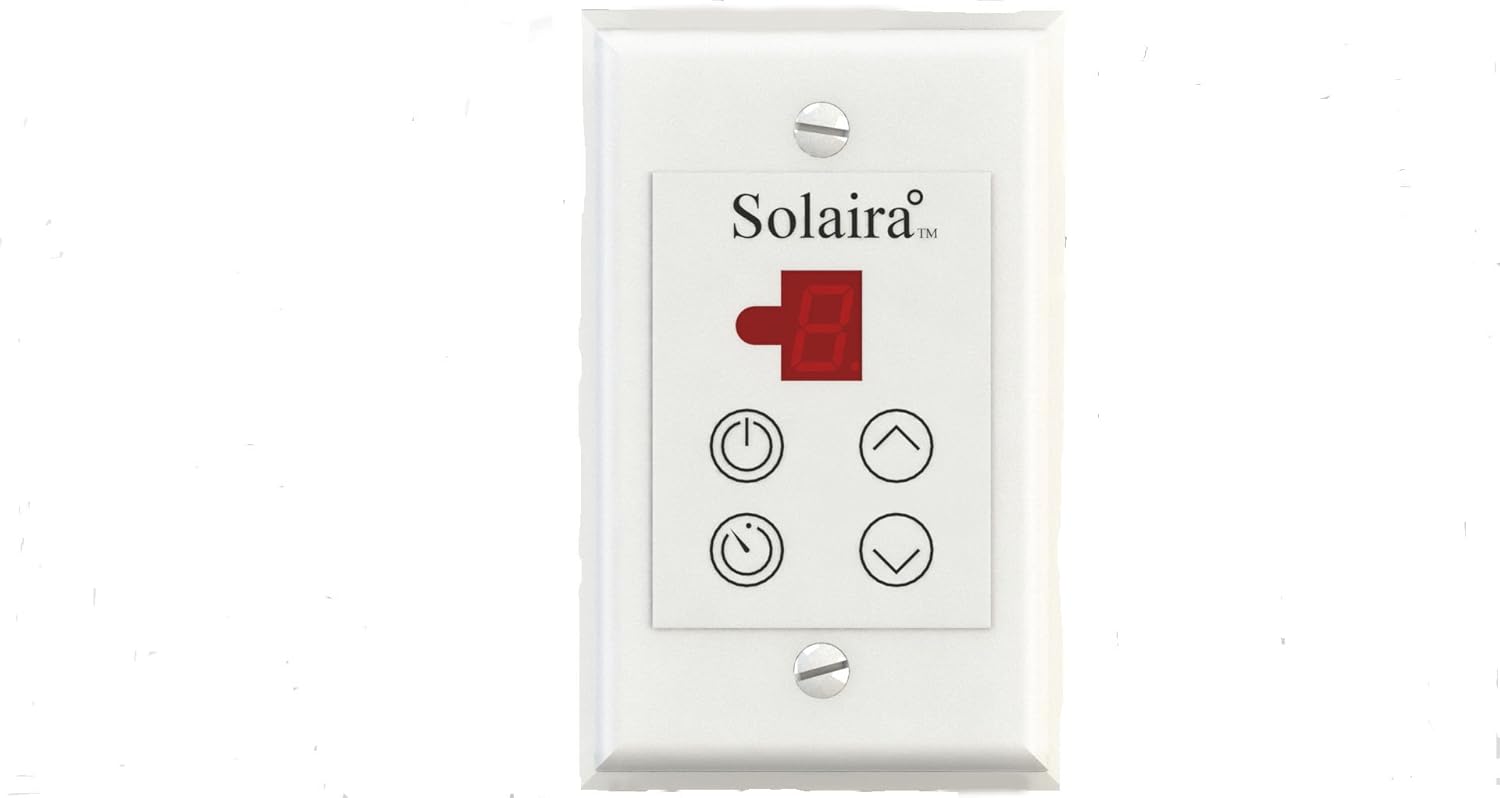
Figura 1: Faţă view of the Solaira Smart 5-Inch Wall Switch. The switch features a digital display at the top, showing the current setting. Below the display are four circular touch buttons: a power button (top left), an up arrow for increasing settings (top right), a timer button (bottom left), and a down arrow for decreasing settings (bottom right).
Funcțiile panoului de control:
- Butonul de pornire (⏻): Turns the connected heating system ON or OFF.
- Up Arrow Button (⌃): Increases the heating output level or timer setting.
- Down Arrow Button (⌄): Decreases the heating output level or timer setting.
- Butonul temporizatorului (⏱): Activează sau ajustează funcția temporizatorului.
- Ecran digital: Shows the current output level (1-5) or timer duration.
4. Configurare și instalare
The Solaira Smart 5-Inch Wall Switch is designed for professional installation. It is compatible with Solaira SMARe16 and SMARe34-DV controllers. Ensure that the electrical wiring is appropriate for the connected heating load.
- Deconectare de la curent: Before beginning installation, ensure that power to the circuit is completely disconnected at the main circuit breaker. Verify with a voltage tester.
- Cablaj: Connect the wall switch according to the wiring diagram provided with your Solaira heating system and controller. Ensure all connections are secure and properly insulated.
- Montare: Mount the wall switch into a standard electrical wall box. Secure it with the provided screws.
- Instalarea plăcii frontale: Attach the decorative faceplate over the switch.
- Restaurarea energiei: După finalizarea instalării și verificarea tuturor conexiunilor, restabiliți alimentarea cu energie electrică la întrerupătorul de circuit.
Note: This device is ETL certified, indicating compliance with North American safety standards.
5. Instrucțiuni de utilizare
Pornirea/Oprirea:
- Apăsați tasta Buton de alimentare (⏻) once to turn the connected heating system ON. The digital display will illuminate and show the current output level.
- Apăsați tasta Buton de alimentare (⏻) again to turn the heating system OFF. The display will turn off.
Adjusting Heating Output (5 Positions):
The switch offers 5 distinct heating output levels, typically ranging from 1 (lowest) to 5 (highest).
- With the system ON, press the Butonul săgeată sus (⌃) to increase the heating output level. The digital display will show the new level.
- Apăsați tasta Butonul săgeată în jos (⌄) to decrease the heating output level. The digital display will show the new level.
Utilizarea funcției Timer:
The timer function allows you to set a duration for the heating system to operate before automatically turning off.
- Apăsați tasta Butonul Timer (⏱) to activate the timer. The display may show a default timer duration or flash.
- Utilizați Butonul săgeată sus (⌃) și Butonul săgeată în jos (⌄) to adjust the desired timer duration.
- Once the desired time is set, the display will revert to showing the output level after a few seconds, and the timer will begin counting down.
- Pentru a anula cronometrul, apăsați tasta Butonul Timer (⏱) repeatedly until the timer indicator is off, or turn the unit off and then on again.
6. Întreținere
The Solaira Smart 5-Inch Wall Switch requires minimal maintenance.
- curatenie: Disconnect power before cleaning. Wipe the surface with a soft, damp Nu utilizați produse de curățare abrazive, solvenți sau umiditate excesivă.
- Inspecţie: Periodically inspect the switch for any signs of damage or loose connections. If any issues are found, disconnect power and contact a qualified electrician.
7. Depanare
If you experience issues with your Solaira Smart 5-Inch Wall Switch, refer to the following common problems and solutions:
| Problemă | Cauza posibila | Soluţie |
|---|---|---|
| Comutatorul nu răspunde. | No power to the switch; loose wiring; internal fault. | Check circuit breaker. Ensure all wiring connections are secure (consult an electrician). If problem persists, contact Solaira support. |
| Heating system not turning ON/OFF. | Switch not properly communicating with controller; controller issue. | Verify compatibility with SMARe16 or SMARe34-DV controllers. Consult the controller's manual. |
| Output level or timer cannot be adjusted. | Buttons unresponsive; internal fault. | Ensure buttons are pressed firmly. If unresponsive, power cycle the switch (turn off/on at breaker). If issue continues, contact support. |
If troubleshooting steps do not resolve the issue, contact Solaira customer support or a qualified electrician.
8. Specificații
| Caracteristică | Detaliu |
|---|---|
| Marca | Solaira |
| Model | Smart 5-Inch Wall Switch |
| Compatibilitate | Solaira SMARe16 and SMARe34-DV controllers |
| Metoda de control | Atingere |
| Numărul de poziții | 5 (for heating output levels) |
| Certificare | Certificat ETL |
| Bateriile necesare | Nu |
| Greutatea articolului | 4 lire sterline (aprox.) |
| Dimensiuni pachet | 7 x 2 x 1 inci (aprox.) |
| UPC | 687175005094 |
9. Garanție și asistență
For warranty information, technical support, or service inquiries, please refer to the documentation provided with your Solaira heating system or visit the official Solaira webPăstrați bonul fiscal ca dovadă a achiziției pentru reclamații în garanție.
Note: Specific warranty terms may vary by region and product.