
1. Produs terminatview
The GeoVision GV-EFD4700-0F is an indoor, fixed, mini-sized network camera designed for day and night surveillance. It features an automatic IR-cut filter and integrated IR LEDs to ensure clear imaging in various lighting conditions. This model offers an entry-level surveillance solution with essential features and high image quality.
Caracteristicile cheie includ:
- 1/3" progressive scan super low lux CMOS sensor for minimal illumination at 0.02 lux.
- Dual streams supporting H.265, H.264, and MJPEG codecs.
- Video resolutions up to 20 fps at 2592 x 1520, 25 fps at 2560 x 1440, and 30 fps at 2048 x 1520.
- Intelligent IR with a distance of up to 15 meters (50 ft).
- Wide Dynamic Range Pro (WDR Pro) for clear images in high-contrast scenes.
- 3D noise reduction for improved image clarity.
- Built-in microphone for audio monitoring.
- 2-axis mechanism (pan / tilt) for flexible positioning.
- Power options: DC 12V or Power over Ethernet (PoE IEEE 802.3af).
2. Conținutul pachetului
Vă rugăm să verificați dacă toate articolele sunt prezente și în stare bună la deschiderea coletului:
- GeoVision GV-EFD4700-0F Mini Fixed IP Dome Camera
- Set șurub de montare
- Șablon de instalare
- Quick Start Guide / Instruction Manual (this document)
3. Informații de siguranță
Read these instructions carefully before installation and operation. Keep this manual for future reference.
- Sursa de alimentare: Use only the specified power adapter (DC 12V) or a compliant PoE (IEEE 802.3af) switch. Incorrect voltage poate deteriora dispozitivul.
- Instalare: Ensure the camera is securely mounted to prevent it from falling. Installation should be performed by qualified personnel if necessary.
- Mediu: Această cameră este concepută pentru utilizare în interior. Nu o expuneți la apă, umezeală sau temperaturi extreme.
- curatenie: Deconectați alimentarea înainte de curățare. Folosiți o cârpă moale și uscată. Nu utilizați agenți de curățare lichizi sau cu aerosoli.
- Service: Nu încercați să reparați singur acest produs. Consultați toate lucrările de service către personalul calificat de service.
4. Configurare și instalare
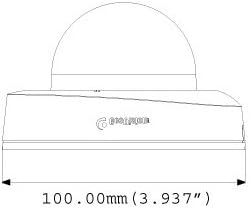
4.1 Dimensiuni fizice
Understand the camera's dimensions for proper placement and mounting.

4.2 Opțiuni de montare
The GV-EFD4700-0F supports both ceiling and wall-surface mounting.


4.3 Etapele de instalare
- Selectați locația: Alegeți o locație interioară potrivită pentru o acoperire optimă a supravegherii.
- Pregătiți suprafața: Use the provided installation template to mark drilling points on the ceiling or wall.
- Găuri: Drill pilot holes according to the template. Insert wall anchors if necessary.
- Camera securizată: Attach the camera base to the mounting surface using the supplied screws.
- Cabluri de conectare: Connect the Ethernet cable for network and PoE, or a DC 12V power adapter and a separate Ethernet cable.
- Reglarea unghiului: Loosen the adjustment screws to pan and tilt the camera lens to the desired viewUnghiul de reglare. Strângeți șuruburile după ce au fost reglate.
4.4 Configurare inițială
After physical installation and power connection, access the camera's web interfață pentru configurarea inițială:
- Conexiune retea: Ensure the camera is connected to your network. It will typically obtain an IP address via DHCP.
- Descoperiți camera: Use GeoVision's IP Device Utility software or a network scanner to find the camera's IP address.
- Acces Web Interfata: Deschide a web browser și introduceți adresa IP a camerei.
- Log in: Enter the default username and password (refer to the Quick Start Guide or GeoVision documentation for default credentials). Change these immediately for security.
- Setări de bază: Configure network settings, date/time, video resolution, and recording preferences.
5. Operarea camerei
5.1 În direct View și Înregistrare
Once configured, you can access the live video feed through the web interface or compatible NVR/VMS software. The camera supports continuous recording, scheduled recording, and event-triggered recording (e.g., motion detection).
- Compresie H.265: Utilizes H.265 video codec for efficient storage and reduced network bandwidth while maintaining high image quality.
- WDR Pro: Wide Dynamic Range Pro enhances image visibility in scenes with both very bright and very dark areas.
- IR Functionality: The built-in IR LEDs automatically activate in low-light conditions, providing clear black and white images up to 15 meters.
5.2 Detectarea mișcării și alertele
Configure motion detection zones and sensitivity within the camera's web interface. The camera can be set to trigger recordings, send email alerts, or notify your VMS upon detecting motion.
Monitorizare audio 5.3
The integrated microphone allows for audio monitoring of the surveillance area. Audio settings can be adjusted via the web interfata.
6. Întreținere
6.1 Curățare
Curățați periodic obiectivul și carcasa camerei pentru a asigura o calitate optimă a imaginii. Folosiți o cârpă moale, fără scame. Pentru murdăria persistentă, curățați ușor.amp Se poate folosi o lavetă cu detergent blând, urmată de o lavetă uscată. Evitați substanțele de curățare abrazive sau solvenții.
6.2 de actualizări de firmware
Periodically check the GeoVision website for firmware updates. Firmware updates can provide new features, performance improvements, and security enhancements. Follow the instructions provided with the firmware update package carefully to avoid damaging the device.
7. Depanare
If you encounter issues with your GV-EFD4700-0F camera, refer to the following common problems and solutions:
- Fără putere:
- Check if the power adapter is securely connected and providing 12V DC.
- If using PoE, ensure the Ethernet cable is connected to a PoE-enabled switch or injector and that the switch port is active.
- Fără flux video:
- Verify network connectivity. Ping the camera's IP address.
- Ensure the camera's IP address, subnet mask, and gateway settings are correct.
- Check if the video stream settings (e.g., resolution, frame rate) are compatible with your viewing software or NVR.
- Restart the camera by disconnecting and reconnecting power.
- Calitate slabă a imaginii:
- Curățați obiectivul camerei.
- Verificați dacă există obstrucții în câmpul de acțiune al camerei view.
- Adjust WDR Pro settings in the web interface for high-contrast scenes.
- Ensure sufficient lighting for optimal color images; IR will provide black and white in low light.
- Nu se poate accesa Web Interfata:
- Confirm the camera's IP address is correct.
- Asigurați-vă că computerul se află pe același segment de rețea ca și camera.
- Încearcă altceva web browser.
- Dezactivați temporar orice software de tip firewall de pe computer.
If problems persist, contact GeoVision technical support.
8. Specificații
| Caracteristică | Detaliu |
|---|---|
| Numele modelului | GV-EFD4700-0F |
| Senzor de imagine | 1/3" progressive scan super low lux CMOS |
| Rezoluție statică efectivă | 4 MP |
| Iluminare minima | 0.02 de lux |
| Compresie video | H.265, H.264, MJPEG |
| Max. Rata cadrelor | 30 fps at 2048 x 1520 |
| Distanța IR | Până la 15 m (50 ft) |
| Obiectiv | 2.8 mm (fix) |
| Interval dinamic | WDR Pro |
| Reducerea zgomotului | Reducerea zgomotului 3D |
| Audio | Microfon încorporat |
| Pan/Tilt Mechanism | 2 axe |
| Intrare de putere | DC 12V / PoE (IEEE 802.3af) |
| Tehnologia de conectivitate | Wired (Ethernet), Wi-Fi (for certain functions/protocols) |
| Utilizare în interior/exterior | De interior |
| Dimensiuni (articol) | 3.9 x 3.9 x 2.4 inchi (100 x 100 x 60.8 mm) |
| Greutate (articol) | 5.28 uncii |
| Culoare | Alb |
| Producător | USA Vision Systems |
9. Informații despre garanție
GeoVision products typically come with a limited manufacturer's warranty. Specific warranty terms, conditions, and duration may vary by region and retailer. Please refer to the warranty card included with your purchase or visit the official GeoVision webpentru informații detaliate despre garanție și proceduri de înregistrare. Păstrați dovada achiziției pentru solicitările de garanție.
10. Suport
For technical assistance, product inquiries, or further support, please utilize the following resources:
- GeoVision Official Website: Vizita www.geovision.com.tw for product documentation, FAQs, software downloads, and support contact information.
- Suport tehnic: Contact GeoVision's technical support team through their website or the contact details provided in your product's packaging.
- Resurse online: Explorează forumuri și comunități online pentru sfaturi și soluții generate de utilizatori.