
Introducere
Mulțumesc pentru achizițieasing the Audioengine A2+ Powered Desktop Speakers. These speakers are designed to provide clear, full audio and can easily connect to various devices. This manual provides essential information for setting up, operating, and maintaining your speakers.

Image: A pair of red Audioengine A2+ powered desktop speakers, showcasindatorită designului lor compact.
Ce este inclus
Your Audioengine A2+ package includes the following components:
- Pair of Audioengine A2+ Powered Speakers (one active, one passive)
- 2m Speaker Wire for connecting the active and passive speakers
- Sursă de alimentare și cablu
- USB cable for digital audio input
- 1.5m Mini-Jack Audio Cable for analog audio input
- Microfiber Speaker bags and Cable Bags for protection
- Setup Guide and Brochure

Image: All cables and the power supply unit included with the Audioengine A2+ speakers.
Înființat
Follow these steps to set up your Audioengine A2+ speakers:
- Plasare: Position the active (left) speaker and passive (right) speaker on your desktop or desired location. Ensure adequate space for ventilation.
- Conectați difuzoarele: Use the included speaker wire to connect the active speaker's "Out to Right" terminals to the passive speaker's input terminals. Match the positive (+) and negative (-) terminals.
- Conectare alimentare: Connect the power supply to the active speaker's "Power" input, then plug the power cord into a wall outlet.
- Intrare audio: Choose your preferred audio input method:
- Audio USB: Connect the USB cable from your computer to the "USB Input" on the active speaker.
- Mini-Jack Audio: Use the 1.5m mini-jack cable to connect your device's headphone output to the "Input" mini-jack on the active speaker.
- RCA Audio: Use RCA cables (not included) to connect your device's RCA outputs to the "Input" RCA jacks on the active speaker.
- Pornire: Turn the volume knob on the active speaker clockwise to power on the unit.
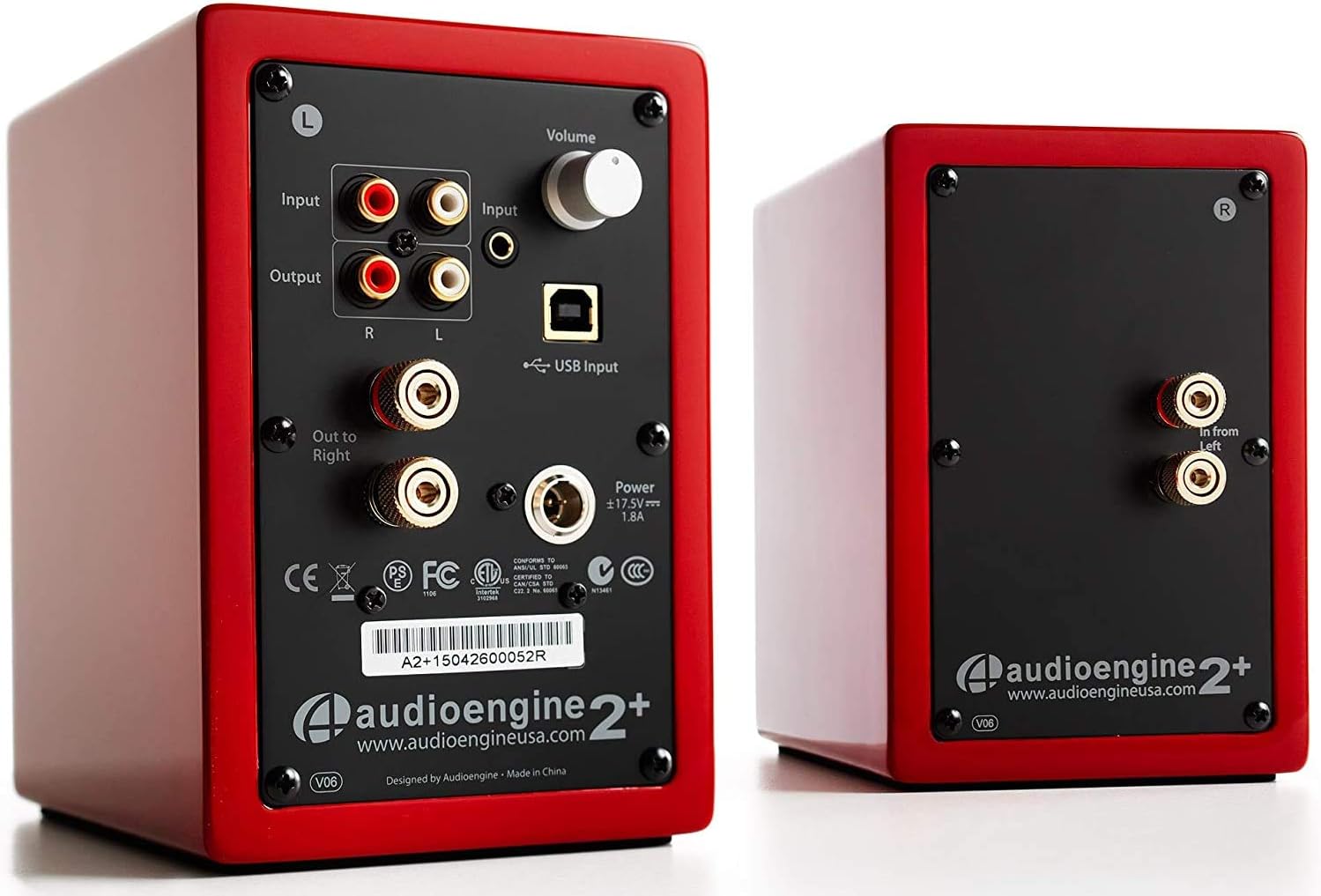
Image: Rear panel of the active speaker, highlighting various input and output connections.

Image: A detailed diagram of the A2+ speaker connections, including volume, inputs, and outputs.
Video: Un pesteview of the Audioengine A2+ speakers, demonstrating setup and features.
Operarea difuzoarelor
Once set up, operating your A2+ speakers is straightforward:
- Controlul volumului: Adjust the volume using the knob on the active speaker. You can also control volume from your connected device.
- Selectare intrare: The A2+ automatically detects and prioritizes active inputs. If multiple inputs are connected, ensure only one is playing audio at a time for optimal performance.
- Conectivitate Bluetooth: The A2+ features Bluetooth for wireless audio streaming. Refer to your device's Bluetooth pairing instructions and select "Audioengine A2+" from the available devices.
- Ieșire subwoofer: The variable audio output allows for easy connection to a subwoofer (e.g., Audioengine S8) for enhanced bass.

Image: Versatile playback options for the A2+ speakers, illustrating connections for phone, USB, and turntable.
Video: Demonstrates various ways to play music through Audioengine speakers, highlighting different connectivity options.
Întreţinere
To ensure the longevity and optimal performance of your Audioengine A2+ speakers, follow these maintenance guidelines:
- curatenie: Use a soft, dry cloth to clean the speaker cabinets. Avoid using harsh chemicals or abrasive cleaners.
- Protecție împotriva prafului: When not in use, consider covering the speakers with the included microfiber bags to protect them from dust.
- Ventilare: Ensure the speakers have adequate airflow around them to prevent overheating. Do not block the rear panel.
- Evitați umezeala: Keep the speakers away from water and excessive humidity.
Depanare
If you encounter issues with your A2+ speakers, try the following common troubleshooting steps:
- Fără sunet:
- Check all cable connections (power, speaker wire, audio input).
- Ensure the volume knob on the active speaker is turned up.
- Verify the volume on your connected device is not muted or too low.
- If using USB, ensure your computer's audio output is set to the A2+ speakers.
- Sunet distorsionat:
- Reduce the volume on both the speakers and your source device.
- Verificați dacă există conexiuni slăbite sau cabluri deteriorate.
- Ensure the audio source is not overdriven.
- Probleme de asociere Bluetooth:
- Ensure the speakers are in pairing mode (refer to your device's Bluetooth settings).
- Mută dispozitivul mai aproape de difuzoare.
- Forget the device on your source and re-pair.
Pentru o depanare mai detaliată, consultați instrucțiunile oficiale Manual de utilizare (PDF).
Specificații
| Caracteristică | Detaliu |
|---|---|
| Numele modelului | A2+ Red |
| Tip difuzor | Raft pentru cărți |
| Caracteristica specială | Fără fir |
| Utilizări recomandate | Muzică |
| Dispozitive compatibile | Smartphone, Tabletă, Player MP3, Desktop, Televizor, Laptop |
| Putere maximă de ieșire difuzor | 60 wați |
| Tehnologia de conectivitate | Bluetooth - Wired |
| Mod ieșire audio | Stereo |
| Dimensiunile produsului | 5.25" D x 4" L x 6" H |
| Greutatea articolului | 3.6 lire sterline |
| Diametrul wooferului | 2 inchi |
| Raportul semnal-zgomot | 95 dB |
Garanție și suport
Audioengine stands behind the quality of their products. All Audioengine products come with a 3 ani garanție transferabilă. For warranty claims or technical support, please refer to the official Audioengine website-ul sau informațiile de contact furnizate pe ambalajul produsului.
Additional resources can be found in the comprehensive Manual de utilizare (PDF).