
Degen DE1125
DEGEN DE1125 User Manual
Model: DE1125 | Brand: Degen
1. Produs terminatview
The DEGEN DE1125 is a compact and versatile portable device that integrates multiple functionalities into a single unit. It serves as a world-band radio, an MP3 player, a digital recorder, and an ebook reader. Designed for portability, it features a slim profile and lightweight construction, making it ideal for travel and on-the-go use.
Caracteristicile cheie includ:
- Pocket-size world-band radio with built-in speaker and Digital Signal Processing (DSP) technology.
- 4 GB flash memory MP3 player for music playback.
- Digital recorder for radio programs and voice recording, offering up to 150 hours of recording time (at 32 kbps).
- 255 preset memories for radio stations.
- Built-in battery charger.
- LED back-lit display for clear visibility.
- Digital clock, sleep timer, key lock, and numeric volume indicator.
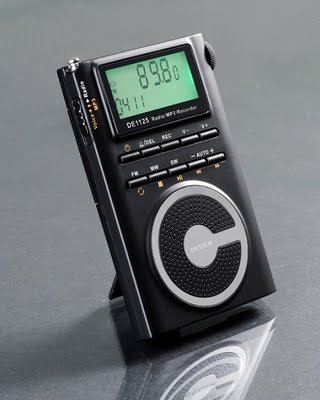
Figure 1.1: The DEGEN DE1125 portable radio and multimedia player, shown standing upright with its integrated kickstand.
2. Ghid de instalare
2.1 Despachetarea și inspecția inițială
Scoateți cu grijă toate componentele din ambalaj. Verificați dacă toate articolele enumerate mai jos sunt prezente și nedeteriorate:
- DEGEN DE1125 Unit
- Căști
- AC Wall Plug (Charger)
- Cablu USB
- Geanta de transport
- Baterie reîncărcabilă
- Manual de utilizare (acest document)
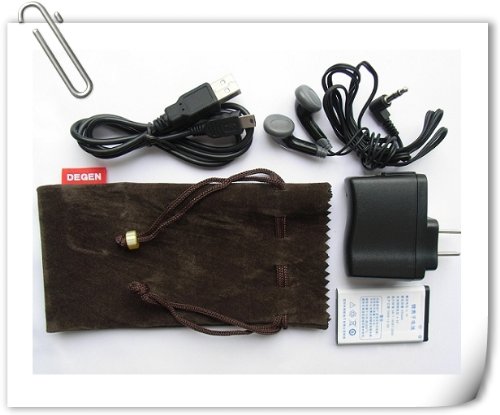
Figure 2.1: All included accessories for the DEGEN DE1125, including earphones, USB cable, AC adapter, carrying pouch, and rechargeable battery.
2.2 Instalarea și încărcarea bateriei
The DE1125 is powered by a rechargeable lithium battery. Before first use, ensure the battery is properly installed and fully charged.
- Localizați compartimentul bateriei de pe spatele dispozitivului.
- Insert the rechargeable battery, ensuring correct polarity as indicated inside the compartment.
- Închideți bine capacul compartimentului bateriei.
- Connect the small end of the USB cable to the mini-USB port on the side of the DE1125.
- Connect the standard USB end of the cable to the AC wall plug, then plug the AC wall plug into a standard electrical outlet. Alternatively, connect the standard USB end directly to a computer's USB port for charging.
- The display will indicate charging status. Allow the battery to fully charge before initial use.
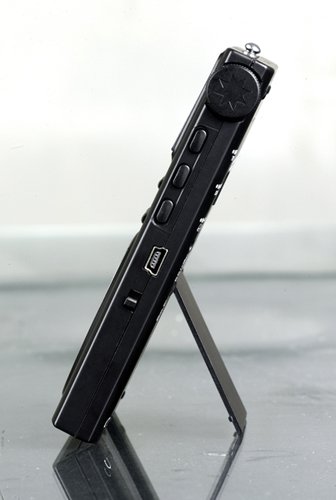
Figura 2.2: lateral view of the DEGEN DE1125, highlighting the mini-USB port for charging and data transfer.
3. Instrucțiuni de utilizare
3.1 Controale generale
Familiarize yourself with the buttons and display on the DE1125:
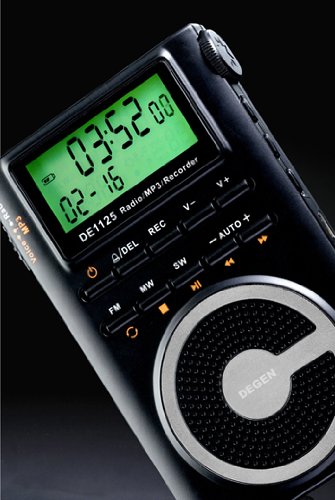
Figura 3.1: Prim-plan view of the DEGEN DE1125's display and control panel, showing buttons for power, mode selection, tuning, and volume.
- Butonul de pornire (): Apăsați lung pentru a porni sau opri dispozitivul.
- Volume Buttons (V+, V-): Reglați nivelul de ieșire audio.
- Buton de meniu: Access the main menu or settings within a mode.
- Butoane de navigare (, ): Navigate through menus or adjust frequencies/tracks.
- Mode Buttons (FM, MW, SW, MP3, REC): Selectați modul de funcționare dorit.
- Buton Redare/Pauză (): Start or pause playback in MP3 mode, or confirm selections.
3.2 Radio Operation (FM, AM, SW)
The DE1125 supports FM (64.0 - 108.0 MHz), MW (520-1710 KHz), and SW (2.3-23.0 MHz) bands.
- Porniți dispozitivul.
- Press the corresponding mode button (FM, MW, or SW) to select the desired radio band.
- Opțiuni de reglare:
- Scanare automată: Press and hold the 'AUTO' button to automatically scan and store available stations.
- Reglare manuală: Folosește butoanele de navigare (, ) to fine-tune the frequency step-by-step.
- Reglare digitală: Enter the desired frequency directly using the numeric keypad (if available, or through menu options).
- ATS (Auto Tuning Storage): Automatically scans and stores strong signals into memory presets.
- Posturi presetate: The device can store up to 255 preset stations. Use the 'M+' and 'M-' buttons to navigate through stored presets.
3.3 MP3 Player Function
The DE1125 features 4GB of internal flash memory for MP3 playback.

Figure 3.2: The DEGEN DE1125 display indicating the 'Music' mode, ready for MP3 playback.
- Press the 'MP3' button to enter MP3 player mode.
- Pentru a transfera muzică files from your computer, connect the DE1125 to your computer using the provided USB cable. The device will appear as a removable disk drive. Drag and drop your MP3 files into the device's storage.
- Folosește butoanele de navigare (, ) to select tracks.
- Apăsați butonul Redare / Pauză () pentru a porni sau a întrerupe redarea.
3.4 Digital Recorder Function
The DE1125 can record radio programs or function as a voice recorder.

Figure 3.3: The DEGEN DE1125 display showing the 'Record' mode, indicating readiness for audio capture.

Figure 3.4: The DEGEN DE1125 display showing the 'Voice' mode, used for voice recording functions.
- Press the 'REC' button to enter recording mode.
- Select either 'Radio Record' or 'Voice Record' from the menu.
- Press the 'REC' button again to start recording. The display will show recording time.
- Press the 'REC' button again to stop recording. Recorded files are saved to the internal memory.
- To play back recordings, navigate to the 'Recordings' folder in MP3 mode.
3.5 Ebook Reader Function
The DE1125 supports basic ebook reading functionality.

Figure 3.5: The DEGEN DE1125 display showing the 'Ebook' mode, indicating readiness to display text files.
- Connect the DE1125 to your computer via USB.
- Transfer text compatibil files (e.g., .TXT) to the device's internal memory.
- Deconectați dispozitivul de la computer.
- Navigate to the 'Ebook' mode using the menu or mode selection.
- Select the desired ebook file a deschide și a citi.
4. Îngrijire și întreținere
Proper care ensures the longevity and optimal performance of your DEGEN DE1125.
- curatenie: Folosiți o lavetă moale și uscată pentru a curăța exteriorul dispozitivului. Nu utilizați substanțe de curățare lichide, aerosoli sau materiale abrazive.
- Depozitare: Store the device in a cool, dry place away from direct sunlight, extreme temperatures, and high humidity. Use the provided carrying pouch for protection during transport.
- Îngrijirea bateriei: Pentru a menține starea bateriei, evitați descărcarea completă frecventă a acesteia. Dacă o depozitați pentru o perioadă lungă de timp, încărcați bateria până la aproximativ 50% și reîncărcați-o la fiecare câteva luni.
- Expunerea la apă: Acest dispozitiv nu este impermeabil. Evitați expunerea la apă sau alte lichide.
- Impact: Protejați dispozitivul de căderi și impacturi, care pot deteriora componentele interne sau ecranul.
5. Depanare
If you encounter issues with your DEGEN DE1125, refer to the following common problems and solutions:
| Problemă | Cauza posibila | Soluţie |
|---|---|---|
| Dispozitivul nu pornește. | Bateria este descărcată sau nu este instalată corect. | Încărcați bateria. Asigurați-vă că bateria este introdusă respectând polaritatea corectă. |
| No radio reception or poor signal. | Weak signal area, antenna not extended, interference. | Extend the telescopic antenna fully. Move to an area with better reception. Avoid sources of electronic interference. |
| MP3 filenu se joacă. | Neacceptat file format, corrupted file, nu files pe dispozitiv. | Asigura files are in MP3 format. Re-transfer files. Verificare files exist in the device's memory. |
| Nu se poate înregistra audio. | Insufficient storage space, incorrect mode. | Ștergeți vechiul files to free up space. Ensure you are in the correct recording mode (Radio Record or Voice Record). |
| Ecranul este gol sau înghețat. | System error, low battery. | Press and hold the power button for 10 seconds to force a restart. Charge the battery. |
6. Specificatii tehnice
| Caracteristică | Caietul de sarcini |
|---|---|
| Marca | Degen |
| Model | DE1125 |
| Dimensiunile produsului | 11 x 1.5 x 6.7 cm |
| Greutatea articolului | 113 g |
| Capacitate de stocare a memoriei | 4 GB |
| Interfață hardware | USB |
| Tehnologie Tuner | AM, FM, SW |
| Gama de frecvențe FM | 64.0 - 108.0 MHz |
| MW Frequency Range | 520 - 1710 kHz |
| Gama de frecvență SW | 2.3 - 23.0 MHz |
| Dispozitive compatibile | Cască |
| Tip de afișare | LED |
| Dimensiunea ecranului | 0.5 Inches (visible diagonal 1" / 2 cm) |
| Sursa de alimentare | Alimentat cu baterie |
| Tip baterie | Litiu reîncărcabil |
| Tip conector | USB |
| Tip de suport compatibil | MP3 |
| Material | Alte |
7. Garanție și asistență
7.1 Informații despre garanție
This product is covered by a manufacturer's warranty. Please refer to the warranty policy provided at the time of purchase or contact your retailer for specific details regarding warranty duration and terms. Keep your proof of purchase for warranty claims.
7.2 Asistență pentru clienți
For technical assistance, troubleshooting beyond this manual, or inquiries about your DEGEN DE1125, please contact the retailer or the manufacturer's customer support. Refer to the contact information provided with your purchase documentation.
Ask a question about this manual
Ask about setup, troubleshooting, compatibility, parts, safety, or missing instructions. Manuals+ will review the question and use this page’s manual context to help answer it.