 User Manual Q&A
Answer

Dec 18, 2025 - 09:08 PM
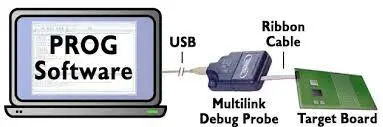
To program a NXP S12Z processor using the PEmicro PROG-HL-S12Z Flash Programming Software, follow these steps:


1. **Connect Hardware Interface:** Ensure that the PEmicro hardware interface is properly connected between your PC and the target MCU via the debug ribbon cable.


2. **Start Programming Software:** Run the programming software by executing the CPROGS12ZZ executable from the Windows Command prompt or by calling it with the correct command line parameters.


3. **Command Line Parameters:** Use the following command line parameters to configure the programming process:

   - `CPROGS12ZZ [?/!] [filename] [/PARAMn=s] [v] [reset_delay n] [hideapp] [Interface=x] [port=y] [showports] [/logfile logfilename]`


4. **Programming Commands:** Use specific programming commands to interact with the target device, such as:

   - `BM` - Blank check module

   - `EM` - Erase module

   - `PB` - Program bytes

   - `PW` - Program words

   - `VM` - Verify module

   - `UR` - Upload range

   - `SS` - Specify S record

   - `RE` - Reset chip

   - `GO` - Starts device running


5. **Configuration Commands:** Configure the software using commands like `:CUSTOMTRIMREF`, `:PROVIDEPOWER`, `:POWERDOWNDELAY`, `:POWERUPDELAY`, and others to set up the programming environment.


6. **Verification Commands:** Use commands like `VC`, `VM`, `SC`, and `VV` to verify the contents of the Flash memory after programming.


7. **DOS Error Returns:** Familiarize yourself with the DOS error return codes to troubleshoot any issues that may arise during the programming process.


By following these steps and referring to the PEmicro PROG-HL-S12Z Flash Programming Software User Guide for detailed command explanations and examples, you can effectively program the Flash memory of your NXP S12Z processor using the PEmicro hardware interface and software.


Add New Comment