 User Manual Q&A
Answer

Dec 18, 2025 - 09:06 PM
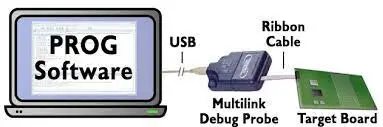
To connect the hardware interface and start using the CPROG32Z programming software, follow these steps:


1. **Connect Hardware Interface:**

   - Connect the hardware interface between your PC and the target MCU using a debug ribbon cable. Ensure the connections are secure.


2. **Start Programming Software:**

   - Run the CPROG32Z programming software from the Windows Command prompt or by calling the CPROG32Z executable with the correct command line parameters.


3. **Command Line Parameters:**

   - Use the allowed command line parameters to modify the executing script if necessary. Parameters include options like '?/!', filename, /PARAMn=s, INTERFACE=x, PORT=y, and more.


4. **Select Hardware Interface Type and Port:**

   - Choose the hardware interface type (e.g., USBMULTILINK, CYCLONE) and specify the port number or name used to connect the PC and target MCU.


5. **Programming the Microcontroller:**

   - Once the hardware interface is connected and software is running, proceed with programming the microcontroller using the programming software.


By following these steps and utilizing the command line parameters as needed, you can effectively connect the hardware interface, configure the software, and program the microcontroller using the CPROG32Z programming software. For further details and specific commands, refer to the product manual provided.


Add New Comment