 User Manual Q&A
Answer

Dec 03, 2025 - 02:31 AM
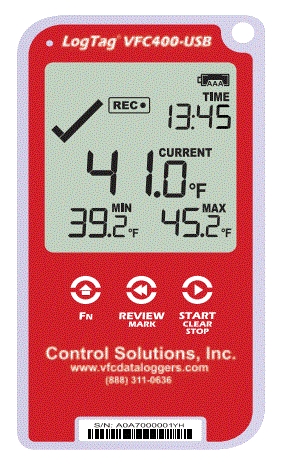
To set up and use the LogTag VFC400-USB Vaccine Monitoring Data Logger Kit, follow these steps based on the provided user guide:


1. **Battery Installation:**

   - Use a small Phillips screwdriver to remove the cover on the back of the VFC400-USB case.

   - Install the two AAA batteries provided, ensuring correct battery orientation.

   - Replace the battery cover and secure it with the  xxxx .

   - Note: The device will not start if the batteries are low or if there is no USB power.


2. **Downloading Control Solutions VTMC:**

   - Visit the Control Solutions VTMC software download link and install the software on your computer.

   - Follow the on-screen instructions to complete the installation.


3. **Configuring the VFC400-USB:**

   - Connect the device to your computer using the provided USB cable.

   - Open Control Solutions VTMC and configure the logger settings as needed.

   - Upload the configuration settings to the logger.


4. **Installing the Wall Mount:**

   - Attach the Wall Mount Bracket to the refrigerator or freezer at eye level using the adhesive strip.

   - Ensure the sensor and USB cables can reach the device without obstruction.

   - Insert the VFC400-USB into the Wall Mount and connect the cables.


5. **Starting the VFC400-USB:**

   - Connect an external probe to the device.

   - Press and hold the START/Clear/Stop button until "STARTING" appears along with "READY."

   - Release the button once "READY" disappears to start temperature data recording.


6. **Downloading Results:**

   - Connect the VFC400-USB to your computer via the USB cable.

   - Access the recorded data either through the device drive in File Explorer or using Control Solutions VTMC software.


By following these steps and referring to the user guide for detailed instructions, users can effectively set up and utilize the LogTag VFC400-USB Vaccine Monitoring Data Logger Kit for temperature monitoring purposes.


Add New Comment