 User Manual Q&A
Answer

Dec 01, 2025 - 03:23 PM
To connect the DCM-DyNet communication module to your home automation system, follow these steps as outlined in the instruction manual:


1. **Installation by Qualified Electrician:** Ensure that the device is installed by a qualified electrician in accordance with all national and local electrical and construction codes and regulations.


2. **Connection of Communication Wires:**

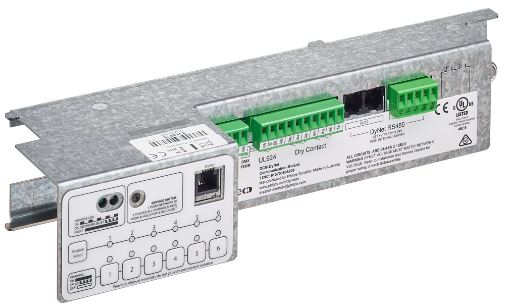
   - Connect the communication wires to the DyNet/DMX Rx RS-485 communication port on the module.

   - Make sure that the temperature limits and current-carrying capacities for the communication wires specified in HD 384.5.523 are not exceeded.


3. **RJ12 Connectors:**

   - Connect the DMX Rx and DMX Rx TERM RJ12 connectors as required for your setup.


4. **UL924 DRY CONTACT INPUTS:**

   - Connect the UL924 DRY CONTACT INPUTS as needed for your specific application.


5. **Power Supply:**

   - The product can operate on either a 12V or 24V power supply.


6. **Additional Details:**

   - For more detailed information and troubleshooting guidance, refer to the user manual provided with the product.


By following these steps and ensuring that the installation is done correctly, you can effectively integrate the DCM-DyNet communication module into your home automation system for reliable and efficient operation.


Add New Comment