 User Manual Q&A
Answer

Nov 14, 2025 - 02:10 PM
To connect and set up the Optoelectronics SP648E SPI RGB LED Controller for use with your LED lights, follow these steps:


1. **Power Connection:** Connect the SP648E controller to a DC5-24V power source using the GND, DAT, and VCC wires.


2. **App Installation:** Download and install the BanlanXin App from the App Store or Google Play on your iOS or Android device.


3. **Device Pairing:** Open the BanlanXin App and click the icon in the top right corner of the home page to add the SP648E controller device.


4. **Settings Configuration:** Click the icon in the upper right corner of the App to enter the settings page. Here, you can modify the device name, set timings, configure the on/off effect, perform OTA firmware upgrades, and more.


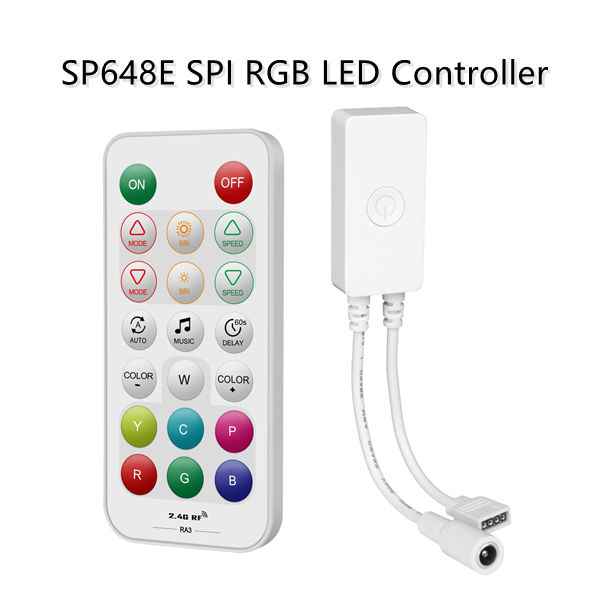
5. **Remote Control:** The SP648E supports remote control using the RA3 remote control. Short press the ON button to turn on the lights and long press it within 20 seconds after the controller is powered on to bind/unbind the remote control. Short press the OFF button to turn off the lights and long press it within 20 seconds after the controller is powered on to clear all bound remote controls.


6. **Additional Features:** The SP648E controller supports a variety of music and dynamic effects, DIY effects, ON/OFF animation effects, sequential channel calibration, and ON/OFF timer functions.


7. **FCC Compliance:** The SP648E complies with part 15 of the FCC Rules regarding radiation exposure limits and interference prevention. Follow the guidelines provided in the manual for safe and proper operation.


By following these steps, you should be able to successfully connect and set up the Optoelectronics SP648E SPI RGB LED Controller for controlling your LED lights using the app and remote control functionalities.


Add New Comment