 User Manual Q&A
Answer

Oct 15, 2025 - 09:25 AM
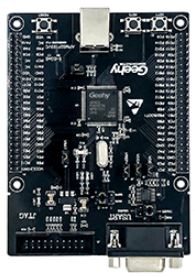
To program and debug the Geehy APM32E103ZE Mini Development Board using the SWD interface, follow these steps based on the information provided in the user manual:


1. **Ensure Jumper Connections:** Make sure that jumpers J6, J7, J8, J9, J10, and J15 are securely connected on the development board.


2. **Connect USB:** Use a Type B USB cable to connect the development board to your PC. This connection will power the development board.


3. **Emulator Connection:** Connect the emulator to the SWD interface on the development board for MCU programming and debugging purposes.


4. **Development Tool:** Install the Keil MDK ARM development tool on your Windows OS (7/8/10). This tool will be used for programming the board.


5. **Programming and Debugging:** With the board powered and connected to the PC, use the Keil MDK ARM tool to write and upload your code to the Geehy APM32E103ZE Mini Development Board. You can also use the tool for debugging purposes to ensure your code runs correctly.


By following these steps and referring to the user manual for any additional information or troubleshooting tips, you should be able to effectively program and debug the Geehy APM32E103ZE Mini Development Board using the SWD interface.


Add New Comment