
1. Introdução
This manual provides detailed instructions for the installation, operation, and maintenance of your darkFlash DS900 Air ATX Mid-Tower PC Gaming Case. Please read this manual thoroughly before beginning assembly to ensure proper setup and safe usage. The DS900 Air is designed to offer a clear view of your components with its 270° full-view tempered glass and provides excellent cooling capabilities for high-performance systems.

Figure 1.1: darkFlash DS900 Air ATX Mid-Tower PC Gaming Case with internal components and RGB lighting.
2. Informações de segurança
Observe sempre as seguintes precauções de segurança durante a instalação e operação:
- Disconnect the power supply from the wall outlet before installing or removing any components.
- Use uma pulseira antiestática para evitar danos por descarga eletrostática (ESD) em componentes sensíveis.
- Handle tempered glass panels with care. Avoid impacts or dropping them, as they can shatter.
- Mantenha as peças pequenas e os parafusos longe do alcance de crianças.
- Assegure-se de que haja ventilação adequada ao redor do gabinete para evitar superaquecimento.
- Do not attempt to modify the case structure, as this may void the warranty and pose safety risks.
3. Especificações
| Recurso | Especificação |
|---|---|
| Nome do modelo | DS900 Air |
| Tipo de caso | ATX Torre Média |
| Suporte para placa-mãe | ATX, Micro ATX, Mini ITX |
| Espaço livre no comprimento da GPU | Até 425 mm |
| CPU Cooler Height Clearance | Até 170 mm |
| Tipo de PSU | ATX (Bottom-mounted) |
| Baías de Unidade | 2x 3.5" HDD or 2x 2.5" SSD, 2x 2.5" SSD |
| Slots de expansão | 7 slots PCIe |
| Portas de E/S | 1x USB-C, 1x USB 3.0, Audio (HD Audio) |
| Suporte dos fãs | Bottom: 3x 120mm; Top: 3x 120mm or 2x 140mm; Rear: 1x 120mm; Right Side: 2x 120mm |
| Suporte para radiador | Top: Up to 360mm; Side: Up to 240mm |
| Materiais | Aço, Vidro Temperado |
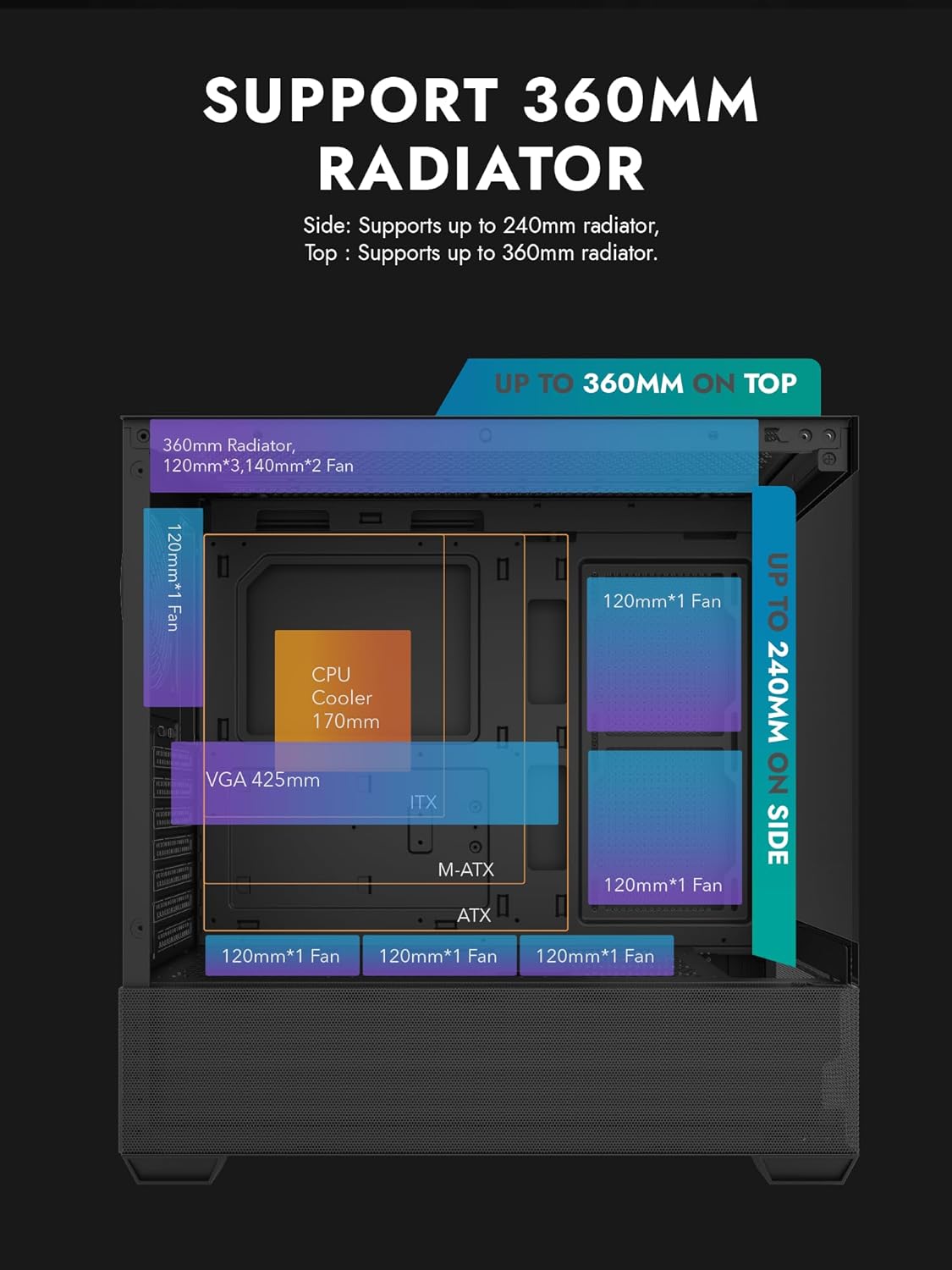
Figure 3.1: Radiator and fan support diagram for the DS900 Air case, illustrating maximum component dimensions.
4. Configuração e instalação
Follow these steps to assemble your PC components within the darkFlash DS900 Air case.
4.1. Preparando o Caso
- Remover painéis laterais: The DS900 Air features a tool-free clamshell side panel. Gently pull the top edge of the tempered glass side panel to unlatch it, then lift it off. Repeat for the other side panel if necessary.
- Caixa de acessórios: Locate the accessory box inside the case, which contains screws, cable ties, and other mounting hardware.
4.2. Instalação da placa-mãe
- Instale o painel de E/S na abertura traseira do gabinete.
- Align your ATX, Micro-ATX, or Mini-ITX motherboard with the standoffs inside the case. Ensure the I/O ports align with the I/O shield.
- Fixe a placa-mãe utilizando os parafusos fornecidos.
4.3. Instalação da Unidade de Alimentação (PSU)
- The DS900 Air has a dedicated bottom PSU chamber. Slide your ATX power supply into the chamber from the rear of the case.
- Fixe a fonte de alimentação com parafusos na parte traseira do gabinete.
- Route necessary power cables through the cutouts into the main compartment.
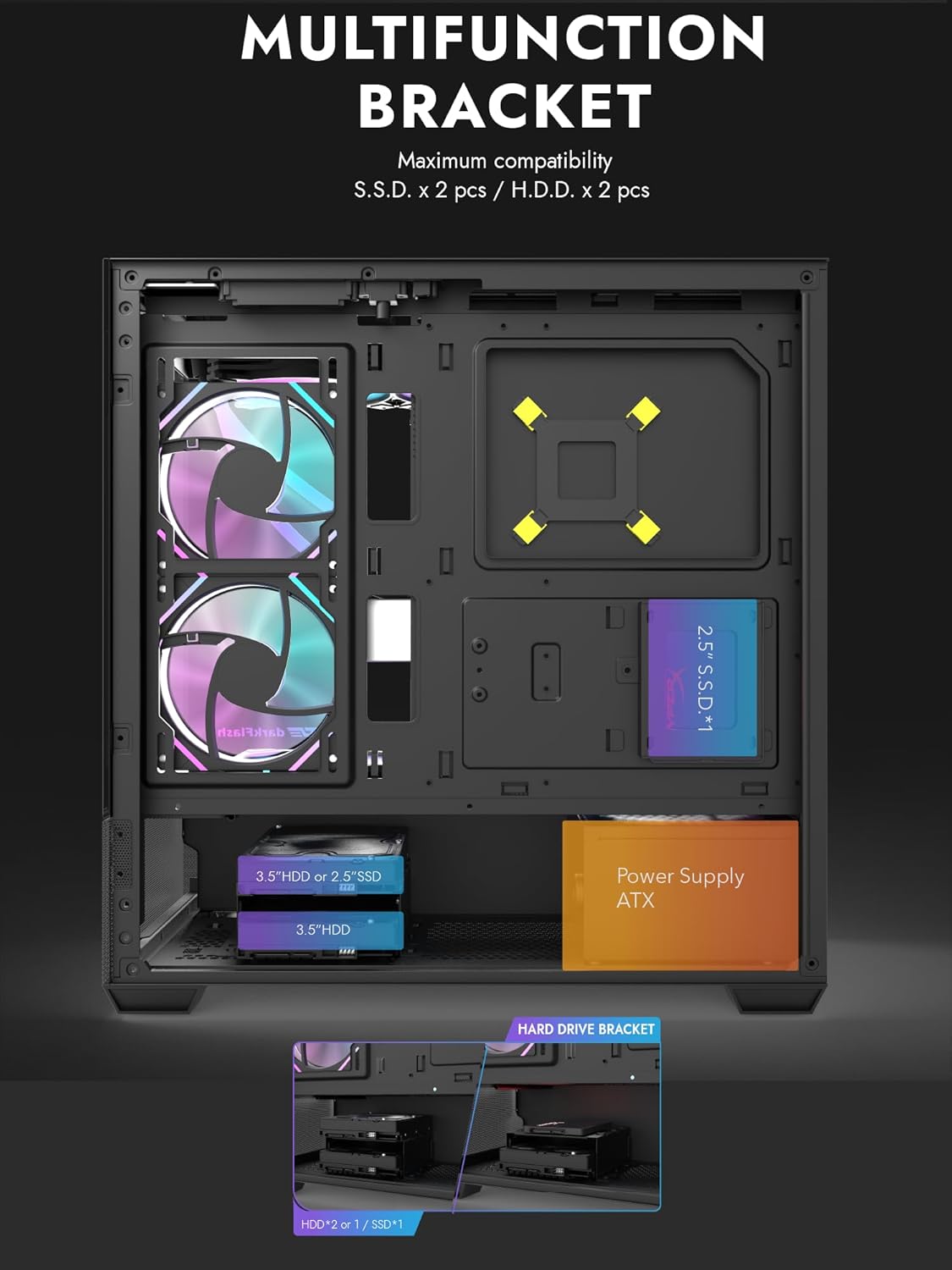
Figure 4.1: Internal layout showing the multifunction drive bracket and the bottom-mounted PSU chamber.
4.4. Instalação do dispositivo de armazenamento
The case supports up to two 3.5" HDDs or 2.5" SSDs in the hard drive bracket, and two additional 2.5" SSDs on the multifunction bracket.
- 3.5" HDD / 2.5" SSD: Install drives into the removable hard drive bracket located in the PSU chamber. Secure with screws.
- 2.5" SSD: Mount 2.5" SSDs onto the multifunction bracket located on the motherboard tray. Secure with screws.
4.5. Instalação da placa gráfica (GPU)
- Remova as tampas dos slots PCIe necessárias da parte traseira do gabinete.
- Insira sua placa de vídeo no slot PCIe apropriado na placa-mãe.
- Secure the graphics card with screws. The case supports GPUs up to 425mm in length.
4.6. Instalação do Sistema de Refrigeração (Ventiladores/Radiadores)
The DS900 Air offers extensive cooling options:
- Principal: Supports up to 3x 120mm fans or 2x 140mm fans, or a 360mm radiator.
- Fundo: Suporta até 3 ventoinhas de 120 mm.
- Traseira: Suporta 1 ventoinha de 120 mm.
- Lado direito: Supports 2x 120mm fans or a 240mm radiator.
Install fans and radiators using the appropriate screws and mounting points. Ensure correct airflow direction for optimal cooling.

Figure 4.2: Fan support locations and quantities within the DS900 Air chassis.

Figure 4.3: Airflow diagram demonstrating optimal cooling paths through the case.
4.7. Conectando os cabos de E/S frontais
Connect the front panel cables (USB-C, USB 3.0, HD Audio, Power, Reset, LED) to their corresponding headers on your motherboard. Refer to your motherboard manual for exact header locations.

Figure 4.4: Top-right I/O panel featuring USB-C and USB 3.0 ports.
4.8. Gerenciamento de cabos
Utilize os recortes para passagem de cabos e os pontos de fixação atrás da bandeja da placa-mãe para organizar os cabos. Isso melhora o fluxo de ar e a estética.
5. Operando seu PC
Once all components are installed and cables are connected, replace the side panels. Connect your monitor, keyboard, mouse, and power cable. Press the power button on the case to start your system. Ensure all fans are spinning and components are receiving power.
6. Manutenção
A manutenção regular ajuda a garantir o desempenho ideal e a longevidade dos componentes do seu PC.
- Limpeza de pó: Periodically clean dust filters and internal components using compressed air. The DS900 Air features mesh panels that help filter dust.
- Fluxo de ar: Ensure no obstructions block the intake or exhaust vents of the case.
- Gerenciamento de cabos: Re-evaluate cable routing periodically to ensure no cables are interfering with fan blades or airflow.
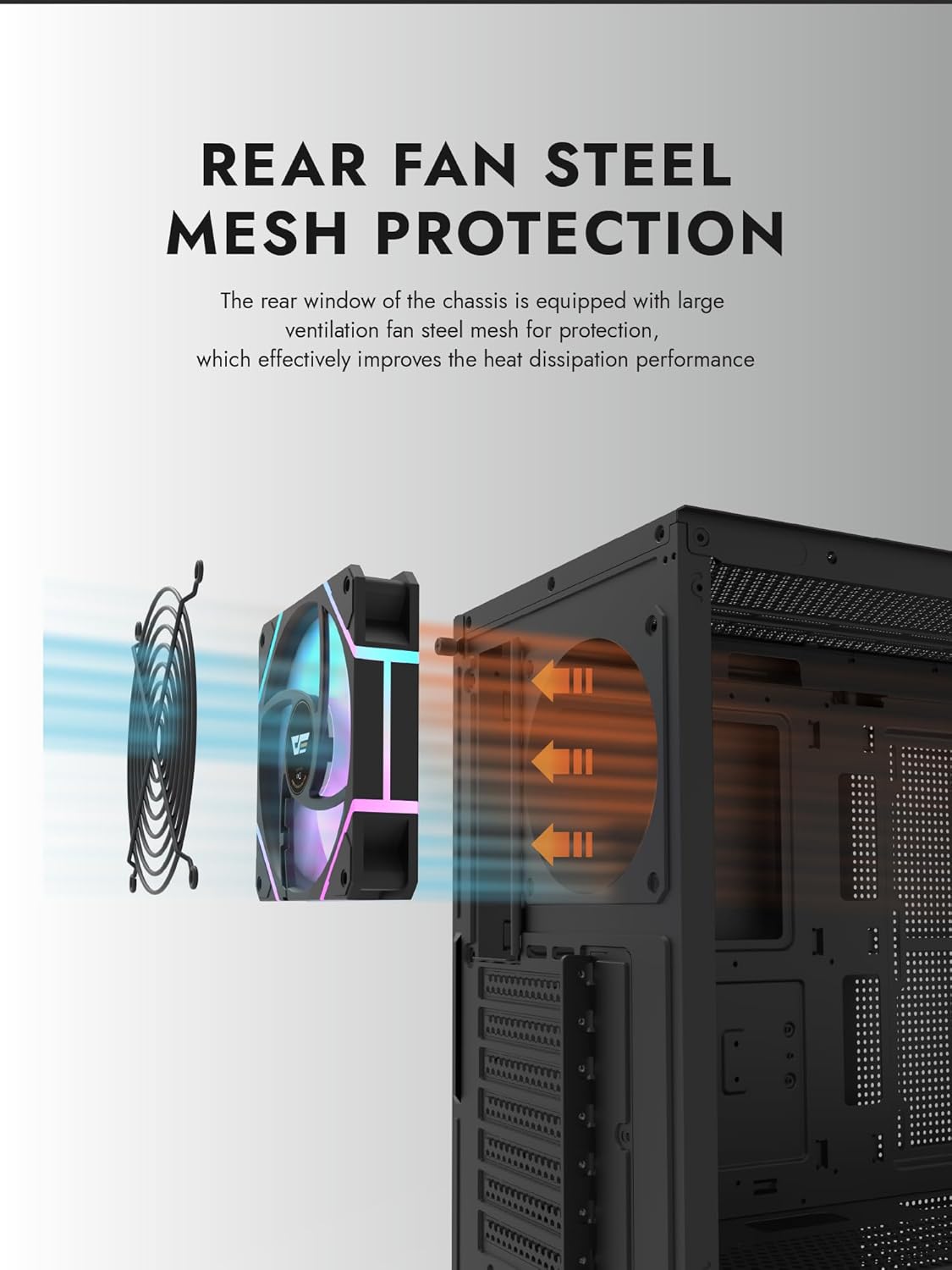
Figure 6.1: Rear fan steel mesh protection, designed to improve heat dissipation.
7. Solução De Problemas
Se você encontrar problemas com a montagem do seu PC, considere as seguintes etapas comuns de solução de problemas:
- Sem energia: Check all power connections, including the PSU to the wall, PSU to motherboard, and front panel power switch cable to the motherboard.
- Nenhuma exibição: Ensure your monitor is connected to the graphics card (not the motherboard I/O unless using integrated graphics). Reseat the graphics card and RAM.
- Superaquecimento: Verify all fans are spinning correctly and are oriented for proper airflow. Check CPU cooler installation.
- Componente não detectado: Reseat the component (e.g., RAM, GPU, storage drive) and check its power and data connections.
8. Garantia e Suporte
darkFlash products are manufactured to high-quality standards. For warranty information or technical support, please refer to the official darkFlash webNo site ou entre em contato com o revendedor. Guarde o comprovante de compra para eventuais solicitações de garantia.